by Scott Muniz | Sep 17, 2020 | Uncategorized
This article is contributed. See the original author and article here.
Sharpen your skills and add some new superpowers in the Learning Zone at the all-digital Microsoft Ignite September 22-24. No matter where you are in your journey as a developer, the Learning Zone has something to help you expand your toolkit. And Ignite is perfectly priced for students—it’s free.
Get in the zone
The Learning Zone is filled with sessions and workshops to help you take your skill set to the next level. Here’s a taste of what’s waiting for you:
Intro to Tech Skills
Explore key topics to help you kick off a career in tech. We’ll cover a variety of interests, job roles, and Microsoft technologies.
Learn Workshops
Get hands-on with online workshops hosted by experts who walk you through a Microsoft Learn module.
Cloud Skills Challenge
Apply and expand your skills through interactive learning modules and earn a free Microsoft Certification exam. You might even win some prizes!
Launch yourself into tech
You’re considering a career in technology. Exciting! But where do you start? Intro to Tech Skills is your chance to explore different paths and find your way forward.
Be sure to catch the Careers in Tech panels, where tech professionals from a variety of backgrounds share their own experiences. You’ll get some insight into the areas of tech that might interest you, things to expect along your journey, and what the current state of recruiting looks like, including the roles that companies are hiring for. You’ll also learn more about how Microsoft technologies and learning resources can help you get started.
Intro to Tech Skills also includes sessions that cover development tools, cloud computing, programming languages, sustainability, and powerful ways to use data. Exploring a career in IT? Join us for sessions on topics like business management, productivity, collaboration with Microsoft Teams, and security with Microsoft 365.
Watch Student Ambassadors in action
You can even see how Microsoft Learn Student Ambassadors help to make Microsoft events unique and inclusive. Many of the Learning Zone sessions will be redelivered by Student Ambassadors in different time zones around the world, in a variety of languages. For example, Ambassadors are redelivering an intro to Python in Spanish and a session on green development in Hindi and French.
Learn, grow, and enter to win
Show off your skills and aim for a shot at the grand prize. The Microsoft Ignite Cloud Skills Challenge is made up of six individual subject-level challenges, each based on a collection of Microsoft Learn modules. You can participate in as many challenges as you’d like, and each one that you complete earns you more sweepstakes entries.
After you’ve completed your first challenge, you’ll earn a free Microsoft Certification exam. And if the sweepstakes drawing goes your way, you could win a chance for you and four of your friends to spend time with a key leader at Microsoft!
Registration for the Cloud Skills Challenge goes live on September 22. To be one of the first to know when the challenge begins, sign up for notifications.
Let’s go!
Ignite is coming up soon—register now so you don’t miss it! We’ll see you there.
by Scott Muniz | Sep 17, 2020 | Azure, Technology, Uncategorized
This article is contributed. See the original author and article here.
In this episode with Rohit Nayak, we cover how to deny public network access settings for Azure SQL Database. Customers can use this setting to block all public access via firewall rules and exclusively rely on private endpoint connections.
Watch on Data Exposed
Resources:
Minimal TLS version
Even more Networking videos
View/share our latest episodes on Channel 9 and YouTube!
by Scott Muniz | Sep 17, 2020 | Uncategorized
This article is contributed. See the original author and article here.
There are some use cases in the SIEM (Security Information and Event Management) world that require correlation with alerts from an expert system like Office 365 Advanced Threat Protection (ATP). Now you can use the built-in data connector to collect alerts from Office 365 Advanced Threat Protection into Azure Sentinel.
Office 365 Advanced Threat Protection (ATP) safeguards your organization against malicious threats posed by email messages, links (URLs) and collaboration tools. By ingesting Office 365 ATP alerts into Azure Sentinel, you can incorporate information about email and URL based threats into your broader risk analysis and build response scenarios accordingly.
The following types of alerts are supported with the data collector:
- A potentially malicious URL click was detected
- Email messages containing malware removed after delivery
- Email messages containing phish URLs removed after delivery
- Email reported by user as malware or phish
- Suspicious email sending patterns detected
- User restricted from sending email
These alerts can be seen by Office 365 customers in the Office Security and Compliance Center as well.
The Office 365 ATP data connector in Azure Sentinel uses the Automated Investigation and Response API and ingest only alerts which are triggered by automatic investigation in Office 365 ATP.
This blog post covers the required steps to ingest Office 365 ATP alerts into sentinel and how to use the ingested alerts.
How to Enable Office 365 ATP alert ingestion in Azure Sentinel
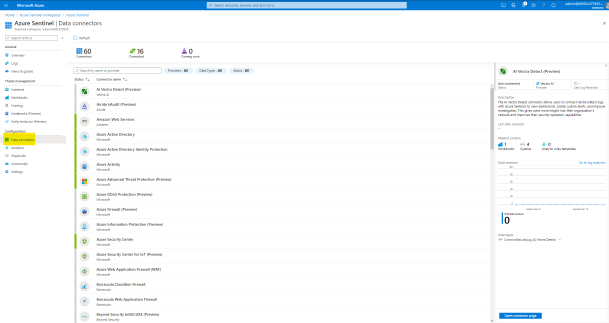
From the Azure Sentinel navigation menu, select Data connectors.

Select Office 365 Advanced Threat Protection (Preview) data connector, and then select Open Connector Page on the preview pane.
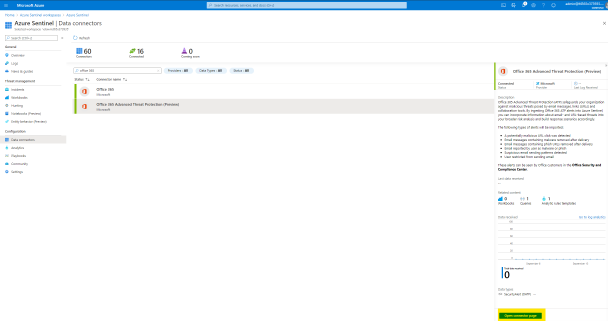
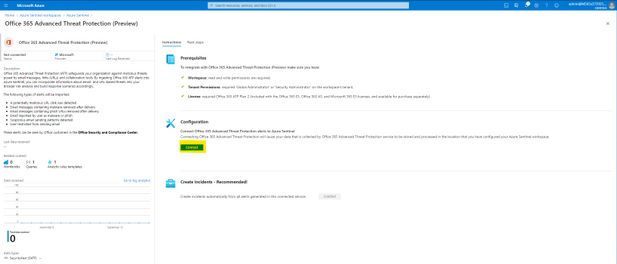
On the Office 365 Advanced Threat Protection (Preview) page, under Configuration select Connect.
Select Next Steps and Create rule to enable and make adjustments for the relevant analytic rule template.
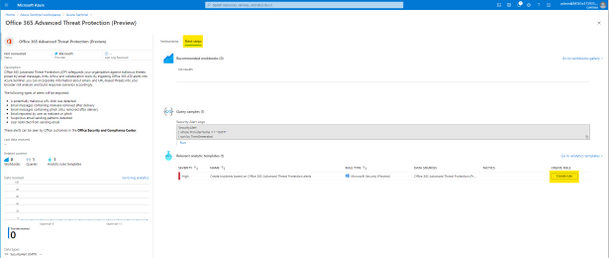
After successfully activation you will see the rule in your Active rules list in the Analytics page. This rule will make sure that all alerts generated by Office 365 ATP will also trigger an Incident in Azure Sentinel.
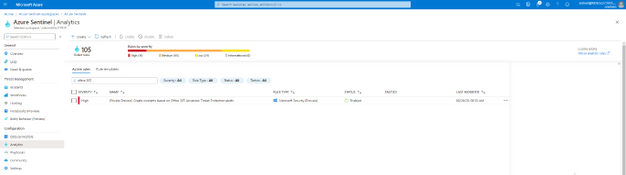
Now the Office 365 ATP alerts from your Office 365 tenant will be ingested into Azure Sentinel workspace and any generated alert in Office 365 ATP will also trigger an Incident in Azure Sentinel.
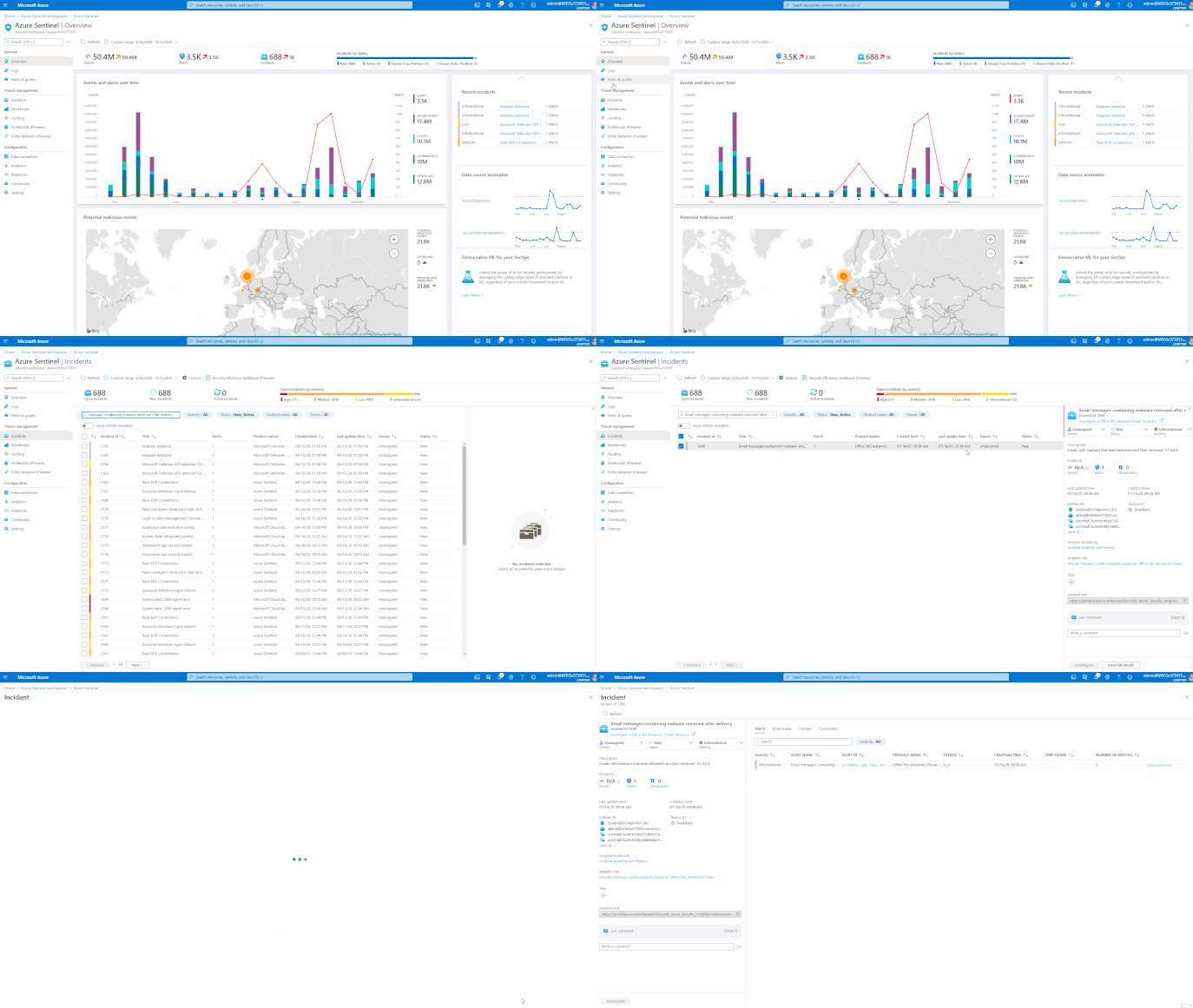
GIF Demonstration – How to enable the Office 365 ATP data connector
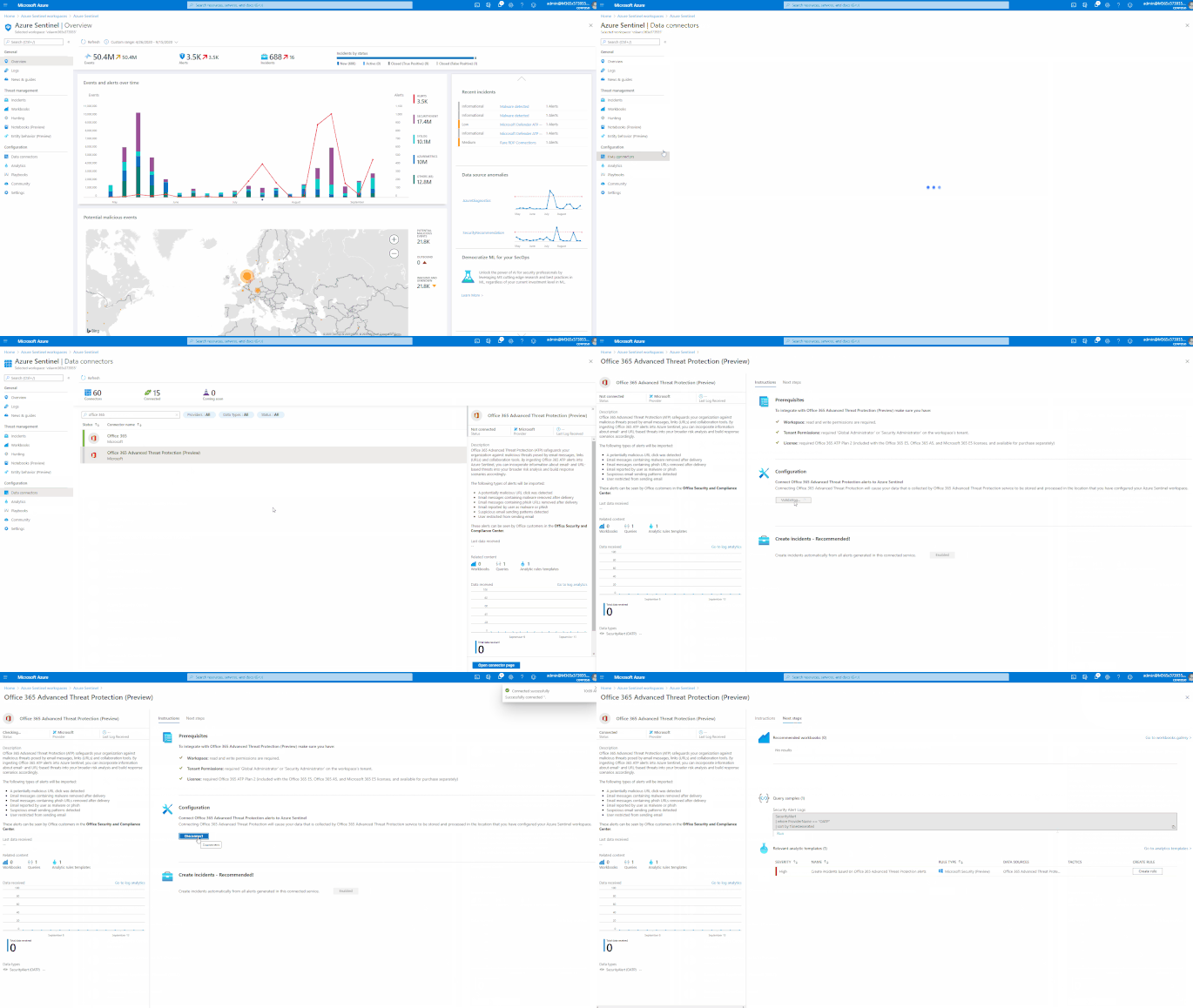
How to Use this Data
Once the data connector is functional you can query the Office 365 ATP alerts. The Office 365 ATP alerts will reside in the SecurityAlert table in Azure Sentinel workspace.
The following example query looks for the generated alerts for Office 365 ATP in Azure Sentinel.
SecurityAlert
| where ProviderName == “OATP”
| sort by TimeGenerated
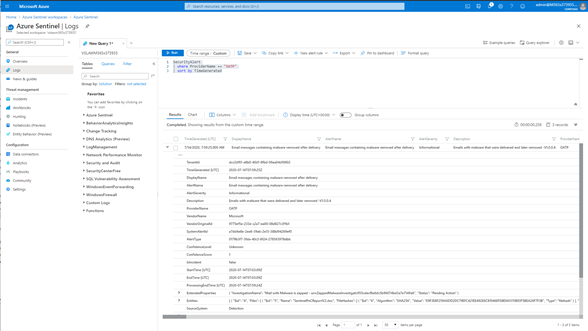
GIF Demonstration – Query Office 365 ATP alerts in Azure Sentinel
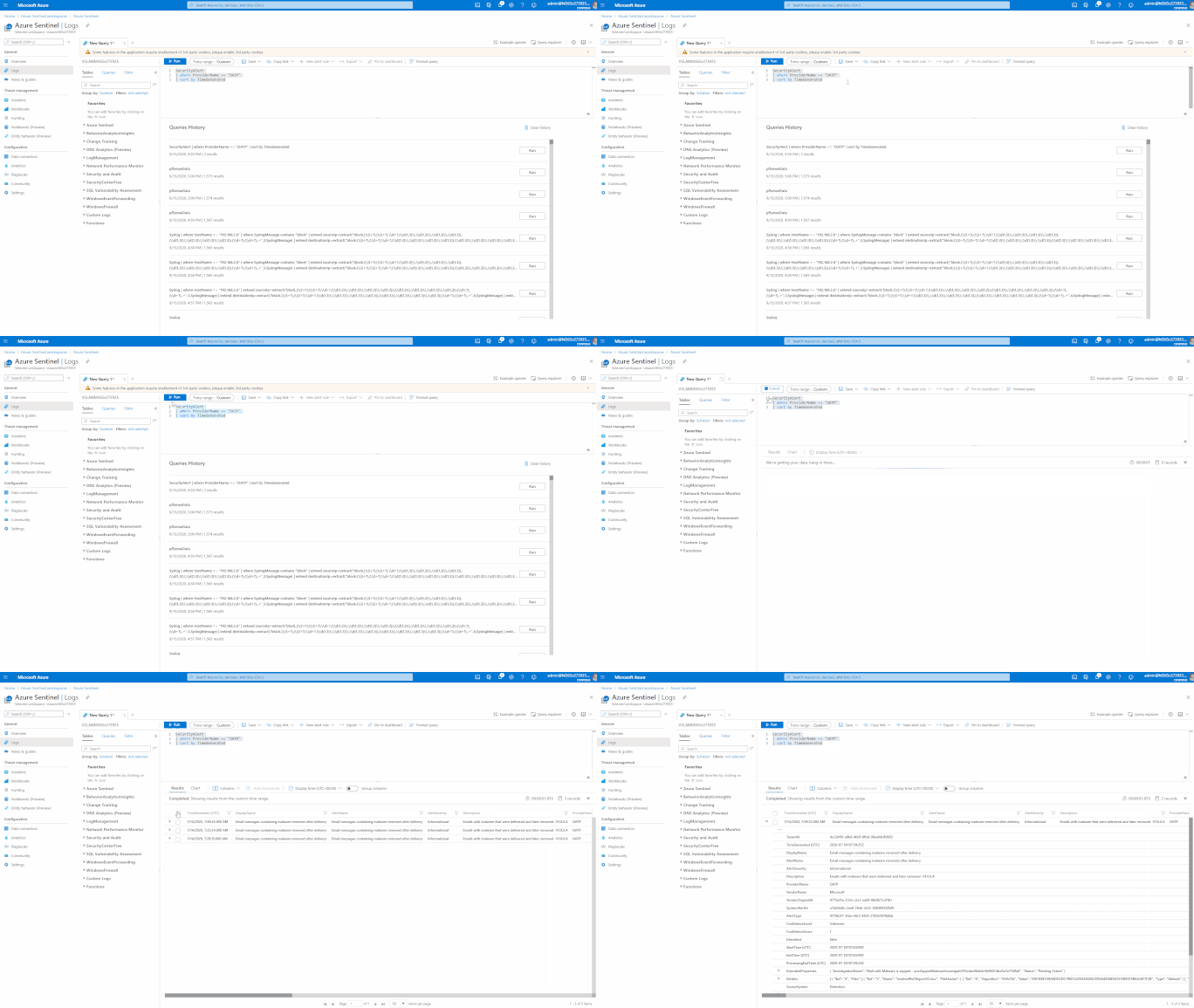
GIF Demonstration – Sample Office 365 ATP Incident in Azure Sentinel
Summary
In this post I have shown how you can onboard Office 365 ATP alerts into Azure Sentinel and sample query how to use the data.
You can also contribute new connectors, workbooks, analytics and more in Azure Sentinel. Get started now by joining the Azure Sentinel Threat Hunters GitHub community and follow the guidance.
by Scott Muniz | Sep 17, 2020 | Azure, Technology, Uncategorized
This article is contributed. See the original author and article here.
Artificial intelligence (AI) opens doors into possibilities that might have seemed like science fiction only yesterday. Discover ways to improve your apps and take your development skills to the next level. Using AI, you can build solutions and advance technology in many fields, including healthcare, financial management, and environmental protection, to name just a few. Microsoft Azure provides easy-to-use services to help you get started.
Prove that you have the AI skills it takes to build a better world. Earning your certification in Azure AI Fundamentals can supply the foundation you need to build your career and demonstrate your knowledge of common AI and machine learning workloads—and how to implement them on Azure. Mastering the basics can help you jump-start your career and get ready to dive deeper into the other technical opportunities Azure offers.
The Azure AI Fundamentals certification validates your foundational knowledge of machine learning and AI concepts, along with related Azure services. You earn it by passing Exam AI-900: Microsoft Azure AI Fundamentals.
You can use Azure AI Fundamentals to prepare for other Azure role-based certifications, like Azure Data Scientist Associate or Azure AI Engineer Associate, but it’s not a prerequisite for any of them.
What are the prerequisites?
If you’re new to the cloud or just starting out with Azure, first choose Azure Fundamentals training and certification—find out how to Master the basics with Microsoft Certified: Azure Fundamentals.
The Azure AI Fundamentals certification is intended for candidates with both technical and non-technical backgrounds. Data science or software engineering experience are not required; however, some general programming knowledge or experience would be beneficial.
How can you get ready?
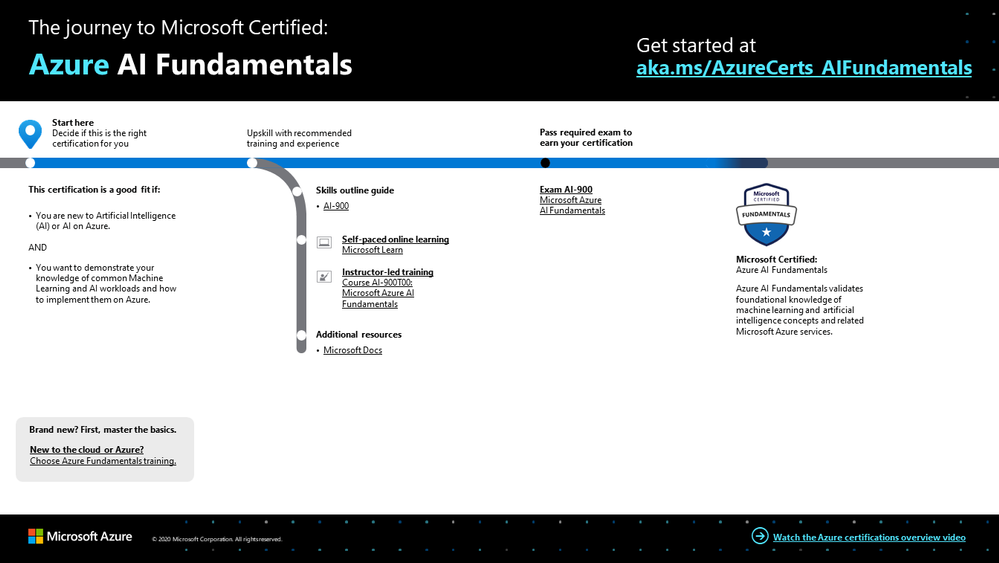
To help you plan your journey, check out our The journey to Microsoft Certified: Azure AI Fundamentals infographic. You can also find it in the resources section on the certification and exam pages, which contains other valuable help for Azure professionals.
 Azure AI Fundamentals certification journey
To map out your journey, follow the sequence in the infographic. First, decide whether this is the right certification for you.
Next, to understand what you’ll be measured on when taking Exam AI-900, review the skills outline guide on the exam page.
Sign up for training that fits your learning style and experience:
After you pass the exam and earn your certification, continue mastering the basics with Azure Data Fundamentals, level up with the Azure AI Engineer Associate certification or the Azure Data Scientist Associate certification, or find the right Microsoft Azure certification for you, based on your profession (or the one you aspire to).
It’s time to master the basics!
Use your Azure AI Fundamentals certification as a starting point to explore deeper training for Azure technologies and to chart your path forward. Whether you’re looking to advance your career or to jump-start a new one, the message is the same: establish your foundations. Earn your certification and open up new possibilities for your career and for turning your AI and machine learning ideas into solutions on Azure.
Related posts
Understanding Microsoft Azure certifications
Finding the right Microsoft Azure certification for you
Master the basics of Microsoft Azure—cloud, data, and AI

by Scott Muniz | Sep 17, 2020 | Uncategorized
This article is contributed. See the original author and article here.
There is something about creating which ignites curiosity in kids.
Regardless of gender, children have an innate appetite for learning what they do not know and perfecting what excites them.
Developer Technologies MVP Sara Chipps found her passion in computing at age 12. Sara recalls that she simply could not believe that her inputs made the computer call another computer – so beginning a lifelong interest in building and coding.
Today, Sara is part of the two-thirds of professional coders who report being under 18 when they start coding. At the same time, however, Sara is part of the less than one in four coders who are women. It is this juxtaposition which drives Sara to inspire young girls just like her towards following their interest in STEM.
Sara’s answer to the gender gap in tech is Jewelbots. Founded in 2014 with Brooke Moreland and Maria Paula Saba, Jewelbots’ original product was a smart friendship bracelet. This soon evolved into science craft kits for budding inventors in geology, chemistry, and electronics.
Now, tens of thousands of girls in more than thirty countries have become coders, chemists, and creators through Jewelbots.
“Our goal is, and always will be, to ignite the curiosity and drive that comes with being a builder,” Sara says. “Consuming technology is ubiquitous in today’s generation. However, true influence lies in being builders and creators of technology. Together, we can eliminate the fear and stigma that can come with being young and science forward.”
Young builders and creators of technology are clearly enjoying the limitless possibilities of Jewelbots. One young girl, for example, took the electronic science kit and sewed its LEDs into a shirt to depict a starry night sky. It is stories like this which continue to drive Sara despite working another full-time job.
“It is always rewarding because the excitement in their eyes truly makes it worth it,” Sara says.
“Every time we get a video or a picture of a girl making something awesome that she is proud of is what gets us going. We couldn’t do what we do without that every day.”
Importantly, direct interaction between the Jewelbots creators and the Jewelbots users informs product development.
“It’s also been a long time since I have been a 10-year-old girl, and imagining the things that drive them is tough,” Sara says. “So, I’ve seen it is best to talk to them and hear about the things that get them excited.”
Jewelbots is but one of Sara’s initiatives to encourage young girls towards STEM. In 2010, Sara co-founded Girl Develop It, a non-profit focused on helping more women become software developers.
Currently, Girl Develop It chapters are building strong, empowered communities in five cities across the US.
Likewise, Jewelbots grows from strength to strength. The creators look forward to expanding their science craft kits into biology and programming, and witnessing the output from the next generation of women scientists.
“We are excited to release more products and see more eyes light up as [girls] learn and make more things that ignite their imagination,” Sara says.
For more on Sara, check out Jewelbots or her Twitter @SaraJChipps




Recent Comments