by Scott Muniz | Sep 18, 2020 | Uncategorized
This article is contributed. See the original author and article here.
Another day another case.
It took me a while to follow this step by step by using the new Synapse APIs. So this post has the intention to make it easier by example.
You will need:
- A Synapse workspace
- An ADF pipeline that you want to start from Rest API.
Doc references:
https://docs.microsoft.com/en-us/azure/data-factory/quickstart-create-data-factory-rest-api
https://docs.microsoft.com/en-us/azure/azure-monitor/platform/rest-api-walkthrough
https://docs.microsoft.com/en-us/rest/api/synapse/data-plane/pipeline/createpipelinerun
That is my pipeline code. It is a simple one it just creates Spark Database using a notebook.
%%spark
spark.sql("CREATE DATABASE IF NOT EXISTS DB_example")
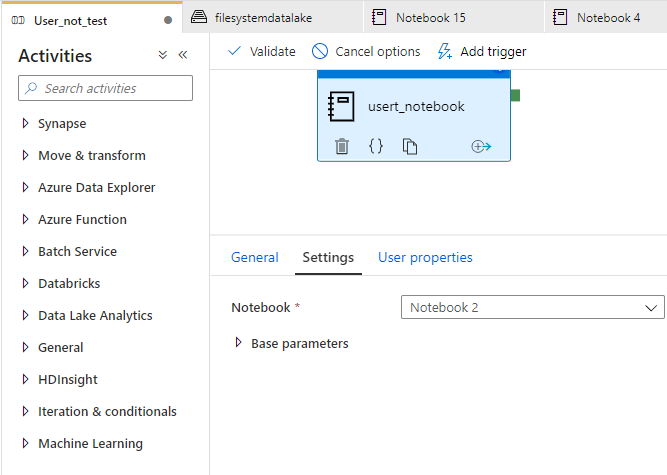
As you can see in figure 1. That is my pipeline:

Figure 1 Pipeline
The name of my pipeline is User_not_test.
I can run successfully this pipeline from Synapse Studio. But I want to run it from the Rest API, actually, that is the post idea.
Step by Step
The first step consists in using this documentation to register my pipeline/workspace as an application:
(https://docs.microsoft.com/en-us/azure/azure-monitor/platform/rest-api-walkthrough)
$subscriptionId = "{azure-subscription-id}"
$resourceGroupName = "{resource-group-name}"

# Authenticate to a specific Azure subscription.
Connect-AzAccount -SubscriptionId $subscriptionId

# Password for the service principal
$pwd = "{service-principal-password}"
$secureStringPassword = ConvertTo-SecureString -String $pwd -AsPlainText -Force

# Create a new Azure AD application
$azureAdApplication = New-AzADApplication `
                        -DisplayName "My Azure Monitor" `
                        -HomePage "https://localhost/azure-monitor" `
                        -IdentifierUris "https://localhost/azure-monitor" `
                        -Password $secureStringPassword

# Create a new service principal associated with the designated application
New-AzADServicePrincipal -ApplicationId $azureAdApplication.ApplicationId

# Assign Reader role to the newly created service principal
New-AzRoleAssignment -RoleDefinitionName Reader `
                          -ServicePrincipalName $azureAdApplication.ApplicationId.Guid
Fill the gasp. For example, suppose my workspace was named as: synapseworkspace_Demo. So this part of the script you should add your workspace name as my example: https://synapseworkspace_Demo.dev.azuresynapse.net
Take note of the password that you create and define here: $pwd = “{service-principal-password}”
# Create a new Azure AD application
$azureAdApplication = New-AzADApplication `
                        -DisplayName "APP_synapseworkspace" `
                        -HomePage "https://synapseworkspace_Demo.dev.azuresynapse.net" `
                        -IdentifierUris "https://synapseworkspace_Demo.dev.azuresynapse.net" `
                        -Password $secureStringPassword
After that, you will execute some steps to actually invoke the API. The example is described here:
https://docs.microsoft.com/en-us/azure/data-factory/quickstart-create-data-factory-rest-api
But the Synapse APIs are here:
https://docs.microsoft.com/en-us/rest/api/synapse/data-plane/pipeline/createpipelinerun
My script will run with the following:
https://synapseworkspace_Demo.dev.azuresynapse.net/pipelines/User_not_test/createRun?api-version=2018-06-01
Do not forget to add the password that you defined:
$pwd = “Password that you defined on the previous step”
$pwd = "Password that you defined on the previous step"
$azureAdApplication = Get-AzADApplication -IdentifierUri "https://YourWorkspaceName.dev.azuresynapse.net"

$subscription = Get-AzSubscription -SubscriptionId $subscriptionId

$clientId = $azureAdApplication.ApplicationId.Guid
$tenantId1 = $subscription.TenantId
$authUrl = "https://login.microsoftonline.com/${tenantId1}/oauth2/token"
$cred = New-Object -TypeName Microsoft.IdentityModel.Clients.ActiveDirectory.ClientCredential -ArgumentList ($clientId, $pwd)

$AuthContext = [Microsoft.IdentityModel.Clients.ActiveDirectory.AuthenticationContext]$authUrl
$result = $AuthContext.AcquireTokenAsync("https://dev.azuresynapse.net", $cred).GetAwaiter().GetResult()

# Build an array of HTTP header values
$authHeader = @{
'Content-Type'='application/json'
'Accept'='application/json'
'Authorization'=$result.CreateAuthorizationHeader()
}


$request = "https://YourWorkspaceName.dev.azuresynapse.net/pipelines/YourPipelineName/createRun?api-version=2018-06-01"
$body =  @"
{
    "name": "YourWorkspaceName",
    "location": "Region",
    "properties": {},
    "identity": {
        "type": "SystemAssigned"
    }
}
"@


$response = Invoke-RestMethod -Method POST -Uri $request -Header $authHeader -Body $body
$response | ConvertTo-Json
$runId = $response.runId
If you face this error:
Invoke-RestMethod: {“error”:{“code”:”Unauthorized”,”message”:”The principal ‘some number display’ does not have the necessary permissions to perform this operation. “}}
Go back to you synapse studio -> open Monitoring -> access control and be sure of 2 things:
1) The user that will start the rest API needs Workspace admin permission
2)The APP that you register needs workspace admin permissions and to satisfy this requisite: Copy the number displayed on the error and add the permission like figure 2:


Figure 2 Permission
Note: Use the number of the principal service id, not the APP name to get this permission done.
You could also monitor the pipeline execution adding this piece of code:
while ($True) {
    $response = Invoke-RestMethod -Method GET -Uri "https://YourWorkspaceName.dev.azuresynapse.net/pipelineruns/${runId}?api-version=2018-06-01" -Header $authHeader
    Write-Host  "Pipeline run status: " $response.Status -foregroundcolor "Yellow"

    if ($response.Status -eq "InProgress") {
        Start-Sleep -Seconds 15
    }
    else {
        $response | ConvertTo-Json
        break
    }
}
Here is the execution – Figure 4:
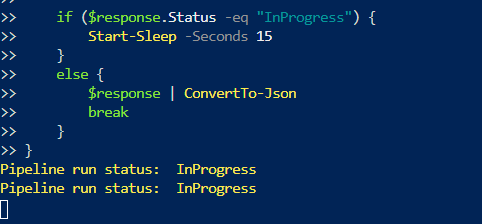
Figure 4 Execution
Thanks, Dan Rosales for help during this process.
That is it!
Liliam
UK Engineer
by Scott Muniz | Sep 18, 2020 | Uncategorized
This article is contributed. See the original author and article here.
This week, MVPs Mynda Treacy, Tony de Jonker, and Alan Murray share their Excel knowledge with us
Excel PivotTable Profit and Loss
Mynda Treacy shows how to create an easy-to-read interactive profit and loss statement in Excel using PivotTable, slicers, and conditional formatting
Excel: Interactieve grafieken (Interactive Charts)
Tony de Jonker walks through using multiple graphs from the same dataset to reveal hidden insights in your data
Excel VLOOKUP Trick – No More Counting Columns
Alan Murray shares a neat VLOOKUP trick to select a column for the data to return instead of specifying a column index number- in case you’re not already using XLOOKUP
Find this useful and/or have an Excel question? Click the Like button and/or leave a comment below
by Scott Muniz | Sep 18, 2020 | Uncategorized
This article is contributed. See the original author and article here.
We hope all of you are taking care of yourselves and staying safe. Here are the latest functionalities that rolled out to production in the month of August-2020.
- Tasks in Word and Excel
- Update to comment notifications
- Mute comment notifications
- OneDrive app for Surface Duo
Tasks in Word and Excel
Roadmap ID: 61110 ; 61111
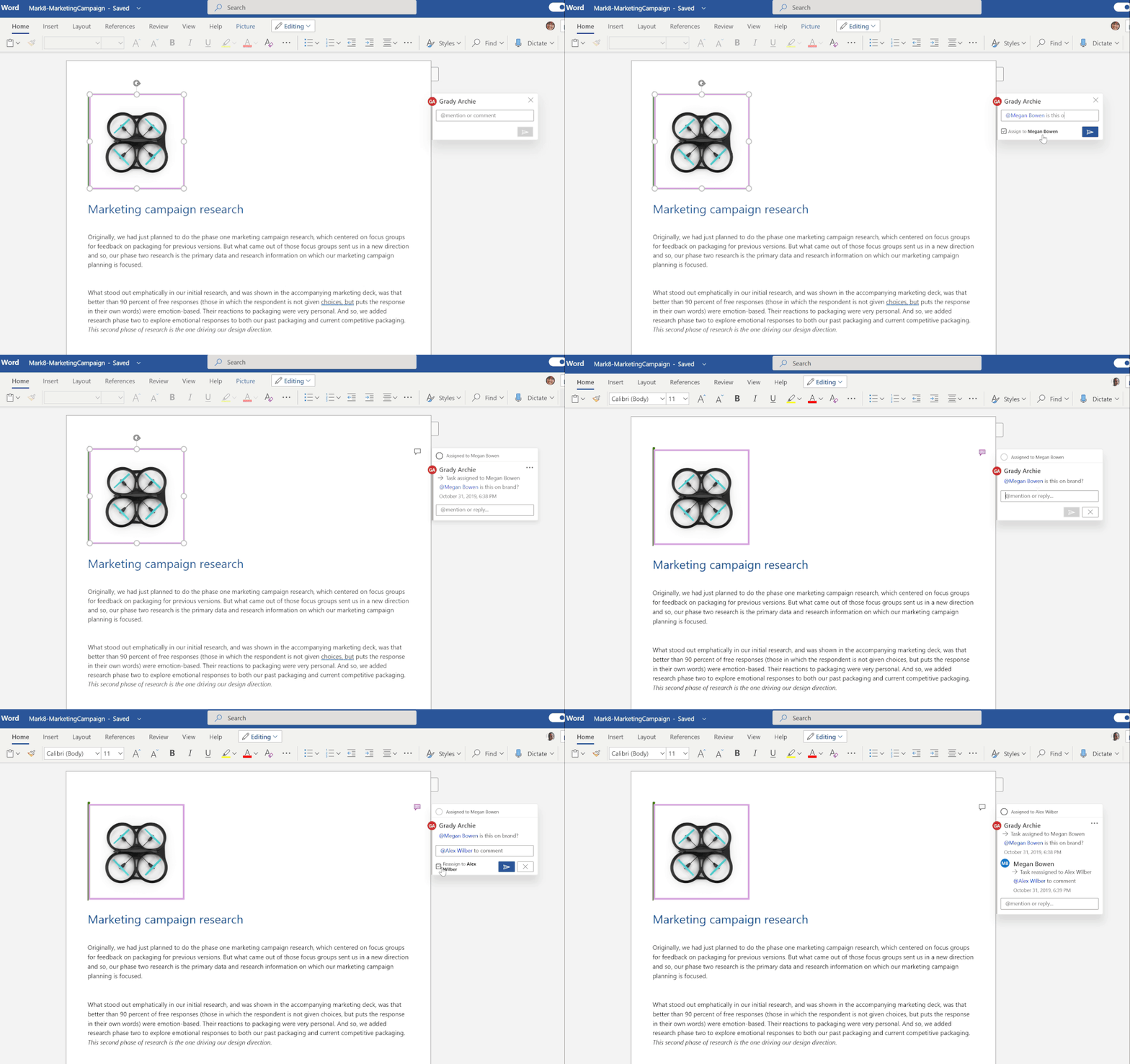
We are always invested in making the collaboration experience reliable, intuitive and secure. Office is more than just a canvas for document creation- it supports native collaboration with real time coauthoring as well as helps you in staying up to date with your file activities with effective features like @mentions, comments and now tasks. Across Word and Excel ,tasks will help you assign responsibilities to your peers, which can be resolved once the job is complete. In addition to assigning the task you can also reassign it and track any changes made to the task within the comment thread via the inline history.

Updates to comment notification
Roadmap ID: 66192
Users who create or upload Word, Excel, PowerPoint or any other type of file to OneDrive or SharePoint will now get email notifications whenever someone else leaves a comment on their file.
Mute comment notifications
Roadmap ID: 65912
We all want to stay on top of our document tasks, but too many reminders can inhibit our productivity on other pressing work. To balance these needs, we’re enabling users to turn off comment notifications for individual files in the details pane. This feature is also incorporated in sharing emails as an actionable message action.
OneDrive app for Surface Duo
Last week we announced the general availability of Surface Duo.
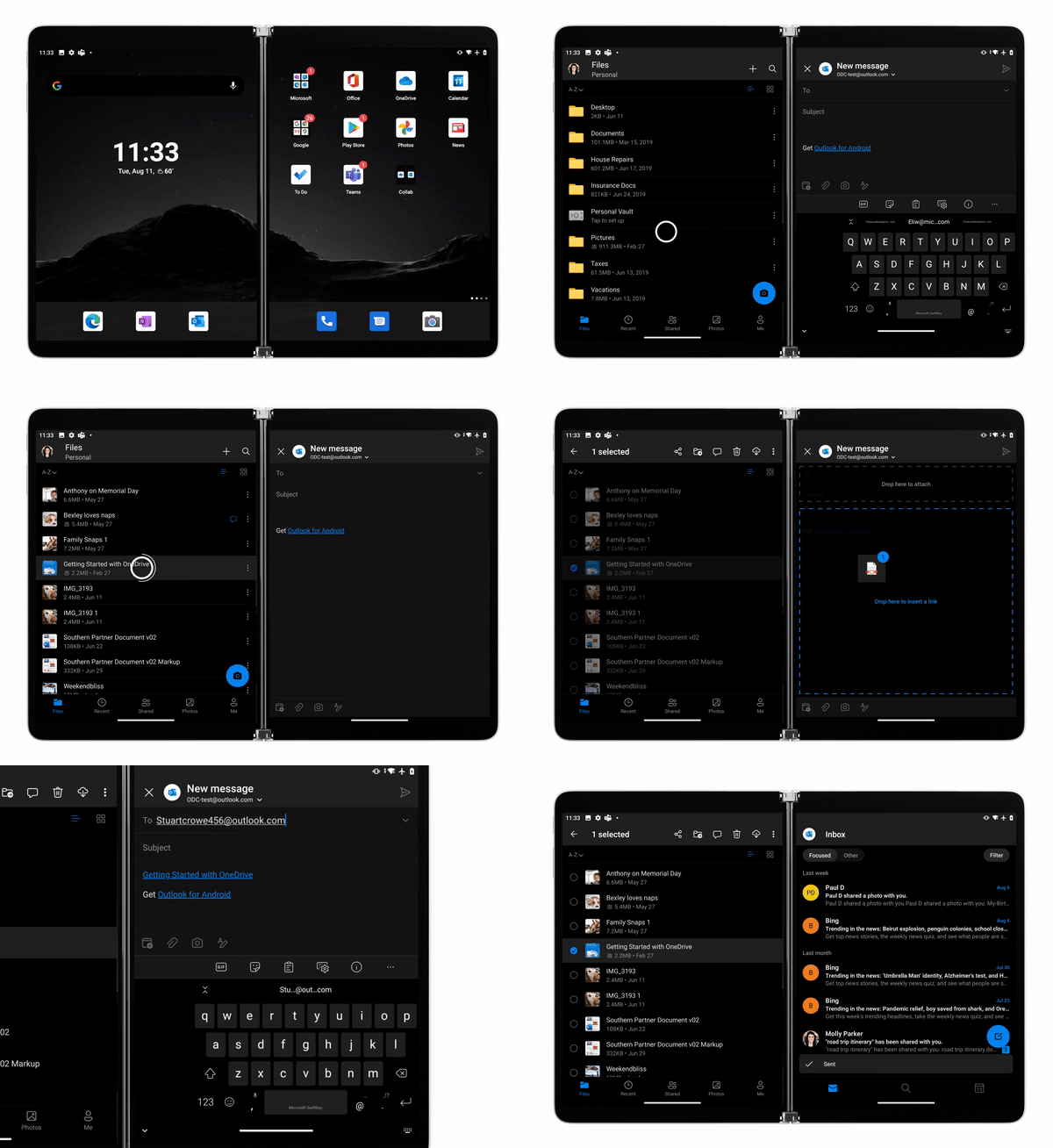
OneDrive app for Surface Duo is a critical component of and is fully integrated into the Surface Duo operating system to ensure you stay connected to your files and photos and enable you with on-the-go collaboration while making the most of the dual-screen and spanning capabilities. Surface Duo and OneDrive enhances multitasking with drag-and-drop functionality as well as the built-in PDF editor for book-like reading and markup experience.
Learn more and stay engaged
As you can see, we continue to evolve OneDrive as a place to access, share, and collaborate on all your files in Microsoft 365, keeping them protected and readily accessible on all your devices, anywhere.
You can stay up-to-date on all things via the OneDrive Blog and the OneDrive release notes.
Check out the new and updated OneDrive documentation.
Take advantage of end-user training resources on our Office support center.
Thank you again for your support of OneDrive. We look forward to your continued feedback on UserVoice and hope to connect with you at Ignite or another upcoming Microsoft or community-led event.
Thanks for your time reading all about OneDrive,
Ankita Kirti – Product Manager – OneDrive | Microsoft
by Scott Muniz | Sep 18, 2020 | Uncategorized
This article is contributed. See the original author and article here.
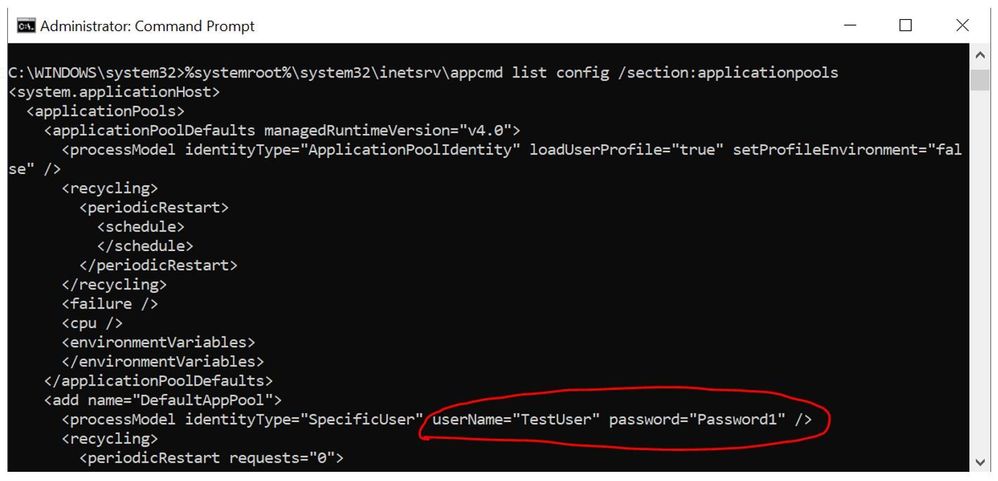
In IIS Manager, the application pool identity set to a custom service account will always display it’s password in encrypted (masked) format. In applicationHost.config file also the password will show as encrypted.
But when you run the below command in a command line tool then the password is visible.
%systemroot%system32inetsrvappcmd list config /section:applicationpools
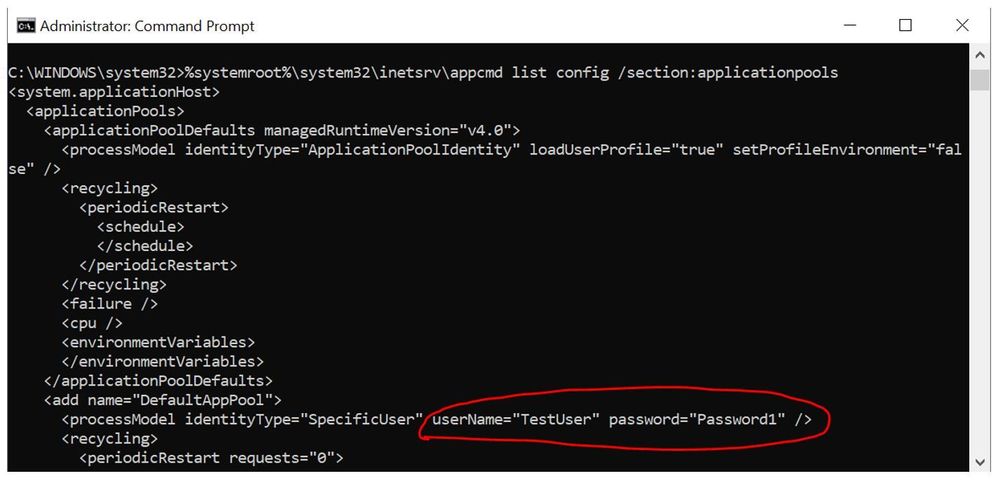 Is there a way to encrypt the password in the command line?
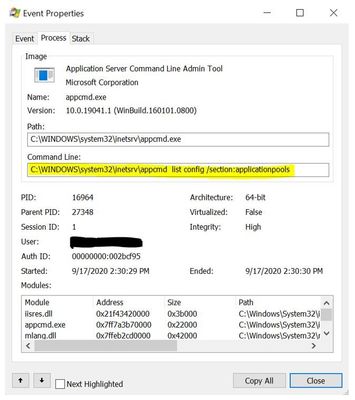
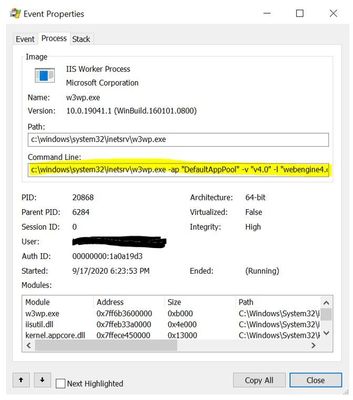
The AppCmd tool uses the same interfaces to read the configuration data that the Windows Process Activation Service uses to read the same configuration data.
Sample dll stack: (Collected using Procmon)
| AppCmd tool |
Windows Process Activation Service |
|
0 ntoskrnl.exe SeOpenObjectAuditAlarmWithTransaction + 0x4ad8 0xfffff8064bed03c8 C:WINDOWSsystem32ntoskrnl.exe
1 ntoskrnl.exe SeOpenObjectAuditAlarmWithTransaction + 0x16ac 0xfffff8064beccf9c C:WINDOWSsystem32ntoskrnl.exe
2 ntoskrnl.exe SeOpenObjectAuditAlarmWithTransaction + 0x57ee 0xfffff8064bed10de C:WINDOWSsystem32ntoskrnl.exe
3 ntoskrnl.exe ObOpenObjectByNameEx + 0x1fa 0xfffff8064beda39a C:WINDOWSsystem32ntoskrnl.exe
4 ntoskrnl.exe ObOpenObjectByName + 0x5c 0xfffff8064beda17c C:WINDOWSsystem32ntoskrnl.exe
5 ntoskrnl.exe SeQueryInformationToken + 0xcf1 0xfffff8064bed9ca1 C:WINDOWSsystem32ntoskrnl.exe
6 ntoskrnl.exe NtFsControlFile + 0x582 0xfffff8064be4f2a2 C:WINDOWSsystem32ntoskrnl.exe
7 ntoskrnl.exe setjmpex + 0x7cc5 0xfffff8064bc058b5 C:WINDOWSsystem32ntoskrnl.exe
8 ntdll.dll ZwOpenKey + 0x14 0x7ffed2cac004 C:WindowsSystem32ntdll.dll
9 bcryptprimitives.dll ProcessPrng + 0x3b5c 0x7ffed08285ec C:WindowsSystem32bcryptprimitives.dll
10 bcryptprimitives.dll ProcessPrng + 0x39dd 0x7ffed082846d C:WindowsSystem32bcryptprimitives.dll
11 bcryptprimitives.dll ProcessPrng + 0x3934 0x7ffed08283c4 C:WindowsSystem32bcryptprimitives.dll
12 bcryptprimitives.dll GetKeyDerivationInterface + 0x13b3e 0x7ffed08474de C:WindowsSystem32bcryptprimitives.dll
13 ntdll.dll RtlActivateActivationContextUnsafeFast + 0x11d 0x7ffed2c47b3d C:WindowsSystem32ntdll.dll
14 ntdll.dll RtlGetThreadErrorMode + 0x313 0x7ffed2c73403 C:WindowsSystem32ntdll.dll
15 ntdll.dll RtlGetThreadErrorMode + 0xa6 0x7ffed2c73196 C:WindowsSystem32ntdll.dll
16 ntdll.dll TpAllocTimer + 0x1c3 0x7ffed2c50d13 C:WindowsSystem32ntdll.dll
17 ntdll.dll LdrGetDllHandleEx + 0x4f6 0x7ffed2c44ca6 C:WindowsSystem32ntdll.dll
18 ntdll.dll ApiSetQueryApiSetPresenceEx + 0x5a4 0x7ffed2c4c414 C:WindowsSystem32ntdll.dll
19 ntdll.dll RtlDosPathNameToRelativeNtPathName_U + 0xd2 0x7ffed2c4c612 C:WindowsSystem32ntdll.dll
20 ntdll.dll RtlVirtualUnwind + 0xae7 0x7ffed2c32b97 C:WindowsSystem32ntdll.dll
21 ntdll.dll LdrResolveDelayLoadedAPI + 0xc6 0x7ffed2c44196 C:WindowsSystem32ntdll.dll
22 rpcrt4.dll RpcErrorGetNextRecord + 0x242 0x7ffed2b04572 C:WindowsSystem32rpcrt4.dll
23 rpcrt4.dll I_RpcServerSetAddressChangeFn + 0xc71 0x7ffed2b11c81 C:WindowsSystem32rpcrt4.dll
24 rpcrt4.dll UuidCreate + 0x15 0x7ffed2af6945 C:WindowsSystem32rpcrt4.dll
25 combase.dll CoInitializeEx + 0x1688 0x7ffed2132588 C:WindowsSystem32combase.dll
26 combase.dll CoInitializeEx + 0xdf3 0x7ffed2131cf3 C:WindowsSystem32combase.dll
27 combase.dll CoInitializeEx + 0xd95 0x7ffed2131c95 C:WindowsSystem32combase.dll
28 combase.dll CoInitializeEx + 0x750 0x7ffed2131650 C:WindowsSystem32combase.dll
29 combase.dll RoGetActivatableClassRegistration + 0x45ca 0x7ffed213080a C:WindowsSystem32combase.dll
30 combase.dll CoInitializeEx + 0x268 0x7ffed2131168 C:WindowsSystem32combase.dll
31 combase.dll CoInitializeEx + 0x58 0x7ffed2130f58 C:WindowsSystem32combase.dll
32 appcmd.exe CLockBase<4,1,1,2,3,3>::LockType + 0x1898 0x7ff7a3b75758 C:WindowsSystem32inetsrvappcmd.exe
33 appcmd.exe STRAU::SafeCopy + 0x58d 0x7ff7a3b81f4d C:WindowsSystem32inetsrvappcmd.exe
34 kernel32.dll BaseThreadInitThunk + 0x14 0x7ffed14b6fd4 C:WindowsSystem32kernel32.dll
35 ntdll.dll RtlUserThreadStart + 0x21 0x7ffed2c5cec1 C:WindowsSystem32ntdll.dll
|
0 ntoskrnl.exe SeOpenObjectAuditAlarmWithTransaction + 0x4ad8 0xfffff8064bed03c8 C:WINDOWSsystem32ntoskrnl.exe
1 ntoskrnl.exe SeOpenObjectAuditAlarmWithTransaction + 0x16ac 0xfffff8064beccf9c C:WINDOWSsystem32ntoskrnl.exe
2 ntoskrnl.exe SeOpenObjectAuditAlarmWithTransaction + 0x57ee 0xfffff8064bed10de C:WINDOWSsystem32ntoskrnl.exe
3 ntoskrnl.exe ObOpenObjectByNameEx + 0x1fa 0xfffff8064beda39a C:WINDOWSsystem32ntoskrnl.exe
4 ntoskrnl.exe ObOpenObjectByName + 0x5c 0xfffff8064beda17c C:WINDOWSsystem32ntoskrnl.exe
5 ntoskrnl.exe SeQueryInformationToken + 0xcf1 0xfffff8064bed9ca1 C:WINDOWSsystem32ntoskrnl.exe
6 ntoskrnl.exe NtFsControlFile + 0x582 0xfffff8064be4f2a2 C:WINDOWSsystem32ntoskrnl.exe
7 ntoskrnl.exe setjmpex + 0x7cc5 0xfffff8064bc058b5 C:WINDOWSsystem32ntoskrnl.exe
8 ntdll.dll ZwOpenKey + 0x14 0x7ffed2cac004 C:WindowsSystem32ntdll.dll
9 bcryptprimitives.dll ProcessPrng + 0x3b5c 0x7ffed08285ec C:WindowsSystem32bcryptprimitives.dll
10 bcryptprimitives.dll ProcessPrng + 0x39dd 0x7ffed082846d C:WindowsSystem32bcryptprimitives.dll
11 bcryptprimitives.dll ProcessPrng + 0x3934 0x7ffed08283c4 C:WindowsSystem32bcryptprimitives.dll
12 bcryptprimitives.dll GetKeyDerivationInterface + 0x13b3e 0x7ffed08474de C:WindowsSystem32bcryptprimitives.dll
13 ntdll.dll RtlActivateActivationContextUnsafeFast + 0x11d 0x7ffed2c47b3d C:WindowsSystem32ntdll.dll
14 ntdll.dll RtlGetThreadErrorMode + 0x313 0x7ffed2c73403 C:WindowsSystem32ntdll.dll
15 ntdll.dll RtlGetThreadErrorMode + 0xa6 0x7ffed2c73196 C:WindowsSystem32ntdll.dll
16 ntdll.dll TpAllocTimer + 0x1c3 0x7ffed2c50d13 C:WindowsSystem32ntdll.dll
17 ntdll.dll LdrGetDllHandleEx + 0x4f6 0x7ffed2c44ca6 C:WindowsSystem32ntdll.dll
18 ntdll.dll ApiSetQueryApiSetPresenceEx + 0x5a4 0x7ffed2c4c414 C:WindowsSystem32ntdll.dll
19 ntdll.dll RtlDosPathNameToRelativeNtPathName_U + 0xd2 0x7ffed2c4c612 C:WindowsSystem32ntdll.dll
20 ntdll.dll RtlVirtualUnwind + 0xae7 0x7ffed2c32b97 C:WindowsSystem32ntdll.dll
21 ntdll.dll LdrResolveDelayLoadedAPI + 0xc6 0x7ffed2c44196 C:WindowsSystem32ntdll.dll
22 rpcrt4.dll RpcErrorGetNextRecord + 0x242 0x7ffed2b04572 C:WindowsSystem32rpcrt4.dll
23 rpcrt4.dll I_RpcServerSetAddressChangeFn + 0xc71 0x7ffed2b11c81 C:WindowsSystem32rpcrt4.dll
24 rpcrt4.dll UuidCreate + 0x15 0x7ffed2af6945 C:WindowsSystem32rpcrt4.dll
25 combase.dll CoInitializeEx + 0x1688 0x7ffed2132588 C:WindowsSystem32combase.dll
26 combase.dll CoInitializeEx + 0xdf3 0x7ffed2131cf3 C:WindowsSystem32combase.dll
27 combase.dll CoInitializeEx + 0xd95 0x7ffed2131c95 C:WindowsSystem32combase.dll
28 combase.dll CoInitializeEx + 0x750 0x7ffed2131650 C:WindowsSystem32combase.dll
29 combase.dll RoGetActivatableClassRegistration + 0x45ca 0x7ffed213080a C:WindowsSystem32combase.dll
30 combase.dll CoInitializeEx + 0x268 0x7ffed2131168 C:WindowsSystem32combase.dll
31 combase.dll CoInitializeEx + 0x58 0x7ffed2130f58 C:WindowsSystem32combase.dll
32 w3wp.exe w3wp.exe + 0x12dd 0x7ff6b36012dd C:WindowsSystem32inetsrvw3wp.exe
33 w3wp.exe w3wp.exe + 0x363d 0x7ff6b360363d C:WindowsSystem32inetsrvw3wp.exe
34 kernel32.dll BaseThreadInitThunk + 0x14 0x7ffed14b6fd4 C:WindowsSystem32kernel32.dll
35 ntdll.dll RtlUserThreadStart + 0x21 0x7ffed2c5cec1 C:WindowsSystem32ntdll.dll
|
At some point we have to decrypt the password to hand it off to LSA to log in the account and both WAS and AppCmd can do this, but it is dependent on running as either Local System or a local administrator.
If we run the same command using an account that is not a local administrator, it will fail.
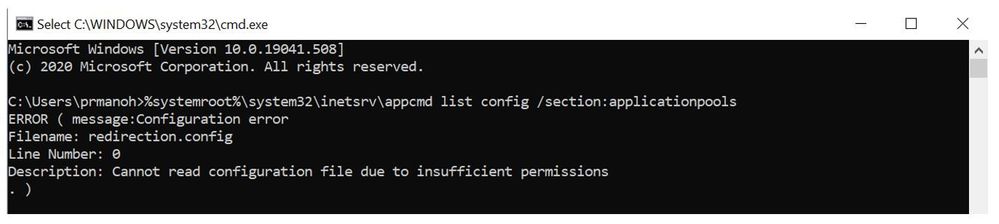 By design, it is architecturally infeasible to prevent an administrator from being able to read the password in this manner.
AppCmd is an IIS admin tool that requires admin privilege to run. Therefore, showing the password doesn’t break the security boundary. On the other hand, if the goal is to prevent “peeking over the shoulder” or “leaking password from the admin script logs”, it might be helpful to have a switch for the command line to mask the passwords. Unfortunately, such an option was never added.
by Scott Muniz | Sep 18, 2020 | Uncategorized
This article is contributed. See the original author and article here.
More and more life science organizations are looking to leverage cloud-based solutions that can be used anywhere, on any device, to support “good practice” quality guidelines and regulations (GxP). To carry out their digital transformation, customers in regulated industries trust Microsoft cloud services such as Microsoft 365, Azure, and Dynamics 365 to shorten their time to market, reduce costs, increase operational efficiency, and accelerate scientific innovation.
Each year Microsoft invests billions of dollars in designing, building, and operating innovative cloud services. But in this highly regulated industry, for you to even consider our services, we must earn and retain your trust. Microsoft cloud services are built around key tenets of security, privacy, transparency, and compliance; and we invest more each year to increase the confidence of our life sciences customers in Microsoft cloud services.
Microsoft aims to ensure the confidentiality, integrity, and availability of data, documents, and GxP applications for life science organizations. With each service, customer data benefits from multiple layers of security and governance technologies, operational practices, and compliance policies to enforce data privacy and integrity at specific levels.
Over time, we intend to make it easier for life sciences organizations to use Microsoft cloud services for their full portfolios of applications. We believe that this GxP guidance document is a key step toward that goal. Given the shared responsibilities of the cloud model, life science customers rely on the fact that Microsoft has implemented appropriate technical and procedural controls to manage and maintain the cloud environment in a state of control. Microsoft’s quality practices and secure development lifecycle encompass similar core elements as would be found in many life sciences customers’ internal Quality Management Systems and meet or exceed industry standards.
This guide should help demonstrate that you can develop and operate GxP applications on Microsoft Azure, Dynamics 365, and Microsoft 365 with confidence and without sacrificing compliance with GxP regulation. We look forward to working with you to help you achieve your digital transformation initiatives.
– Daniel Carchedi – Sr. Director Business Development & Strategy Life Sciences
GxP Guidelines for Microsoft 365, Dynamics, and Azure are attached below
Webinars to check out:
The future of digital collaboration in pharma and biotech: The Microsoft 365 Journey
Accelerate your journey to the cloud: Move your GxP regulated workloads to Microsoft Azure
Register for the GxP Cloud Compliance Summit October 20th and 21st


Recent Comments