by Scott Muniz | Sep 21, 2020 | Azure, Technology, Uncategorized
This article is contributed. See the original author and article here.
Final Update: Monday, 21 September 2020 08:54 UTC
We’ve confirmed that all systems are back to normal with no customer impact as of 9/21, 08:54 UTC. Our logs show the incident started on 9/21, 08:00 UTC and that during the 54 minutes that it took to resolve the issue some customers may have experienced intermittent data latency, data gaps and incorrect alert activation in East Asia.
- Root Cause: The failure was due to issues with one of our dependent service.
- Incident Timeline: 54 minutes – 9/21, 08:00 UTC through 9/21, 08:54 UTC
We understand that customers rely on Application Insights as a critical service and apologize for any impact this incident caused.
-Harshita
by Scott Muniz | Sep 21, 2020 | Azure, Technology, Uncategorized
This article is contributed. See the original author and article here.
We have worked with the following partners during the preview of Azure Arc. We have trained their engineers and collaborated with them to develop unique proof of concepts. We have found that these partners demonstrate expertise with Azure Arc and are well positioned to help their customers transform their digital infrastructure leveraging Azure Arc.
Please reach out to the following partners if you need help with Azure Arc in your IT environment.
List in alphabetical order.
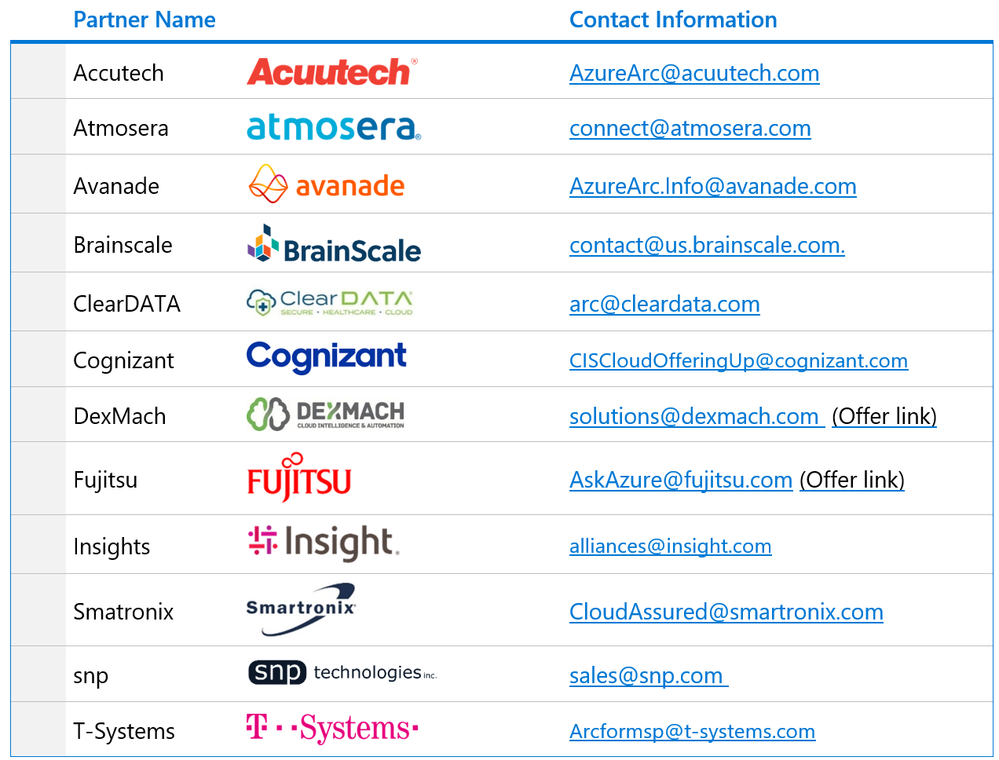
Microsoft doesn’t accept any liability on behalf of these partners.
by Scott Muniz | Sep 21, 2020 | Azure, Technology, Uncategorized
This article is contributed. See the original author and article here.
Azure Blob Versioning when enabled is a feature that will automatically maintain previous versions of an object. This allows you to restore an earlier version to recover your data if it was modified or deleted by mistake. Which is a great feature to be able to have access to for organisations or even for home use. Being able to quickly recover a previous version of a file without having to engage your whole backup/recovery process/tool will save a lot of pain and time.
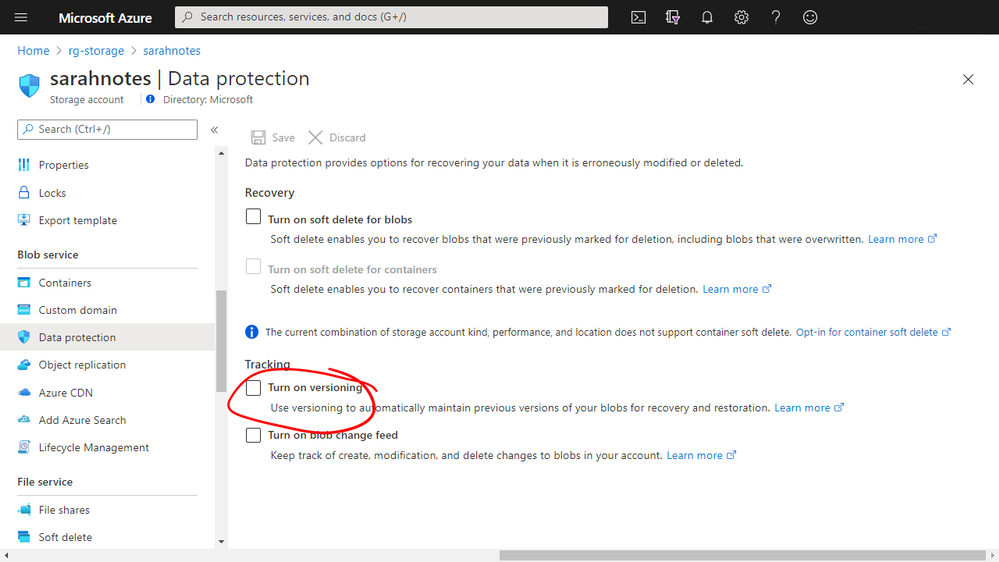
You can enable blob versioning when you create an Azure Storage account in the portal or via an ARM template.
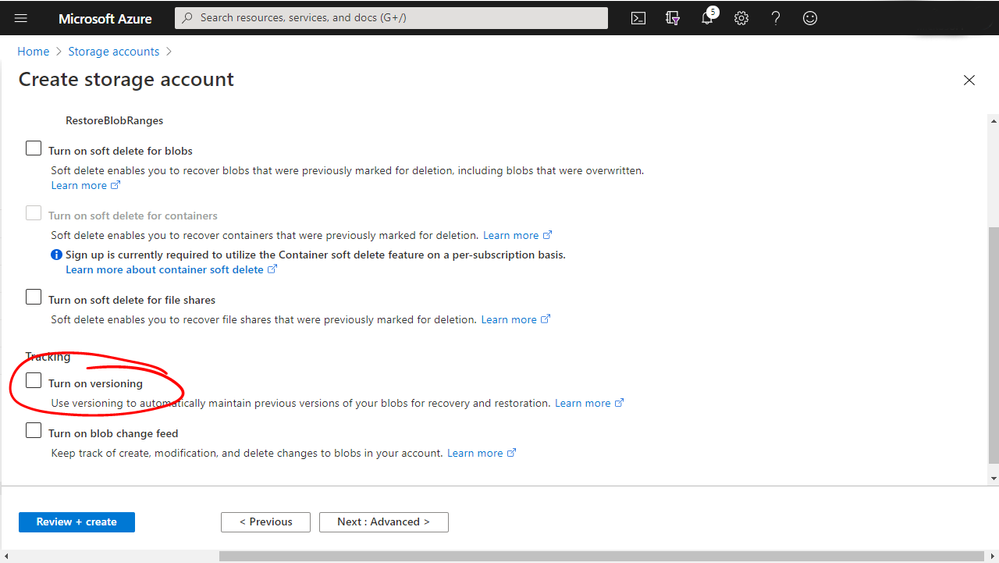 Azure Portal
 Azure Portal
I have an Azure Storage Account with a Blob Container and some files stores within it, just some simple text files. I have versioning turned on that storage account.
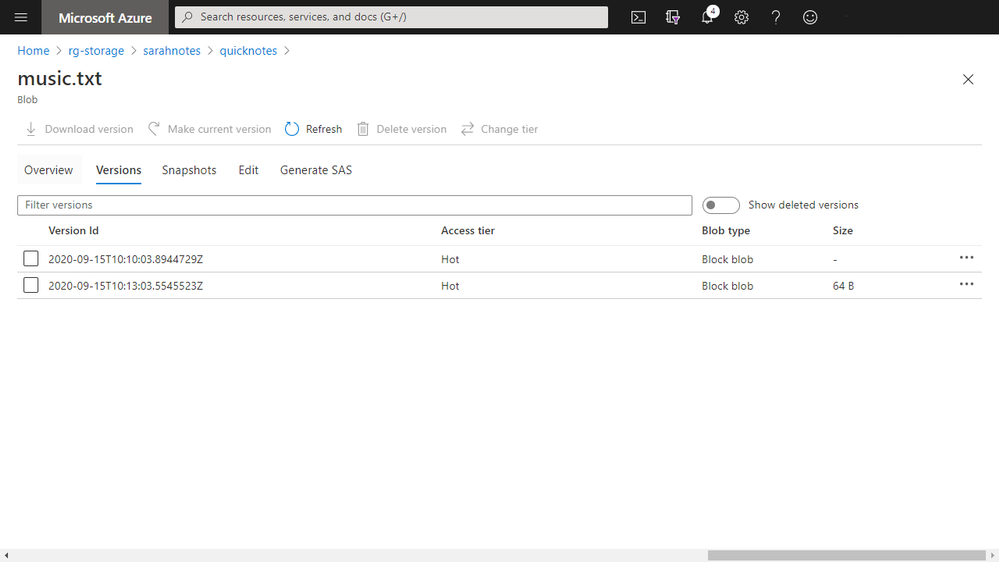
You can see with my music.txt file that I have the ability to see the different saved versions of that file. Each version of the file is given a version ID to help you identify it.
For each version of the file I have a lot of options, I can download it, make it the current version (ultimately restoring it), delete it, generate a shared access signature (SAS) for that blob or even change the access tier that that version is stored in.
 Azure Portal
Now you don’t just have to use the Azure Portal to interact with the versions of the files. AzCopy supports interacting with them as well.
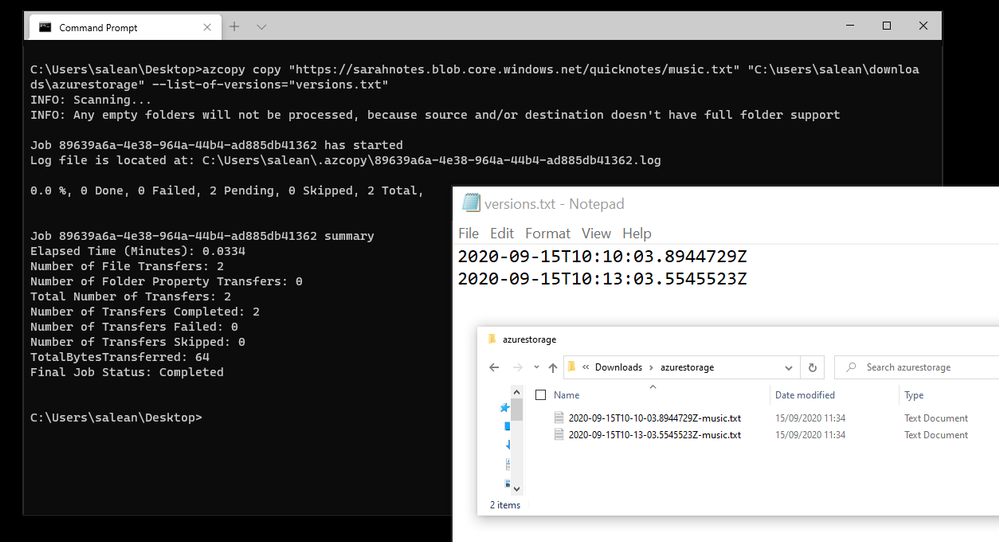
If I launch AzCopy and issue the AzCopy Copy command, which will copy files from one location to another. In this case I want to copy the different versions of my “music.txt” from Azure down to my local machine.
The command starts off with the copy instruction and the source and destination locations, then I add on the switch that will allow me to download the file versions:
Azcopy copy https://sarahnotes.blob.core.windows.net/quicknotes/music.txt “C:userssaleandownloadsazurestorage” –list-of-versions=”versions.txt”
Copy code snippet
For the list of versions switch to work I need to pass in a file listing the version IDs of all the versions that I want to download. Each version ID needs to be placed in a separate line.
And when I run the command AzCopy will download the relevant files for me.
 Windows Terminal and commands
by Scott Muniz | Sep 21, 2020 | Uncategorized
This article is contributed. See the original author and article here.
If you’ve ever wanted to dive into the what, how, and why of Windows deployment and servicing, we have a lot to offer at Microsoft Ignite this year. What’s up? Two days of non-stop fresh information sessions across multiple time zones. We have some stellar live digital breakouts, with expert support on hand to provide real-time Q & A plus on demand videos taking you into the technical details around what’s new, what’s changed, and what’s next!
Below is a quick guide that will put you on your way to improving the way you deploy and service Windows 10 on all your devices. And, best of all, this year Microsoft Ignite is free so there’s no reason not to attend! Simply register at https://ignite.microsoft.com and start building your schedule. Click on the session names below to add them to your schedule (or digital “backpack”)—then bookmark this post as we’ll be updating it each day with links to the big announcements, links to our on demand sessions, and post-conference activities.
Now let’s jump in!
Digital breakout: Windows 10 innovations for enhanced productivity and resiliency
First up, we have our spotlight digital breakout session, Windows 10 innovations for enhanced productivity and resiliency, with Joe Lurie and Karen Simpson. Together, Joe and Karen will walk you through the advanced management and security features that get better with every Windows 10 update—highlighting recent and upcoming innovations for organizations, end users, developers, and, of course, the IT professional! Hybrid and remote workplaces are now prevalent so they’ll also share tips you can use today to maximize update adoption and minimize user disruption.
For a broader look at, we also recommend Catherine Boeger’s session on Building a resilient organization on Microsoft 365. For a closer look at the value of moving to cloud-based management—and how to make that move in the current climate—check out Brad Anderson’s session on Playing chess on a trampoline: How to innovate in an era of uncertainty.
Ask the experts
While we’ll be supporting all broadcasts of Joe and Karen’s digital breakout session with live Q&A during the session, you’ll have an opportunity to ask additional questions and get answers from a diverse group of engineering, support, and product experts—including members of our Microsoft MVP community—with our Ask the Expert sessions. These sessions are conducted in Teams Live Events so there’s sure to be some lively banter and space is limited to be sure to RSVP today!
Similar sessions will be offered for endpoint management and Office administration and servicing so be sure to attend those if you have questions in those areas.
On point and on demand
We know you come to Microsoft Ignite to increase your technical skills and knowledge. So, if you’re looking to dive deeper into the topics covered in our digital breakout and familiarize yourself with ways to optimize how you manage your devices and Windows updates, we’ll be offering a variety of topics in the Video Hub on Tech Community—direct from our engineering and product teams!
First up is our Microsoft Ignite digital learning path—designed to help you integrate a prescriptive, process-based model into the way you deploy Windows and manage updates. This complements our Microsoft Learn learning path, Stay current with Windows 10 and Microsoft 365 Apps, offering additional tips and tricks plus valuable insights from James Bell and Dave Backman, two esteemed experts thanks to close work with organizations of all sizes troubleshooting and unblocking deployment projects.
- Plan to deploy and manage updates for Windows 10 and Office
- Prepare to deploy and manage updates for Windows 10 and Office
- Deploy and manage updates for Windows 10 and Office
- Best practices for managing Windows 10 and Office updates for remote devices
If you’re looking to get specific, our engineering teams want to bring you up to speed and help address the concerns you’ve voiced to us through the Feedback Hub and the Windows Insider Program for Business over the last year:
- On-premises Windows update management: what’s changed and what you need to know (Ritvik Raj, Asish Varghese, Shailja Joshi)
- Optimize monthly Windows update delivery for remote work and business continuity (Sneha Deo)
- Modernizing update testing in the cloud (Raji Rajagopalan)
- Make the Windows update and recovery experience smooth and seamless for IT and end users (Steve DiAcetis)
- Accelerating the journey to modern management (Chris Sweeney)
- How to deploy Windows Virtual Desktop and secure your environment (Pavithra Thiruvengadam, Maggie Dakeva)
Note: Links to these great sessions will be available after the keynotes conclude on day one.
Additional resources
For a closer look at sessions and resources related to Microsoft 365 Admin Tools and Experiences, see the Microsoft 365 Admin Guide to Microsoft Ignite 2020.
To catch up on the latest in Microsoft Endpoint Manager, check out Microsoft Endpoint Manager at Microsoft Ignite 2020.
For the latest in all things Office and Microsoft 365 Apps, bookmark this post to reference related Microsoft Ignite 2020 sessions: Office deployment & servicing at Microsoft Ignite 2020.
by Scott Muniz | Sep 20, 2020 | Azure, Technology, Uncategorized
This article is contributed. See the original author and article here.
Initial Update: Sunday, 20 September 2020 14:10 UTC
We are aware of issues within Log Analytics and Log Search Alerts and are actively investigating. Some customers in Australia South East region may experience intermittent data access issues when accessing application data. Customers that have set up Log Search Alerts may experience those alerts missing or being delayed.
- Work Around: None
- Next Update: Before 09/20 16:30 UTC
We are working hard to resolve this issue and apologize for any inconvenience.
-Madhav


Recent Comments