by Scott Muniz | Sep 21, 2020 | Azure, Technology, Uncategorized
This article is contributed. See the original author and article here.
Check out the following deep dive videos to learn more about new Azure Disk Storage capabilities and features:
Understanding disk IO and how to leverage disk bursting
Overview of Azure Disk Storage security features
Run clustered applications on Azure with shared disks
by Scott Muniz | Sep 21, 2020 | Uncategorized
This article is contributed. See the original author and article here.
Attending Microsoft Ignite virtually this year and missing good ol’ conference swag? Want to win a special limited edition Humans of IT swag box? Here’s your chance – read on to learn more!
You’ve probably already seen these boxes all over social media, but if you haven’t and want to know what’s in the box, click here or here.
ENTER FOR A CHANCE TO WIN A MICROSOFT HUMANS OF IT SWAG BOX
3 easy steps:
1. RSVP and attend at least one of the eight Microsoft Humans of IT sessions. View the entire session list at https://aka.ms/MSIgniteHumans. Be sure to hit the RSVP button to guarantee your spot since they are limited capacity only. Unfortunately, only folks who tune in live are eligible to participate as we will be picking winners that same day and session recordings will not be available until after the conference has ended.
2. After the session, comment on this blog post below with your response to the 3 questions below:
– What was your favorite Microsoft Ignite Humans of IT session and why? (Please note: Only entries mentioned Humans of IT sessions will be eligible)
– Why is it so important to embrace the human side of tech?
– How have you connected with other humans during the virtual Microsoft Ignite conference?
3. When you’re done posting the above response, post a tweet with the URL to your response with the hashtags #MSIgnite #HumansofIT so that we can contact you if you’re the winner.
Two winners will be selected at the end of Day 1 (Sept 22) and Day 2 (Sept 23) of Microsoft Ignite.
Terms and conditions apply.
TERMS AND CONDITIONS
- This giveaway is opened to anyone aged 18 and above in any country where domestic/international shipping from the US is permitted. If you have not reached the age of majority in your legal place of residence, then you must have consent from your parent/legal guardian to participate.
- Each selected winner can only win once. You may submit multiple entries for different sessions, however you will only be eligible to win once.
- Winners must consent to providing us their shipping address so we can deliver this to you.
- Winner may not resell this giveaway item for commercial profit.
- We reserve the right to withdraw/cancel this giveaway if the winner is found to be in violation of the Community Code of Conduct.
- Winners will be notified within 3 days following the drawing via their Tech Community account and/or Twitter handles with prize claim instructions, including a submission deadline of 3 days. If a selected winner cannot be contacted, is ineligible, fails to claim a prize or fails to return any forms, the selected winner will forfeit their prize. If you are a potential winner but have not reached the age of majority in your legal place of residence, we may require your parent/legal guardian to sign all required forms on your behalf.
ENTRY PERIOD
The entry period starts at 11:30 a.m. Pacific Time (PT) on September 22, 2020, and ends at 9:30 p.m. PT on September 23, 2020 (“Entry Period”). Please see https://time.is/UTC or another time zone converter for your local time.
We look forward to seeing you at Microsoft Ignite Humans of IT sessions starting tomorrow!
#HumansofIT
#MSIgnite
by Scott Muniz | Sep 21, 2020 | Uncategorized
This article is contributed. See the original author and article here.
This article is written by Humans of IT Community Ambassador and Business Applications MVP, Nathan Lasnoski (in partnership with Windows Development MVP Min Maung), who shares how artificial intelligence can be used to enable employment and functional opportunities for individuals with cognitive disabilities.

What responsibility does technology (and do technologists) have in creating innovation that leads to the realization and fulfillment of a human being? Does technology create a new generation of unfairly applied have and have-nots? We can use technology to drastically improve the positive tech impact on human involvement and engagement, especially for individuals with disabilities who are often excluded from opportunities within society. In this story we talk about the work done at Clover to enable individuals with cognitive disabilities to engage in opportunities that were previously thought impossible.
USING AI FOR GOOD BEYOND ANY ONE INDUSTRY: EMPLOYMENT FOR THE COGNITIVELY DISABLED
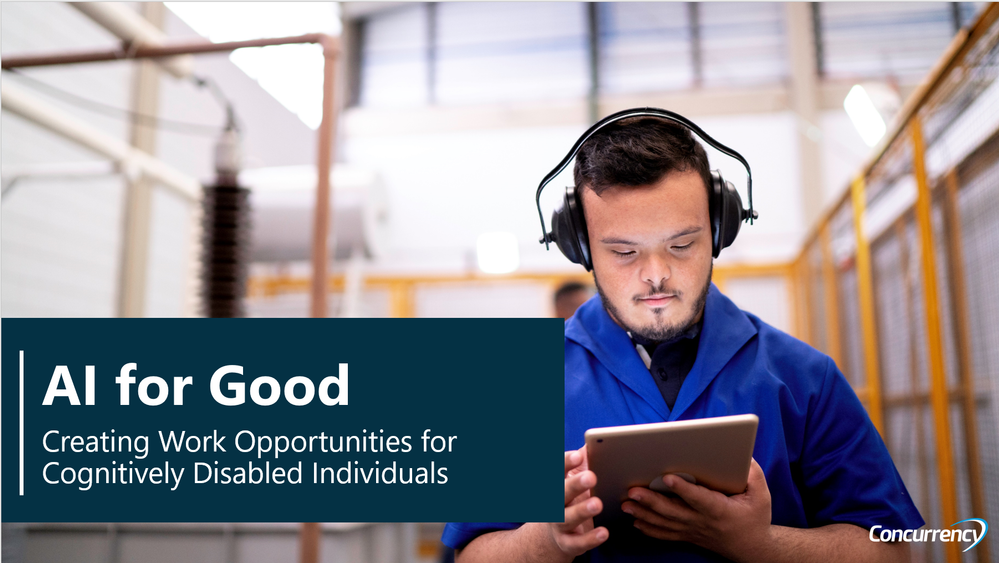
Clover Technologies wanted its warehouses to be the best workplace environments among any of its competitors. To get there, we built a mixed-reality platform leveraging a multi-component scanner, headset, visual, and audio input. The idea was to optimize the picking experience for a worker by providing instructions on where they should go, when, and how, augmenting it with quality control, location awareness, and easy scanning capabilities. Then, this idea expanded further: if we could provide impact to capable workers, why not ones with cognitive disabilities, such as Down syndrome or autism?
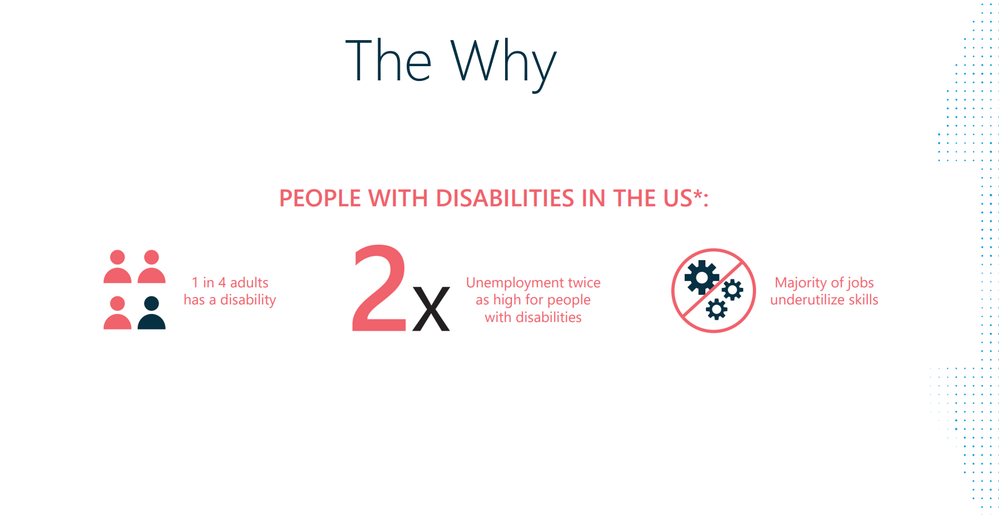
Did you know that less than 10% of individuals with Down syndrome and cognitive disabilities are employed? We believe that tech can help empower all individuals to be productive and have the ability to be gainfully employed. Clover, Concurrency (with MVPs Min Maung and Nathan Lasnoski), Microsoft, and Gigi’s Playhouse Down syndrome development centers partnered to do something about it. We realized these individuals could do meaningful warehouse work with a human assistant, and we wanted to simulate this assistance with technology.
AZURE COMPONENTS IN THE OPEN-SOURCE SOLUTION
We combined the headset, audio input, visual input and hand-attached scanner to enable an individual to work in the warehouse. We proved the success of the technology with one individual, then expanded to more, bringing groups from Gigi’s Playhouse to experience the difference. The solution leverages Microsoft Azure Cognitive Services, Azure ML, Azure SQL, Azure Speech and location awareness.
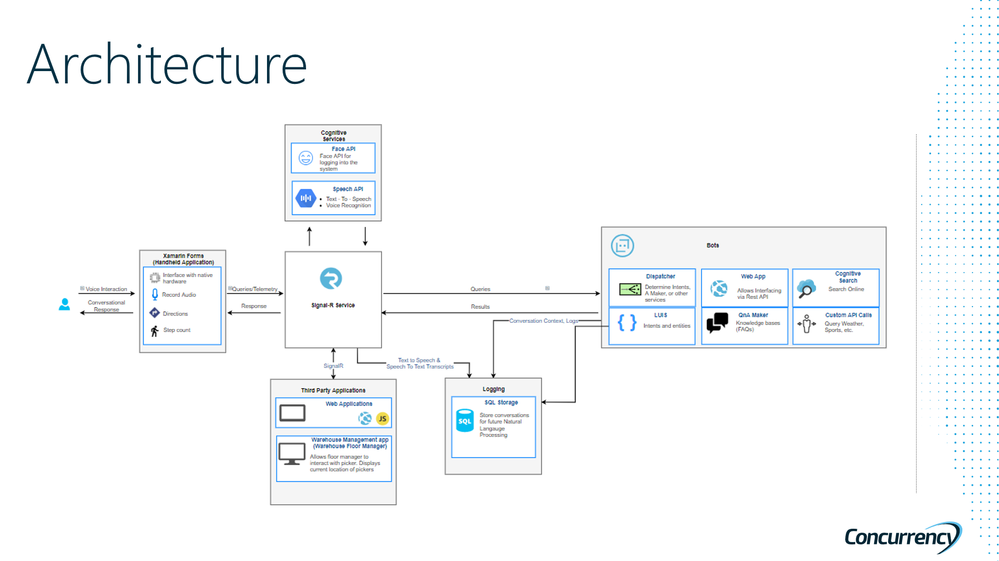
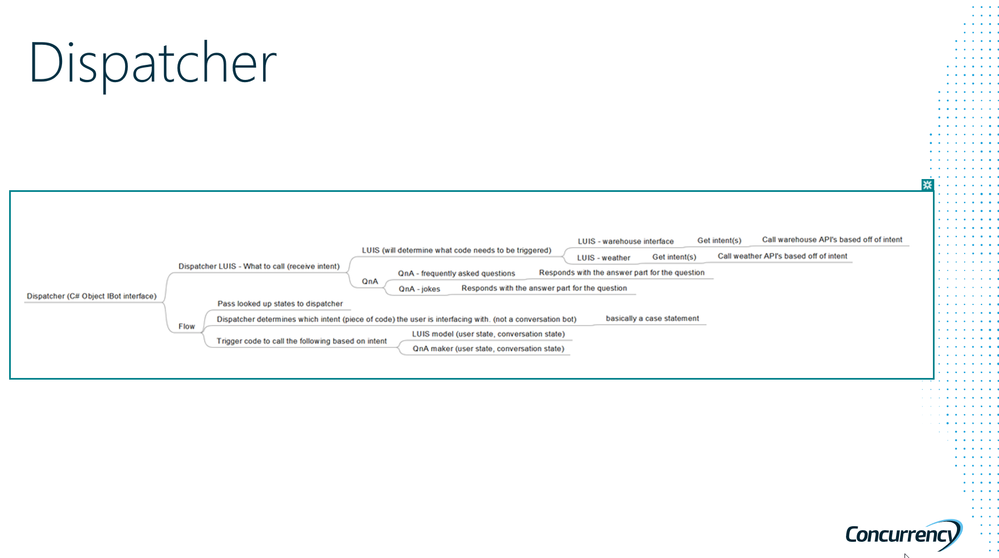
The architecture made use of the dispatcher modules to facilitate routing between QnA maker AI models, weather, fun engagement, and third party applications.
You can see here how the project evolved over time. We started with initial pilot capabilities, moved into validation, learnings in a real environment with real people, then moving into open source.
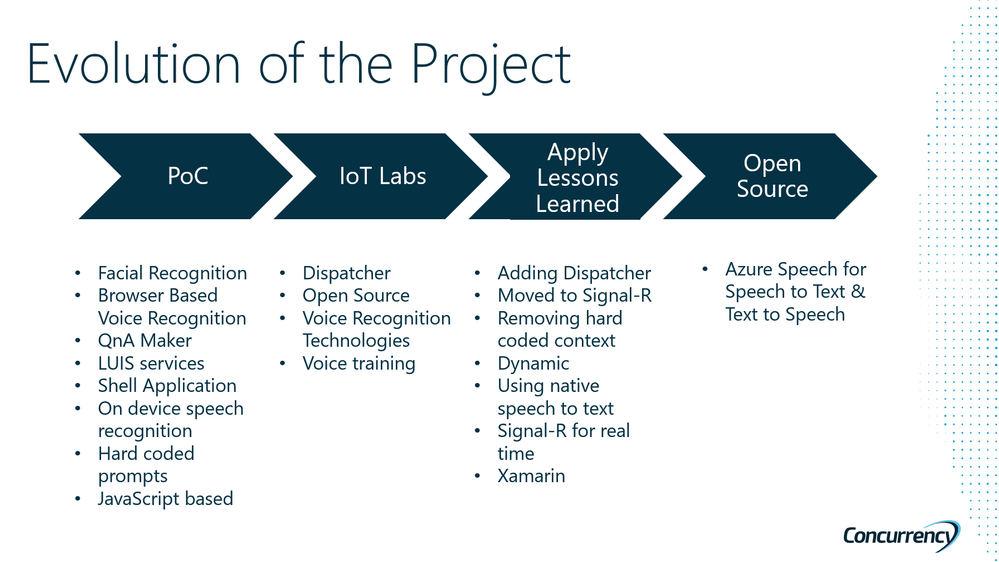
This AI for Good solution is now available on open source in order to increase its impact for good. Large suppliers, manufacturers, and stores are asking to leverage it to improve their own working environments. The result is a better workplace and a larger base of potential employees for companies to hire from. We know of nothing out there that better demonstrates the power of AI to create jobs for those most at risk than this technology. Visit AI For Good Technologies (aitechnologyforgood.com) to join the Open Source Community on GitHub.
WORLDWIDE RELEVANCE
This gets to a critical point about the relevance and impact of this work. When a large company like Clover can achieve this level of impact, leaders at even larger companies can begin to see their own opportunities to help empower others in the community. The impact has been proven out across hundreds of Microsoft customers—in tours, reference calls for the field sales team, and at Microsoft’s DTA. At the DTA presentation, the story “brought the house down” without a dry eye in the theatre, driving excitement about what is possible when leaders see AI not as “nice to have” but “need to have”— in order to transform business operations and people’s work opportunities. Now, as organizations look to survive, recover, and thrive beyond the COVID-19 pandemic, broadening employment opportunities on both the employer and employee side becomes even more compelling than before. How will YOU use your tech skills to help empower others today?
#HumansofIT
#AIforGood
by Scott Muniz | Sep 21, 2020 | Uncategorized
This article is contributed. See the original author and article here.

Onsite gyms. Stocked refrigerators and gourmet cafeterias. Catered morale events and offsite retreats. Hallway conversations and conference room whiteboarding sessions. If workplace facilities and perks help people feel more comfortable, productive, and valued, those investments stop paying off when most people work remotely.
Let’s face it: the sudden global migration from on-premises to work-from-anywhere computing has transformed the device user experience into the entire workplace experience.
Many organizations have understandably deprioritized device user experience in the face of economic pressures and security threats that have strained IT bandwidth in the transition.
What does that look like? Devices that hang or crash, taking 10 or more minutes to reboot. Disruptive remote troubleshooting sessions. Important files getting lost in email – and worse: version control issues – as colleagues adopt digital collaboration tools.
When the device is the only conduit for literally all workplace experiences, there are no free snacks to balance out the inconveniences, disruptions, and frustrations adding up over the course of months.
More likely than not, your organization can relate. Analyst Josh Bersin finds the #1 employee concern is tech for remote work. IDG reports that 44% of organizations say they need new tech to address the new work dynamic. And AppDynamics says that 61% of IT professionals feel more pressure at work than ever.
Accelerating the journey to modern management
As a senior program manager with the Microsoft Managed Desktop customer acceleration team, I help customers modernize endpoint management to delight end users, protect data, and reclaim IT bandwidth for digital transformation..
If you share these goals, I encourage you to check out my session at Microsoft Ignite 2020, Accelerating the journey to modern management, which covers the following:
- How work evolution strains IT bandwidth, security, device user experience, especially in the context of economic uncertainty,
- How modern management is shown to help organizations resolve those issues,
- What Microsoft Managed Desktop does to accelerate the journey to modern management,
- Technical and non-technical considerations that affect deployment timelines, and
- Real Microsoft Managed Desktop customer onboarding journeys ranging from six weeks to six months.
As promised at the end of my session, this docs page will help you get ready for Microsoft Managed Desktop enrollment. It covers prerequisites, readiness tools, app preparation, environment configuration, and other tasks you’ll encounter as you work to modernize.
Additional modernization resources
Wherever you are on your journey to modern device management, you’ll want to check out this guide to Microsoft Endpoint Manager at Ignite.
Here are several additional promising sessions on topics about managing the new workplace:
Everyone can access these virtual sessions, which are available on-demand at your convenience. If you find them useful, please let me know in comments.
And if you’d like to start planning your enterprise journey to Microsoft Managed Desktop, please reach out to your Microsoft account team. My colleagues and I on the customer acceleration team look forward to helping you deliver a secure device experience that helps your people – and your IT organization – feel productive and valued in the work-from-anywhere environment.
How has the evolution of work affected your organization? Which customer deployment story best resembles your situation? Please share your comments below.
by Scott Muniz | Sep 21, 2020 | Uncategorized
This article is contributed. See the original author and article here.
By Caroline Lee & Sebastien Molendijk
Welcome to our third post in the Automation in Cloud App Security blog series. If you are a new reader joining us for the first time, I encourage you to go check out our last two posts (https://aka.ms/MCAS/Auto-Blog & https://aka.ms/MCAS/Auto-Triage). In this series, we showcase various Power Automate flows that help to mitigate advanced customer scenarios we see today in Microsoft Cloud App Security (MCAS).
In today’s post, Seb & I will go over a new Power Automate template that will send alerts to a user’s manager requesting for action. By sending the alert details to the manager, they can make the decision to ignore the alert, disable the user or request an investigation. This helps to take to the load off the Security team by asking the manager to validate the alert instead. Another benefit sending the alert to the user’s manager versus the SOC team is they’re able to verify with the user if the alert is a false or true positive.
This flow can be tweaked for any given policy but for the sake of this post we will focus on the multiple failed login attempts policy. If you’re unfamiliar with how this policy works, check out our built-in anomaly detection policies. We’ll start by gathering a couple of details: the user profile and the manager information for that user. When an alert is triggered for a given user, the flow will send an email to the user’s manager requesting for input. There are a couple of options they can choose from:
- Dismiss Alert: this will dismiss the alert in Cloud App Security
- Disable User: this will disable the user in AzureAD
- Request an investigation: this will send a message to a SOC teams channel with the incident details
By giving the manager the ability to take action, this can help with the volume of alerts that are generated in MCAS; allowing the security teams to focus on ones that are true positives. All of our flow templates can be found in this Github respository: https://github.com/microsoft/Microsoft-Cloud-App-Security/tree/master/Playbooks. Let us know if you all have any feedback after trying this flow out. What other scenarios would you like us to cover? Feel free to comment below!


Recent Comments