by Scott Muniz | Sep 22, 2020 | Uncategorized
This article is contributed. See the original author and article here.
Now Generally Available: High throughput streaming ingestion into Synapse SQL pools
Azure Synapse is an analytics service that seamlessly brings together enterprise data warehousing and Big Data analytics workloads. It gives customers the freedom to query data using either on-demand or provisioned resources at scale, and with a unified experience to ingest, prepare, manage, and serve data for immediate BI and machine learning needs. A Synapse SQL pool refers to the enterprise data warehousing features that are generally available in Synapse.
As more and more customers require their Modern Data Warehouse patterns and reporting environments to be real-time representations of their business, streaming ingress into the warehouse is becoming a very core requirement.
Azure Stream Analytics is a market leading Serverless PaaS offering for real-time ingress and analytics on Streaming data. Starting at a very low price point of USD $0.11 per Streaming Unit per hour, it helps customers process, and reason over streaming data to detect anomalies and trends of interest with ultra-low latencies. Azure Stream Analytics is used across a variety of industries and scenarios such as Industrial IoT for remote monitoring and predictive maintenance, Application telemetry processing, Connected vehicle telematics , Clickstream analytics, Fraud detection etc.
Today, we are announcing the General Availability of high throughput streaming data ingestion (and inline analytics) to Synapse SQL pools from Azure Synapse Analytics, that can handle throughput rates even exceeding 200MB/sec while ensuring ultra-low latencies. This is expected to support even the most demanding warehouse workloads such as real-time reporting, dashboarding and many more. More details can be found in the feature documentation.
With Azure Stream Analytics, in addition to high throughput ingress, customers can also run in-line analytics such as JOINs, temporal aggregations, filtering, real-time time inferencing with pre-trained ML models, Pattern matching, Geospatial analytics and many more. Custom de-serialization capabilities in Stream Analytics help with ingress and analytics on any custom or binary streaming data formats. Additionally, developers and data engineers can express their most complex analytics logic using a simple SQL language, that is further extensible via Javascript and C# UDFs.
For IoT specific scenarios, Azure Stream Analytics enables portability of the same SQL query between cloud and IoT edge deployments. This provides several opportunities for customers such as pre-processing, filtering or anonymization of data the edge.

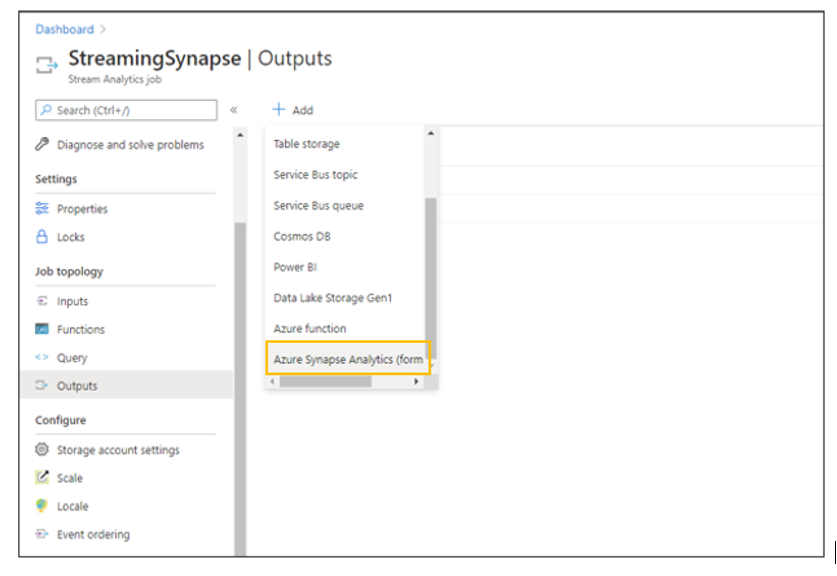
Azure Stream Analytics output to Synapse SQL table
Feedback and engagement
Engage with us and get early glimpses of new features by following us on Twitter at @AzureStreaming. The Azure Stream Analytics team is highly committed to listening to your feedback and letting the user’s voice influence our future investments. We welcome you to join the conversation and make your voice heard via our UserVoice page.
by Scott Muniz | Sep 22, 2020 | Uncategorized
This article is contributed. See the original author and article here.
Purpose:
SQLPackage allows you to authenticate with Access Token instead of providing Login name and password.
This article will show you how to do that end to end.
General steps:
- Create App Registration in your Azure Active Directory (AAD)
- Create user for the Application to access Azure SQL DB and grant the needed permissions.
- Generate Access token for your Application.
- Use the Access token to import or export your database.
Detailed steps:
- Create App Registration in your Azure Active Directory (AAD)
- Open Azure portal and access you Azure Active Directory management blade
- Click on App Registrations
- Click on New Registration
- Give your application a name so it can be identified afterwards
- Click on “Register”
- Once the App is created you will be redirected to the App blade
- Note your application (client) ID – you will use that later
- Click on “Endpoints” at the top and note the “OAuth 2.0 token endpoint (v2)” url – we will use this later as well.
- Click on “Certificate & Secrets”
- Click on “New Client Secret”
- Set the expiry time and click “Add”
- Note the value of the key – we will use it later.
- Create user for the Application to access Azure SQL DB and grant the needed permissions.
- CREATE USER [SQLAccess] FROM EXTERNAL PROVIDER
- alter role dbmanager add member [SQLAccess]
- Make sure your server has AAD Admin account configured.
- Connect to you SQL DB with your AAD account
- Create the user for the application access
- Grant the needed permissions.
- Generate Access token for your Application.
- Using PowerShell
$key= ConvertTo-SecureString `
         -String "{Key Secret}" `
         -AsPlainText `
         -Force

Get-AdalToken `
    -Resource "https://database.windows.net/" `
    -ClientId "{Application ID}" `
    -ClientSecret $key `
    -TenantId "{Tenant ID}"
- Using C#
using System;
using System.Collections.Generic;
using System.Linq;
using System.Text;
using System.Threading.Tasks;
using Microsoft.IdentityModel.Clients.ActiveDirectory;

namespace ConsoleApp1
{
    class Program
    {
        static void Main(string[] args)
        {

            string clientId = "{Client ID}";
            string aadTenantId = "{Tenant ID}";
            string clientSecretKey = "{Key Secret}";

            string AadInstance = "https://login.windows.net/{0}";

            string ResourceId = "https://database.windows.net/";

            AuthenticationContext authenticationContext = new AuthenticationContext(string.Format(AadInstance, aadTenantId));

            ClientCredential clientCredential = new ClientCredential(clientId, clientSecretKey);
            DateTime startTime = DateTime.Now;
            Console.WriteLine("Time " + String.Format("{0:mm:ss.fff}", startTime));
            AuthenticationResult authenticationResult = authenticationContext.AcquireTokenAsync(ResourceId, clientCredential).Result;
            DateTime endTime = DateTime.Now;
            Console.WriteLine("Got token at " + String.Format("{0:mm:ss.fff}", endTime));
            Console.WriteLine("Total time to get token in milliseconds " + (endTime - startTime).TotalMilliseconds);
            Console.WriteLine(authenticationResult.AccessToken.ToString());
            Console.ReadKey();
        }
    }
}
4. Use the Access token to import or export your database.
- Use your SQLPackage command and instead of using Login / User and password use the /AccessToken:{AccessTokenHere} (or /at)
by Scott Muniz | Sep 22, 2020 | Uncategorized
This article is contributed. See the original author and article here.
Question:
When I’m using P1 tier for my geo-replicated database I can scale to another edition such as Standard or Business critical, but it will not allow me to scale to General purpose.
Why?
Short Answer:
When scaling between DTU and vCore model you may only scale between equivalent editions.
Standard is similar to General purpose and Premium to Business Critical.
If needed, scale both Primary and Secondary to Standard and then to General Purpose.
Never break the geo-replication setup for such modifications.
Answer:
When using Geo-Replication for your database the recommendation is to keep both in the same edition and tier.
The reason behind that is that (most common scenario) if the secondary will have lower tier compare to the primary, it might lag when processing changes coming from the primary database.
It will affect workloads running on both primary and secondary. And it will impact RPO and RTO when failover in needed.
However, if your workload is more of reads on the primary and less write, you may find that having lower tier on the secondary that need to deal with writes only will be more efficient for you (financial wise)
To allow customer to scale between editions (Standard, Premium) we must allow temporary hybrid setup while secondary and primary does not have the same edition.
The instructions about how to do that correctly is well described in additional considerations for scale database resource docs page.
Now back to our question, when scaling the database from Standard edition which uses DTU model we may only scale to General Purpose as this would be the equivalent edition in vCore model.
Same thing for Premium while the equivalent vCore edition is Business Critical.
Therefore if you need to go from P1 to GP (General Purpose) you may first scale both primary and secondary to Standard edition and then move to GP
In any case it is not recommended to break the geo-replication setup as during this time you have no active cross region High Availability solution for your database, this means that your database setup is vulnerable and might be impacted if an issue happen.
by Scott Muniz | Sep 22, 2020 | Uncategorized
This article is contributed. See the original author and article here.
In today’s digital world, managing work and personal tasks can be overwhelming. Microsoft To Do is a task management app that helps you stay organized, be productive, and get more time for yourself. With Microsoft To Do, you can easily create to-do lists, set reminders, and collaborate with friends and colleagues. Microsoft To Do is integrated with Microsoft 365 apps like Outlook, Planner, and Microsoft Teams. Microsoft To Do is available on Windows, Android, iOS, Mac, and web, so you always have access to your tasks.
Let’s see how To Do can help you stay on top of your tasks.
Meet Microsoft To Do
Learn more about how to get started with Microsoft To Do.
Manage tasks with Microsoft To Do in Outlook
Microsoft To Do integrates seamlessly with Outlook. You can create tasks by dragging and dropping emails to the My Day pane, or highlight a section of an email to create a task out of it. When you flag an email in Outlook, we create a task for you in To Do so you can find all your pending work in one place.
Focus on what matters with My Day
Do you feel overwhelmed by the number of tasks on your plate? With My Day, you get a blank canvas every day. Create a short list so you can focus on a few key things. Learn how to make the most of your day with My Day.
How to make time for yourself with Microsoft To Do
Microsoft To Do helps you collect what you need so you can focus on what matters. From planning your day to starting a big project, you can make more time for yourself with Microsoft To Do.
Get things done with Microsoft To Do
Microsoft To Do helps you stay organized and get things done. You can create lists and reminders and set due dates to stay on top of your tasks.
Get started with Microsoft To Do: https://msft.it/6000TUO8K
Follow us on Twitter : https://twitter.com/MicrosoftToDo
Find us on Facebook: https://www.facebook.com/MicrosoftToDo
Email us at todofeedback@microsoft.com
by Scott Muniz | Sep 22, 2020 | Uncategorized
This article is contributed. See the original author and article here.
In the 6 months since Microsoft Build 2020, where we made exciting steps forward, such as the GA availability of Bot Framework Composer and the Virtual Assistant Solution Accelerator, we have continued to drive the Conversational AI platform forward – improving the developer experience and meeting the needs of our enterprise customers. Azure Bot Service now handles 2.5 billion messages per month, double the rate announced at Build, with over 525,000 registered developers.
Our updates for Ignite 2020 include a new release of Bot Framework Composer, a public preview of Orchestrator, providing language understanding arbitration / decision making, optimized for conversational AI applications and version 4.10 of the Bot Framework SDK.
New release of Bot Framework Composer
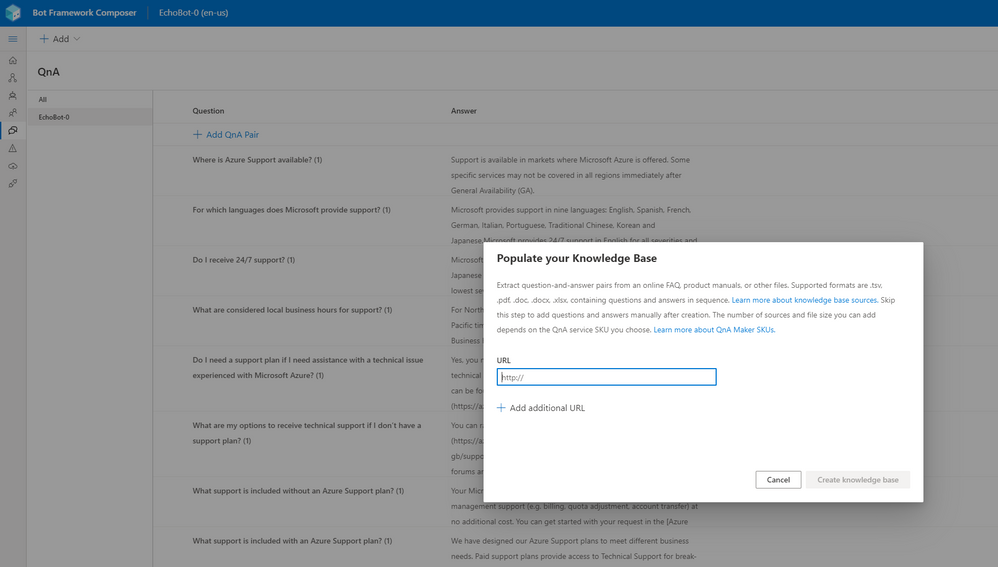
Bot Framework Composer v.1.1.1, released earlier this month, has added a number of significant features to the application, including the addition of creation and management capabilities for QnA Maker knowledgebases. Now, as with the existing integration for LUIS apps, QnA pairs can be added / edited from within Composer, improving overall productivity by removing the need to use a separate portal for these tasks.
 QnA Maker integration in Composer
The ability to build bots that target multiple languages has been added, with a user able to produce appropriate LU (language understanding) and LG (language generation) assets in seconds to target one or more alternative locales.
Other enhancements in this release include automatic generation of manifests when developing Bot Framework Skills, the addition of Intellisense for text editing and preview support for a JavaScript bot runtime.
We also continue to deepen our integration with other key partners within Microsoft and starting this fall, users of Power Virtual Agents will be able to create custom dialogs and directly add them to Power Virtual Agents bots. These dialogs can be saved, hosted, and executed together with Power Virtual Agents bot content, providing a simpler way to extend bot capabilities with custom code.
The next release of Composer, later this year, will feature further QnA Maker integration, improvements to the authoring canvas and the ability to easily re-use assets built with Composer between projects.
Additionally, we are updating the list of pre-built skills, that we released as part of Virtual Assistant Solution Accelerator 1.0, to be based on Bot Framework Composer and adaptive dialogs.
Get started with Composer today at http://aka.ms/bfcomposer.
Orchestrator public preview!
Conversational AI applications today are built using multiple technologies to fulfil various language understanding needs, such as LUIS and QnA Maker, as well as often being composed of multiple skills, with each fulfilling a specific conversation topic. Orchestrator answers a critical need for language understanding arbitration and decision making, to route incoming user request to an appropriate skill or to dispatch to a specific sub-component within a bot.
Orchestrator is a transformer-based solution, which is heavily optimized for conversational AI applications and runs locally within a bot. You can find more details and try the Orchestrator public preview by visiting https://aka.ms/bf-orchestrator.
Later this year, we plan to introduce a preview of Orchestrator support within Composer and the Virtual Assistant Solution Accelerator.
Bot Framework SDK 4.10 released
Version 4.10 of the Bot Framework SDK is now available, adding several new supporting features for our key partners. These included enhanced support for building skills for Power Virtual Agents and adding adaptive dialog and additional lifecycle event support for Microsoft Teams.
A core focus of this release was on quality across the entire stack, covering key pillars of documentation, customer supportability, customer feature requests, code quality and improvements to our internal team agility. Almost 600 GitHub issues were resolved as part of the release, across our SDK languages (C#, JavaScript, Python, Java) and our tools, including accessibility improvements for WebChat.
See the August 2020 release notes for more details on v4.10 of the SDK.
Azure Bot Service
In response to feedback from customers, Azure Bot Service (ABS) now has support for WhatsApp, allowing you to surface your bot on the popular chat app, alongside the existing channels available via ABS. Built in partnership with InfoBip, the WhatsApp adapter can be added to your bot within minutes. Get started with WhatsApp integration for Bot Framework at https://aka.ms/bfwhatsapp.
As part of our commitment to customer privacy and security, ABS has introduced support for Azure Lockbox. Lockbox enables approval flows and audits when support engineers require access to customer data and, additionally, we will soon add customer managed encryption keys.
Azure Bot Service now has expanded channel support within the Azure US Government region and, looking ahead, we will be adding a preview of Adaptive Cards 2.0 and SSO (single sign-on) support for the Teams and WebChat channels.
Ignite 2020 sessions
Conversational AI Customer and Employee Virtual Assistants
Darren Jefford, Group Program Manager, Conversational AI
Building Bots with Power Virtual Agents and extending them with Microsoft Bot Framework
Marina Kolomiets – Senior Program Manager, Power Virtual Agents


Recent Comments