by Contributed | May 31, 2021 | Technology
This article is contributed. See the original author and article here.
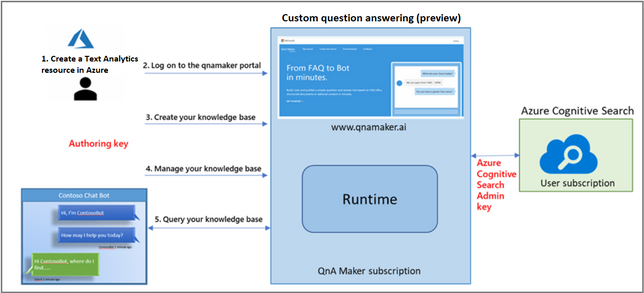
QnA Maker is an Azure Cognitive Service that allows you to create a conversational layer over your data in minutes. As part of our AI at Scale initiative across Microsoft, we are making the latest breakthroughs in natural language understanding available across our products and within our Azure Services portfolio. Powered by our Turing natural language model, excited to e the new Custom Question Answering feature (public preview) with Text Analytics. Alongside Custom question answering, we are also introducing a new Prebuilt Question answering capability that lets users extract relevant answers to questions from a given passage of text.
Overview
- Custom question answering supports all capabilities introduced with QnA Maker managed.
- You can add unstructured files to your knowledge bases with Custom question answering.
- We are also introducing Prebuilt question answering capability that lets users extract relevant answers to questions from a given passage of text.
Enabling Custom question answering feature
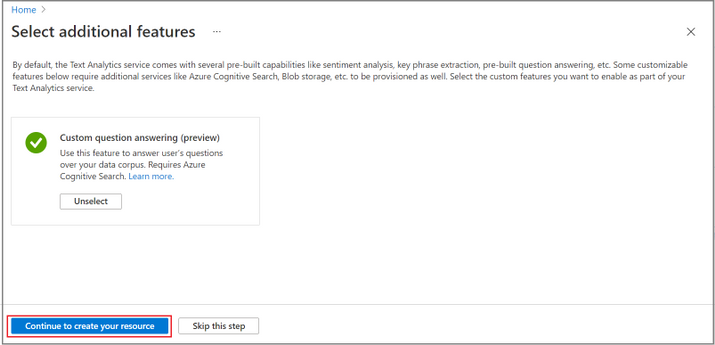
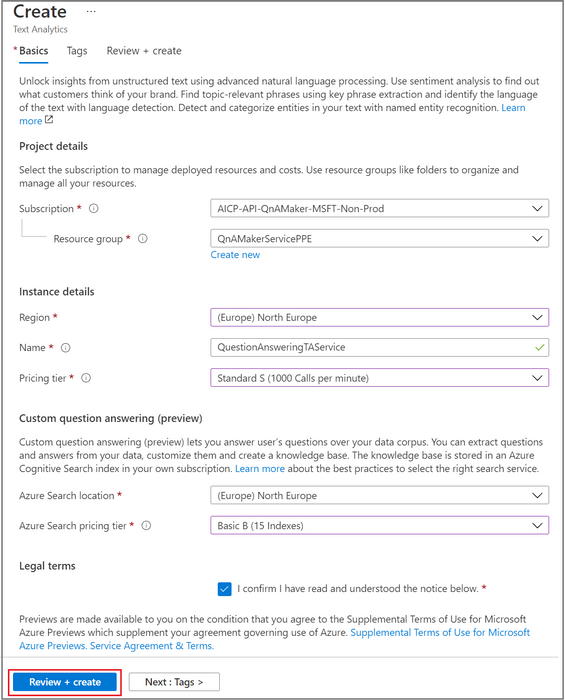
As Custom question answering is now a feature in Text Analytics, users should first visit the Text Analytics resource create blade on Azure portal. They will have the option to enable Custom question answering feature within the resource. Once the Custom question answering feature is selected, the user will update all details related to the feature in the create blade. On creation, a new Text Analytics resource with Custom question answering feature is deployed.
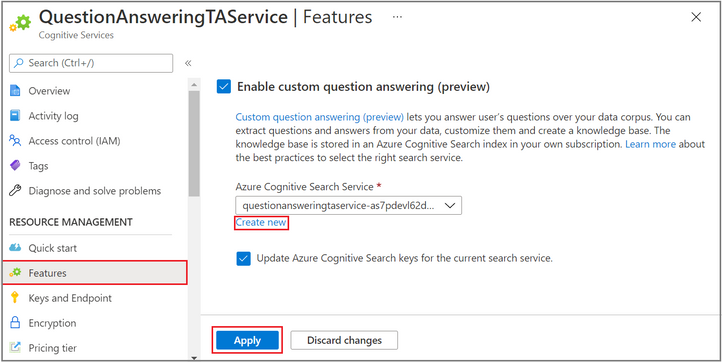
If users don’t enable the feature on resource creation, they will have the option to enable the feature later through the Features tab of the Text Analytics resource blade. They will also be able to disable the Custom question answering feature via the Features tab.
Support for unstructured documents
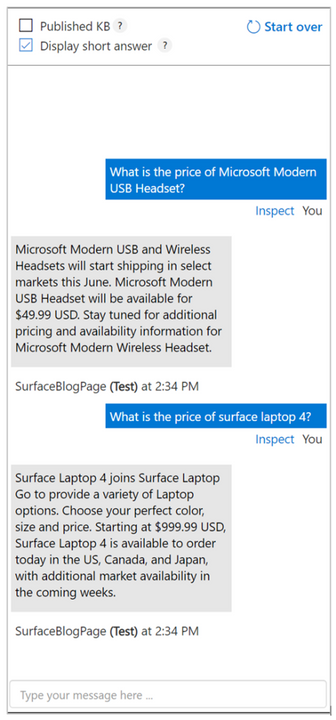
With Custom question answering (preview), we are introducing the ability to add unstructured files to the knowledgebases. Now the content author can ingest entire documents in the knowledgebase and when a user query is passed, a response is returned on searching the documents ingested. The content authors don’t need to manage QnA pairs for unstructured documents.
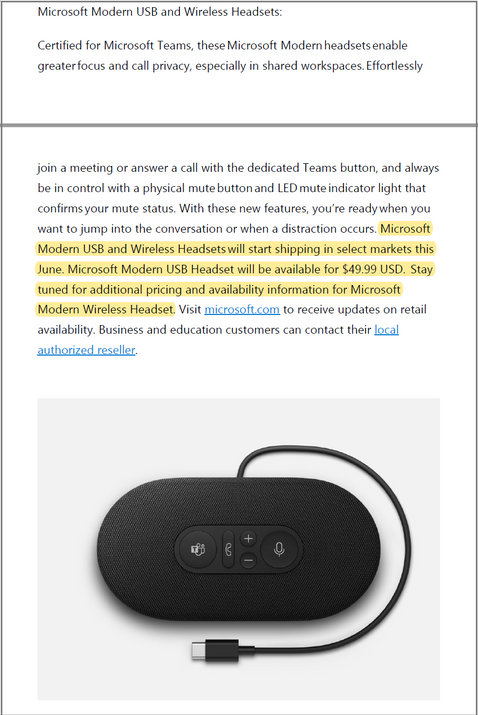
Take for instance the following unstructured document introducing Surface Products: SurfaceBlog. The user can ingest this document in the knowledge base and test for user queries from the text. We tested this with a few queries as shown below.
Prebuilt Question Answering
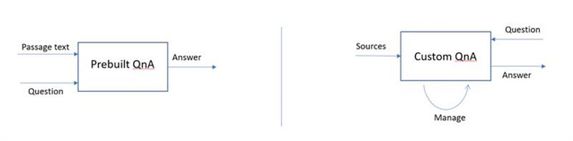
Prebuilt question answering provides users the capability to answer questions over a passage of text without having to create knowledge bases and manage additional storage. This functionality is provided as an API and can be used without having to learn the details about QnA Maker. Given a user query and a block of text/passage the API will return an answer and precise answer (if available). We currently support the ability to pass text from 5 documents.
API Updates
We have added a new preview release for v5.0 APIs: V5.0-preview.2. Users should access this version for unstructured documents support and pre–built question answering.
Pricing
Custom question answering feature is free in public preview. However, users will be charged for Azure cognitive search they add to the feature as per the tier selected.
Note to existing QnA Maker managed users
- QnA Maker managed has been re-introduced as Custom question answering feature in Text Analytics.
- Going forward users will not be able to create a new QnA Maker managed resource. All new resources can be created by enabling Custom question answering feature with Text Analytics.
- All existing QnA Maker managed (preview) resources continue to work as before. The resource settings, portal, endpoints, keys, SDK, etc. pertaining to existing QnA Maker managed resources will work as is. There is no action required from the user at this point in time.
- We will continue to support v5.0-preview.1 for existing QnA Maker managed customers.
- If the users choose to migrate to Custom Question answering, they can do so. To migrate from QnA Maker managed to Custom question answering, users can create a Text Analytics resource with Custom question answering feature enabled and migrate the knowledge bases from QnA Maker managed to the Text Analytics resource.
- Custom question answering (preview) continues to be offered in free public preview.
- Custom question answering (preview) is available in the following regions:
- South Central US
- North Europe
- Australia East
References
by Contributed | May 31, 2021 | Technology
This article is contributed. See the original author and article here.
Hello everyone, here is part 8 of a series focusing on Endpoint Protection integration with Configuration Manager. This series is recorded by @Steve Rachui, a Microsoft principal premier field engineer.
This tutorial focuses on how Configuration Manager integrates with Windows Defender Application Control and how it can be used to enforce Windows Defender Application Control settings. The session begins with a review of what Windows Defender Application Control is and why it is a critical security component for protecting devices in your enterprise.
This is final video in the Endpoint Protection series. We hope you found the series helpful.
Posts in the series
Go straight to the playlist
by Contributed | May 31, 2021 | Technology
This article is contributed. See the original author and article here.
Overview
SQL Server Migration Assistant (SSMA) is a suite of 5 tools designed to automate migrations from Oracle, Access, DB2, MySQL and SAP ASE (formerly SAP Sybase ASE) to Microsoft SQL. It automates the conversion of database schemas to a Microsoft SQL Server schemas, deployment of the schemas, data migration to the target SQL Server (see below for supported versions), and validation of migrated objects.
What’s new?
The latest releases of SSMA for Oracle enables automatic partition conversion for Oracle partitioned tables while migrating to Azure SQL and SQL on-premises. You can leverage your Oracle partition strategy and accelerate your migration by retaining the partition model even when there is no direct type mapping in SQL. Moreover you can now automatically convert SKIP LOCKED clause and save significant development time.
In addition, this release includes the following:
- SSMA for MySQL, SSMA for Access and SSMA for SAP ASE surface minor performance improvements and bug fixes
- SSMA for DB2 is enhanced with:
- Improved
VARCHAR_FORMAT emulation function
- Fixed table discovery issues for DB2 for i
Downloads
Supported sources and target versions
Source: For the list of supported sources, please review the information on the Download Center for each of the above SQL Server Migration Assistant downloads.
Target: SQL Server 2012, SQL Server 2014, SQL Server 2016, SQL Server 2017, SQL Server 2019, Azure SQL Database, an Azure SQL Database managed instance, and Azure SQL Data Warehouse (Azure Synapse Analytics)*.
*Azure SQL Data Warehouse (Azure Synapse SQL Pool) is supported as a target only when using SSMA for Oracle.
Resources
SQL Server Migration Assistant documentation
Enabling Automatic Conversions for Partitioned Tables (Ep. 5) | Data Exposed
by Contributed | May 31, 2021 | Technology
This article is contributed. See the original author and article here.
According to MSDN article, ‘DISABLE_PARAMETER_SNIFFING’ instructs Query Optimizer to use average data distribution while compiling a query with one or more parameters. This instruction makes the query plan independent on the parameter value that was first used when the query was compiled. This hint name is equivalent to trace flag 4136 or Database Scoped Configuration setting PARAMETER_SNIFFING = OFF.
Looks like it’s a pretty good hint, However, it doesn’t means you can resolve all parameter sniffing issue by using this query hint.
Actually, the sentence ‘Query Optimizer to use average data distribution while compiling a query with one or more parameters’ is not 100% correct. It really depends on what symbol you used in the where clause.
‘DISABLE_PARAMETER_SNIFFING’ is a replacement of variable, these two have exactly same effect. If you are not familiar with selectivity of variable, please review my post Selectivity and Estimated Row: Variable – Microsoft Tech Community
I’m going to use AdventureWorks 2019 in this post.
——————–Please run this script—————
use AdventureWorks2019
go
IF exists(select 1 from sys.tables where name=’SalesOrderDetail’ and schema_id=schema_id(‘dbo’))
drop table SalesOrderDetail
go
select * into SalesOrderDetail from [Sales].[SalesOrderDetail]
go
create statistics iProductID ON SalesOrderDetail(productid) with fullscan
Go
dbcc traceon(3604,2363)
——————–Please run this script—————
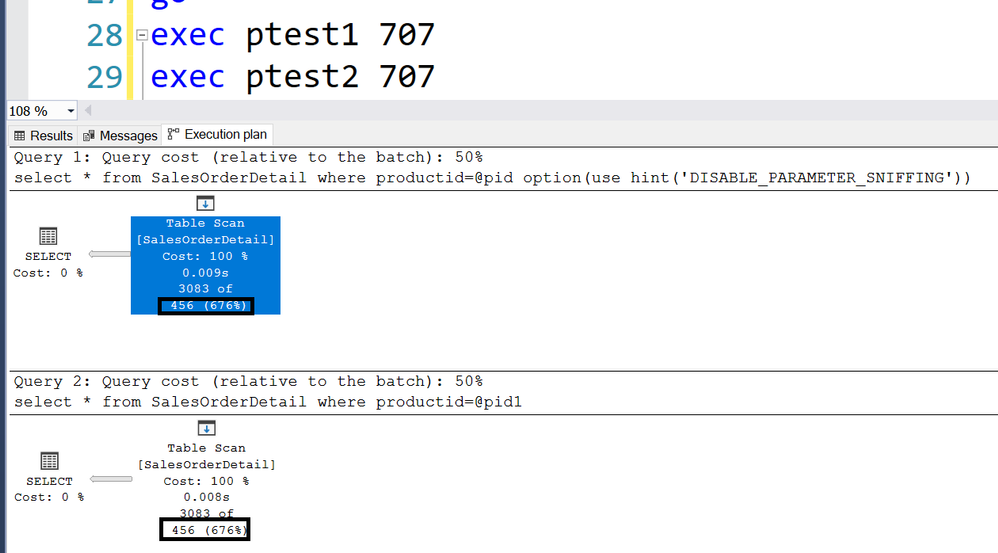
For example, following two stored procedure returns exactly same Estimated rows 456.
create proc ptest1
@pid int
as
select * from SalesOrderDetail where productid>=@pid option(use hint(‘DISABLE_PARAMETER_SNIFFING’))
go
create proc ptest2
@pid int
as
declare @pid1 int =@pid
select * from SalesOrderDetail where productid=@pid1
Go
Trace flag 2363 displays more detail about the selectivity.
———————————-trace flag 2363 output———————————-
Begin selectivity computation
Input tree:
LogOp_Select
CStCollBaseTable(ID=1, CARD=121317 TBL: Sales.SalesOrderDetail)
ScaOp_Comp x_cmpEq
ScaOp_Identifier QCOL: [AdventureWorks2019].[Sales].[SalesOrderDetail].ProductID
ScaOp_Identifier COL: @pid
Plan for computation:
CSelCalcHistogramComparison(POINT PREDICATE)
Loaded histogram for column QCOL: [AdventureWorks2019].[Sales].[SalesOrderDetail].ProductID from stats with id 3
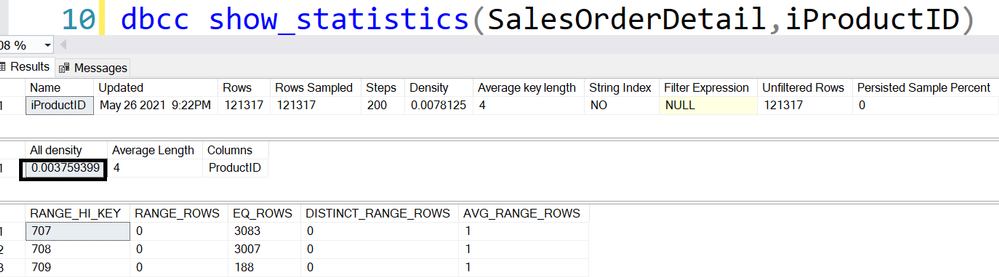
Selectivity: 0.0037594
Stats collection generated:
CStCollFilter(ID=2, CARD=456.079)
CStCollBaseTable(ID=1, CARD=121317 TBL: Sales.SalesOrderDetail)
End selectivity computation
———————————-trace flag 2363 output———————————-
121317*0.0037594=456
Please review Selectivity and Estimated Row: Variable – Microsoft Tech Community for other inequations.
by Contributed | May 31, 2021 | Technology
This article is contributed. See the original author and article here.
Whether you are using Microsoft Azure for development, for production workloads, or for both, it’s important to consider the security of the connections to those cloud systems. Virtual private networks are often used to encrypt traffic between a device and Azure using a private tunnel over the public internet – especially for information and systems you don’t want to be made available to the public or open to the possibility of being captured and read. At scale, a site-to-site VPN can be configured to the internet router used by an office (or home office) so the VPN connection can be used by all the devices on that network. But you can also set up a point to site VPN between just one device and Azure – especially useful for laptops and staff who travel or work from home.
Establishing a VPN connection requires some sort of authentication method – commonly a certificate or a username & password. Microsoft Azure point-to-site connections support Azure certificate authentication, authentication with a RADIUS server, or Azure Active Directory authentication with the OpenVPN(r) protocol. Active Directory authentication was limited to only Windows clients, but we’ve just announced a public preview of this capability for macOS.
This means that your macOS device will be able to establish a point-to-site VPN connection to Microsoft Azure using authentication with your Azure Active Directory credentials. And because you’re using native Azure AD authentication, the additional security features of user-based risk policies, conditional access and multi-factor authentication can now also apply from your Mac device when connecting to the VPN. So, for example, you could ensure that macOS VPN connections are only established from allowed locations, or that other locations force a multi-factor-authentication challenge. Note: while authenticating your VPN with Azure Active Directory does not require any additional Azure AD licensing, some of the premium features (like conditional access) do have Azure AD licensing requirements – check the linked feature documentation for details.
Remember: Public preview features are subject to change and don’t come with a Service Level Agreement. Learn more at Choose the right Azure services by examining SLAs and service lifecycle.
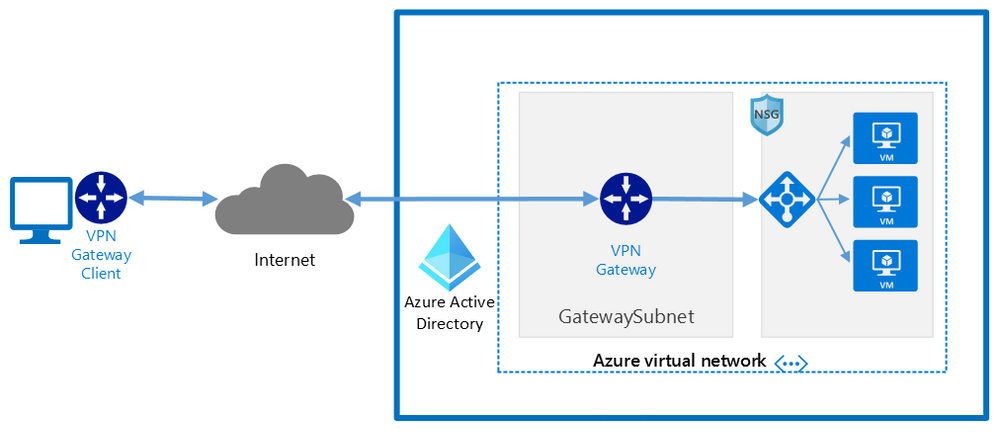
Components of a Microsoft Azure Point-to-Site VPN from macOS with Azure Active Directory authentication
A point-to-site VPN connection from macOS to Microsoft Azure requires:
- An Azure Active Directory tenant
- An Azure virtual network
- An Azure virtual network gateway, with the correct point-to-site configuration.
- A macOS device with a correctly configured Azure VPN Client application.
Network architecture showing a point to site VPN from macOS to Microsoft Azure
The detailed steps
Detailed documentation for each of steps is provided at Microsoft Docs and is updated should the product feature or steps change, but I’ll link to each step in the process here. To implement a VPN client for point-to-site OpenVPN protocol connections from macOS (preview):
Configure an Azure Active Directory tenant.
Register the Azure VPN “Enterprise application”
Create a virtual network
Create a virtual network gateway
Note: You can use an existing virtual network or virtual network gateway if you already have one.
Configure the virtual network gateway & download the VPN client (steps 9-13)
Then on the macOS device:
Install the “Azure VPN Client” application from the Apple Store
Import the connection profile (using azurevpnconfig.xml from the VPN client you downloaded)
Now, when you connect to the Azure VPN, you’ll be promoted for your Azure Active Directory credentials!
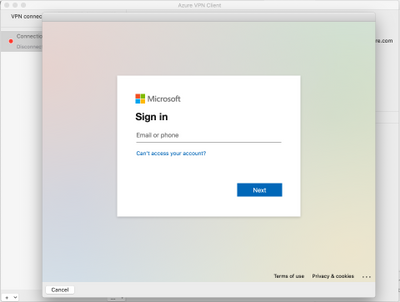 Azure AD sign-in for the macOS VPN to Azure
Conclusion:
VPNs are an important component of network security, especially with a remote and mobile workforce. Azure Active Directory authentication for the VPN for macOS devices is easy to configure and lets you take advantage of other Azure AD security features you may be using for other devices in your organisation.
Learn more:
What is a VPN Gateway?
Explore Azure networking services
Architect network infrastructure in Azure
Implement network security in Azure


Recent Comments