
by Contributed | Jun 8, 2021 | Business, Microsoft 365, Technology
This article is contributed. See the original author and article here.
If you feel like you are juggling more meetings, emails, and chats than ever, you’re probably right—and you’re certainly not alone. In our recent Work Trend Index annual report, Microsoft shared data that clearly illustrated how the digital intensity of workers’ days has increased substantially. Email is no exception—the number of emails delivered to commercial…
The post Three new voice features for Outlook mobile—now on iOS, and coming soon to Android appeared first on Microsoft 365 Blog.
Brought to you by Dr. Ware, Microsoft Office 365 Silver Partner, Charleston SC.

by Contributed | Jun 3, 2021 | Dynamics 365, Microsoft 365, Technology
This article is contributed. See the original author and article here.
In today’s digital landscape, sellers face new changes at a rapid pace, making it more important than ever to be equipped with the right information when connecting with customers. The sales journey is like a game of strategyyou have to carefully deliver the right details at the right time in order to successfully provide great customer experiences. However, many sellers miss the opportunity to source customer feedbacka proven way to improve the buying experience and deepen customer relationships. According to a Walker study at the end of 2020, customer experience overtook both price and product as the key brand differentiator.1
Customer feedback is an essential source of data for optimizing your customer experience throughout the sales process. Microsoft Dynamics 365 Customer Voice works with Microsoft Dynamics 365 Sales to source feedback, engaging with customers at key points within the buyer journey. This captures input on critical steps within the sales process to gain relevant, contextual customer feedback that companies can leverage to improve the customer experience. Learn more about seamlessly connecting Dynamics 365 Sales and Dynamics 365 Customer Voice in our free e-book, “The Power of Knowing Your Customers.”
KPMG leverages automation for customer obsession
Successful companies that prioritize customer experience aren’t afraid to ask customers how they can improve. They seek to understand how their customers feel about the product, service, and sales engagement in order to recognize patterns that reveal opportunities for improvement. A constant loop of gathering feedback and making improvements drives toward the best possible customer experience.
One organization that’s harnessing the power of understanding customer needs is KPMG Australia. The company deployed Dynamics 365 Sales as its end-to-end sales solution to deliver more value to customers in every interaction. After capturing and analyzing customer feedback, KPMG leverages these insights from Dynamics 365 Sales to develop strategies their sellers can use to generate more satisfied customers.
“We are using Dynamics 365 Customer Voice and Dynamics 365 Sales to provide the right solution to the right customer at the right time. And, using automation, we provide our teams the important feedback from our clients in the form of data and tasks that not only help sellers be more effective and successful in the upfront pitch, but also help them provide the greatest value in delivery.” Anthony Coops, Head of Major Projects and Pursuits, KPMG Australia
To stay in sync with the customer, feedback is critical to continued success. The right data keeps sellers constantly learning about changing customer needs, driving a customer-centric culture that leads to stronger relationships and life-long customers.
Capture feedback during the buying process
Sellers and customers know that the buying process can be complicated, but by listening to your customers, this process can be simplified.
With Dynamics 365 Customer Voice, sellers can easily capture feedback on the buying process, seamlessly connecting the data into Dynamics 365 Sales. Your sellers can become more agile and effective in their interactions with contacts, accounts, and opportunities with rich insights from customer feedback. Watch the video below to learn how to easily capture feedback with surveys in Dynamics 365.
Once the survey is sent, Dynamics 365 Customer Voice automatically adds the customer feedback to the contact or account record and updates the status of the survey. Responses, customer sentiment, and trigger words are all compiled into survey results within Dynamics 365 Sales, allowing users to view trends and access data quickly. Now, sellers can be empowered to collect feedback throughout any point of the buying process, utilize the data to adapt their selling strategy in the moment, and optimize their customer engagement.
The value of personalization in selling
Customers feel understood and prioritized when sellers make each interaction personalized. Many organizations know the value of personalization but don’t leverage it effectively to increase sales. KPMG utilized the power of the Dynamics 365 suite to evolve their practice and processes, turning interactions into personalized experiences.
“We are always thinking about how to use core systems to bring our teams closer to our clients in order to drive improved quality and client experience. As we mature and leverage our technology in new ways, our obsession with quality and client value has moved from an “here’s what you should do next” approach, to a system with specific personas that recognize our teams’ and our clients’ unique needs and preferences.” Anthony Coops, Head of Major Projects and Pursuits, KPMG Australia
Surveys give your customer a voice in optimizing the sales process. With Dynamics 365 Customer Voice, sellers engage customers more effectively because feedback is integrated into the unified view of the customer. Combined with Dynamics 365 Sales, seller productivity gets a boost because seller feedback improves automated processes and next best activity workstreams. By leveraging the power of customer feedback, sellers are more equipped than ever to drive revenue through every opportunity.
Learn more
To learn more about Microsoft’s feedback management solution, visit the Dynamics 365 Customer Voice website or start your free Dynamics 365 Customer Voice trial today.
Watch Dynamics 365 Sales demos or take a guided tour to see how Dynamics 365 Sales can empower your sellers with actionable insights. Start a free Dynamics 365 Sales trial today.
Learn more about seamlessly connecting Dynamics 365 Sales and Dynamics 365 Customer Voice in our free e-book, “The Power of Knowing Your Customers.”
1“Customers 2020: A Progress Remote”, Walker, 2020
The post Empower seller excellence with customer feedback solutions appeared first on Microsoft Dynamics 365 Blog.
Brought to you by Dr. Ware, Microsoft Office 365 Silver Partner, Charleston SC.
by Contributed | Jun 2, 2021 | Dynamics 365, Microsoft 365, Technology
This article is contributed. See the original author and article here.
Companies need accurate sales forecasts to keep on track to meet quarterly and annual revenue goals.
In Dynamics 365 Sales 2021 release wave 1, sellers can now clone an existing forecast when they need to make edits, and gain immediate clarity on revenue scenarios. The existing forecast remains intact while you configure different scenarios quickly and seamlessly.
This enhancement helps you plan for upcoming periods, when a few simple tweaks to the scheduling timeframe in an existing forecast will give you the insights you need.
Cloning not only eliminates repetitive data entry, but it also helps prevent forecasting errors.
With forecast cloning, these capabilities are now available:
- Change the rollup and hierarch entities and their relationship.
- Change the top of the hierarchy.
- Change the timeframe of a forecast.
- Change the hierarchy entity and user lookup field that defines who can access each record of the forecast.
- Change a forecast category option set, add columns, or modify columns.
- Add or modify filters that limit the data which drives the forecast.
For more information, read how to bring predictability to your revenue pipeline.
Next steps
The post Save time by cloning sales forecasts in Dynamics 365 Sales appeared first on Microsoft Dynamics 365 Blog.
Brought to you by Dr. Ware, Microsoft Office 365 Silver Partner, Charleston SC.
by Contributed | Jun 1, 2021 | Technology
This article is contributed. See the original author and article here.
The product submissions must be tested using the Hardware Lab Kit (HLK) for Windows Server 2022 hardware and software testing. The kit is available at the Partner Center for Windows Hardware, https://docs.microsoft.com/en-us/windows-hardware/test/hlk/.
For information on how to make a submission, see https://docs.microsoft.com/en-us/windows-hardware/drivers/dashboard
Vendors may download the Windows Server 2022 Eval version of the operating system for testing purposes here, https://www.microsoft.com/en-us/evalcenter/evaluate-windows-server-2022-preview
Vendors may also download the Virtual Hardware Lab Kit (VHLK) here, https://docs.microsoft.com/en-us/windows-hardware/test/hlk/ . The VHLK is a complete pre-configured HLK test server on a Virtual Hard Disk (VHD). The VHLK VHD can be deployed and booted as a Virtual Machine (VM) with no installation or configuration of the HLK required.
The playlist for testing Windows Server 2022 hardware and software may also be downloaded at that location. For Windows Server 2022, the release playlist has been consolidated for both X64 and ARM64 architecture. The Playlist may be updated in the future, so it is best to check for new versions regularly.
Preview versions of the OS and HLK cannot be used for certification testing of products for Windows Server 2022.
Previous versions of the HLK to be used for testing previous Windows Server versions will continue to be available in accord with the Microsoft Product Lifecycle guidance.
by Contributed | Jun 1, 2021 | Technology
This article is contributed. See the original author and article here.
Scenario:
With RA-GRS redundancy, you can read the data using secondary endpoint. The document points at connecting to Blob Storage using secondary endpoint and read data ahead.
Actions:
We will be making use of connection string to connect to the secondary endpoint and follow the below steps:
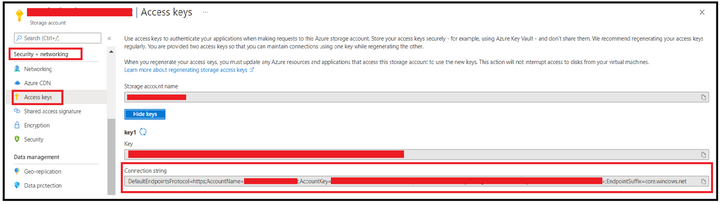
Step 1: Obtain the connection string.
We can obtain this from Azure Portal, from Access Keys section under Security & Networking Pane of Storage Account Blade.
Step 2: Editing connection string to use Secondary Endpoint.
Append the BlobEndpoint section pointing to secondary endpoint at the end of the connection string like the one given below:
DefaultEndpointsProtocol=https;AccountName=<StorageAccountName>;AccountKey=35tCZY3DXXXXXXXXXXXXXXXXXXXXXXXXXX==;EndpointSuffix=core.windows.net;BlobEndpoint=https://<StorageAccountName>–secondary.blob.core.windows.net
In case you want to leverage SAS, then you can edit the SAS URL to add secondary keyword after the account name and blob as endpoint. Below is one of the sample SAS URL:
https://<StorageAccountName>–secondary.blob.core.windows.net/?sv=2020-02-10&ss=bfqt&srt=sco&sp=rwdlacuptfx&se=2021-05-29T11:38:06Z&st=2021-05-29T03:38:06Z&spr=https&sig=XXXXXXXXXXXXXXXXXXXXXX
Step 3: Connecting to Storage Account using the connection string.
We will try connecting and accessing blobs using Azure Storage Explorer and via a powershell script. Let’s check for the process with first option.
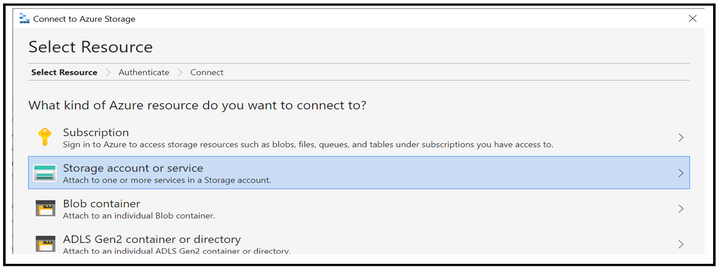
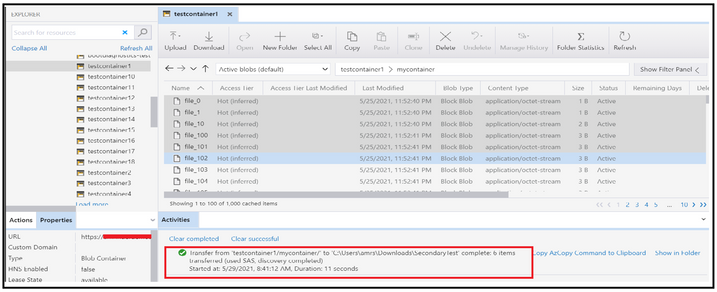
When accessing via Azure Storage Explorer, you can follow the below steps of first selecting the resource type as Storage account.
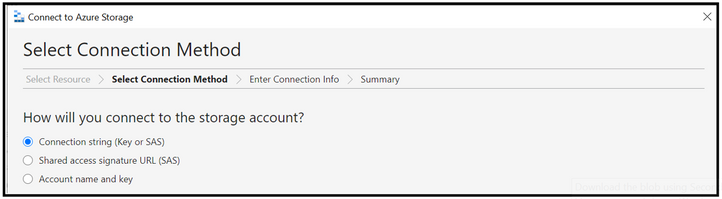
Select the connection method as connection string and then provide the connection string created at step 2 along with the display name using which you want the connection to be displayed. Once done, click on the connect button.
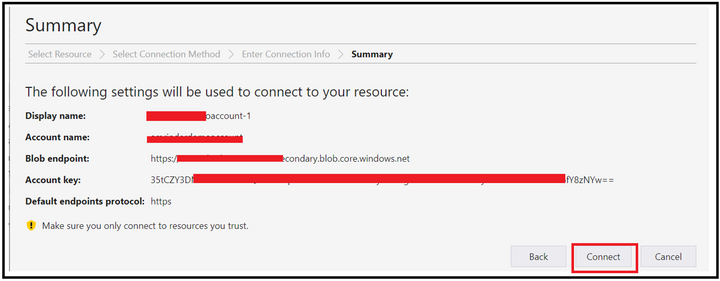
At this point, the connection will get added under the Storage Accounts section of Local & Attached.
Step 4: Validations
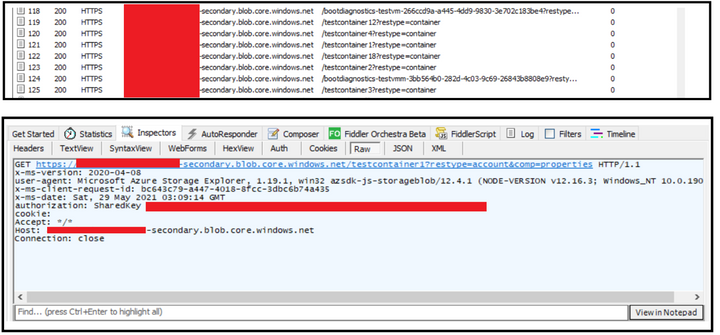
To validate you are hitting the secondary endpoint only, you can configure fiddler as a proxy in the storage explorer and then try performing the operation of listing and reading (Get operation) while running the fiddler in the backend.
At the backend, you will see that you are hitting the secondary endpoint while trying to access the blobs.
In order to connect using Powershell, you can leverage below script to listing of the blobs inside a container.
$bMaxReturn = 100
$storageContext = New-AzStorageContext -ConnectionString “<String Generated at Step 2>”
do
{
# get a list of all of the blobs in the container
$listOfBlobs = Get-AzStorageBlob -Container “<Container Name>” -Context $storageContext -MaxCount $bMaxReturn -ContinuationToken $bToken
if($listOfBlobs.Length -le 0) { Break;}
foreach($blob in $listOfBlobs) {
write-host “Blob name:”
write-host $blob.Name
}
$bToken = $blob[$blob.Count -1].ContinuationToken;
}while ($bToken -ne $Null)
Disclaimer
By using the following materials or sample code you agree to be bound by the license terms below and the Microsoft Partner Program Agreement the terms of which are incorporated herein by this reference. These license terms are an agreement between Microsoft Corporation (or, if applicable based on where you are located, one of its affiliates) and you. Any materials (other than sample code) we provide to you are for your internal use only. Any sample code is provided for the purpose of illustration only and is not intended to be used in a production environment. We grant you a nonexclusive, royalty-free right to use and modify the sample code and to reproduce and distribute the object code form of the sample code, if you agree:
- to not use Microsoft’s name, logo, or trademarks to market your software product in which the sample code is embedded.
- (ii) to include a valid copyright notice on your software product in which the sample code is embedded.
- (iii) to provide on behalf of and for the benefit of your subcontractors a disclaimer of warranties, exclusion of liability for indirect and consequential damages and a reasonable limitation of liability; and
- (iv) to indemnify, hold harmless, and defend Microsoft, its affiliates and suppliers from and against any third-party claims or lawsuits, including attorney’s fees, that arise or result from the use or distribution of the sample code.”
For any information regarding data redundancy, you can check this link.
Hope this helps!


Recent Comments