The contact center industry is at an inflection point. AI agent performance measurement is becoming essential as contact centers shift toward autonomous resolution. Gartner predicts that by 2029, AI agents will autonomously resolve 80% of common customer service issues. Yet, despite massive investment in conversational AI, most organizations lack a coherent way to measure whether their AI agents are good. Traditional metrics like AHT, CSAT, and others are important to track business results. However, they are trailing signals and don’t tell you whether an AI agent is competent, reliable, or most importantly improving.
This isn’t just a technical problem. It’s a business problem. Without rigorous measurement, companies can’t improve their agents, can’t demonstrate ROI, and can’t confidently deploy AI to handle their most valuable customer interactions.
What Makes a Great Customer Service Agent?
In 2017, Harvard Business Review published research that challenged everything the industry believed about customer service excellence. The study, based on data from over 1,400 service representatives and 100,000 customers worldwide, revealed a truth which goes against many support manuals. Customers don’t want to be pampered during support interactions. They just want their problems solved with minimal effort and maximum speed. This research also highlights why strong AI agent performance measurement is required to benchmark these behavioral models.
The research team identified seven distinct personality profiles among customer service representatives. Two profiles stand out as particularly instructive for understanding AI agent design:
Empathizers are agents most managers would prefer to hire. They are natural listeners who prioritize emotional connection. They validate customer feelings, express genuine concern, and focus on making customers feel heard. When a frustrated customer calls about a billing error, an Empathizer responds with warmth: “I completely understand how frustrating that must be. Let me look into this for you and make sure we get it sorted out.” Empathizers excel at building rapport and defusing tension. Managers love them, 42% of surveyed managers said they’d preferentially hire this profile.
Controllers take a fundamentally different approach. They’re direct, confident problem-solvers who take charge of interactions. Rather than asking customers what they’d like to do, Controllers tell them what they should do. When that same frustrated customer calls about a billing error, a Controller responds differently. “I see the problem. There’s a duplicate charge from October 15th. I’m removing it now and crediting your account. You’ll see the adjustment within 24 hours. Is there anything else I can help you fix today? ” Controllers are decisive, prescriptive, and focused on the fastest path to resolution.
Here’s what the HBR research revealed: Controllers dramatically outperform Empathizers on virtually every quality metric that matters: customer satisfaction, first-contact resolution, and especially customer effort scores. Yet only 2% of managers said they’d preferentially hire Controllers. This does not eliminate the need for empathetic agents but clarifies that empathy is necessary but not enough.
This insight becomes even more important when we consider the context of modern customer service. Nearly a decade of investment in self-service technology means that by the time a customer reaches a human or an AI agent, they’ve already tried to solve the problem themselves. They’ve searched for the FAQ, attempted the chatbot, maybe even watched a YouTube tutorial. They’re not calling because they want to chat. They’re calling because they’re stuck, frustrated, and need someone to take charge and fix their problem.
The HBR research quantified this: 96% of customers who have low-effort service experience intend to re-purchase from that company, directly translating into higher retention and recurring revenue. For high-effort experiences, that number drops to just 9%. Customer effort is four times more predictive of disloyalty than customer satisfaction.
The AI Advantage: Dynamic Persona Adaptation
Human agents are who they are. An Empathizer can learn Controller techniques, but their natural instincts will always pull toward emotional validation. A Controller can practice active listening, but they’ll always be most comfortable cutting the chase. Training can shift behavior at the margins, but a fundamental personality is remarkably stable.
AI agents can learn from the best human agents and adapt their style in real time based on conversation context. A well-designed agent can operate in Controller mode for straightforward technical issues- direct and prescriptive-and shift to Empathizer mode when a customer shares difficult news. It adapts mid-conversation based on sentiment, issue complexity, and customer preferences.
This isn’t about mimicking personality types. It’s about dynamically deploying the right approach for each moment of each interaction. The best AI agents don’t choose between being helpful and being efficient. They recognize that true helpfulness often means being efficient. They adapt their communication style to what each customer needs in each moment.
But this flexibility adds to the fundamental measurement challenges for both human and AI agents’ evaluation. There is no single “best” conversation. All interactions are highly dynamic with no fixed reference for comparison, and the most important business metrics are trailing and hard to attribute at the conversation or agent level. As a result, no single metric can capture this complexity. We need a framework that evaluates agent capabilities across contexts.
Defining Excellence: What the Best AI Agents Achieve
Before introducing a measurement framework, let’s establish benchmarks that framework, let’s establish benchmarks that define world-class performance.
First-Contact Resolution (FCR) measures whether the customer’s issue was fully resolved without requiring a callback, transfer, or follow-up. Industry average sits around 70-75%. This matters because FCR correlates directly with customer satisfaction: centers with high FCR see 30% higher satisfaction scores than those struggling with repeat contacts.
Customer Satisfaction (CSAT) captures how customers feel about their interaction. The industry average, measured via post-call surveys, hovers around 78%. World-class performance means 85% or higher. Top performers in 2025 are pushing toward 90%.
Response Latency is particularly critical for voice AI. Human conversation has a natural rhythm, roughly 500 milliseconds between when one person stops speaking, and another responds. AI agents that exceed this threshold feel unnatural. Research shows that customers hang up 40% more frequently when voice agents take longer than one second to respond. The target for production voice AI is 800 milliseconds or less, with leading implementations achieving sub-500ms latency.
Average Handle Time (AHT) varies significantly by industry. Financial services averages 6-8 minutes, healthcare 8-12 minutes, technical support 12-18 minutes. The key insight is that AHT should be minimized without sacrificing resolution quality. Fast and wrong is worse than slow and right, but fast and right is the goal.
These benchmarks provide targets, but they are trailing signals and don’t tell us how to build agents that achieve them. For that, we need to understand the three pillars of agent quality.
The Three Pillars: Understand, Reason, Respond
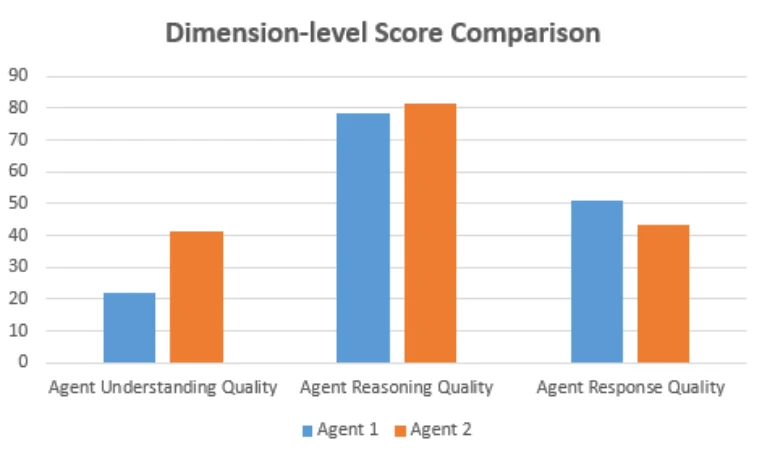
Every customer interaction, whether with a human or an AI, follows the same fundamental structure. The agent must understand what the customer is saying, reason about how to help, and deliver an effective answer. The key is that any weakness in any pillar undermines the entire interaction. LLM benchmarks are fragmented and do not provide a holistic and focused view into contact center scenarios.
Pillar One: Understand
The first challenge is accurately capturing and interpreting customer input. For voice agents, this means speech recognition that works in real-world conditions of background noise, accents, interruptions, domain-specific terminology. For video or images, it means visual understanding that handles varying noise, object occlusion, and context-dependent interpretation. Classic benchmarks are misleading here. Models achieving 95% accuracy on clean test data often fall to 70% or below in production environments with crying babies, barking dogs, and customers calling from their cars. Additionally, interruptions and system latency are key challenges that impact understanding score quality.
Beyond transcription, understanding requires intent determination. When a customer says, “I’m calling about my order. I think it was delivered to the wrong address,” the agent needs to identify both the topic (order delivery) and the specific issue (wrong address). The measure needs to detect that this is a complaint requiring resolution, not just an informational query. And ideally, it should pick up on emotional cues: frustration, urgency, confusion, all that should influence how it responds.
Key metrics for this pillar include word error rate for transcription accuracy, intent recognition precision and recall, and latency from when the customer stops speaking to when the agent begins responding. Interruption rates also matter. Agents that talk over customers while they’re still speaking destroy the conversational experience.
Pillar Two: Reason
Understanding what the customer said is only the beginning. The agent must then determine the right course of action. This is where “intelligence” in artificial intelligence matters.
Effective reasoning means connecting customer intent to appropriate actions. If the customer needs their address changed, the agent should access the order management system, verify customer identity, make the change, and confirm success. If the issue is more complex (say, the package was marked delivered but never arrived), the agent needs to pull tracking information, assess whether this looks like miss-delivery, determine whether a replacement or refund is appropriate, and potentially flag the case for investigation.
This pillar also encompasses multi-turn context management. Customers don’t speak in complete, self-contained utterances. They reference previous statements, use pronouns, and assume the agent is tracking the conversation. “What about my other order?” only makes sense if the agent remembers discussing a first order. “Can you do that for my husband’s account too?” requires understanding what “that” refers to and what permissions are appropriate.
Perhaps most critically, reasoning quality includes knowing what the agent doesn’t know. A well-designed agent admits uncertainty rather than fabricating answers. This is particularly challenging in the LLM where models are trained to produce answers no matter what. There are two parts to that problem, one the agent should reason and ask for additional data. In truly autonomous agents such interactions should go beyond slot filling or interview. It needs to be dynamic, adaptive, and contextual. When the agent feels stuck, it should admit that and either ask for help from supervisor or simply escalate. In any case, responsible AI guardrails and validations are key to ensuring proper agent responses and guarded interactions.
Key metrics include intent resolution rate, task completion rate, context retention across turns, and hallucination frequency.
Pillar Three: Respond
The final pillar is delivering the response effectively. Even perfect understanding and flawless reasoning mean nothing if the agent can’t communicate the resolution clearly.
Answer quality encompasses both content and delivery. The content must be accurate, complete, and actionable. Customers shouldn’t need to ask follow-up questions because the agent omitted critical information. They shouldn’t be confused by jargon or ambiguous phrasing.
In a multi-channel, multi-modal agent world, AI agents must adapt how they deliver responses based on the channel and context. Effective delivery is about aligning the form, timing, and tone of responses to the interaction at hand. Emotional Quotient matters regardless of modality. When the tone, voice or interaction feels mechanical, even correct content can lose its impact and undermine trust across channels, the objective remains consistent: ensure responses feel natural, clear, and trustworthy from the customer’s perspective.
The Controller research is relevant here. The best responses are often more direct than traditional customer service training suggests. Instead of “I’d be happy to help you with that. Let me take a look at your account and see what options might be available for addressing this situation,” top performers say “I see the problem. Here’s what I’m doing to fix it.”
Key metrics include solution accuracy, response completeness, fluency ratings, and post-response customer sentiment. For voice, prosody and expressiveness scores capture delivery quality.
To build AI agents that customers truly trust, organizations must move beyond fragmented metrics and isolated KPIs. Excellence in customer service is not the result of a single capability. It emerges from how well an agent performs across the three pillars. These pillars form the foundation of modern AI agent performance measurement.
A Composite Score as Unified Measure
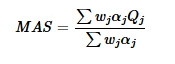
We believe the future of AI agent evaluation lies in a composite approach, the one that brings together these core capabilities into a unified measure of quality. However, no single metric can tell you whether an AI agent truly works well with real customers. Individual measures tend to over-optimize narrow behaviors while hiding the trade-offs between speed, accuracy, reasoning quality, and customer experience.
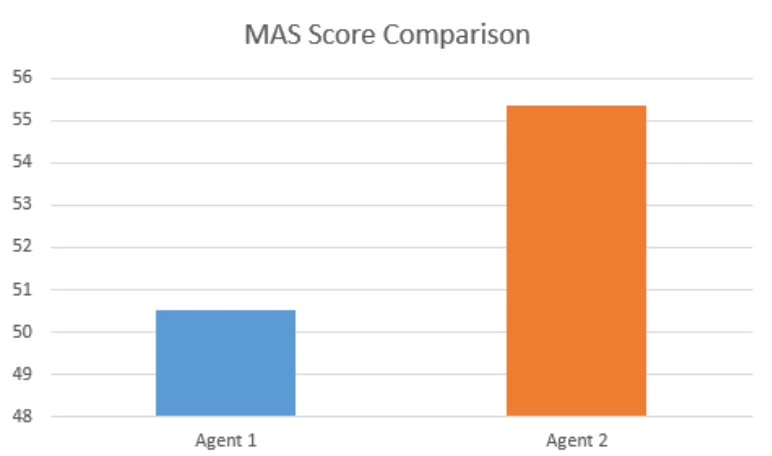
A composite score solves this problem by balancing multiple dimensions into one holistic view of agent performance. This approach reveals strengths and weaknesses at the system level rather than through isolated signals. Most importantly, a unified score enables consistent benchmarking and clearer progress tracking. It gives both executives and practitioners a metric they can confidently use to drive improvement.
We are introducing a contact center evaluation guideline and a set of metrics designed to holistically assess AI agent performance across the dimensions that matter most in real customer interactions. Rather than optimizing isolated signals, this approach evaluates how effectively an agent understands customer intent, reasons through the problem space, and delivers clear, confident, and timely resolutions.
These guidelines are intended to provide a practical foundation for teams building, deploying, and scaling AI agents in production. They enable consistent measurement, meaningful comparison, and continuous improvement over time.
This framework is intended to be open and evaluable by anyone. For a deeper dive into the evaluation framework, recommended metrics, and examples of how this can be applied in practice, please refer to the detailed blog: Evaluating AI Agents in Contact Centers: Introducing the Multi-modal Agents Score
The post Measuring What Matters: Redefining Excellence for AI Agents in the Contact Center appeared first on Microsoft Dynamics 365 Blog.
Brought to you by Dr. Ware, Microsoft Office 365 Silver Partner, Charleston SC.



Recent Comments