This article is contributed. See the original author and article here.
Introducing the new Get Data Experience: Streamlining Your Data Ingestion Journey
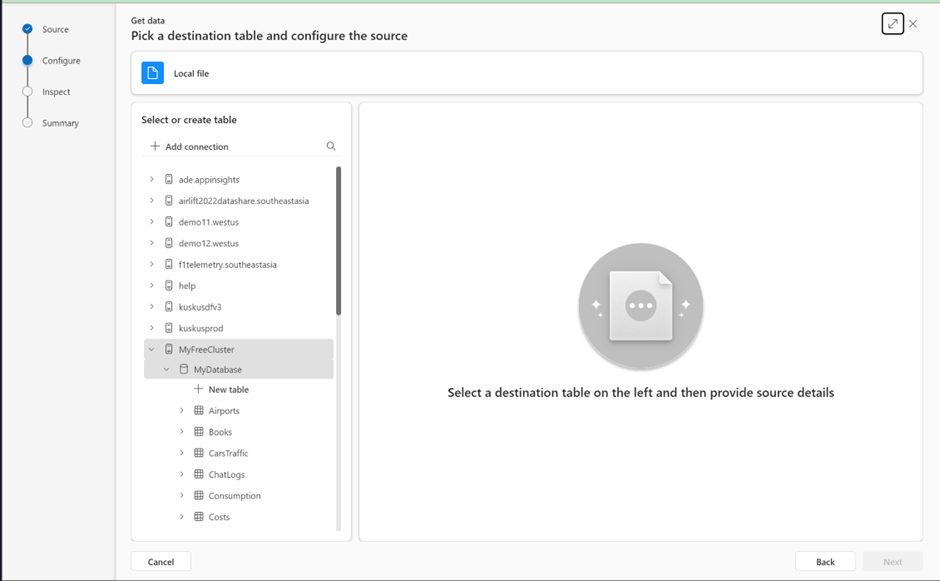
We’re thrilled to unveil a brand new Get Data Experience – the next generation evolution of Ingestion Experience in Azure Data Explorer (ADX)! Designed with simplicity and efficiency in mind, this update streamlines the way you bring data into ADX. Whether you’re a seasoned data professional or just starting your data exploration journey, this new user experience is crafted to empower you every step of the way.
Supporting various auth methods for clusters’ connections
By allowing users to set up connections with alternative credentials, we now provide seamless experience for managing clusters from various user accounts or Azure AD directories.
When adding new cluster connections, if you have multiple user accounts and want to authenticate with a different account, or your account is linked to multiple Azure AD directories, you can follow the optional steps described in this document to create the connections.
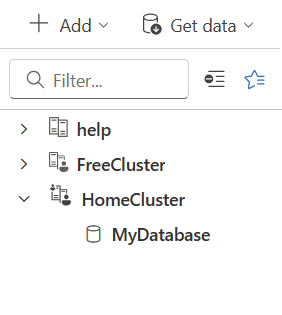
Once connected, you can switch between clusters associated with different credentials within a unified interface, without a need to repeatedly sign in and sign out or switch directories.
In the above image The HomeCluster connection uses different credentials from those of the signed-in user, as indicated by the small icon of a person in the upper-left corner.
Heatmap – new visual in ADX dashboards
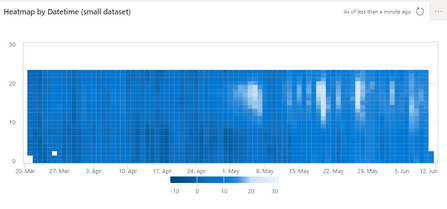
We’re happy to let you know that we just released a new Heatmap visual.
Heatmaps are graphical representations of data using color. They are most commonly used to provide a clear view of numerical values.
To learn more about heatmap visualization in ADX dashboards, read this document
This article is contributed. See the original author and article here.
For the month of September, we’re exploring learning resources to help you get started with Azure AI and Microsoft Copilots. Get an overview of copilots (AI assistants) available from Microsoft, get started with Azure OpenAI Service, and learn about Azure tools for building intelligent apps and working with machine learning.We also have updates about upcoming events, including details about .NET Conf and Microsoft Ignite.
Use Microsoft Copilots Microsoft offers a variety of copilots (AI assistance in the apps you already use). Check out GitHub Copilot, Microsoft365 Copilot, and Copilot in Viva Sales and discover what each can do for you.
GitHub Copilot documentation Get feedback and predictions from an AI pair programmer as you code. Here’s everything you need to know to get started with GitHub Copilot.
How Microsoft 365 Copilot works Curious about Microsoft 365 Copilot. Watch a demo to see how it works. See how Copilot can write a new business proposal, generate meeting summaries, and identify trends in your data.
Use Azure OpenAI Service Check out this collection of resources to learn everything you need to know to start using Azure OpenAI to build intelligent solutions. Explore Microsoft Learn resources to learn about generative AI, responsible AI, and prompt engineering.
Introduction to prompt engineering Do you know these best practices for working with prompt-based models? This Microsoft Learn documentation offers an intro to prompt engineering and advice for constructing prompts.
Develop Generative AI solutions with Azure OpenAI Service Learn how to develop generative AI solutions with Azure OpenAI. This Microsoft Learn path covers everything from natural language solutions and prompt engineering to working with DALL-E and tapping into your own data.
Build apps and custom models Explore curated resources from Microsoft Learn to help build your Machine Learning skills. Discover Azure tools to help you build apps and work with custom models.
Create computer vision solutions with Azure AI Vision Creating computer vision solutions is easier than you think. Start this Microsoft Learn path and discover how to use Azure Cognitive Services in common computer vision scenarios.
AI Builder documentation You don’t need coding and data science skills to build AI solutions. Delve into AI Builder documentation and discover a low-code path to intelligent apps in your organization.
Azure AI services documentation Build cutting-edge, market-ready applications with AI. Explore Azure AI services, including Azure OpenAI, Custom Vision, Bot Service, Azure Cognitive Service, and more.
AI learning and community hub Power your AI transformation with the Microsoft Cloud. Explore the AI learning and community hub to build AI skills, learn from experts, and find upcoming events.
Events and other highlights
Microsoft Ignite Registration for this year’s Microsoft Ignite is now open. Join us November 14–17, 2023 to explore the latest innovations, learn from experts, and level up your skills. Register now.
.NET Conf 2023 Save the date for .NET Conf, November 14–16. Join this free, 3-day digital event to watch live sessions, get answers from .NET experts, and celebrate the launch of .NET 8.
Azure Developers – Python Day Take your cloud dev skills to the next level. Watch the Azure Developers – Python Day event, available on demand, to learn cutting-edge skills and explore features in Azure designed specifically for Python developers.
Enterprise-grade Reference Architecture for JavaScript Explore this popular reference architecture for JavaScript, available on GitHub. This repo includes architecture patterns, best practices, and functional components that can be used to build modern JavaScript apps on Azure.
This article is contributed. See the original author and article here.
Overview
Moving to Cloud is a crucial part of digital transformation as business grows. As a leading Cloud provider, Azure provides intuitive, guided, and repeatable support for migrating an on-prem application to Azure cloud. You can learn more at Reliable web app pattern – Azure Architecture Center.
To ensure a web application runs performantly and resiliently, you can use Azure Cache for Redis. This blog zooms into caching best practices and guidance in the Reliable Web App Pattern.
Moving In-Memory Cache to Distributed Cache in Azure
Suppose your online order web app saves shopping cart items in a user’s session data in memory. As you migrate a web application from on-prem to Azure Cloud, caching in-memory no longer works because the virtual servers may scale-in or shut down to save cost. In such cases, in-memory data will be gone. Distributed caching persists cached data by decoupling cache from the web server instances to support scalability and resiliency. In addition, if you were self-hosting Redis Cache, re-platform to use Azure Cache for Redis removes operational overhead from self-hosting. Azure resources located within the same data center have negligible network latency, and the in-memory nature of Azure’s Cache service ensures accessing data is fast.
Azure Cache for Redis is the 1st party caching solution in Azure. Developed in partnership with Redis Inc, Azure Cache for Redis provides the unparalleled up to 99.999% SLA with Enterprise SKUs, data replication across geographic locations, and scenario-drive cost effective hosting options to meet your business needs.
Patterns and Best Practices to Use Distributed Caching in Azure
To help customers successfully re-platform from on-prem to Azure, the Reliable web app pattern offers reference architecture scenarios to guide the process. Currently, the Reliable Web App Pattern for .NET and Java are available. Without losing generosity, we will look at the recently announced Java support for how to apply caching when migrating an application.
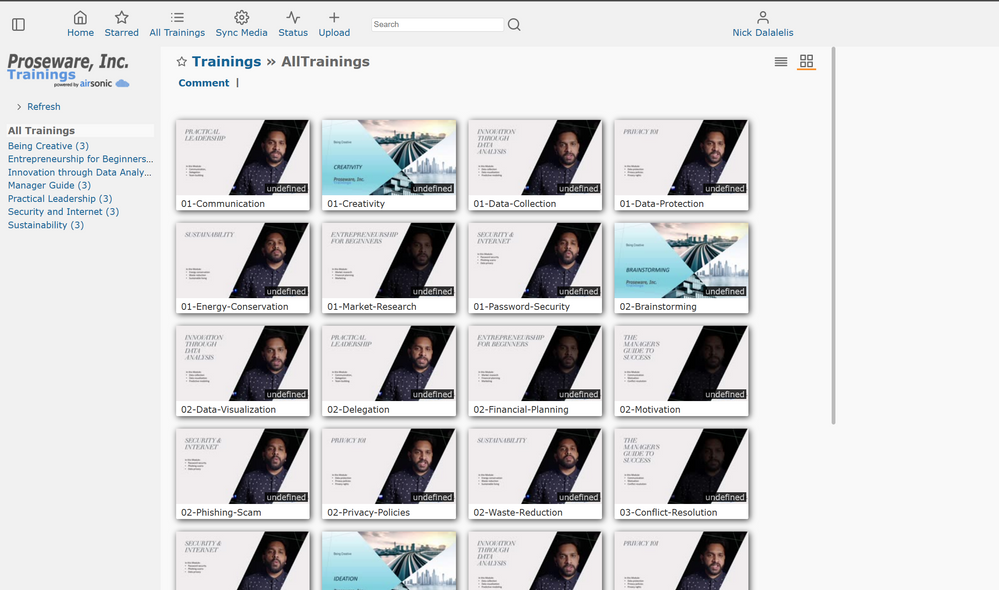
We recently announced GA for the Java version of Reliable Web App pattern, which is a set of architectural recommendations and guided, repeatable process with Reference Architecture applications to ensure customers can successfully migrate to Azure. You can learn more at Reliable web app pattern for Java – Plan the implementation – Azure Reference Architectures. In the example reference application, an online training web app written in Java Spring Framework is transformed to run on Azure. Figure 1 shows a screenshot of the web application, which is a real-world and production-ready training web application that shows a series of educational tutorials. The playlist of video tutorials might be different for each user and can be cached for quick access and saving a user’s training progress.
Figure 1: Java sample application homepage that shows training video playlist
In the reference architecture caching is applied to multiple scenarios such as logged in user settings, security settings, and displaying the playlist on the homepage as shown in Figure 1. Let’s look at how smooth it is to transition from local cache to Azure with our example.
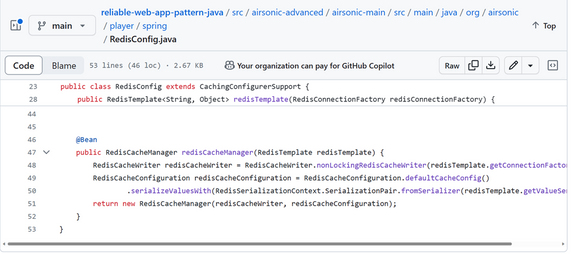
Per Figure 2, initializing Redis in a Java application only takes a few lines of code, and the configuration is very flexible. You can find it at RedisConfig.java.
Figure 2: Initializing Redis client in a Java Spring web application.
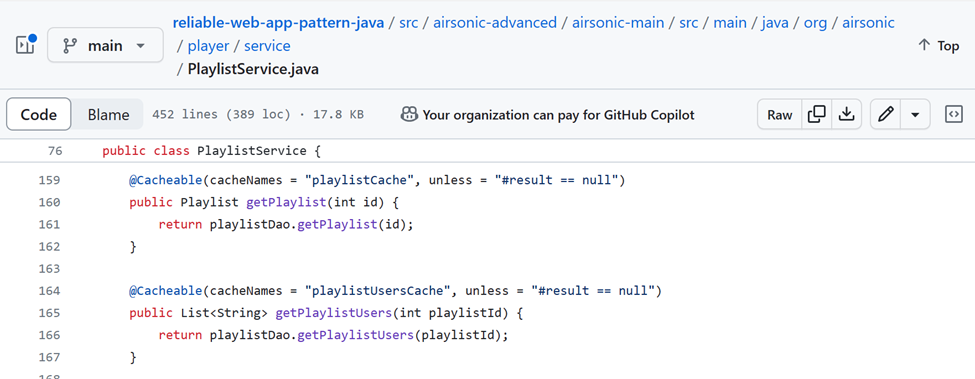
Java Spring Caching abstraction allows tag annotations to be used for indicating if a method’s return value should be cached and how. In Figure 3, the tag annotations hide all the details on interacting with Redis Cache and allows developers to focus on business logic. Referring back to the video playlist shown in Figure 1 above, in its implementation from the PlaylistService.java, the playlist and playlist per user are cached for saving user progress and performantly and query-efficiently loading the result next time.
Figure 3: Java Spring Caching Abstraction for caching method return results.
Deploying the application to use Azure Cache for Redis is straight forward. Just point the app configuration to the right Azure Cache for Redis endpoints to get your app working! Follow the README.md instructions to deploy the app.
Use the Cache-Aside pattern for data consistency
As a user’s playlist is part of the session data and is saved in cache, what if the overall playlist gets updated? How do we make sure information in cache stays consistent with the backend database?
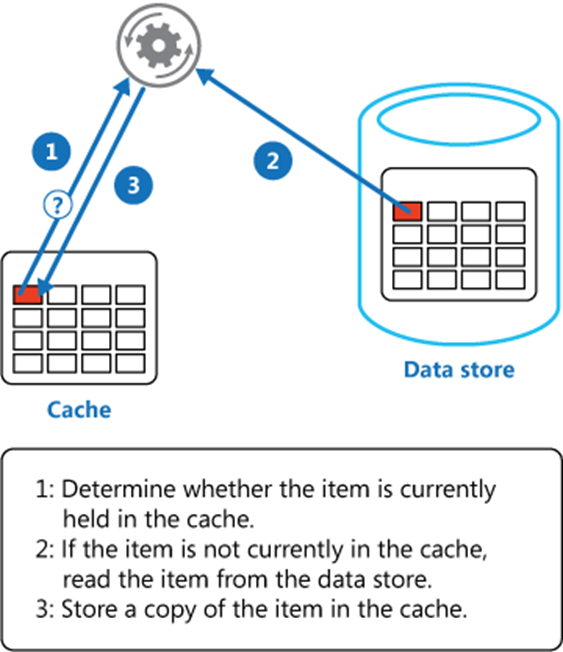
The cache-aside pattern guarantees application data consistency. It would attempt to read from cache every time, upon a cache miss it reads from the database and put the value in cache for the next read, and upon an update in database all related cache records will be cleared to keep data up-to-date. Figure 4 illustrates how the cache-aside pattern keeps data from cache to the backend data store to be consistent. You can learn more at Cache-Aside pattern – Azure Architecture Center.
Figure 4: cache-aside pattern keeps cache and datastore consistent
Referring to our Java sample application, the Spring Caching Abstraction hides the details as this algorithm is a highly repeatable process.
This article is contributed. See the original author and article here.
In today’s fast-paced sales landscape, staying ahead of the game is more crucial than ever. Sales teams aiming to close deals swiftly understand the importance of real-time opportunity information. But let’s be honest, obtaining a straightforward Opportunity summary can be quite the challenge. Vital details are often scattered across various applications and documents, making it a time-consuming endeavor to compile a concise and up-to-date opportunity snapshot. However, there’s a game-changer now available within Microsoft Sales Copilot, and it comes in the form of AI-powered Opportunity summaries. In this blog, we’ll dive into how deal teams can revolutionize collaboration and keep the focus on valued customers. Say goodbye to information overload and hello to seamless teamwork!
Stay informed: AI-generated Opportunity summaries
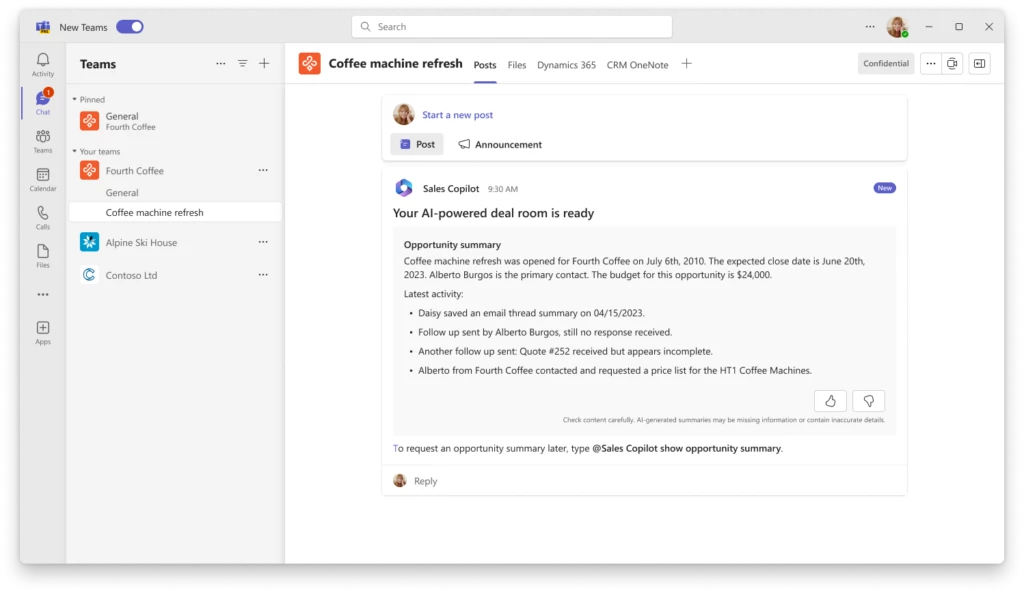
Sales Copilot makes it easy for sales team members to stay up to date on opportunities by providing AI generated summaries of the latest opportunity information. Sellers see this information in a Deal room Collaboration space in Microsoft Teams, which is set up to collaborate and stay connected on opportunity-related activities. The Opportunity summary includes details such as sales stage, budget, closing date, and latest activity saved in opportunity notes. These summaries not only provide time saving benefits, but also help the sales team gain a shared understanding of the opportunity status. This shared perspective enhances their ability to collaborate effectively, particularly when addressing customer needs and managing deals efficiently.
Enhancing team collaboration: comprehensive access to opportunity details
For Dynamics or Salesforce organizations that have created a Deal room in Microsoft Teams, the Opportunity summary is instantly displayed after setup. Members of the deal team will find a complete summary that shows information from relevant CRM opportunity fields like sales stage, budget amount, estimated close date, parent account name, primary contact name, and more. Any important notes added to the opportunity are also included in the latest activity summary.
AI generated Opportunity summary shown on setup of a Deal room
This AI-generated summary offers the sales team a clear overview of the opportunity and helps them save a lot of time and work better together, focusing on the most important things with the latest information available.
Whether new team members join the deal room or existing ones seek real-time updates, accessing this summary is effortless. By issuing the command “@Sales Copilot show Opportunity summary” within Deal rooms, or alternatively, by generating the Opportunity summary through the “@Sales Copilot Help” options, individuals can promptly tap into the most pertinent details of an opportunity.
Activate AI summaries via Sales Copilot admin settings
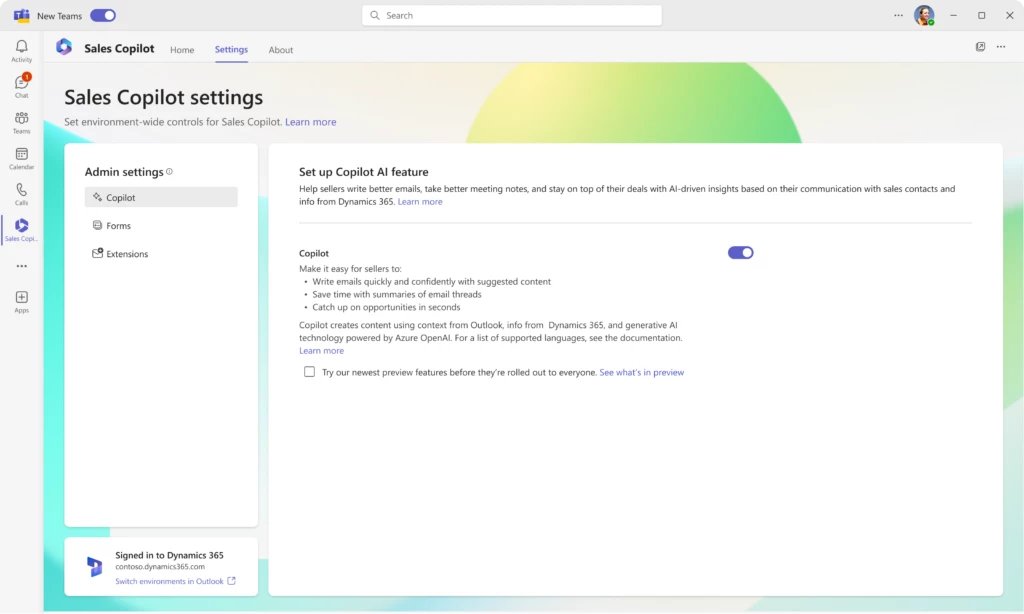
Dynamics and Salesforce administrators can enable AI-generated Opportunity summaries in Deal rooms by accessing the Sales Copilot admin settings in Sales Copilot app in Microsoft Teams. Within the admin settings, simply toggle on the Copilot option in the ‘Set up Copilot AI features’ page.
Once the Copilot toggle is enabled, the Opportunity summary is generated using the following CRM fields from the opportunity record:
Opportunity name
Opportunity ID
Created On
Estimated close date
Sales stage
Budget amount
Description
Parent Account name
Primary contact name
Content under the Latest activity section is generated from the summary of the last three notes added to the opportunity record.
Admin settings to enable AI generated Opportunity summaries
This article is contributed. See the original author and article here.
In today’s fast-paced business world, embracing technology and prioritizing employee engagement are key to staying ahead. Sage, a global leader in payroll, HR and finance software, understands this well. Their partnership with Microsoft Viva Glint and Viva Insights is a compelling example of how utilizing a comprehensive employee listening strategy can drive business performance within organizations.
Delivering exceptional customer service and prioritizing engineering time is critical for Sage to stay ahead in a competitive market. Sage addressed challenges to retention and productivity by understanding the voice of the employee and meeting patterns. With this knowledge in hand, leaders at Sage were able to address root causes and improve retention by 30% in their customer service department, improve engineering productivity by 10% by reducing unnecessary meetings and improve customer service performance by 10%.
Take a look at the full customer story here and video highlights below.


Recent Comments