This article is contributed. See the original author and article here.
We are very happy to announce the private preview of Data Virtualization in Azure SQL Database. Data Virtualization in Azure SQL Database enables working with CSV, Parquet, and Delta files stored on Azure Storage Account v2 (Azure Blob Storage) and Azure Data Lake Storage Gen2. Azure SQL Database will now support: CREATE EXTERNAL TABLE (CET), CREATE EXTERNAL TABLE AS SELECT (CETAS) as well as enhanced OPENROWSET capabilities to work with the new file formats.
The list of capabilities available in private preview are:
Major benefits of Data Virtualization in Azure SQL Database are:
No data movement: Access real-time data where it is.
T-SQL language: Ability to leverage all the benefits of the T-SQL language, its commands, enhancements, and familiarity.
One source for all your data: Users and applications can use Azure SQL Database as a data hub, accessing all the required data in a single environment.
Security: Leverage SQL security capabilities to simplify permissions, credential management, and control
Export: Easily export data as CSV or Parquet to any Azure Storage location, either to empower other applications or reduce cost.
-- Create data source for NYC public dataset:
CREATE EXTERNAL DATA SOURCE NYCTaxiExternalDataSource
WITH (LOCATION = 'abs://nyctlc@azureopendatastorage.blob.core.windows.net');

-- Query all files with .parquet extension in folders matching name pattern:
SELECT TOP 1000 *
FROM OPENROWSET(
 BULK 'yellow/puYear=*/puMonth=*/*.parquet',
 DATA_SOURCE = 'NYCTaxiExternalDataSource',
 FORMAT = 'parquet'
) AS filerows;

-- Schema discovery:
EXEC sp_describe_first_result_set N'
 SELECT
 vendorID, tpepPickupDateTime, passengerCount
 FROM
 OPENROWSET(
  BULK ''yellow/*/*/*.parquet'',
  DATA_SOURCE = ''NYCTaxiExternalDataSource'',
  FORMAT=''parquet''
 ) AS nyc';

-- Query top 100 files and project file path and file name information for each row:
SELECT TOP 100 filerows.filepath(1) as [Year_Folder],
filerows.filepath(2) as [Month_Folder],
filerows.filename() as [File_name],
filerows.filepath() as [Full_Path]
FROM OPENROWSET(
 BULK 'yellow/puYear=*/puMonth=*/*.parquet',
 DATA_SOURCE = 'NYCTaxiExternalDataSource',
 FORMAT = 'parquet') AS filerows;

-- Create external file format for Parquet:
CREATE EXTERNAL FILE FORMAT DemoFileFormat
WITH ( FORMAT_TYPE=PARQUET );

-- Create external table:
CREATE EXTERNAL TABLE tbl_TaxiRides(
 vendorID VARCHAR(100) COLLATE Latin1_General_BIN2,
 tpepPickupDateTime DATETIME2,
 tpepDropoffDateTime DATETIME2,
 passengerCount INT,
 tripDistance FLOAT,
 puLocationId VARCHAR(8000),
 doLocationId VARCHAR(8000),
 startLon FLOAT,
 startLat FLOAT,
 endLon FLOAT,
 endLat FLOAT,
 rateCodeId SMALLINT,
 storeAndFwdFlag VARCHAR(8000),
 paymentType VARCHAR(8000),
 fareAmount FLOAT,
 extra FLOAT,
 mtaTax FLOAT,
 improvementSurcharge VARCHAR(8000),
 tipAmount FLOAT,
 tollsAmount FLOAT,
 totalAmount FLOAT
)
WITH (
 LOCATION = 'yellow/puYear=*/puMonth=*/*.parquet',
 DATA_SOURCE = NYCTaxiExternalDataSource,
 FILE_FORMAT = DemoFileFormat
);

-- Query the external table:
SELECT TOP 1000 * FROM tbl_TaxiRides;
Private Preview Sign-up form:
Data Virtualization in Azure SQL Database is in active development, Private Preview users will help shape the future of the feature, with regular interactions with Data Virtualization product team. If you want to be part of the private preview a sign-up form is required and can be found here.
This article is contributed. See the original author and article here.
Introduction
In the fast-paced realm of modern business, companies often find themselves in need of agile warehousing solutions that can quickly adapt to changing customer demands. This evolution frequently involves a departure from their central ERP(enterprise resource planning) system, enabling the rapid establishment of a new warehousing entity. This shift requires the separation of warehouse management functionality from the broader ERP functions. In certain cases, the inexorable shift towards cloud-based operations drives the adoption of cloud-based warehouse systems.
The swift adoption of advanced warehouse management systems in a two-tier environment, working in harmony with any ERP system, represents a significant leap forward in operational efficiency. This dynamic solution provides robust core Warehouse Management System (WMS) capabilities, supports shared warehousing, seamlessly facilitates extended warehousing scenarios beyond advanced core WMS capabilities through pre-configured integrations with Microsoft’s suite of cloud solutions, including Sustainability Cloud, Intelligent Order Management, PowerBi, and a wide array of others. At the same time, it offers the flexibility to effortlessly integrate with numerous third-party Material Handling Equipment (MHE) systems, cloud-based printing solutions, and carrier hub cloud platforms.
Depending on specific operational requirements, businesses may choose to implement a Warehouse Management Only solution to address temporary or growing warehousing needs. These solutions offer customizable deployment options finely tuned to align with the enterprise’s unique demands. Operating in Warehouse management only mode enhances warehouse capabilities, ensuring a trifecta of flexibility, efficiency, and scalability—all achieved without necessitating a comprehensive overhaul of the existing system.
The embrace of Warehouse Management Only mode optimizes warehouse operations in an exceptionally effective manner, unlocking transformative potential that should not be underestimated. Take the plunge into these possibilities today by exploring the preview release and immersing yourself in the profound impact it can have on your business.
You can use lightweight source documents that are dedicated to inbound and outbound shipment orders to communicate between the systems. These documents focus exclusively on warehouse management, so they can replace multiple types of general-purpose documents (such as sales orders, purchase orders, and transfer orders) from a pure warehouse management perspective.
Warehouse management only mode also provides several deployment options to support your business needs. You can use Supply Chain Management to handle only warehouse operations, or you can use it to handle warehousing plus a wider range of processes (such as sales, purchase, and production orders). You can also set up a dedicated legal entity in Supply Chain Management that handles only the warehouse management processes for external systems.
Warehouse management only mode is a great way to enhance your warehouse management capabilities without having to overhaul your existing systems. It offers flexibility, efficiency, and scalability for your warehouse operations. Don’t miss this opportunity to try out this feature and see how it can transform your business. Try out the preview release today and get ready to experience the power of Warehouse management only mode.
This article is contributed. See the original author and article here.
Business Central 2023 release wave 2 introduces regional formats for reports, which adds a new dimension of customization for reports. This feature gives you more flexibility to tailor how reports print, according to your unique needs. Addressing inherent limitations, such as the inability to customize region formats for specific reports, the absence of support for designating a specific format for Customers and Vendors, and the reliance on report format settings from My Settings, this enhancement simplifies the reporting experience in Business Central. In this article, we’ll dive into the mechanics of these changes and explore how they enhance the overall reporting process in Business Central.
Behavior and Priority Order
To understand how the new regional format feature works, let’s explore its behavior and order of priority. This insight will help you grasp how Business Central determines the language and format to use for reports in different situations, so you can adjust these settings to suit your business requirements.
1. Request Page: Advanced Settings Take Center Stage
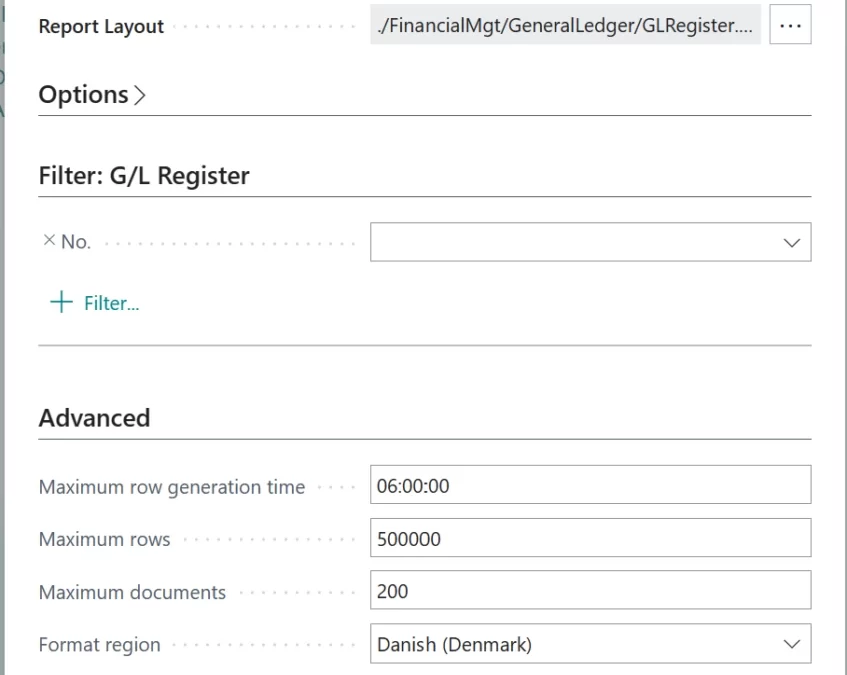
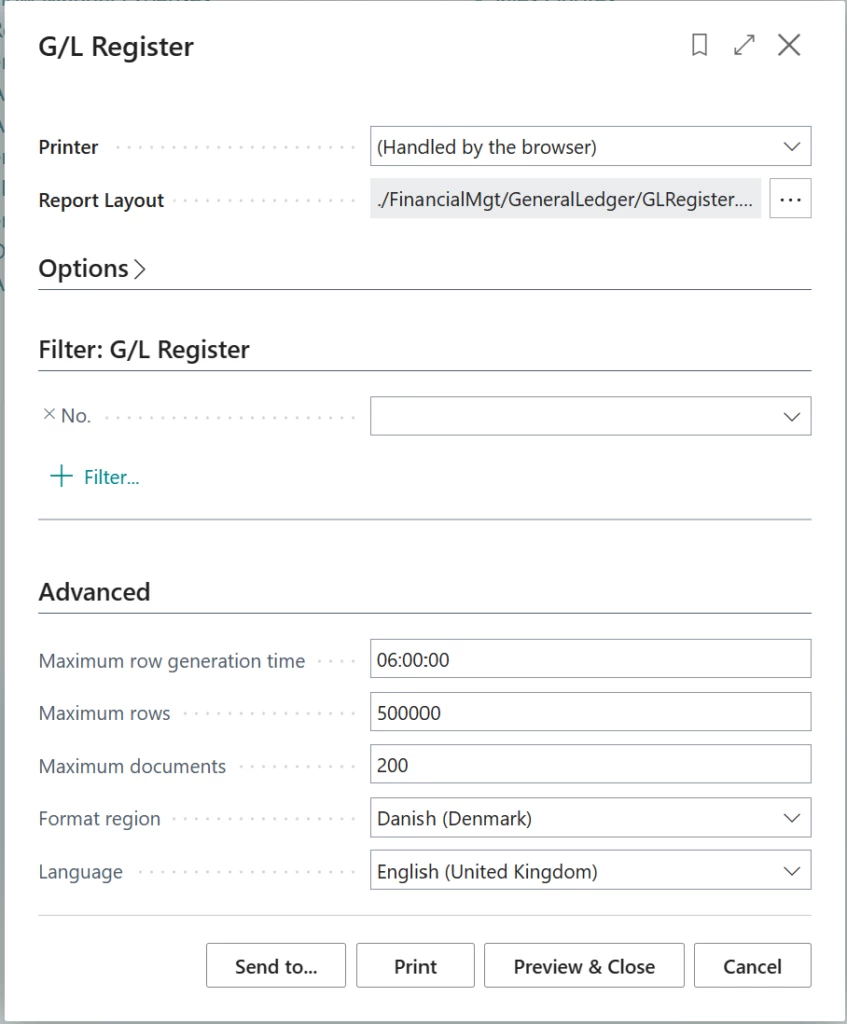
The highest priority in the report generation process resides with the advanced settings on the report request page. When you generate a report, you can specify the language and format you want to use for the report.
Advanced settings in the report request page
2. Report Object in AL: Precise Configuration
The heart of the matter lies in the AL triggers associated with the report object. Reports now include two important properties: Report.Language and Report.FormatRegion. These properties, defined within the AL triggers, play a key role in configuring reports. For many standard document reports in the Base App, these properties are set based on the Language Code and Format Region fields from the document itself. These fields get their values from the corresponding entity settings. For example, the Sales Header report gets its settings from the customer entity.
3. Language and Format in Customer/Vendor Card
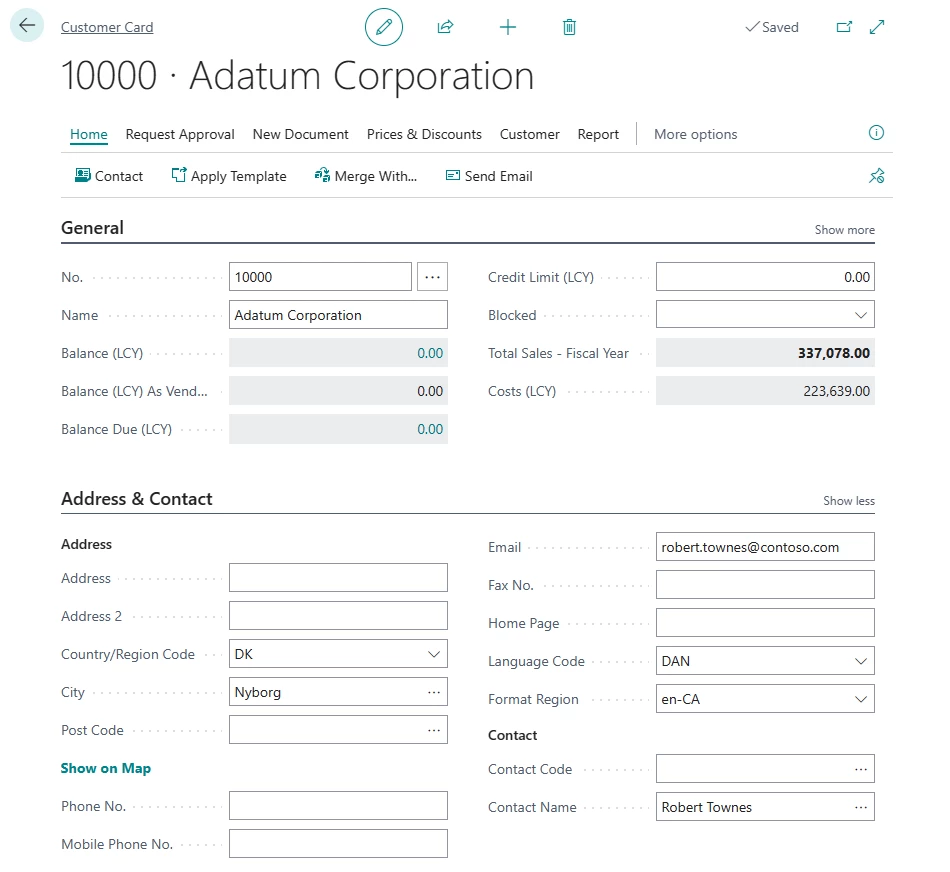
If a report should be printed in the language of the recipient rather than in the working language, the developer can add code in the report to handle this. This functionality is already enabled for most reports in the standard Business Central database. The document is printed in the language that is specified in the Language Code field on the Customer or Vendor Card page.
Example of Language and Format Region Codes on the Customer page
4. Language and Format in My Settings
If the report properties mentioned earlier aren’t configured within the AL triggers, Business Central then refers to the settings in My Settings. For example, consider a scenario where a regional format isn’t defined for a customer. In this case, when you print documents associated with the customer, the Report.FormatRegion property won’t have a specific regional format set. Consequently, Business Central will turn to the regional format setting in My Settings as a fallback. While My Settings had a more prominent role in earlier versions, its current function is to step in when no alternative settings are available.
By using this order of priority, Business Central ensures that the report output language and format are based on the most relevant and specific configurations. This approach gives you greater control over language and format customization for individual reports. Ultimately, this feature streamlines the reporting process, making it more efficient and user-centric.
This article is contributed. See the original author and article here.
Our Microsoft Learn community, along with the rest of the world, has experienced a time of great change over the last few years—the pandemic, a sudden shift to remote work, economic volatility, and huge leaps in the capabilities and implementation of AI, to name just a few. Times of change like these cause us all to reevaluate our priorities, how we operate, and what’s most important across all areas of our lives. Careers are no small part of that equation. We must continuously adapt to these new realities, whether we’re employees, employers, job seekers, educators, or leaders of organizations. Because of that impact, Microsoft Learn remains committed to leading the way with resources to help equip our learners and customers with technical skills to not only meet but thrive through the challenges of that ever-changing landscape.
What does ‘skills-first’ mean and why are we talking about it?
We’re always on the lookout for emerging trends so that we can bring you insights to help you succeed. The latest and most significant of these trends is a direct response to the massive global shifts we alluded to above, what the World Economic Forum refers to as “an accelerated shift towards a skills-based operating model for talent.” Simply put: whether you’re focused on your own career or on finding the right talent, a skills-centric mentality is becoming more essential.
How does this impact you? There are all sorts of reasons to engage with skilling content—you might have one or more of the following goals (featuring some great Microsoft Learn blogs on the subject!):
Whatever your objective, knowing how to find and feature the right skills is a game-changer, and we want to be part of your journey.
What to expect from Microsoft Learn through the end of October
Our ‘Skill-it-forward’ content throughout September and October will be focused on understanding the skills-first trend and why it’s important. We’ll also be highlighting the tools and resources you need to build your technical skills and expertise. You can expect the inside scoop about what’s new with Microsoft Learn (hint: we might have a few announcements to make…). We’ll offer resources across Microsoft Learn and beyond to help you not only navigate this skills-centric shift but use it to achieve your goals. And of course, we can’t leave out Tips & Tricks – we always have a few up our sleeve!
Make sure you’re following us on Twitter and LinkedIn, and are subscribed to “The Spark,” our recently enhanced LinkedIn newsletter so you don’t miss any of the exciting stuff we have planned!
This article is contributed. See the original author and article here.
In a previous blog, we introduced Continuous Access Evaluation(CAE) – a product that brings Zero Trust principles to session management. Today we would like to discuss securing cross-tenant access with a focus on preventing data exfiltration.
It’s impossible to imagine a successful modern organization that doesn’t collaborate with partners across organizational boundaries. While cross-company collaboration empowers employees and enables partnerships, it also lowers barriers for both accidental and malicious data exfiltration. Microsoft Cross-Tenant Access Settings is designed to address security of cross-company exchange.
Outbound and Inbound Cross-Tenant Access Settings offer fine grain security controls for cross-company collaboration using user’s home identity, while Tenant Restriction v2 (TRv2) can be used to prevent data exfiltration using foreign identity.
Some of the hardest-to-prevent data leaks happen when users inside your organization use foreign identities to connect to external tenants. Let’s consider one such attack. A malicious insider creates a Microsoft Entra tenant. Then they authenticate to their malicious tenant from your organization’s device. Now the attacker can leak your files via email using the Exchange Online account of the malicious tenant. These types of attacks can be described as creating a “USB dongle in a cloud.” Regular security methods do not work against such attacks. Your tenant’s policies do not apply to external identities that attackers use. Blocking Microsoft Entra ID or Exchange Online URIs in the firewall would block your legitimate users along with the attacker. These types of attack need special defenses that TRv2 provides.
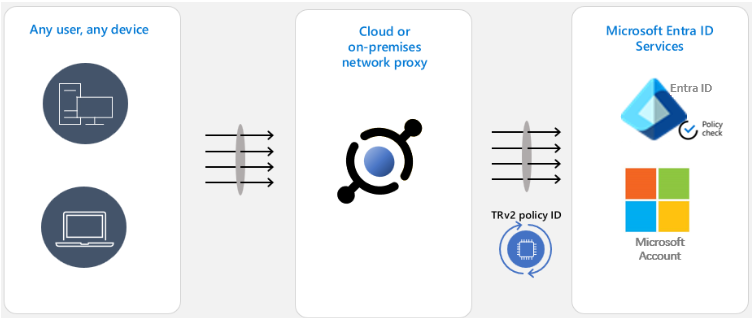
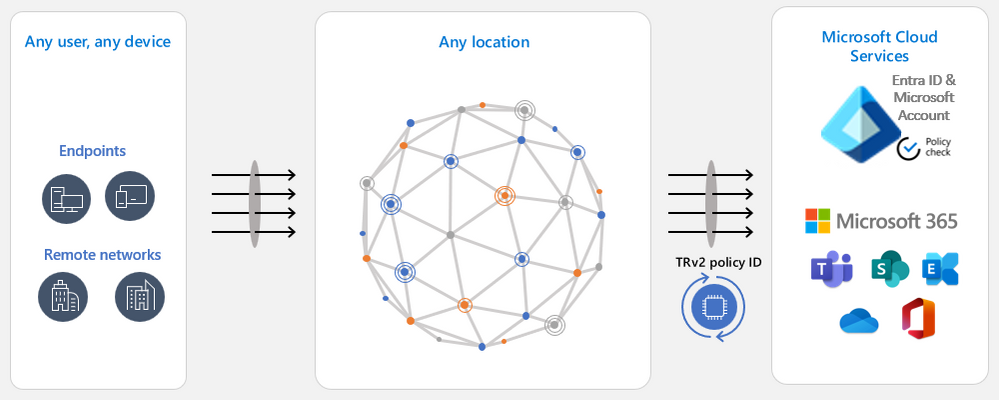
TRv2 works by sending special signals to Entra ID, Microsoft Account and other Microsoft resources. These signals point to Cross-Tenant Access Settings’ TRv2 policy that you created. Microsoft resources evaluate the policy and block unsanctioned access. We have two major flavors of TRv2.
Auth Plane TRv2 can block logins with external identities based on policy. To configure it you need to deploy a network proxy in your organization and configure that proxy to set TRv2 signals on all traffic to Entra ID and Microsoft Account. In the above example of a malicious insider leaking data over external email, the attacker will not be able to login to their malicious tenant and therefore will not be able to send email. Auth Plane TRv2 is now generally available.
Universal TRv2 as part of Microsoft Entra Global Secure Access goes one step further to protect against more sophisticated attacks where an attacker bypasses authentication by allowing anonymous access to the malicious tenant’s apps, such as anonymous meeting join in Teams. Or the attacker can import to your organizational device an access token lifted from a device in the malicious tenant. All these attack vectors bypass login to Entra ID. Since Universal TRv2 sends TRv2 signals on authentication plane (Entra ID and Microsoft Account) and data plane (Microsoft cloud applications), these attacks will be prevented. Universal TRv2 is currently in public preview.
We have another flavor of TRv2 in public preview – TRv2 on Windows. It’s a partial solution that protects the authentication and data planes but only for some scenarios. It only works on managed Windows devices and does not protect .NET stack, Chrome, or Firefox. We have heard from customers that it is difficult to deploy and does not provide adequate security. The Windows solution was meant to provide temporary protection until Universal TRv2 is released and we’re planning to retire it after Universal TRv2 is generally available.



Recent Comments