This article is contributed. See the original author and article here.
In today’s global marketplace, translating applications is not just a nice-to-have, it’s a necessity. Providing native language versions of your software not only enhances user experience but also ensures compliance with regional laws and regulations, including language requirements. For select products, partners have the flexibility to create their own translations in countries where Microsoft does not provide a translated or localized version.
Dynamics 365 Translation Service (DTS): Your partner in localization
If you’re a partner or an Independent Software Vendor (ISV) looking to expand your reach through localization and translation, look no further than Dynamics 365 Translation Service (DTS). Hosted within Dynamics 365 Lifecycle Services (LCS), DTS is a comprehensive solution that enables end-to-end translation workflows. With DTS, you can create and manage translation projects with ease. It also provides seamless integrations with Visual Studio, Visual Studio Code, Azure DevOps, and Power Platform. Trusted by over 1,800 companies worldwide, DTS is your reliable partner for all your Dynamics 365 translation needs.
High-quality translations with DTS
What sets DTS apart is its use of product-specific machine translation models. These models are custom trained with Microsoft-produced translations, ensuring high-quality outputs that match the style and terminology of the original product. For those seeking a more personalized touch, DTS offers the option to create a custom-trained machine translation models using your own translation memories. This feature allows you to obtain translations that are tailored to your business’ existing content, providing a truly customized experience.
Web Portal
The DTS web portal is the primary means for interacting with the service. Through the friendly interface, you can create and manage translation projects. Once a translation request is completed, DTS provides the translated native file along with an XLIFF translation memory (TM). This TM can be used to revise the machine translation output and regenerate translations with the updated content. You can also use those TMs during future requests. Matching strings will be recycled, alleviating the need to edit the known translation again whilst maintaining consistency across product versions.
Extensibility
DTS offers a range of extensions and an API to enhance accessibility and enable automation. With the IDE extensions, translations can be performed directly within the respective workspaces. These offerings save you time by bringing the DTS experience to your development environment along with allowing for automated translation workflows.
Visual Studio Extension – Translate Finance and Operations solutions from the developer environment.
In the realm of translation project management, the Dynamics 365 Translation Service (DTS) prioritizes ease of use and efficiency. The DTS web portal, along with its API and extensions streamline your translation workflow. With DTS, you can deliver fast high-quality translations with ease and at no additional cost. This service is available to Dynamics partners and ISVs. To get started, or learn more visit these pages:
This article is contributed. See the original author and article here.
This blog is the second of three that details our recommendation to adopt cloud native device management. Understand the lessons from various Intune customers in their journeys and how they achieved greater security, cost savings, and readiness for the future through their cloud transformations.
This article is contributed. See the original author and article here.
AnnounceBot Automated and Personalized Greetings, a solution published to Microsoft AppSource, helps companies celebrate special occasions like birthdays, work anniversaries, and welcoming new hires. With minimal setup and no calendars or manual work, AnnounceBot increases engagement, collaboration, and retention.
Microsoft interviewed Stephen Cornell, Service Director, Protected Trust, to learn what he had to say about the app.
What do you like best about AnnounceBot? We absolutely love how easy AnnounceBot is to use! It is user-friendly, and setting it up was quick. Before using AnnounceBot, social media was our only way to track birthdays, which means some folks got left out. And work anniversaries were out of the picture. Since we started using AnnounceBot, we have never missed a birthday or work anniversary. It’s all automatic now.
How has AnnounceBot helped your organization? Keeping the team engaged became challenging when we transitioned into working remotely. AnnounceBot helped us rebuild team connections by providing a centralized system to celebrate special events. Now, everyone engages in birthday and work anniversary posts, makes jokes, and tells stories about times we were all together in an office. It is a small gesture that has made a big difference in our company culture.
How is customer service and support? I wanted to know how to check birthdays that are getting tracked. The support team responded within an hour and provided the information I needed.
Any recommendations or insights for other users considering AnnounceBot? My suggestion would be to set it up in a small team first, just to get the hang of it. Test it out there before you go big and use it for the whole organization.
On a scale from 1 to 5 (5 being the highest), what is your overall rating for this AnnounceBot? I would give AnnounceBot a 4.5 only because I think they should support Microsoft Entra ID (formerly Azure Active Directory) integration to make birthdate and joining date collection even smoother.
This article is contributed. See the original author and article here.
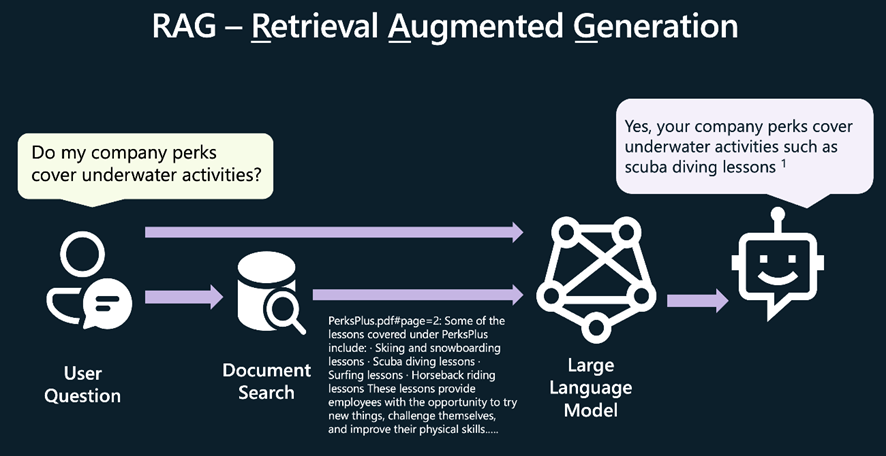
En los últimos seis meses, hemos conocido a cientos de desarrolladores que están utilizando Python para crear aplicaciones de chat de IA en sus propios campos de conocimiento, utilizandoRAG (Recuperación Aumentada de Generación)para enviar fragmentos de información a un modelo de LLM junto con la pregunta del usuario.
También hemos escuchado a muchos desarrolladores que les gustaría aprender a crear sus propias aplicaciones de chat con RAG, pero no saben por dónde empezar. Por eso, estamos organizando un hackathon virtual para ayudarte a aprender a construir tu propia aplicación de chat con RAG en Python.
Del 29 de enero al 12 de febrero, realizaremos transmisiones en vivo en inglés y los días 31 de enero y 2 de febrero en español, donde te mostraremos cómo construir ennuestro repositorio de ejemplo de chat con RAG más popular, al mismo tiempo que explicamos los conceptos clave detrás de todas las aplicaciones de chat con RAG modernas. Los temas de las transmisiones en vivo incluirán búsqueda vectorial, control de acceso, GPT-4 con visión y más.
Mantente conectado a tus sesiones locales de Reactor. Esperamos involucrar a desarrolladores de todo el mundo, así que también tendremos transmisiones en vivo en español, portugués y chino. Habrá premios para las mejores aplicaciones e incluso un premio para el miembro más útil de la comunidad. ¡Mantente atento a tus sesiones locales de Reactor!
Para obtener más información, visita lapágina de Reactorpara sintonizar tu evento local y visita la páginaAI Chat App Hack, donde podrás seguir los pasos para registrarte y unirte a la comunidad. ¡Te esperamos ya!
Más recursos de RAG para desarrolladores de Python:
This article is contributed. See the original author and article here.
The linked blog post was originally published on the Microsoft Security Blog on November 6th, 2023. We are sharing it again on the SMB Tech Community blog channel to ensure that all of our partners, who manage customer tenants and their conditional access policies, are informed about the upcoming policy changes.
Microsoft announced the automatic rollout of Conditional Access polices in Entra ID back in November 2023.
This feature automatically creates new Conditional Access policies in report-only mode for eligible customers of Microsoft Entra ID P1/P2 (M365 E3/M365 E5/M365 Business Premium). Between November 9th, 2023, and December 31st, 2023, policies were created in all eligible tenants. Customers will have at least 90 days to review the policy’s impact, manage exclusions, turn the policy on, or turn it off if necessary.
This 90-day period is ending soon, and enforcement will begin on a rolling basis in February and March 2024.
Recommended actions
To avoid any potential disruption to users’ access and to ensure these policies meet your organization’s needs, take the following actions within 90 days of their creation, before they’re moved to the On state:
Review the effects and benefits of the new policies. If you don’t want us to enable them automatically, set them to Off. Or, you may set them to On at any time.
Customize these policies according to your specific needs, such as excluding emergency access accounts. If you require more extensive customizations, you can clone a policy and then make as many changes as you want.
Verify that all users covered by these policies have enabled and registered at least one multifactor authentication method. If necessary, run a registration campaign to set up the Authenticator app.








Recent Comments