by Contributed | Jul 6, 2023 | Technology
This article is contributed. See the original author and article here.
Microsoft Purview Data owner policies is a cloud-based service that helps you provision access to data sources and datasets securely and at scale. Data owner policies expose a REST API through which you can grant any Azure AD identity (user, group or service principal) to have Read or Modify access to a dataset or data resource. The scope for the access can range from fine-grained (e.g., Table or File) to broad (e.g., entire Azure Resource Group or Subscription). This API provides a consistent interface that abstracts the complexity of permissions for each type of data source.
More about Microsoft Purview Data policy app and the Data owner policies at these links:
If you would like to test drive the API, sign-up here to join the private preview.

by Contributed | Jul 6, 2023 | Dynamics 365, Microsoft 365, Technology
This article is contributed. See the original author and article here.
Finance teams’ roles have evolved—and expanded—into new realms. As economic pressures demand that everyone deliver more with fewer resources, finance professionals’ plates are increasingly crowded with analysis, strategy, even supplier relationships—plus all the traditional finance processes they’ve long been responsible for.
It’s not just moving invoices along—finance teams are being asked by upper management to bring cost-saving, time-optimizing, and value-adding insights to the table when business model evolution and digital transformation are discussed. And they’re looking for any solution that will give their overstretched employees time back in their day to think bigger, by tightening up tedious processes that drain human energy and douse the spark of innovation.
The Future of Finance
Streamline your accounts payable process and free up resources to fund your business transformation
For finance teams, incorporating automation into accounts payable (AP) is a great place to start. After all, the work of capturing invoices, processing and verifying them, then paying vendors can be complex—with plenty of sub-processes to support the end goal of on-time payments and stronger customer relationships. Automating parts of the accounts payable process lets finance teams spend less time on repetitive tasks and more time on higher-value work that builds agility in finance operations and across your business.
5 ways accounts payable automation elevates finance operations
To get started on your AP automation journey, check out this webinar, The Future of Finance: Unlocking the Benefits of Accounts Payable Automation, and learn how automating accounts payable data can help you:
1. Focus on strategy—not tedious data tasks
Allow your finance teams to put more energy where it matters—fulfilling, strategic work that keeps them engaged—not cumbersome accounts payable processes that waste time and drag down productivity.
2. Reign in costs and unnecessary fees
Understand payment trends, analyze vendor performance, and improve processing time to drive significant savings. Cut paper costs by automating manual processes, while helping avoid handwritten errors that lead to mistakes and late payment fees downstream.
3. Stop small errors from becoming big problems
Improve accuracy with automated accounts payable software that limits the unavoidable errors inherent with manual data entry—so you sidestep risk now while dialing in what you need for compliance later.
4. Get to know your vendors
Strengthen vendor relationships by automating AP processes to pay them on time, every time. And over time, analyze accounts payable data to reveal valuable cost-saving insights that put you on more solid footing for future negotiations.
5. Gain more visibility
Put more eyes on your cashflow to help people across your business focus more on cost savings. Empower everyone—not just data specialists or finance operations teams—to support larger initiatives with more readily available data.
When should you automate accounts payable?
To keep pace with competitors, you’re probably looking at ways your finance team can integrate new technology into traditional processes like accounts payable that have long kept business’ bottom lines in order. Because the pace of business isn’t slowing, nor are potential disruptions retreating. To respond to changing business conditions and guard against long-term risk, finance leaders are starting to recognize how the latest AI-powered automation can help them take on what’s currently taking up too much of their employees’ time:
- Complex processes: The more complex the process, the more challenging it can be to manage effectively. Inefficient processes with too many steps are not only a drag on people’s time and energy, they’re often a barrier to digital transformation. When that leads to a delayed payment, it can damage customer relationships that have taken years to build—putting the wrong kind of spotlight on finance teams.
- Strained IT: When organizations are facing flat (or shrinking) IT budgets and people don’t have the tools they need, it’s hard to build consistent processes. A lack of IT budget is more than annoying; unreliable systems can overwhelm employees, get in the way of strategic work they’d rather be doing, and make it tougher to follow processes that finance regulations demand.
- Data overload: Invoices, payment records, information on multiple vendors—all that data is difficult to manage on its own. When people naturally turn to manual processes to make sense of it all, it’s often time intensive and susceptible to errors, fraud, and missed opportunities for insights.
- People power: Freeing up resources to hire new talent is tough enough, and retaining that talent is even tougher when mundane tasks fill up their plate. Engaging them in their current role with opportunities to be creative and offer strategic insights is often a better investment than trying to find, onboard, and retain a new hire.
If these obstacles sound familiar, automating accounts payable processes is a cost-efficient way to start moving your organization past them. When your company is ready to shift from managing cumbersome accounts payable operations to supporting strategic initiatives, Microsoft Dynamics 365 Finance can help.
How Dynamics 365 Finance modernizes accounts payable operations
Dynamics 365 Finance modernizes accounts payable operations by capturing invoices in multiple formats (digital and manual), processing them while coding and resolving errors with full automation, then automatically paying vendors on time—with analytics around payment scenarios and compliance gathered in real time. Be sure to watch the webinar to learn more, including how one Microsoft customer cut invoice costs in half and reduced overall costs by 25 percent by streamlining procedures across their business, including invoice processing, with accounts payable automation. It also features a demo of how to use AI-powered automation to accelerate digital transformation with Dynamics 365 Finance.
The post 5 ways accounts payable automation drives digital transformation appeared first on Microsoft Dynamics 365 Blog.
Brought to you by Dr. Ware, Microsoft Office 365 Silver Partner, Charleston SC.
by Contributed | Jul 5, 2023 | Technology
This article is contributed. See the original author and article here.
Today, we’re excited to announce the public preview of Exchange Online Role Based Access Control (RBAC) management in Microsoft Graph. The preview is designed for admins who want a consistent management interface, and for developers who want to programmatically control RBAC.
The public preview supports create, read, update, and delete APIs in Microsoft Graph which conform to a Microsoft-wide RBAC schema. Exchange Online RBAC role assignments, role definitions, and management scopes are supported through this new API.
With this preview, Exchange Online joins other RBAC systems in the Microsoft Graph Beta API, namely, Cloud PC, Intune, and Azure AD directory roles and entitlement management.
How Unified RBAC for Exchange Online works
Admins assigned the appropriate RBAC role in Exchange Online can access Unified RBAC using the Microsoft Graph beta endpoint or by using Microsoft Graph PowerShell. RBAC data remains stored in Exchange Online and can be configured using Exchange Online PowerShell.
In addition to Exchange RBAC permissions, you will also need one of these permissions:
- RoleManagement.Read.All
- RoleManagement.ReadWrite.All
- RoleManagement.Read.Exchange
- RoleManagement.ReadWrite.Exchange
Actions and entities supported in this preview:
Entity
|
Endpoint
|
Allowed API Actions
|
Read
|
Create
|
Update
|
Delete
|
Roles
|
graph.microsoft.com /beta/roleManagement/exchange/roleDefinitions
|
✓
|
X
|
X
|
✓
|
Assignments
|
graph.microsoft.com /beta/roleManagement/exchange/roleAssignments
|
✓
|
✓
|
✓
|
✓
|
Scopes
|
graph.microsoft.com /beta/roleManagement/exchange/customAppScopes
|
✓
|
✓
|
✓
|
✓
|
Role Groups
|
Not supported
|
X
|
X
|
X
|
X
|
Transitive Role Assignment
|
Not supported
|
X
|
X
|
X
|
X
|
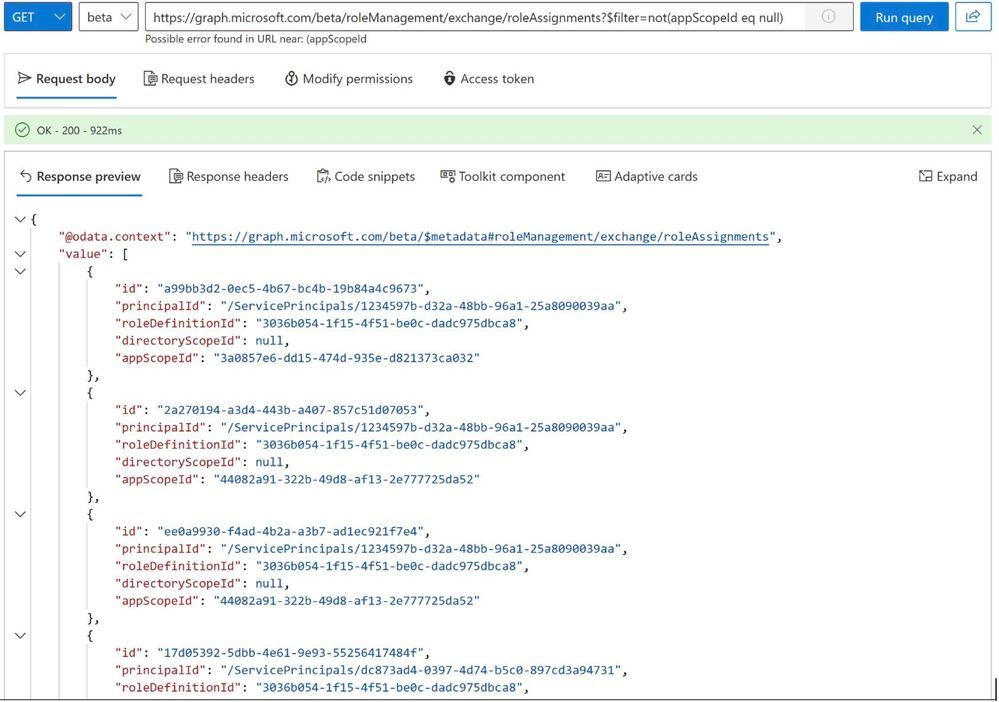
Reading the list of role assignments assigned with a management scope:
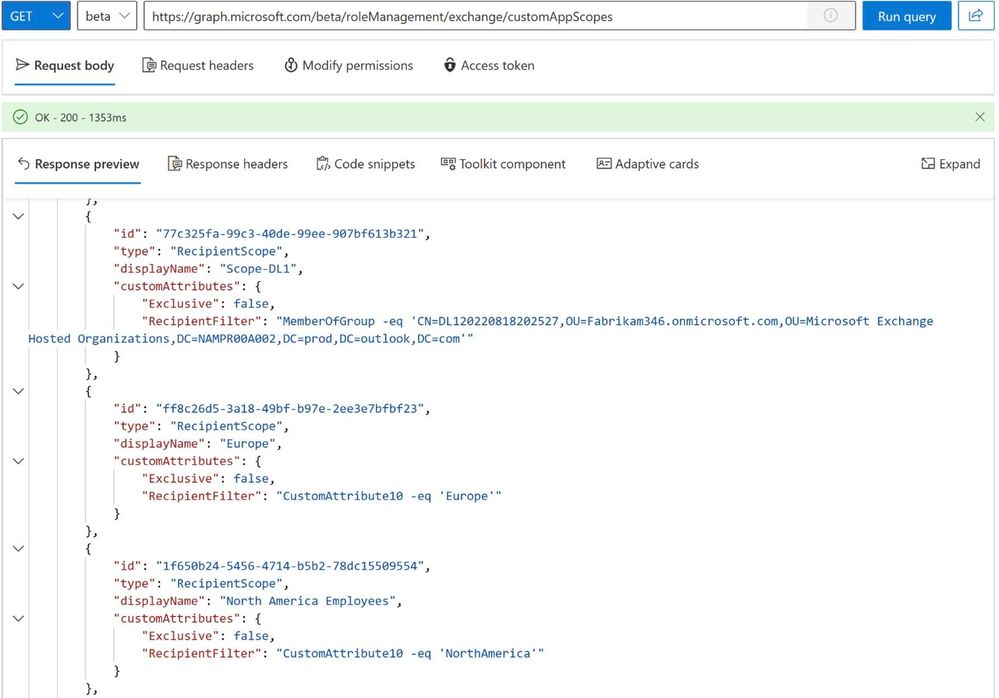
Reading the list of Management Scopes:
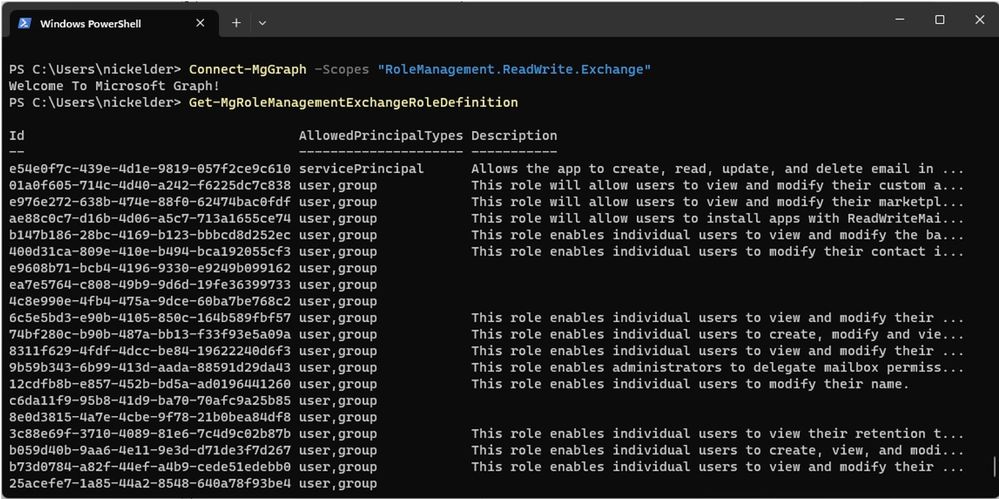
List roles using Microsoft Graph PowerShell:
Try the Public Preview Today
Unified RBAC is available to all tenants today as a part of the public preview. See Use the Microsoft Graph SDKs with the beta API and roleManagement resource type for more information.
We’d love your feedback on the preview. You can leave a comment here or share it with us at exourbacpreview@microsoft.com.
FAQs
Does this API support app-only access?
Not yet. This will be added to the preview later.
Exchange Online Team
by Contributed | Jul 4, 2023 | Technology
This article is contributed. See the original author and article here.
People sometimes wish to review and change their form or quiz responses after submission, even days later. We’re happy to share that you can now review and edit responses when needed.
- First, save your response
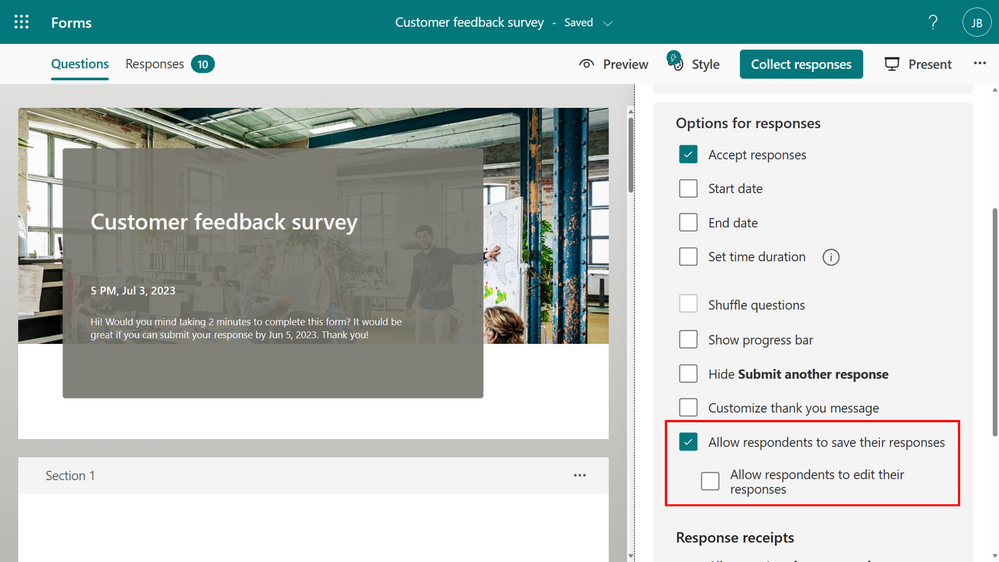
To save your response, ensure that the form creator has selected “Allow respondents to save their responses” option in the Forms settings.
Forms setting – save response
Once the setting is enabled, and you submit a form, you will have the option to save your response from the thank you page.
 “Save my response” in Thank you page
The response will be saved in “Filled forms” in Microsoft Forms.
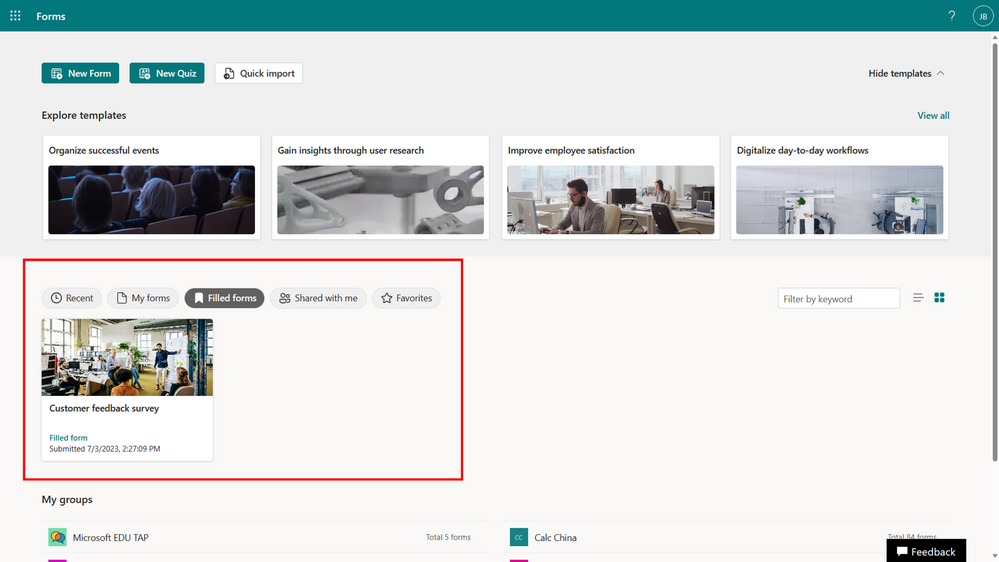 Filled forms
- If enabled, you can then edit your response
The form’s creator must select “Allow respondents to edit their responses” in the form’s setting.
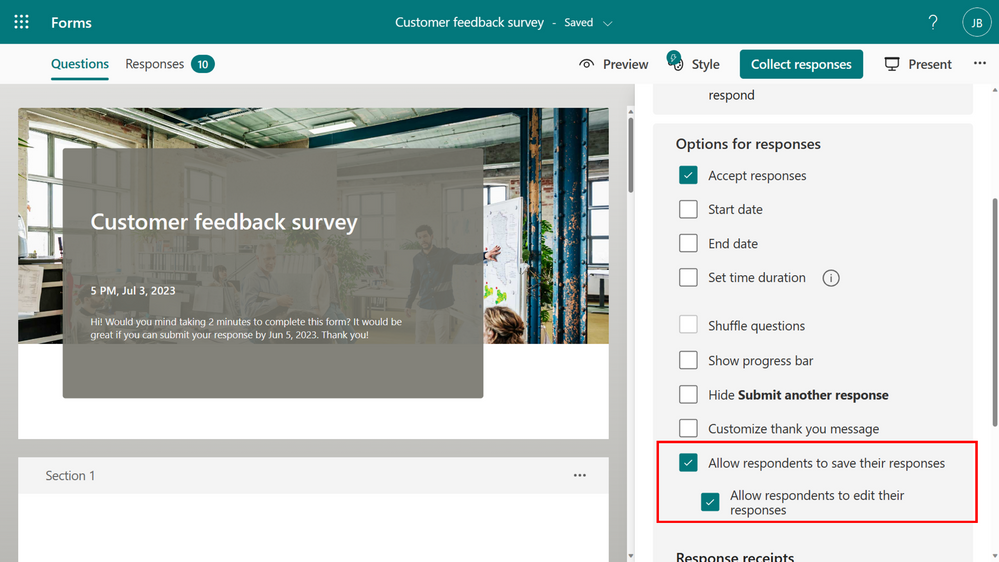 Forms setting – edit response
If enabled, you will have the option to “Save my response to edit” on the thank you page.
 “Save my response to edit” in Thank you page
As long as the form is open, you have the flexibility to revisit the form at any time to edit your answers. However, edits cannot be made once a form has been closed or deleted.
 Edit response
FAQ
Where is the data saved?
As with all forms, the response data will be stored in the form creator’s repository only. Respondents can only view their own and cannot make any changes unless the form creator allows them to edit their response. If the form or the response is removed, the respondent will no longer have access to the response.
What’s the limitation of the feature?
Updating a response do not trigger a Power Automate flow. This capability will be enabled soon.
We hope you find these new features helpful! We will continue working on enabling more options with Microsoft Forms. Let us know if you have questions or if there’s anything else we can help you with!

by Contributed | Jul 3, 2023 | Technology
This article is contributed. See the original author and article here.
In this issue:
Ace Aviator of the Month

What is your role and title? What are your responsibilities associated with your position?
I am a Senior Digital Architect with Sonata Software Europe Limited. I am responsible for delivering the right integration technologies to the customers. I interact with my team members to share the latest updates on various integrations and brainstorm the best fit for the client requirement. My manager provides me additional support in exploring new concepts and encourages us to do POCs with latest updates and share the knowledge to the wider forum.
Can you provide some insights into your day-to-day activities and what a typical day in your role looks like?
I plan my day beforehand, but it takes a different direction as it progresses. This is what my role demands. I am involved in multiple assignments and learn everyday with various challenges. More complex it is, the more growth is my thought, and this keeps me motivated throughout the day. I also offer guidance to other teams, and I get excited when the discussion or the task is for Logic Apps integration.
What motivates and inspires you to be an active member of the Aviators/Microsoft community?
My spouse, Santosh Ramamurthy, always motivates me in upgrading my skills. He supported my learning path and noticed my passion, he advised me to write blogs, sharing techniques via forums.
I started my career in 2006 and have been travelling with Microsoft Technologies for close to 17 years. With the limited resources those days, we had challenges in getting proper guidance. We referred to books and often learnt from our mistakes. I thought our future generation should have a strong foundation on technologies which they can pass on. So, I started writing blogs, attending forums, giving sessions which will motivate the people who are new to the technology or planning to switch the domain. Resources are abundant nowadays. How to use and where to apply is our skill. Logic Apps Aviators is a community which binds the people at all levels – be it beginner, intermediate or expert.
Looking back, what advice do you wish you would have been told earlier on that you would give to individuals looking to become involved in STEM/technology?
As I said earlier, resources are abundant. Learn to use, apply, make mistakes, correct them, and keep moving. Gone are the days where a high-speed PC or a classroom is needed to start your learning path. Most of the technologies are giving free trial and lab environments to encourage the individuals and give an attempt on the new skill. It is only the interest and the passion which keeps their learning spirit on.
What has helped you grow professionally?
Passion for learning new skills, handling complexities are my best teachers. Expand the network and time management is an important skill as we have numerous distractions around us. Tiny drops make a mighty ocean – so learning something new every day (be it simple concept or complex) and we are sure to trace the growth in the learning graph.
Imagine you had a magic wand that could create a feature in Logic Apps. What would this feature be and why?
Logic apps can create wonders in integration when some of the minor features can be incorporated to make them more friendly to the beginners.
For instance, when suggesting recurring API integration with D365FO via logic apps, there comes a question of creating a zipped package file. As most connectors are missing this action and even though azure functions / ADF / third-party tool comes to rescue, integration becomes simpler if available readymade.
Also, a feature to track the state of the previous run – this is needed for integrations to safeguard the data overlap and thus to cancel the run automatically if the previous execution is still in progress.
News from our product group:
News from our community:
Microsoft Previews .NET Framework Custom Code for Azure Logic Apps Standard
Post by Steef-Jan Wiggers
Read more about the public preview for .NET Framework Custom Code from Aviator’s own Steef-Jan!
Resolving 401 “Forbidden” Error When Deploying Logic Apps ARM Template
Post by Harris Kristanto
Harris discusses the issue of encountering a 401 Forbidden error during the deployment of Logic Apps ARM templates and provides steps to resolve it. Learn the potential causes of the error and suggests troubleshooting methods, including adjusting authentication settings and ensuring proper access permissions are set, to successfully deploy the Logic Apps template.
Compare Azure Messaging Services | How to Chose | Azure Service Bus vs Event Hub vs Event Grid
Post by Srikanth Gunnala
In this video Srikanth discusses Azure Messaging Services’ three most utilized components: Azure Service Bus, Azure Event Grid, and Azure Event Hub. See real-world applications and demonstrations on how these services ensure smooth communication between different parts of a software program.
Mastering GraphQL Resolvers for Cosmos DB
Post by Ryan Langford
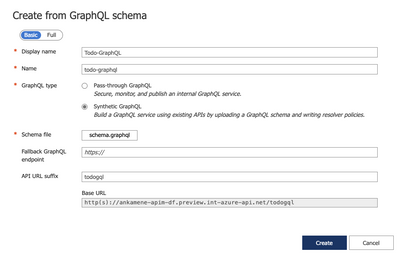
Developers looking for more cloud skills should read Ryan’s post on mastering GraphQL Resolvers in Azure Cosmos DB. He covers everything from setting up your API Manager Instance to querying and mutating the graph in Azure Cosmos DB.






Recent Comments