3 ways Moveworks and Microsoft Teams use AI to improve employee productivity

3 ways Moveworks and Microsoft Teams use AI to improve employee productivity

This article is contributed. See the original author and article here.

Since launching on Teams about four years ago, Moveworks has earned dozens of Fortune 500 customers by saving countless hours of employee time, making work more efficient, and reducing millions of dollars in IT support costs. Three key strategies helped generate that success.

The post 3 ways Moveworks and Microsoft Teams use AI to improve employee productivity appeared first on Microsoft 365 Blog.

Brought to you by Dr. Ware, Microsoft Office 365 Silver Partner, Charleston SC.

The power of AI in Viva Sales: Insights from Lori Lamkin and Nathalie D’Hers

The power of AI in Viva Sales: Insights from Lori Lamkin and Nathalie D’Hers

This article is contributed. See the original author and article here.

Join me, Lori Lamkin, and my esteemed colleague Nathalie D’Hers, as we take you on an extraordinary journey through the development, deployment, and continuous improvement of Microsoft Viva Sales. As the Corporate Vice President (CVP) of Dynamics 365 Customer Experiences, I bring extensive leadership experience and strategic vision to guide the product team responsible for Viva Sales. Viva Sales is a tool that maximizes Microsoft Dynamics 365 Sales and Salesforce seller teams’ productivity with AI-assisted experiences in Microsoft 365 apps. Nathalie, another accomplished CVP, leads the deployment efforts across Microsoft, positioning the Microsoft sales field as customer zero. Together, we bring a wealth of knowledge and expertise to revolutionize the way sellers engage with customers through Viva Sales. In this Q&A session, we will share our insights, experiences, and the remarkable story of Microsoft’s journey in unlocking the full potential of Viva Sales. Get ready to be inspired!

Rapid deployment: Unleashing the potential of Viva Sales

Lori: It’s been six months since you’ve deployed Viva Sales, what results are you seeing? What key considerations did you have when rolling out a generative AI tool like Viva Sales on a global scale?

Nathalie: Viva Sales is deployed across Microsoft. Being customer zero has been invaluable in this process. It has allowed us to confirm the product, learn important insights, and make improvements along the way. We’ve been focused on turning on Copilot features to enhance the seller experience, and the feedback we’ve received from our own teams has been instrumental in refining and perfecting the deployment. I’m so excited to partner with our teams to see the first commercial solution at Microsoft to combine Copilot and Viva Sales.

Since the launch of Copilot in March, we have seen incredible adoption with nearly 4,000 users taking advantage of its capabilities. The impact has been significant, with approximately 37,500 draft emails generated through the power of generative AI. It’s encouraging to see the positive response from our users and the value they are experiencing. In fact, during a recent customer conversation, the Senior VP of Sales expressed their enthusiasm to partner with us as early adopters, emphasizing their willingness to invest in any technology that enhances the productivity of their sellers. It’s a testament to the effectiveness of Copilot and its ability to drive tangible benefits in the workplace.

Nathalie: It’s been quite the journey since we launched Viva Sales to our Microsoft sellers. What were the main goals your team hoped to achieve with this product?

Lori: We’ve been focused on seller productivity gains through taking advantage of conversation intelligence, enabling Copilot features, and ultimately improving customer connection, job satisfaction, and revenue for our sellers. Microsoft being customer zero has provided us with a unique advantage. It has allowed us to test these features within our own organization, gather valuable feedback, and fine-tune the experiences before rolling them out to more customers.

In the new update, we are adding some exciting capabilities to Viva Sales that have been influenced by your team’s customer zero work. Sellers can get real-time suggestions and guidance as they craft emails, pulling insights from automated email summaries. It’s like having a virtual assistant right at their side, helping them to generate compelling content and ensuring that no opportunity is missed. Our sellers have embraced these features with enthusiasm, recognizing how it significantly boosts their productivity and enables them to focus on building strong customer relationships.

Nathalie: Speaking of Copilot, how does your organization ensure that the implementation of Copilot features align with Microsoft’s ethical and responsible AI principles?

Lori: Supporting ethical and responsible AI practices is of paramount importance to us and our customers. As we use generative AI, we are committed to helping our customers be transparent, fair, and accountable to their employees and their customers.

As you know, one of the ways we do this here is with our works councils, where a few of our colleagues volunteer to help us protect the privacy of all our employees when we deploy new technology like Viva Sales. More importantly, they make sure we follow privacy laws in each of the countries and regions where we operate. We roll the feedback that we get from them directly into our products, which helps our customers protect their own employees. It’s this kind of thinking—and these kinds of checks and balances—that helps with the ethical use of AI in Viva Sales.

Lori: We were so excited to be the first Microsoft product to bring Copilot to our users; the feedback we have received from sellers has been incredibly positive! How have our newest Copilot in Viva Sales features influenced your thinking about supporting the employee experience?

Nathalie: It helped a lot! Seeing a tangible implementation of Copilot with real value opened our eyes to what was possible and is influencing ways that we’ll incorporate generative AI into our own employee experience. Kudos to you and your team for dreaming big and acting fast to bring that experience to the market!

Lori: Thank you. So, tell me more about this employee experience and how deploying Viva Sales Copilot in Microsoft has given your team insights and learnings that shaped your approach to using AI?

Nathalie: Just like Viva Sales provides conversation summaries and next actions for sales opportunities, we’re thinking through scenarios that will enable us to transform the way employees interact with our different services—like support and HR—to make them more personalized and efficient.

Broadly, our efforts fall into three categories—AI for IT, AI for the hybrid workplace, and AI for the employee experience. AI for IT includes investments to help us proactively detect and remediate issues in our employee services and IT infrastructure. AI for the hybrid workplace includes investments to help us perfect space planning and to enhance the experience when employees come into the office. Finally, AI for the employee experience is all about transforming the ways that Microsoft employees interact with our services and support. Across each of these investment areas, Viva Sales provided us with a great benchmark for how AI can really propel employee productivity.

Male working remotely from his home office on a Dell Latitude 13 device, running Microsoft PowerPoint.

Microsoft Viva Sales

Learn more about our internal deployment of Microsoft Viva Sales.

Talking about works councils and deployment

Lori: Nathalie, as the leader responsible for deploying Viva Sales across Microsoft, I understand that your team has been actively engaging with works councils. Can you provide insights into the impact of working with works councils during the deployment process?

Nathalie: Absolutely, Lori. Works councils play a critical role in standing for the interests of employees within our organization, particularly in European countries where they are prevalent, and they make sure that whatever we deploy internally within the company protects the privacy of the employees who live in that region. Engaging with works councils ensures that we consider the perspectives and concerns of the workforce during the deployment of Viva Sales. Their input is valuable in addressing compliance, privacy, and employee relations matters, making our deployment process more robust and aligned with local regulations.

Lori: What have you found to be some of the challenges in managing a global-scale deployment of Viva Sales?

Nathalie: Deploying any new technology globally has challenges, but the speed and efficiency with which we were able to roll out this transformative product was truly remarkable. We are working on a brand-new solution that is revolutionizing the way generative AI changes the workplace, and being customer zero has given us some unique advantages. We’ve had to navigate compliance and obtain necessary approvals for deploying AI features on a global scale. Our active engagement process, which includes working closely with works councils, has been instrumental in streamlining the deployment process and ensuring that our global teams can receive help from Viva Sales. Despite the challenges, the feedback from sellers has been incredibly positive, especially with the AI-generated email content enhancements we’re introducing. The best part is how easy and painless it is to enable Viva Sales, allowing our teams to quickly harness its productivity-boosting capabilities and experience a seamless transition to a more efficient way of working.

Lori: It seems like building an effective approval process is crucial. How replicable has Microsoft made this process for other companies?

Nathalie: At Microsoft, we have developed a globally recognizable, efficient process for enabling Copilot scenarios. By supporting open dialogue, we can gather feedback, address emerging concerns, and align our deployment approach with evolving regulations. We recently set up a framework with European works councils to supply valuable insights into employee needs and expectations, enabling Microsoft to tailor the product and deployment process accordingly. We encourage all companies to get connected with their respective works counsels to achieve a balance between rapid implementation and compliance, ensuring that their employees are protected, and the organization meets regulatory requirements.

Lori: It’s truly exciting to see the transformative power of Viva Sales in action and see the positive impact it’s having on our organization!

Learn more about Viva Sales

To learn more about our internal deployment of Viva Sales, read about how we’re simplifying sales with Viva Sales. You can also read more about our internal deployment of Viva at Microsoft by visiting our “Viva la vida! Work life is better at Microsoft with Viva” content suite. Learn more about other applications and capabilities in Dynamics 365 Sales and Viva Sales using the links below:

If you’re not yet a Dynamics 365 Sales customer, check out our Dynamics 365 Sales webpage where you can take a guided tour or get a free 30-day trial.

The post The power of AI in Viva Sales: Insights from Lori Lamkin and Nathalie D’Hers appeared first on Microsoft Dynamics 365 Blog.

Brought to you by Dr. Ware, Microsoft Office 365 Silver Partner, Charleston SC.

Lesson Learned #396: Fixing ‘Invalid value for key ‘authentication’ using System.Data.SqlClient

This article is contributed. See the original author and article here.
Our customer is getting the following error message: Application Error System.ArgumentException: Invalid value for key ‘authentication’.    at System.Data.Common.DbConnectionStringBuilderUtil.ConvertToAuthenticationType(String keyword, Object value)    at System.Data.SqlClient.SqlConnectionString.ConvertValueToAuthenticationType()    at System.Data.SqlClient.SqlConnectionString..ctor(String connectionString)    at System.Data.SqlClient.SqlConnectionFactory.CreateConnectionOptions(String connectionString, DbConnectionOptions previous)    at System.Data.ProviderBase.DbConnectionFactory.GetConnectionPoolGroup(DbConnectionPoolKey key, DbConnectionPoolGroupOptions poolOptions, DbConnectionOptions& userConnectionOptions)    at System.Data.SqlClient.SqlConnection.ConnectionString_Set(DbConnectionPoolKey key) using in the authentication keyword in the connection string the value Active Directory Managed Identity.


Understanding the Error


The error message our customer received, “Application Error System.ArgumentException: Invalid value for key ‘authentication'”, signifies an issue in the connection string’s authentication parameter. This error is generated when the provided value is incompatible or not supported by the current implementation.


Limitations of System.Data.SqlClient


System.Data.SqlClient, a widely used library for interacting with SQL Server databases, does not have built-in support for Azure Active Directory Managed Identity authentication. It offers support only for AAD password, integrated, and interactive authentication methods.


Introducing Microsoft.Data.SqlClient


To overcome the limitation of System.Data.SqlClient, we recommend migrating to Microsoft.Data.SqlClient. This newer library offers enhanced features and broader support for Azure SQL Database, including seamless integration with Azure Active Directory Managed Identity authentication.


Benefits of Migrating to Microsoft.Data.SqlClient


By migrating to Microsoft.Data.SqlClient, our client can unlock several benefits, such as, Full support for Azure Active Directory Managed Identity authentication, ensuring adherence to the latest security standards. Improved performance and reliability due to ongoing updates and optimizations in the library. Access to additional features and functionalities introduced in the latest versions of Microsoft.Data.SqlClient.


Migrating to Microsoft.Data.SqlClient: Step-by-Step Guide


  • Assess the codebase and identify all occurrences where System.Data.SqlClient is used for database connections.

  • Replace instances of System.Data.SqlClient with Microsoft.Data.SqlClient in the codebase.

  • Update the connection string to include the necessary configurations for Azure Active Directory Managed Identity authentication.

  • Test the application.


A Comprehensive Guide to Getting Started with Data API Builder for Azure SQL Database or SQL Server

A Comprehensive Guide to Getting Started with Data API Builder for Azure SQL Database or SQL Server

This article is contributed. See the original author and article here.

Getting started with Data API builder for Azure SQL Database or SQL Server


kevin_comba_0-1688562754496.png


What is Data API builder?


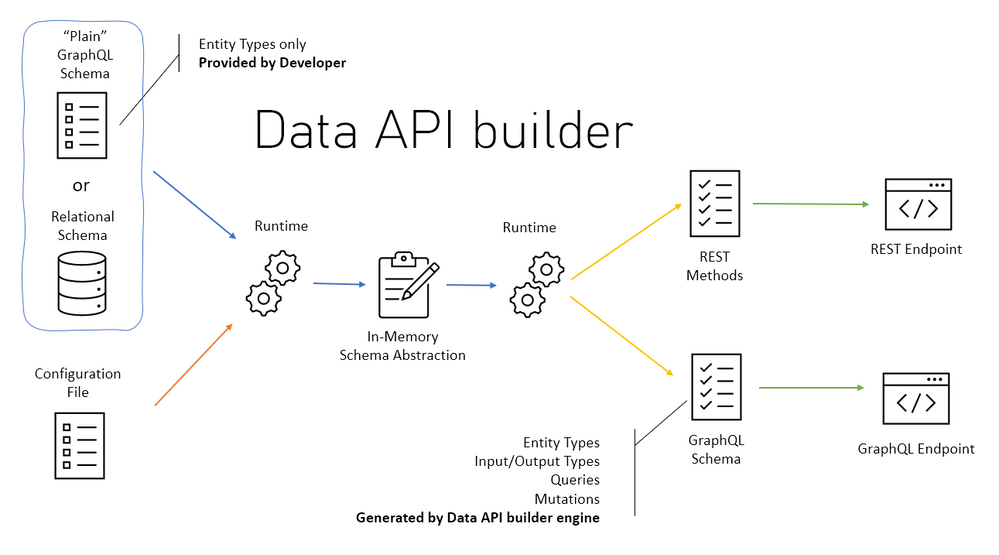
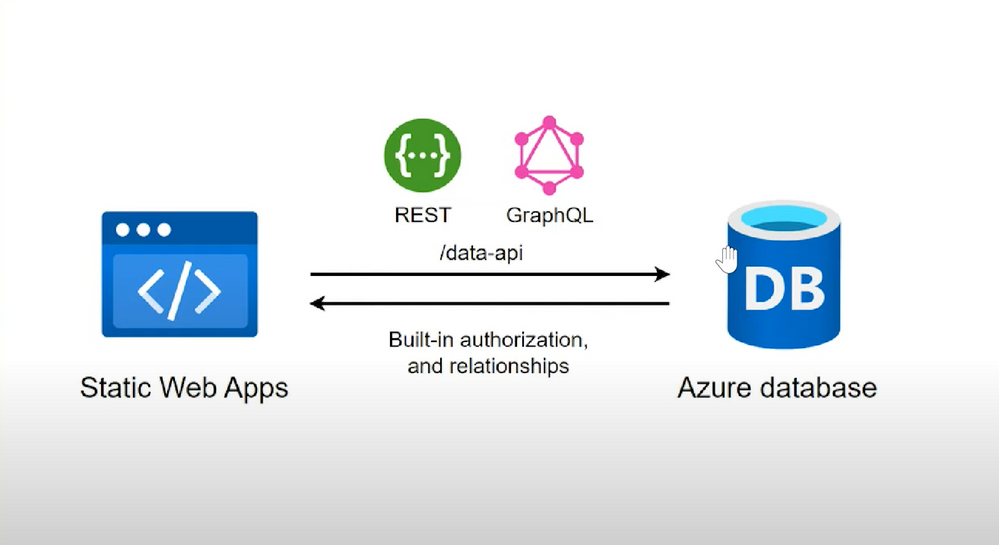
Data API builder for Azure Databases provides modern REST and GraphQL endpoints to your Azure Databases. Database objects can be safely exposed via REST or GraphQL endpoints with Data API builder, allowing your data to be accessed using modern approaches on any platform, language, or device. Granular security is ensured by an integrated and configurable policy engine; integration with Azure SQL,


SQL Server, PostgreSQL, MySQL, and Cosmos DB provides developers with unprecedented productivity.


Data API Builder Features


  1. REST operations like CRUD ( POST, GET, PUT, PATCH, DELETE) , filtering, sorting and pagination.

  2. GraphQL operations like queries and mutation, queries and mutations.

  3. Support authentication via OAuth2/JWT.

  4. Role-based authorization using received claims.

  5. Allow collections, tables, views and stored procedures to be accessed via REST and GraphQL.

  6. Full integration with Static Web Apps via Database Connection feature when running in Azure.

  7. Easy development via dedicated CLI.

  8. Open Source, you can always contribute


Our Focus.


In this blog, I’m going to walk you through a simple process to get started with Data API Builder with Microsoft SQL Database deployed on Azure. This can also be done using Azure Cosmos Db, Azure Database for PostgreSQL and Azure MySQL Database.


Prerequisites.


  • Basic understanding of Rest CRUD operations like POST and GET

  • Basic understanding of a relational database like Microsoft SQL or MYSQL

  • Willingness to follow along and learn as the above two prerequisites are not a must.


Requirements to get started.


Please click the below links to download .Net 6 and Vs Code editor, you can search Live Preview and Thunder client in the Vs code Extension Tab and install them.


Procedure


  1. Provision and deploy Microsoft SQL on Azure

  2. Create a Data API builder.

  3. Test our API with Thunder client & Insomnia

  4. Link our Azure SQL DB via Data API Builder to our simple HTML Page to view our Data.


kevin_comba_1-1688562810119.png


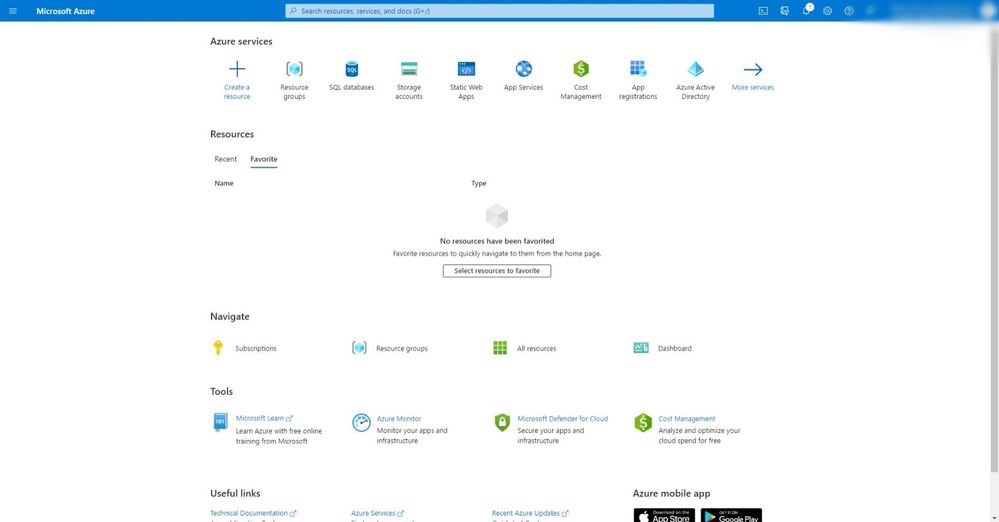
Provision and deploy Microsoft SQL on Azure


1.jpg


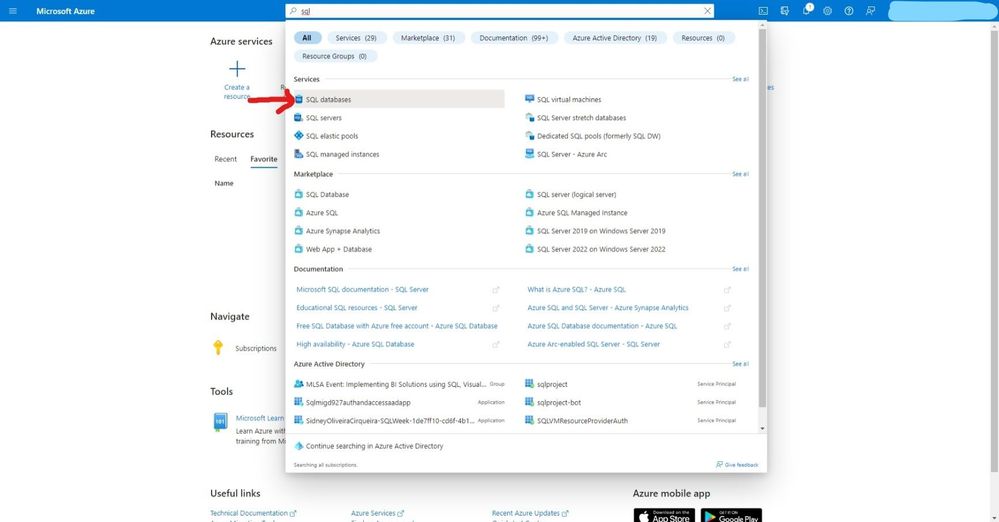
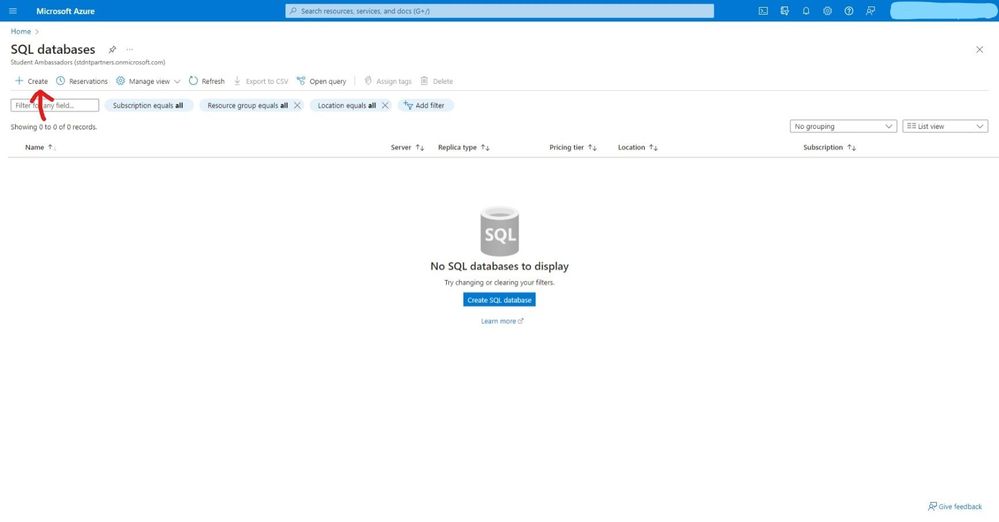
  • Search for SQL databases


Inked2.jpg


  • Click create to start provisioning your service.


Inked3.jpg


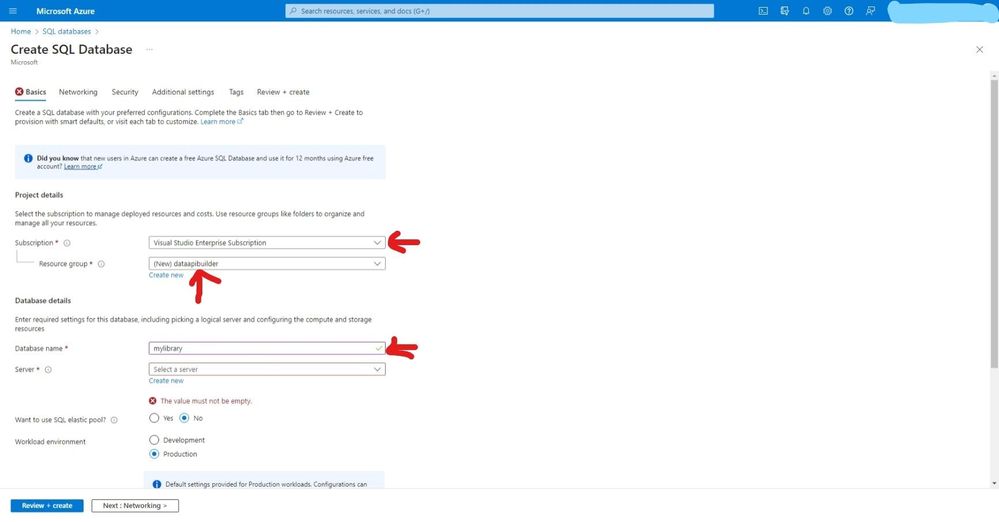
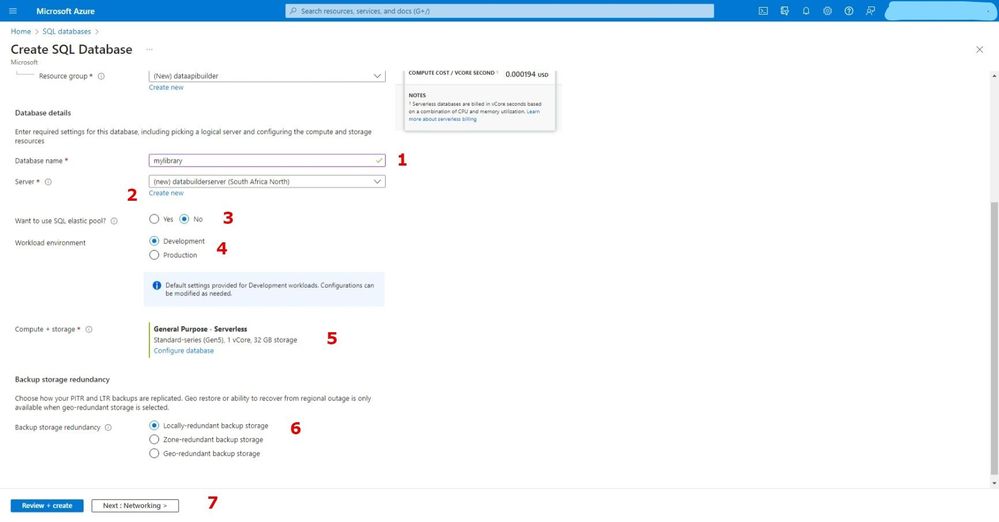
  • Select your subscription, create a resource group, enter a database name and select elastic pool no for this is just a demo project.


4.jpg


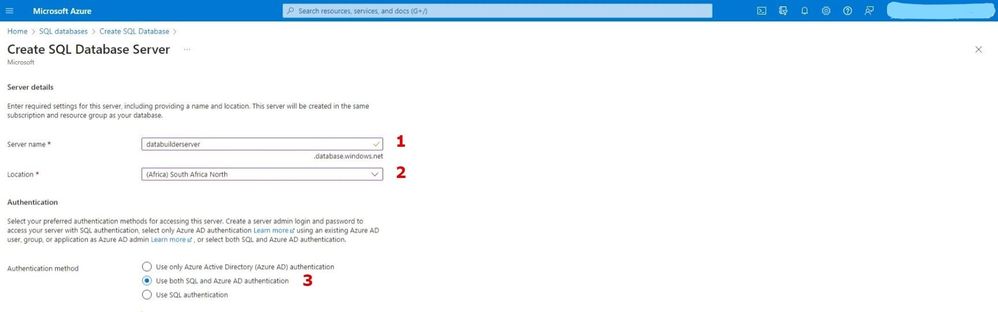
  • Create your SQL server and select a location.


Inked6.jpg


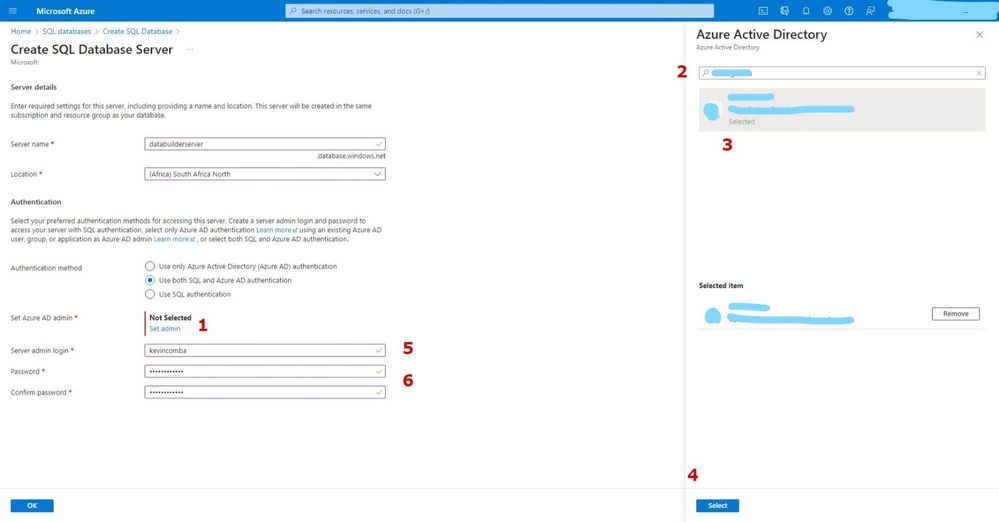
  • For authentication I have selected both SQL and Azure Active directory, but SQL alone is enough for authenticating this project. Add sever admin and password and keep the safe because we will need them later.


InkedInked5.jpg


  • After creating the SQL server, select locally – redundant backup for demo purposes.


Inked7.jpg


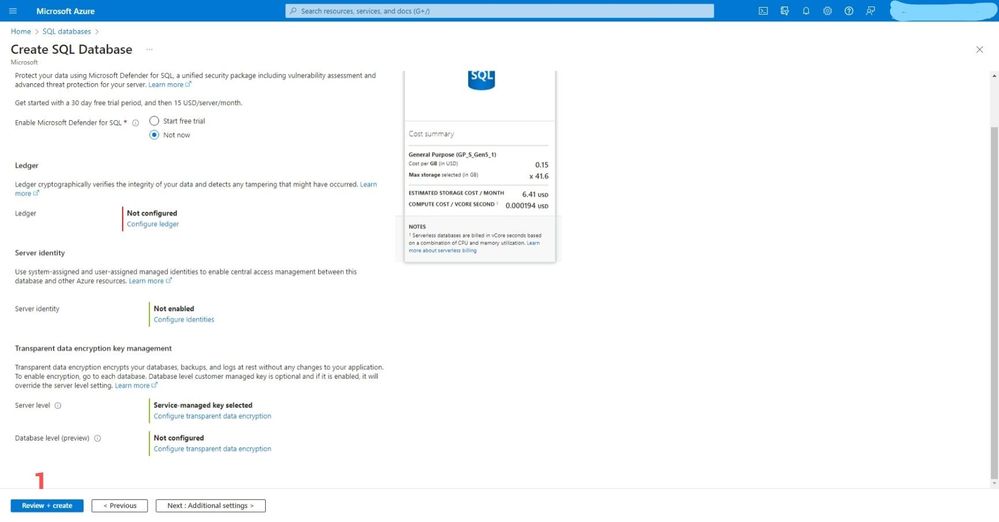
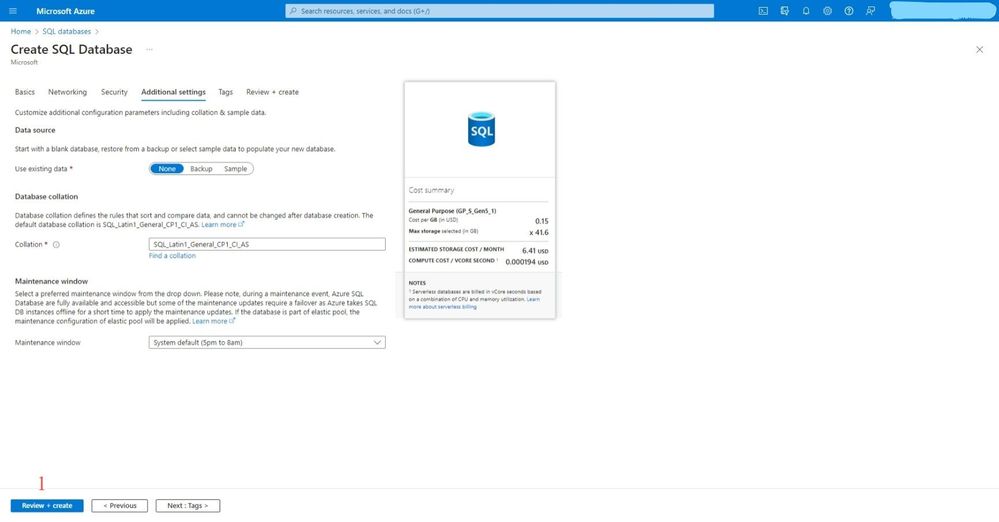
  • For these options, let’s go with the defaults.


Inked9.jpg


  • For these options, let’s go with the defaults.


Inked10.jpg


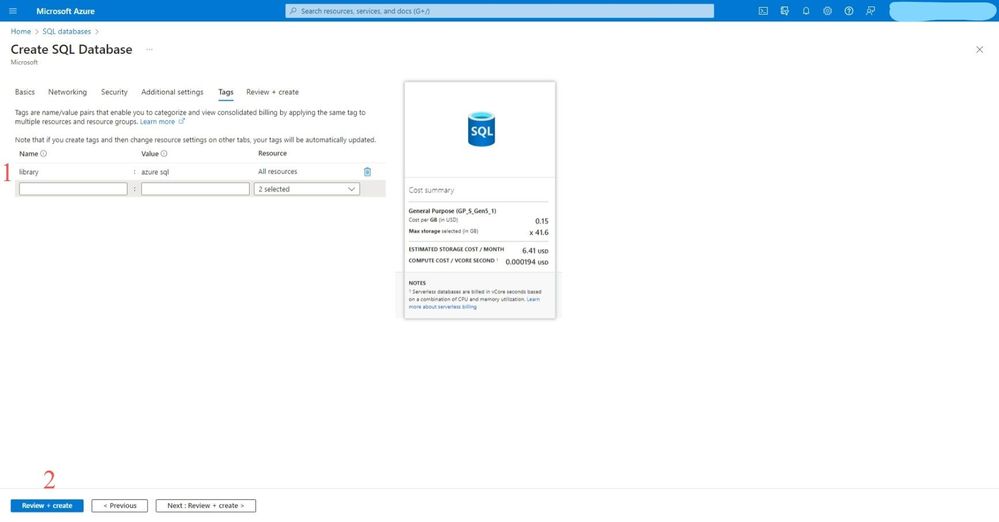
  • Create tags to identify your services on your resource group and create Review + create


Inked11.jpg


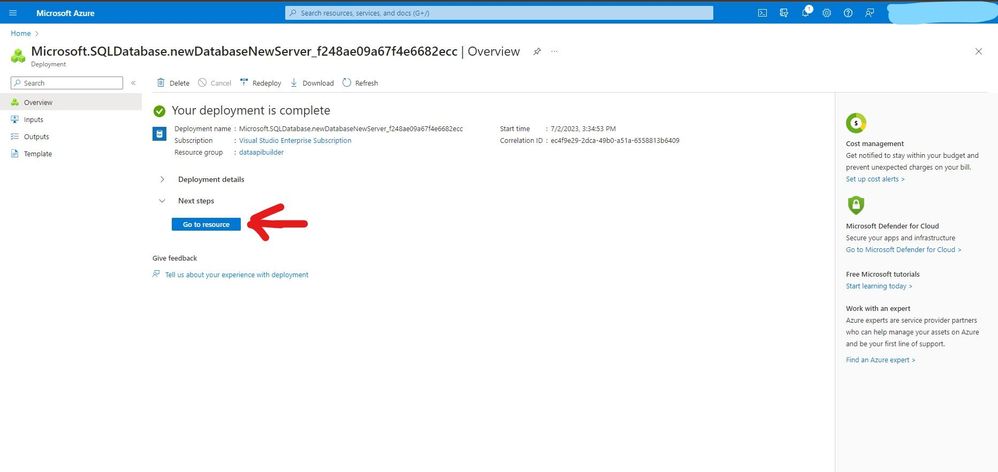
  • Click go to resources after deployment is complete


Inked13.jpg


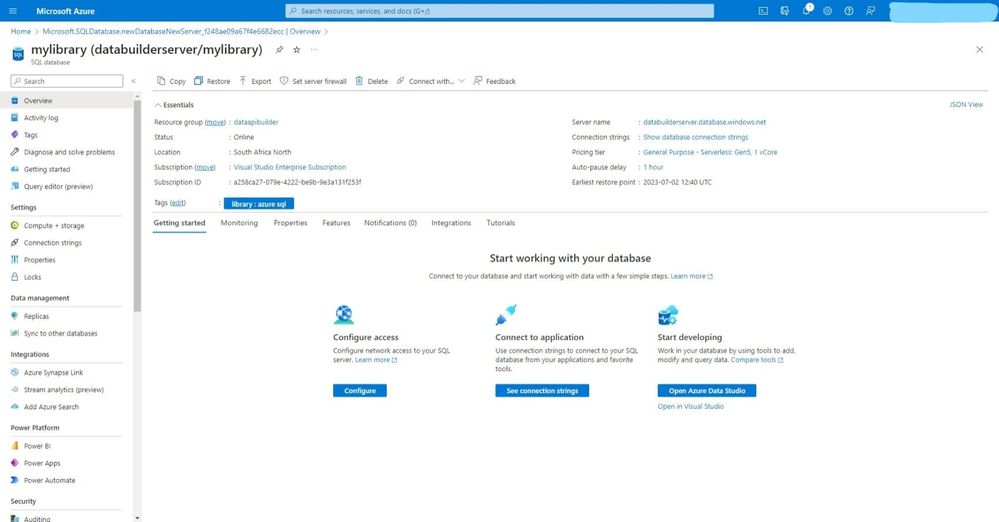
  • On the overview you will see all the essential details of our SQL Database and SQL Server.


Inked14.jpg


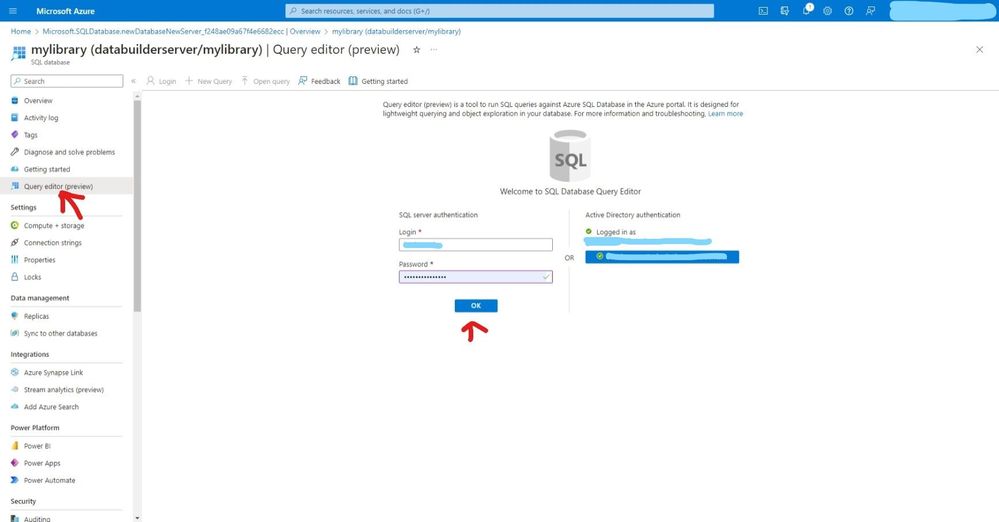
  • Click on the Query editor and sign in with either SQL Server auth or Azure Active Directory


Inked16.jpg


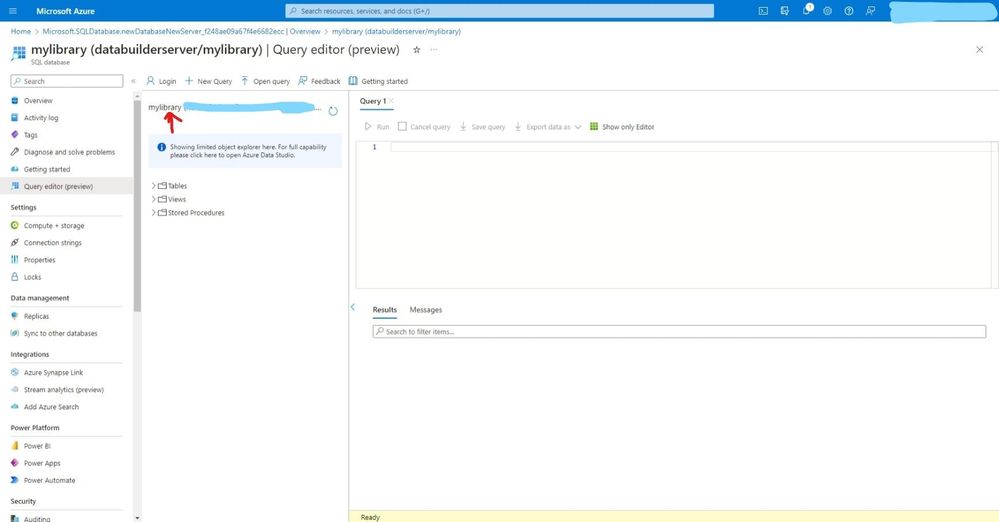
  • You can view your database name below


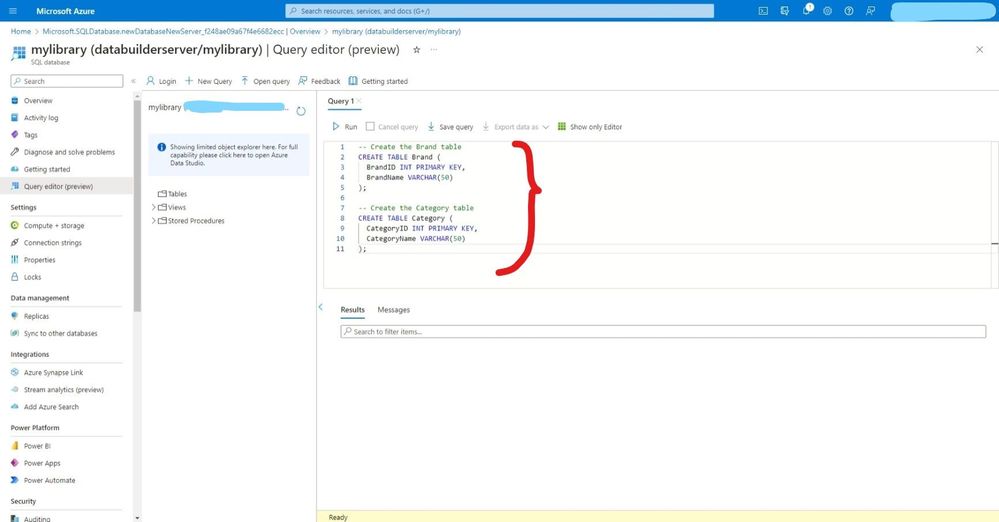
Inked17.jpg


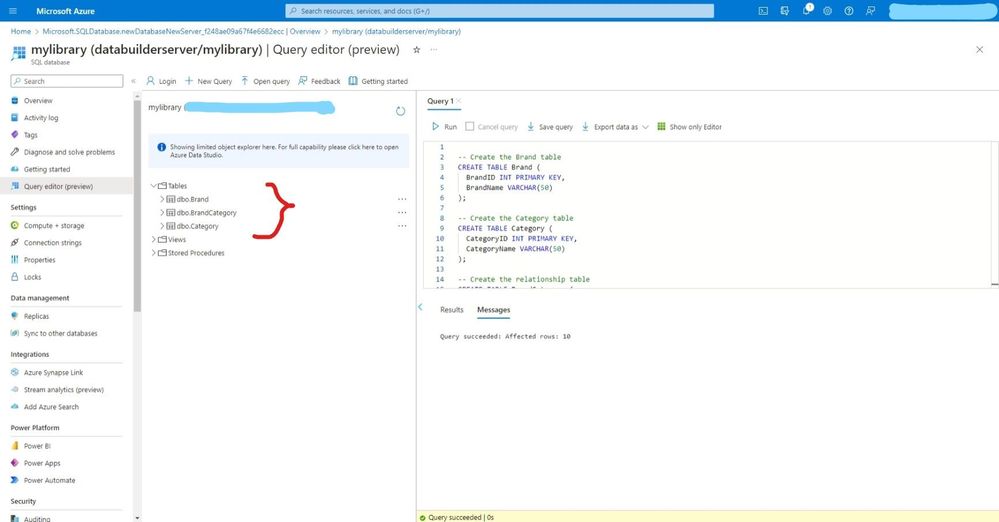
  • Click new query and add this code below to create two tables (Brand & Category) then click run to execute these queries.


Inked18.jpg


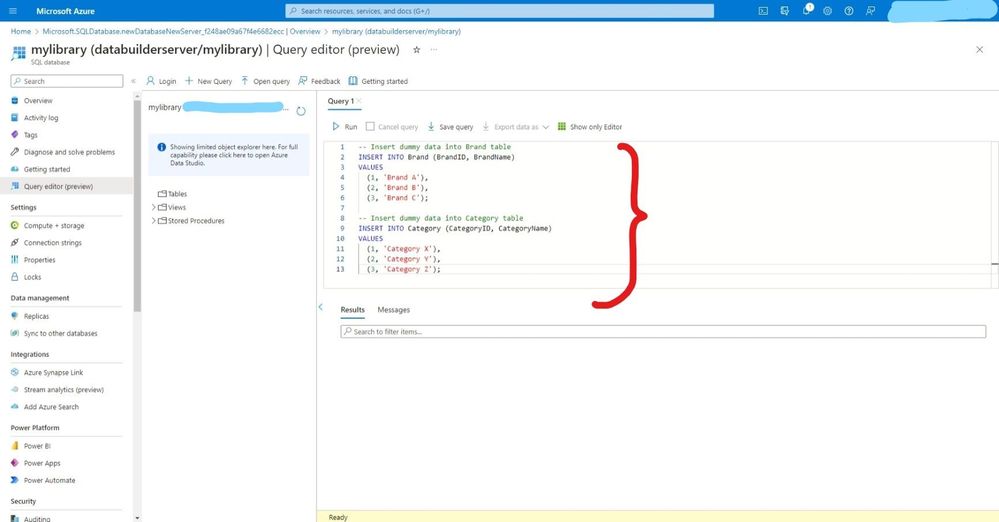
  • Add this insert statements to insert data in our database.


Inked20.jpg


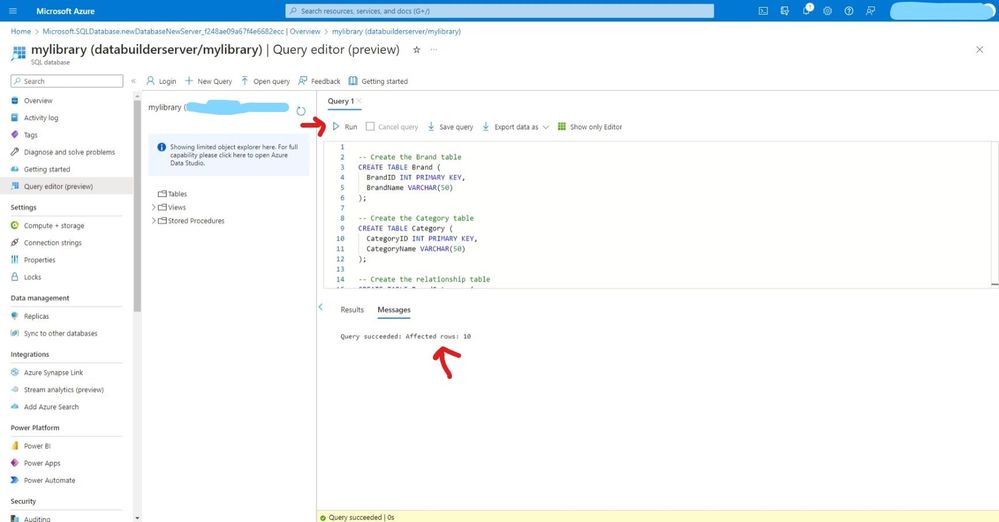
  • click run to execute and check the message below ‘query succeeded’.


Inked22.jpg


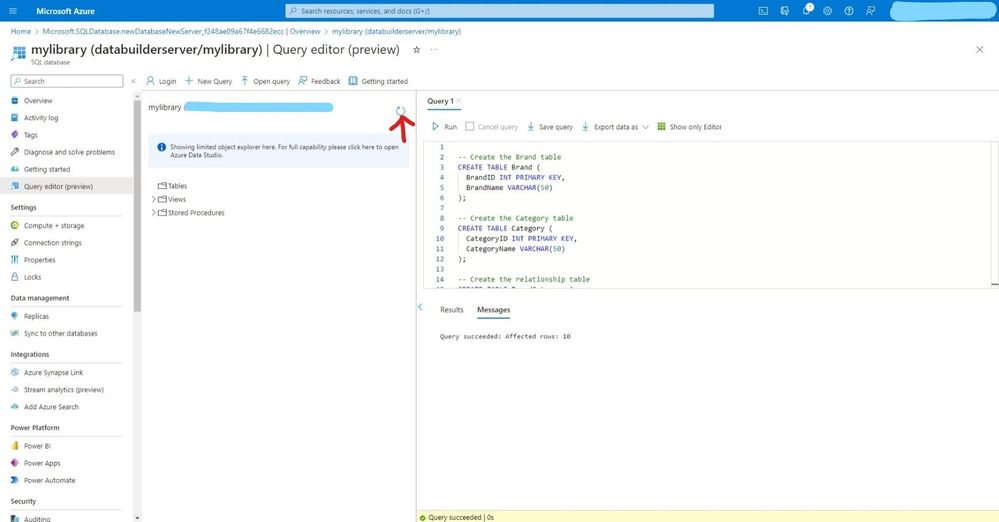
  • refresh to view the newly created tables.


Inked23.jpg


  • You can easily view tables available in our database


Inked24.jpg


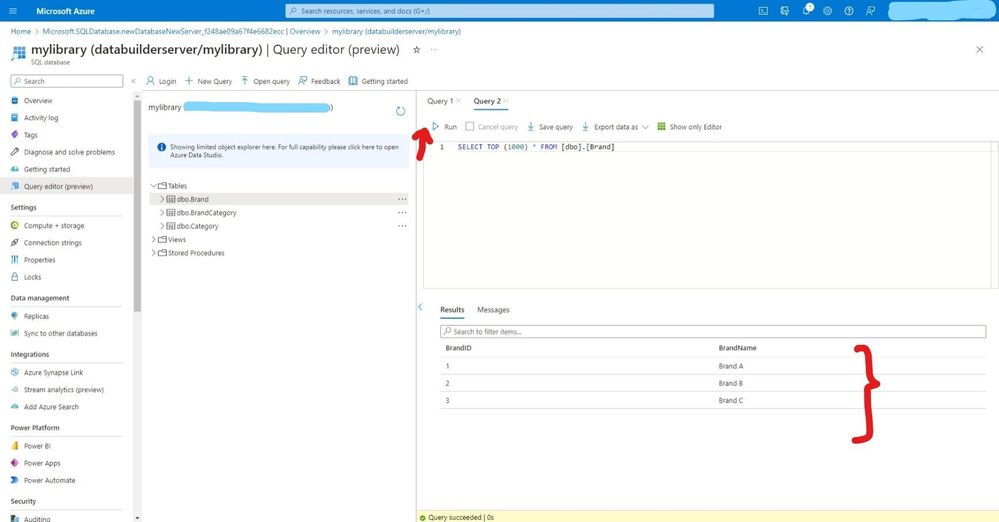
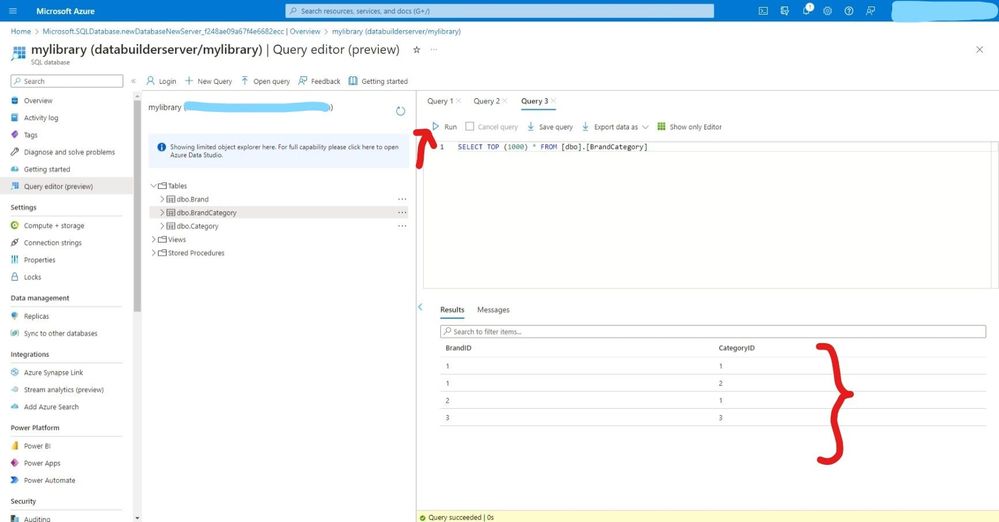
  • Run the below SQL Statement to confirm data inside our table.


Inked25.jpg


Inked26.jpg


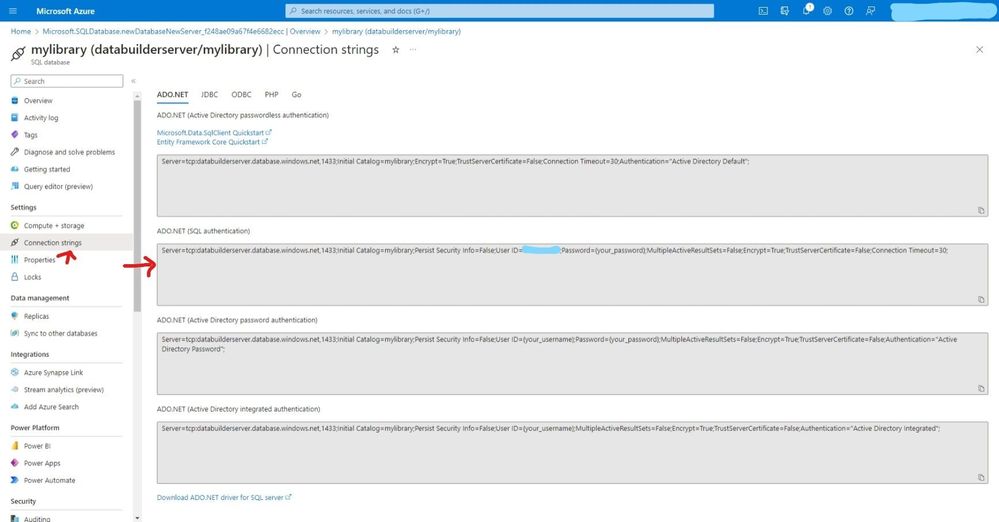
  • On the connection string copy ADO.NET(SQL authentication) we will use it late.(NB: do not expose your connection string with password, I will do so for demo purposes)


Inked28.jpg


Create a Data API builder.


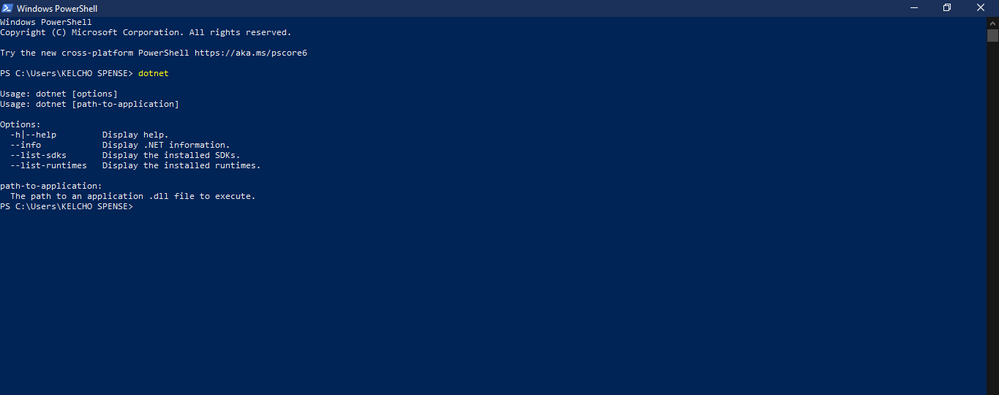
  • Back to our windows open windows PowerShell and type dotnet, if the below message doesn’t appear. Install .NET 6.0


kevin_comba_24-1688562888616.png


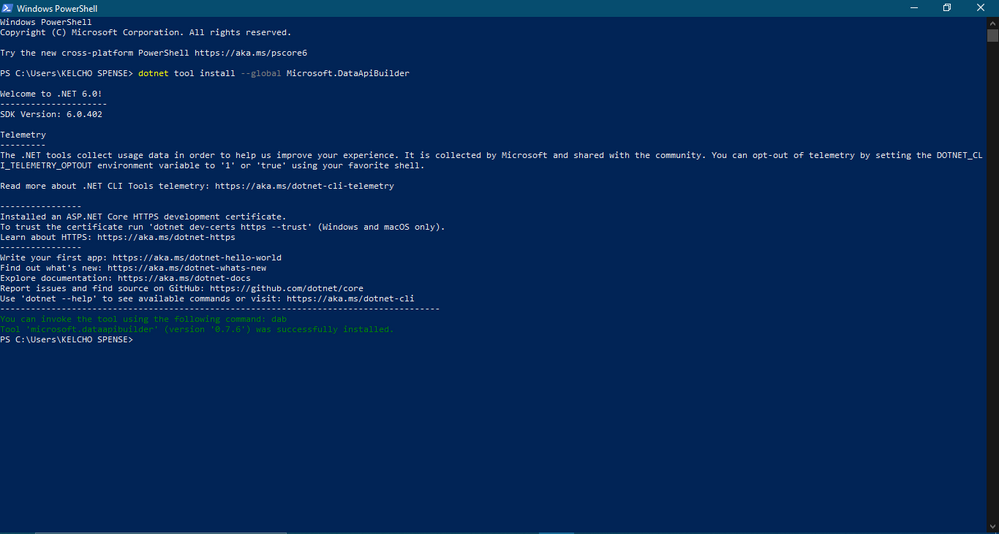
  • Run the below command to install Data API Builder locally.


kevin_comba_25-1688562888618.png


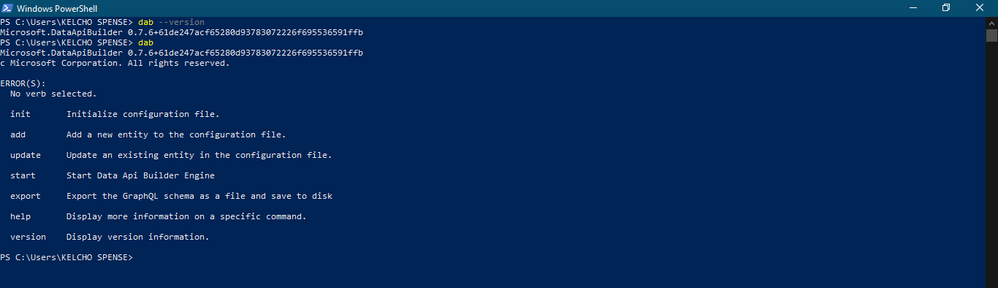
  • Confirm installation was successful by running the below command.


kevin_comba_26-1688562888619.png


Test our API with Thunder client & Insomnia


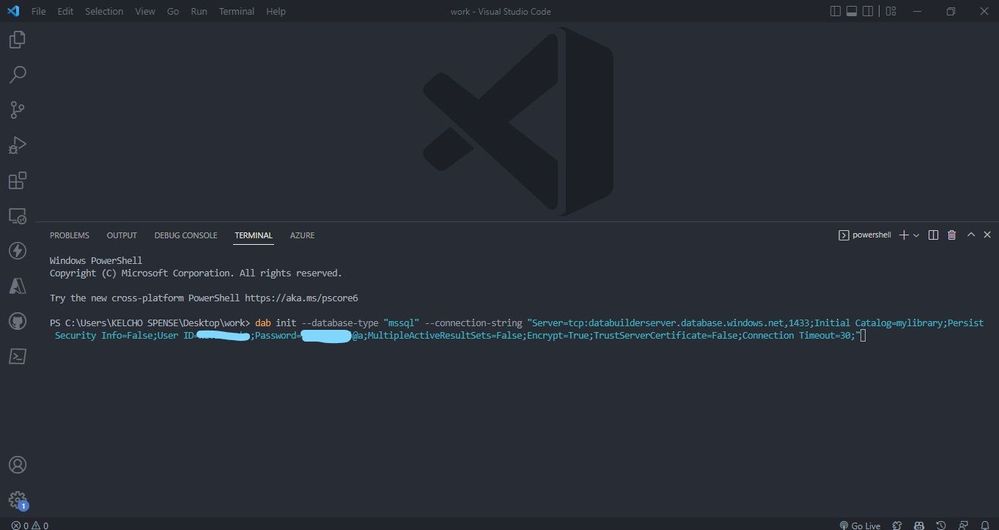
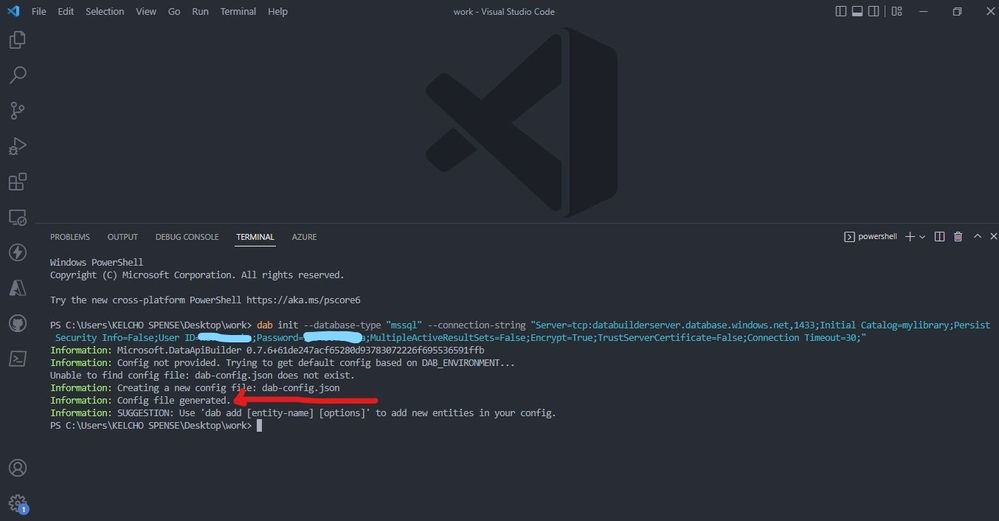
  • Open any folder you want to work on with VS Code then open your terminal. Run dab init –database-type “mssql” –connection-string “enter-your-connection-string-we-copied-in-the-above-steps”. Its good practice to use .env file on your root folder and call it on our connection string ie dab init –database-type “mssql” –connection-string “@env(‘my-connection-string’)”


Inked32.jpg


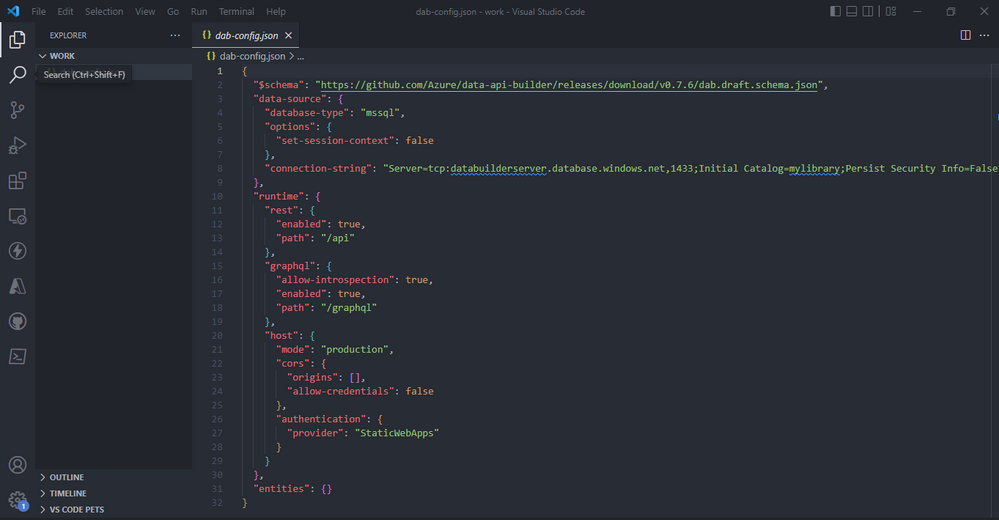
  • The command generates a config file called dab-config.json looking like this:


Inked33.jpg


  • Data-source will directly enable us to specify the database we are using and connection-string.The runtime will specify that our Data API will be consumed by both Rest endpoint is made available at the path `/api/` and GraphQL endpoint is available at `/graphql`. Under host we specify the mode of our data API either production or development, cors enables us to set origins example if yourdormain.com is your client app which will be sending request to your API you should add it under origins. Under authentication you can specify how you want to be authenticated.


kevin_comba_29-1688563499583.png


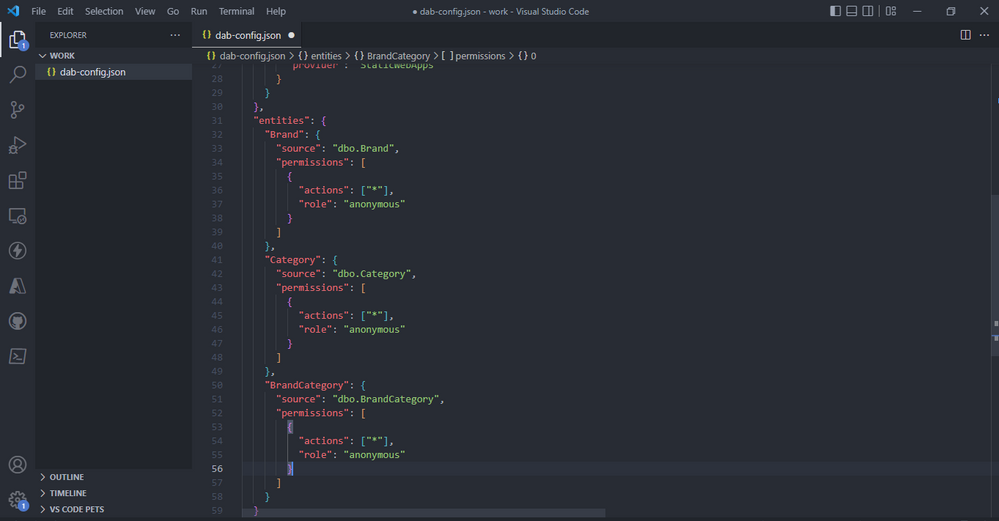
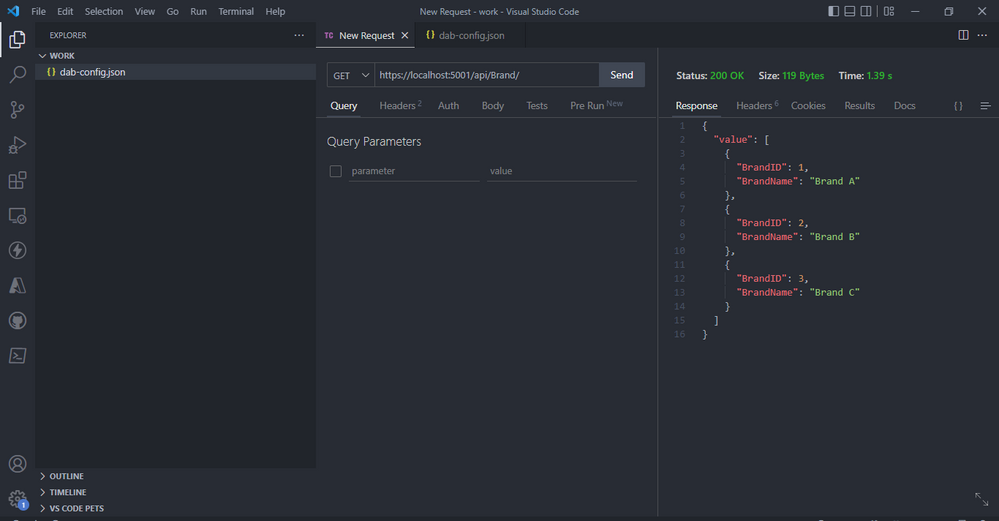
  • Add the below code for the brand category entities. This entities maps directly to your tables on Azure SQL database, wo do this by specifying the source. Permissions lets use specify the actions, “*” means all operations Create Edit Read Delete are enabled. With role you can assign people roles to do this actions above, anonymous will let anyone do all the actions.


kevin_comba_30-1688563499587.png


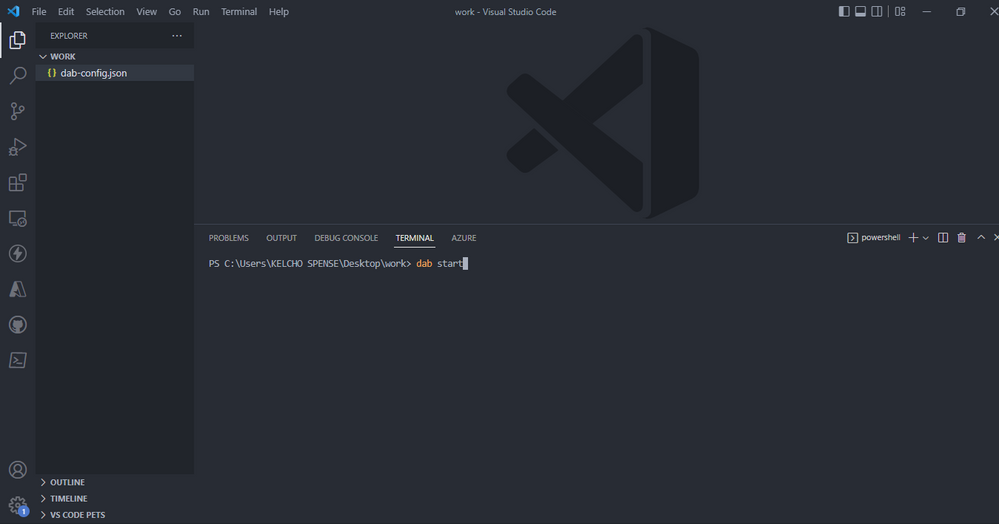
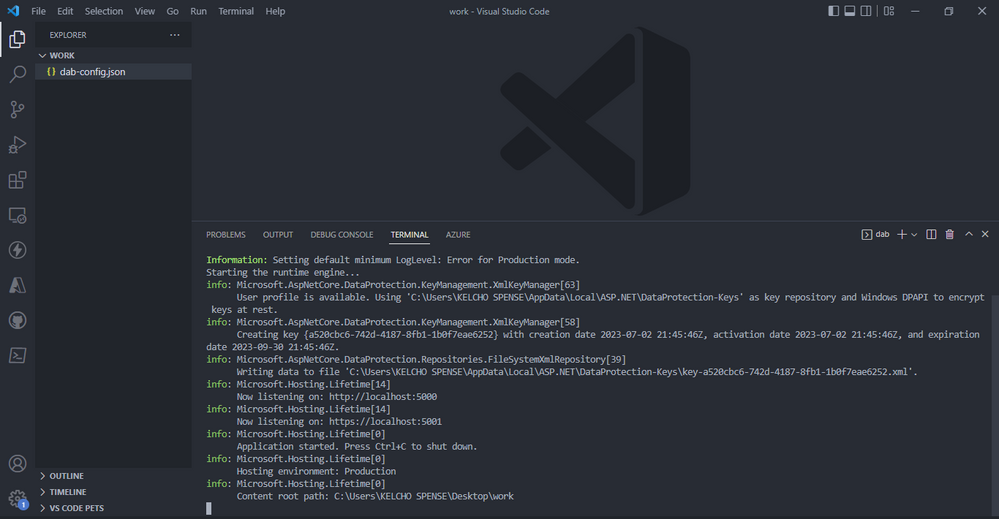
  • To start run the code below.


kevin_comba_31-1688563499589.png


kevin_comba_32-1688563499593.png


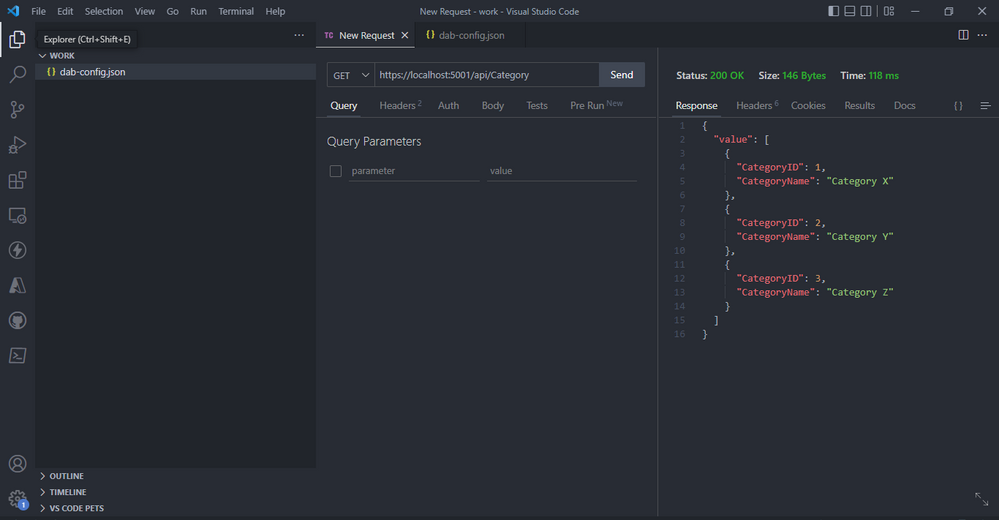
  • launch your Thunder client VS code extension( if on windows use CTRL + SHIFT + R). create a new request, select GET and https://localhost:5001/api/category. Click send and you should get a response from our deployed Azure SQL database.


kevin_comba_33-1688563499596.png


kevin_comba_34-1688563499598.png


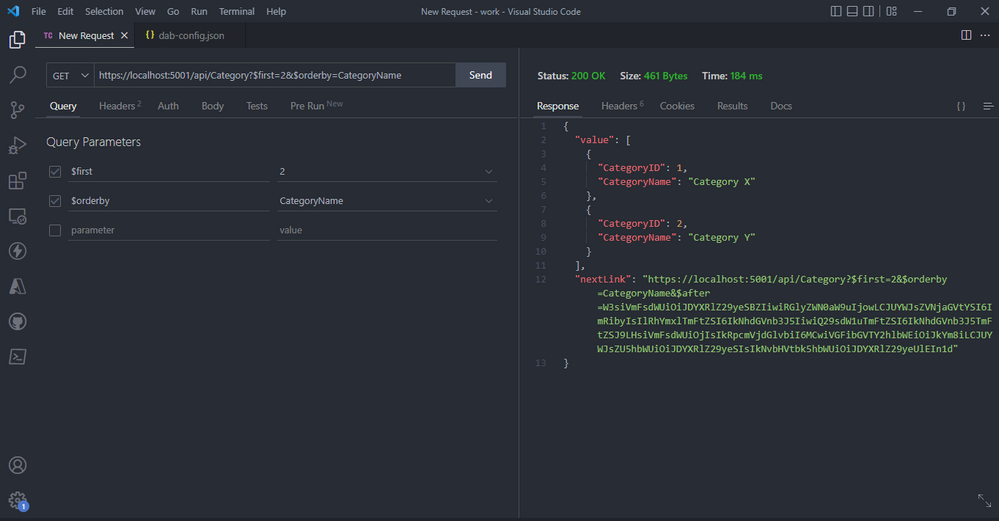
  • The GET verb also supports several query parameters (also case sensitive) that allow you to manipulate and refine the requested data:

    • $orderby: return items in the specified order

    • $first: the top n items to return

    • $filter: expression to filter the returned items

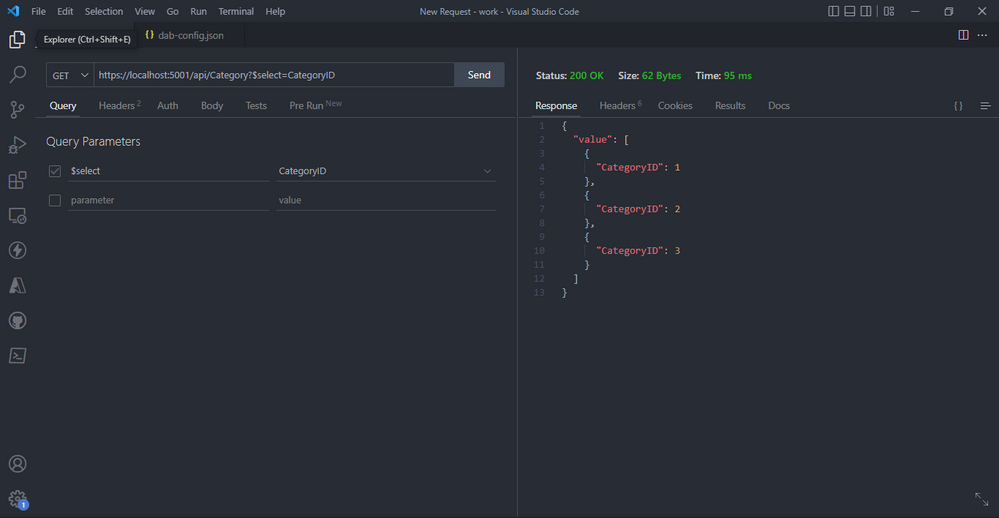
    • $select: list of field names to be returned


kevin_comba_35-1688563499602.png


  • The query parameters select will Only select CategoryID field after you click send.


kevin_comba_36-1688563499604.png


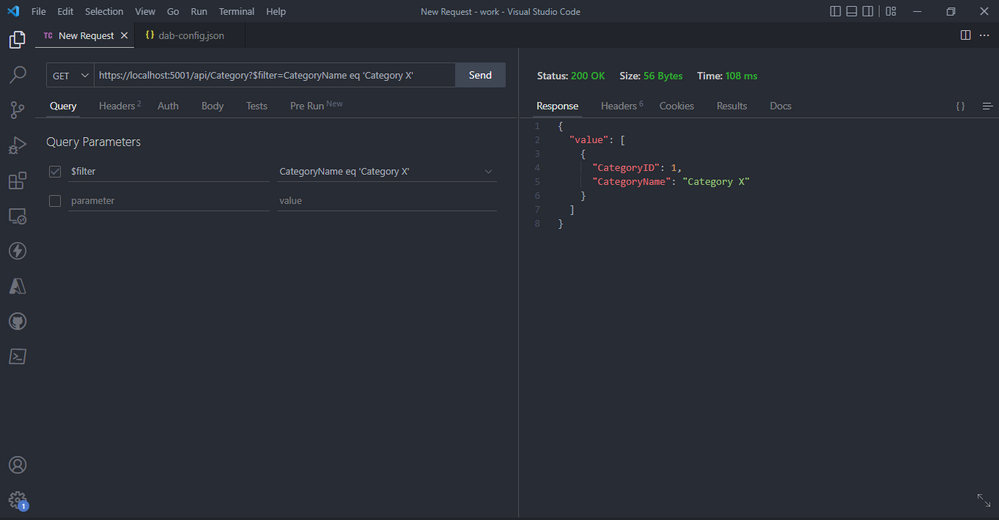
  • The query parameters `filter` and `eq` will return CategoryName equal to Category x after you click send.


kevin_comba_37-1688563499606.png


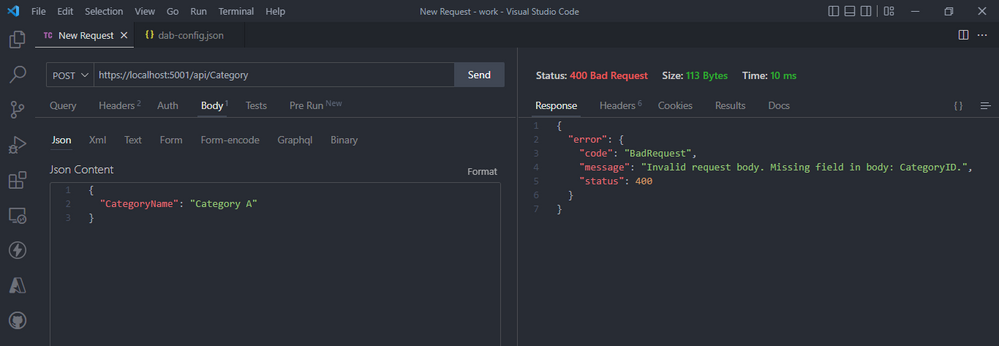
  • Data API offers validations, example you can’t just send categoryName as the only field because our table requires both categoryName and categoryID. An error will be returned.


kevin_comba_38-1688563499608.png


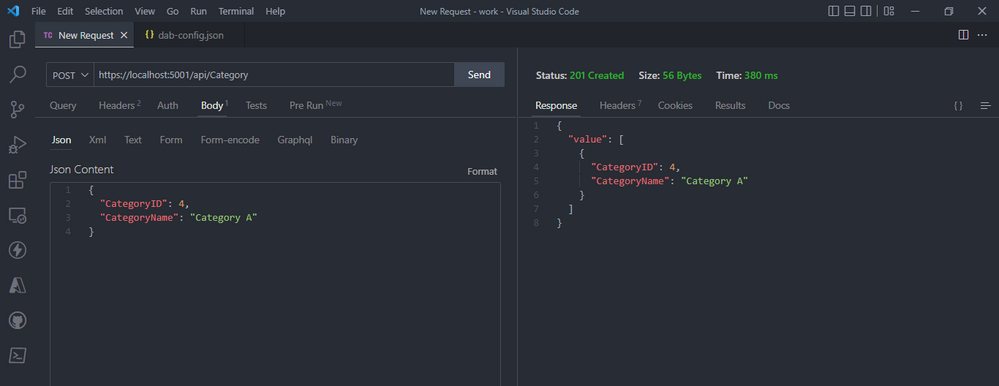
  • REST Endpoint POST: create a new category after you add the json object below with that data and  click send.


kevin_comba_39-1688563499612.png


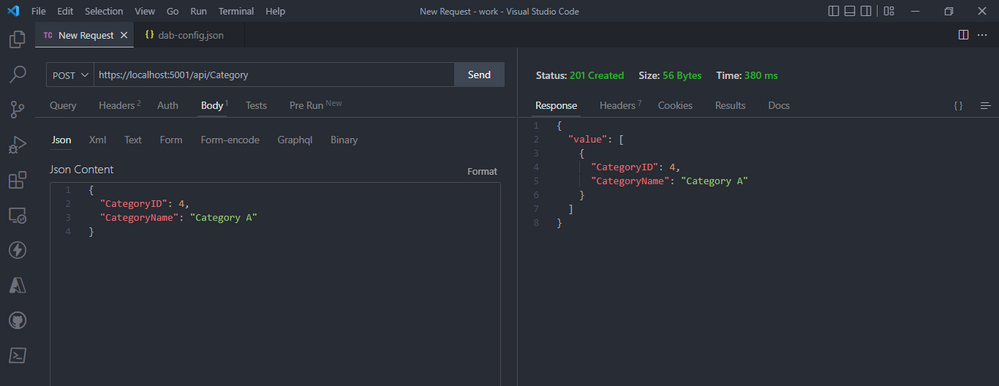
  • REST Endpoint POST: create a new category after you add the json object below with that data and  click send.


kevin_comba_40-1688563499614.png


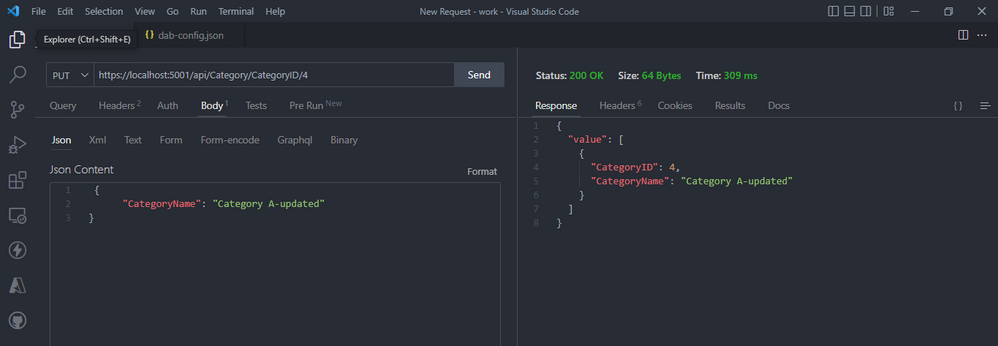
  • REST Endpoint PUT: will update a category after you add the json object below with that data and  click send.


kevin_comba_41-1688563499617.png


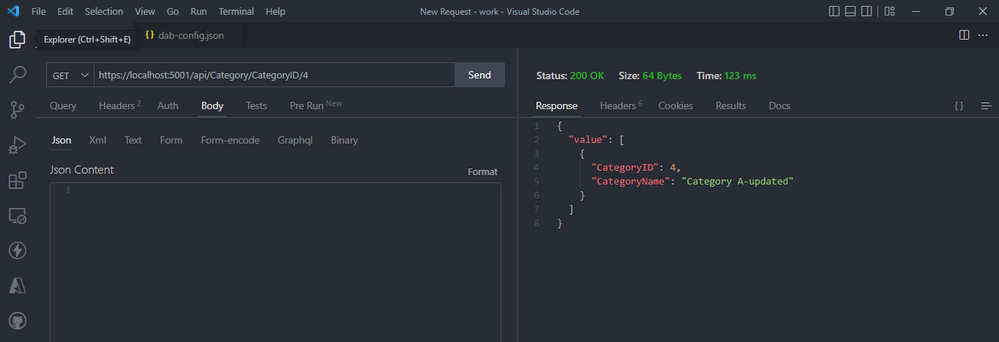
  • Whenever you need to access a single item, you can get the item you want through a GET request by specifying its primary key example CategoryID


kevin_comba_42-1688563499620.png


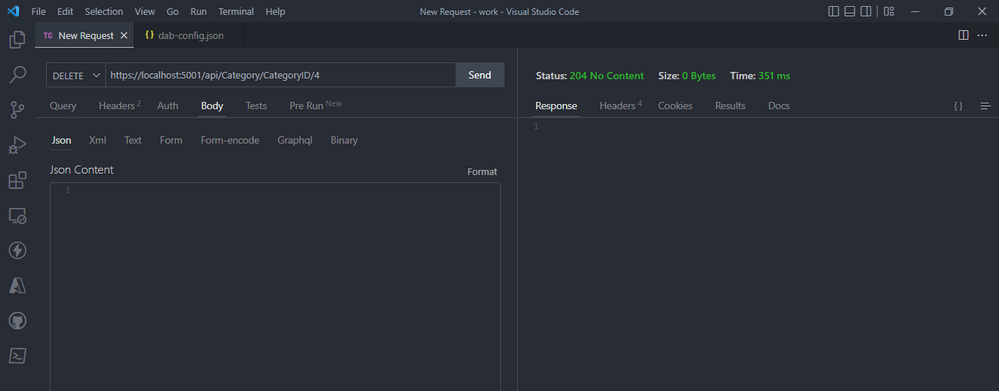
  • To delete a record by specifying its primary key example CategoryID and set the HTPP request to delete, and click send.


kevin_comba_43-1688563499621.png


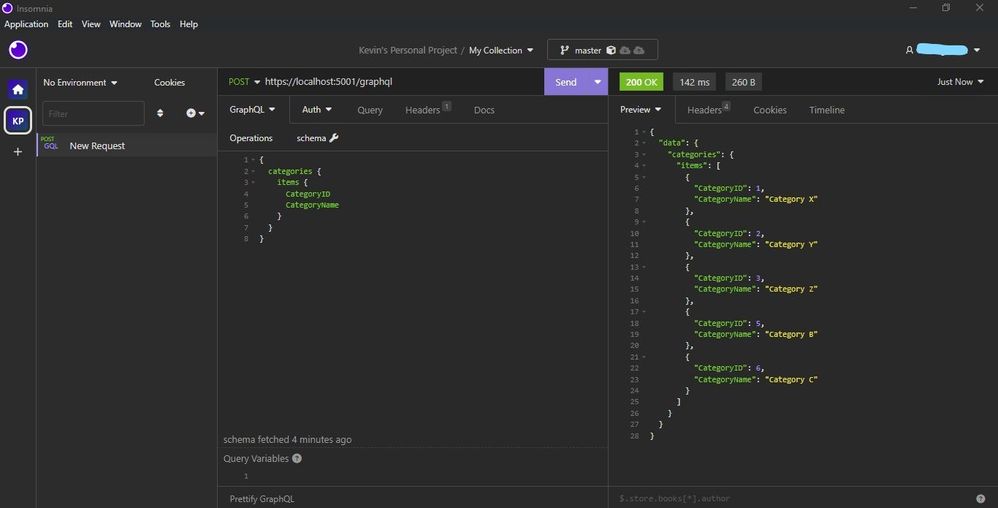
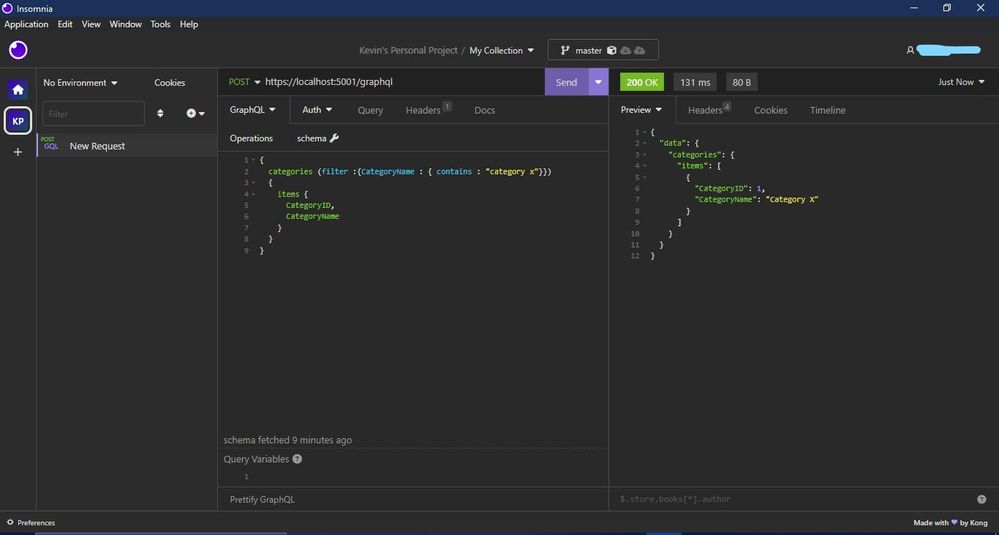
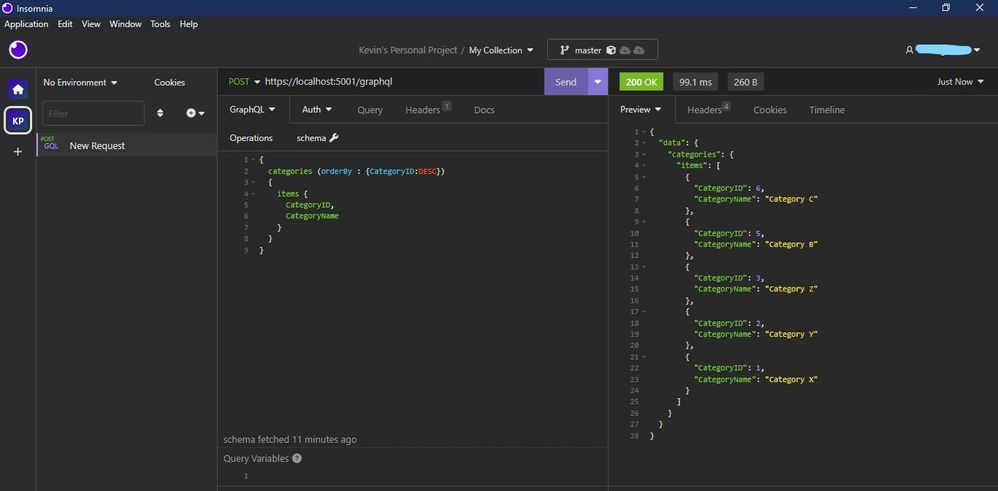
  • GraphQL endpoint is available at `/graphql`, set the HTPP request to post and provide the schema below and click send. For this example we need REST client like Postman or Insomnia to query. I have used Insomnia.


Inked50.jpg


  • This is how we filter using the filter method.


Inked51.jpg


  • This is how we orderBy descending or ascending.


Inked52.jpg


Link our Azure SQL DB via Data API Builder to our simple HTML Page to view our Data.


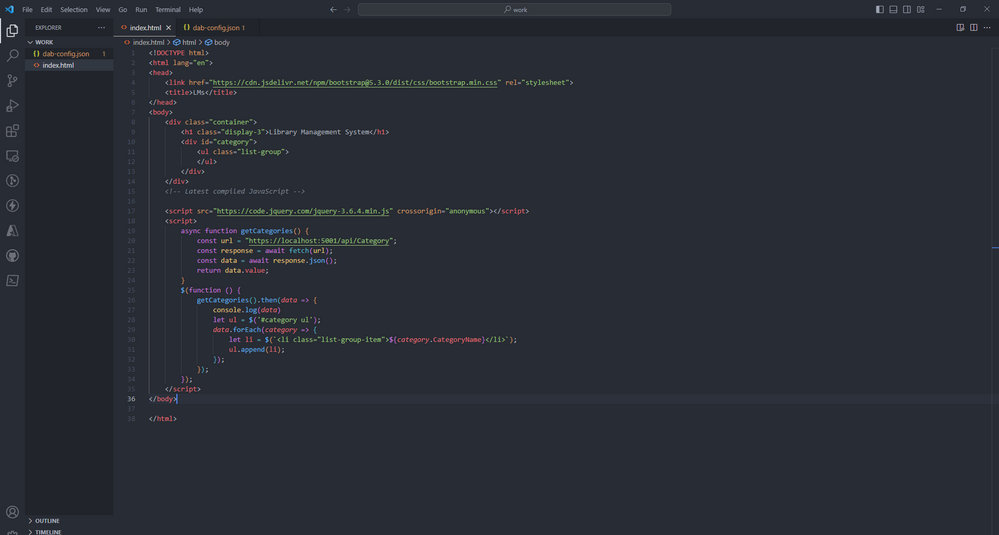
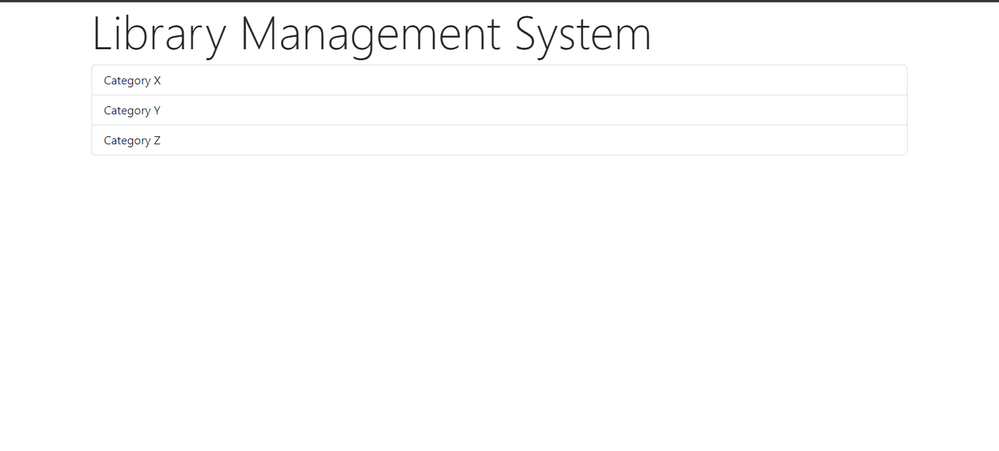
 For this demo am using a simple html page with jQuery and bootstrap. is helping me to make the HTTP request to our API server using fetch, get the response and append it to our html page dynamically.


  • Step one – add this code in index.html. and right click on the code to open with live server. Copy the URL displayed after the html page loads.


kevin_comba_47-1688563499636.png


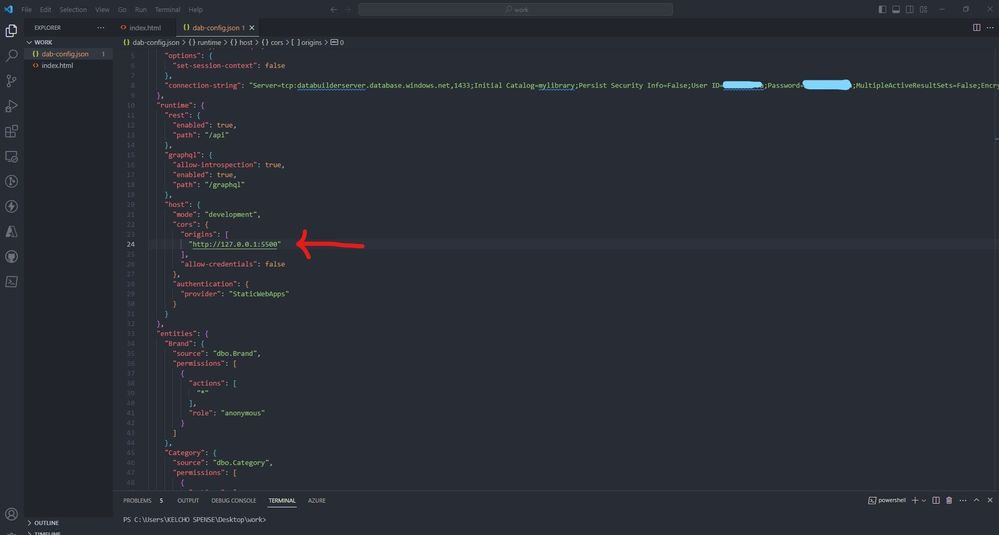
  • Step two – Paste the URL below on the dab-config.json on origins. Save your code. On your terminal `CTRL + C` to terminate the  Data API server and start it again using `dab start`.


Inked54.jpg


  • There you go it, successfully connected your static web app with Data API builder for Azure Databases engine.


kevin_comba_49-1688563499646.png


Read more:


Maratona de Inteligência Artificial: aulas ao vivo e trilha de estudos gratuita

Maratona de Inteligência Artificial: aulas ao vivo e trilha de estudos gratuita

This article is contributed. See the original author and article here.


A Inteligência Artificial está cada dia mais presente em nosso dia a dia. Segundo o Relatório do Futuro do Trabalho publicado pelo Fórum Econômico Mundial, as habilidades em IA representem a terceira maior prioridade para as estratégias de treinamento das empresas, ao lado do pensamento analítico e criativo.


Para te ajudar a obter novos conhecimentos, teremos a Maratona #AISkills, uma imersão gratuita e online, destinada para pessoas que querem aprender a usar a IA na prática, abordando temas como Ética na IA, Prompt Engineering, GitHub Copilot, Análise de Dados, Machine Learning, Azure OpenAI e muito mais. 


Captura de tela 2023-07-06 124352.jpg


18 de Julho, 12:30h


Palestrante:


Danielle Monteiro


Princípios do Microsoft Responsible AI na prática
IA responsável é a aplicação de princípios éticos e sociais na criação, desenvolvimento e uso de tecnologias de Inteligência Artificial (IA). Estes princípios ajudam a garantir que os sistemas de IA sejam usados de forma responsável e segura, ao mesmo tempo em que ajudam a proteger os direitos humanos.


19 de Julho, 12:30h


Palestrante:


Henrique Eduardo Souza


Ganhe produtividade com Prompt Engineering
Prompt engineering é a prática de fornecer instruções específicas a um modelo de IA para produzir os resultados desejados. Do Chat GPT ao GitHub Copilot, você aprenderá a escrever prompts eficientes para gerar textos e até mesmo, linhas de código.

01 de Agosto, 12:30h


Palestrante:


Cynthia Zanoni


Como criar um jogo de pedra, papel e tesoura com o GitHub Copilot
O GitHub Copilot está transformando a produtividade e a jornada de aprendizado de pessoas desenvolvedoras. Nesta palestra, vamos explorar o Codespaces e o GitHub Copilot para criar um jogo de pedra, papel e tesoura!

03 de Agosto, 12:30h


Palestrante: 


Livia Regina Bijelli Ferreira


Microsoft Fabric: análise de dados para a era da IA
O mundo de hoje está inundado de dados — sempre em fluxo dos dispositivos que usamos, dos aplicativos que construímos e das interações que temos. O Microsoft Fabric é uma plataforma de análise unificada de ponta a ponta que reúne todos os dados e ferramentas de análise de que as organizações precisam. O Fabric integra tecnologias como Azure Data Factory, Azure Synapse Analytics e Power BI em um único produto unificado, capacitando dados e profissionais de negócios a liberar o potencial de seus dados e estabelecer as bases para a era da IA.

15 de Agosto, 12:30h


Palestrante:


Pablo Lopes


Criando um assistente com o Azure OpenAI Service
Crie um assistente natural com o Azure OpenAI, faça notas, pegue os pontos mais importantes e feedback sobre as ideias como especialista.


16 de Agosto, 19h


Palestrante:


Beatriz Matsui


Introdução a MLOps: Conceitos e Prática
O machine learning está no núcleo da inteligência artificial, e muitos aplicativos e serviços modernos dependem de modelos de machine learning preditivos. Nesta sessão vamos falar sobre conceitos de MLOps (Machine Learning Operations) e como trabalhar com tais práticas usando ferramentas de DevOps e aprendizado de máquina da Microsoft.


Captura de tela 2022-10-24 201024.jpg


O Cloud Skills Challenge é uma plataforma integrada com o Microsoft Learn, portal global de cursos gratuitos da Microsoft, disponível 24 horas por dia, 7 dias por semana. Além de assistir as aulas gratuitas da Maratona #AISkills, você pode participar do nosso grupo de estudos de Inteligência Artificial, basta realizar a sua inscrição no Cloud Skills Challenge.


Depois de concluir um desafio, você receberá um selo do Microsoft Learn AI Skills Challenge e um certificado de conclusãoNa Maratona #AISKills, temos 4 trilhas de desafio de estudos. Você pode escolher uma ou mais trilhas!


Desafio de Machine Learning


O aprendizado de máquina está no centro da inteligência artificial, e muitos serviços modernos dependem de modelos preditivos de aprendizado de máquina. Saiba como usar o Aprendizado de Máquina do Azure para criar e publicar modelos sem escrever código. Você também explorará as várias ferramentas de desenvolvedor que pode usar para interagir com o espaço de trabalho.


Desafio dos Serviços Cognitivos


Os Serviços Cognitivos do Azure são blocos de construção da funcionalidade de IA que podem ser integrados em aplicativos. Você aprenderá a provisionar, proteger e implantar serviços cognitivos. Usando essa ferramenta, você pode criar soluções inteligentes que extraem significado semântico do texto e oferecem suporte a cenários comuns de visão computacional.


Desafio de operações de aprendizado de máquina (MLOps)


As operações de aprendizado de máquina (MLOps) aplicam princípios de DevOps a projetos de aprendizado de máquina. Você aprenderá a implementar conceitos chave, como controle de origem, automação e CI/CD para criar uma solução MLOps de ponta a ponta enquanto usa Python para treinar, salvar e usar um modelo de aprendizado de máquina.


Desafio do Construtor de IA


Este desafio apresenta o AI Builder, ensina como criar modelos e explica como você pode usá-los no Power Apps e no Power Automate. Você aprenderá a criar tópicos, entidades personalizadas e variáveis para capturar, extrair e armazenar informações em um bot.


Os desafios começam dia de 17 de Julho e se quiser antecipar sua inscrição, acesse a página do Cloud Skills Challenge.


:stareyes:  BÔNUS  :stareyes:


Benefícios gratuitos para estudantes


Tutoriais do GitHub para iniciantes em programação


Quero trazer um destaque para estes recursos, pois todos os tutoriais foram traduzidos para Português com a ajuda de nossa comunidade Microsoft Learn Student Amabassadors. Então, acesse os tutoriais e não esqueça de deixar uma estrelinha!


Cursos no Microsoft Learn com certificado