This article is contributed. See the original author and article here.
Since first announcing new AI-powered experiences for Microsoft Viva Sales last month, we’ve given these capabilities a nameCopilot in Viva Salesand introduced new sales scenarios and updates.
All of this is happening in conjunction with the introduction of Dynamics 365 Copilotthe world’s-first AI copilot in both customer relationship management (CRM) platforms and finance applications enterprise resource planning (ERP). To date, tens of thousands of customers have used next-generation AI capabilities in Dynamics 365 Copilot and within Microsoft Power Platform.
Today’s debut of Microsoft 365 Copilot powers even more ways to unleash creativity, unlock productivity, and uplevel skills. For sellers, the seamless integration of Copilot across Microsoft 365 and Viva Sales (as well as AI-powered capabilities in Microsoft Dynamics 365 Sales) is a powerful combination. It’s a new way to engage prospects and customers, all while freeing up time previously tied up in “busy work”like composing every email from scratch.
As we move into a new era for customer experience, we want to ensure that salespeople feel empowered to focus on what matters, which is deeper engagements with customers. Let’s take a closer look at some of the Copilot capabilities in Viva Sales that make this possible.
Try Viva Sales Today
Use Viva Sales to help sellers be more efficient, productive, and effective.
Copilot in Viva Sales automated email replies is now generally available
With Copilot in Viva Sales, AI-generated email replies have now moved from preview into general availability, with more features and enhancements built into the generated response. Here are some of the new additions we’ve made:
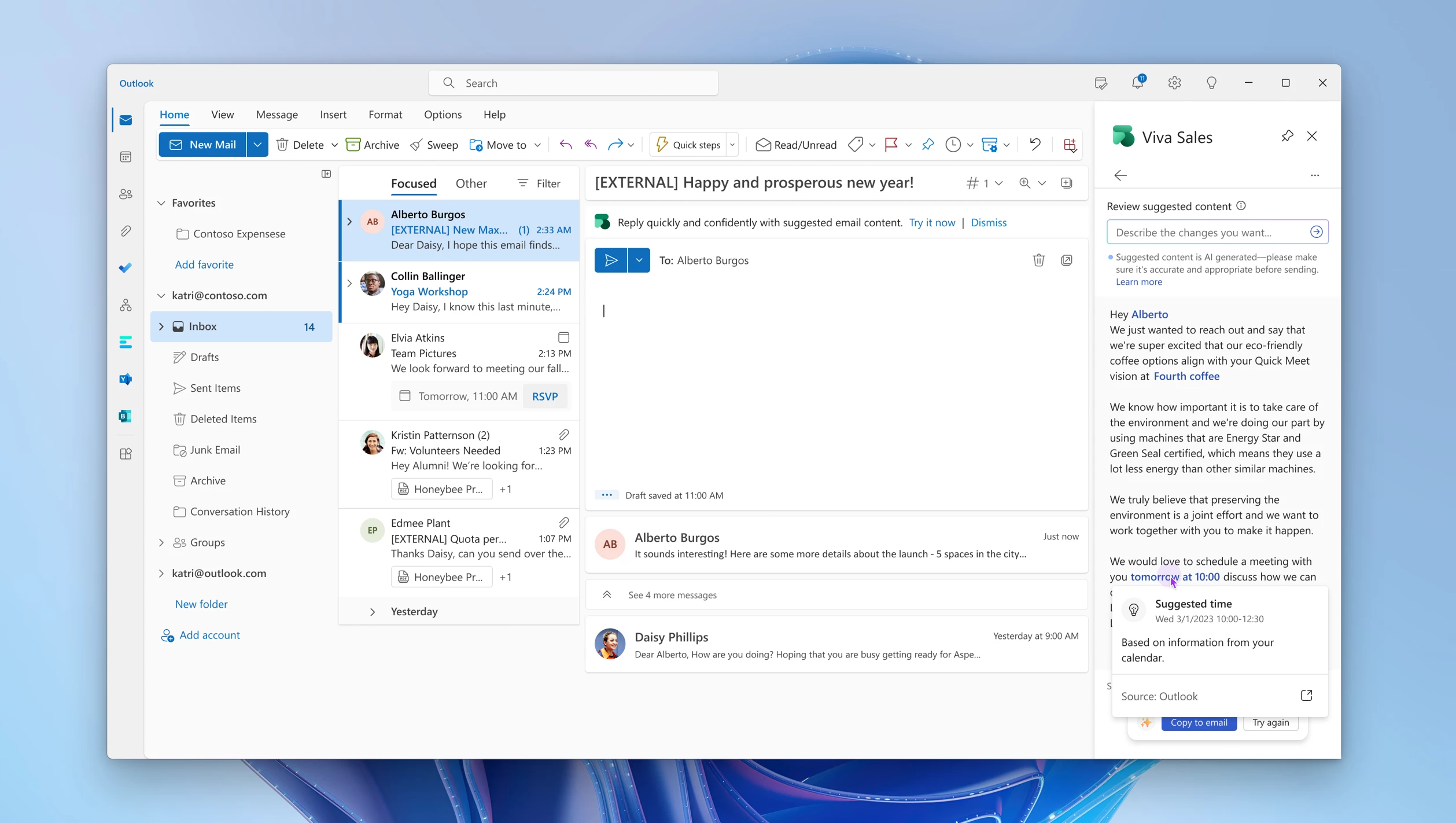
Generate replies with proposed meeting times: Sellers can now generate email replies with proposed meeting times based on their calendar availability in Outlook, making it easier to schedule customer meetings and simplifying the process for finding a time that works for everyone.
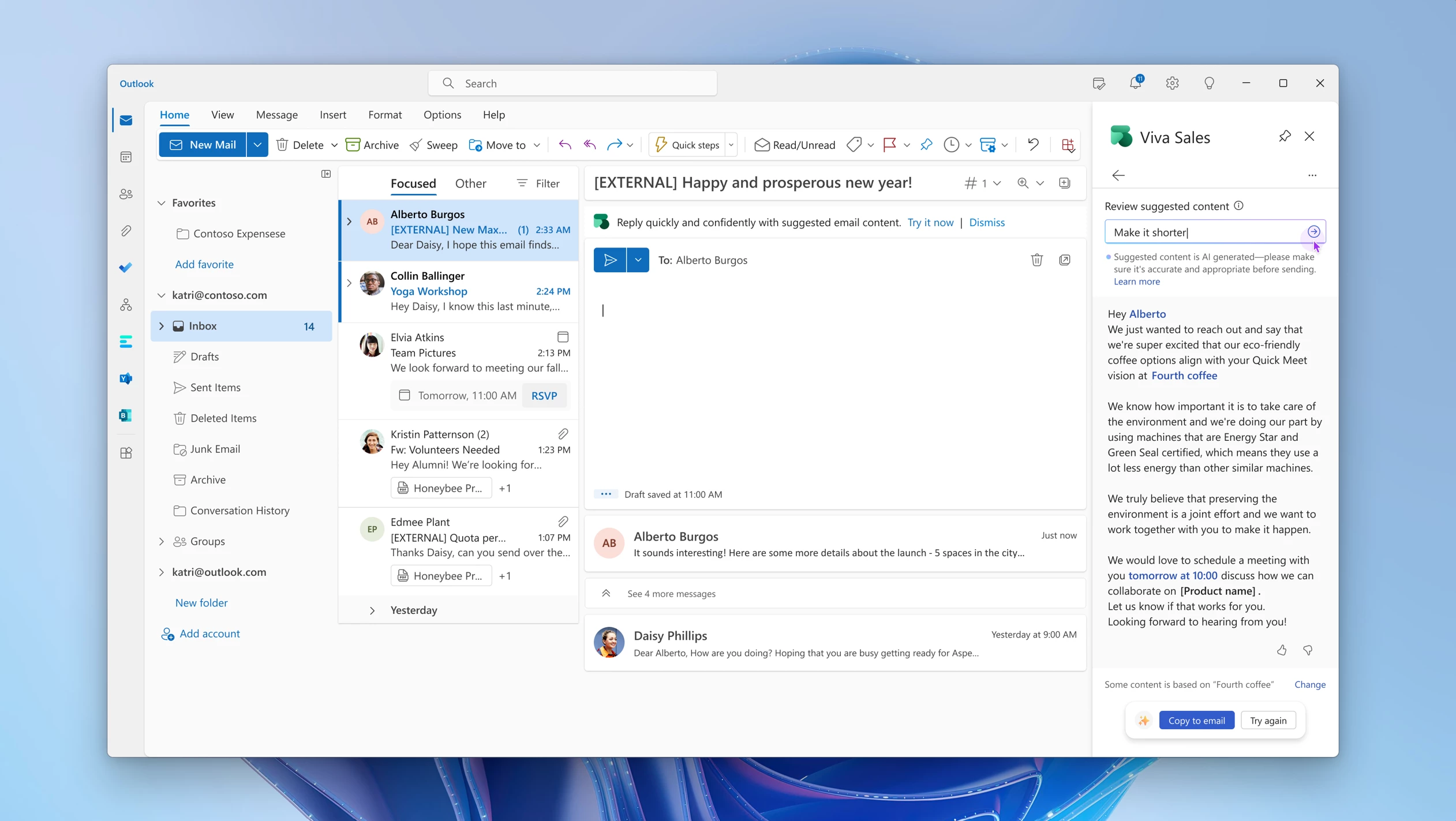
Build upon generated replies by providing additional prompts: To make modifications to the generated reply, sellers can refine the results further by providing a new prompt that builds upon the previous suggestion. This allows sellers to more easily fine-tune their email replies according to their unique needs and preferences.
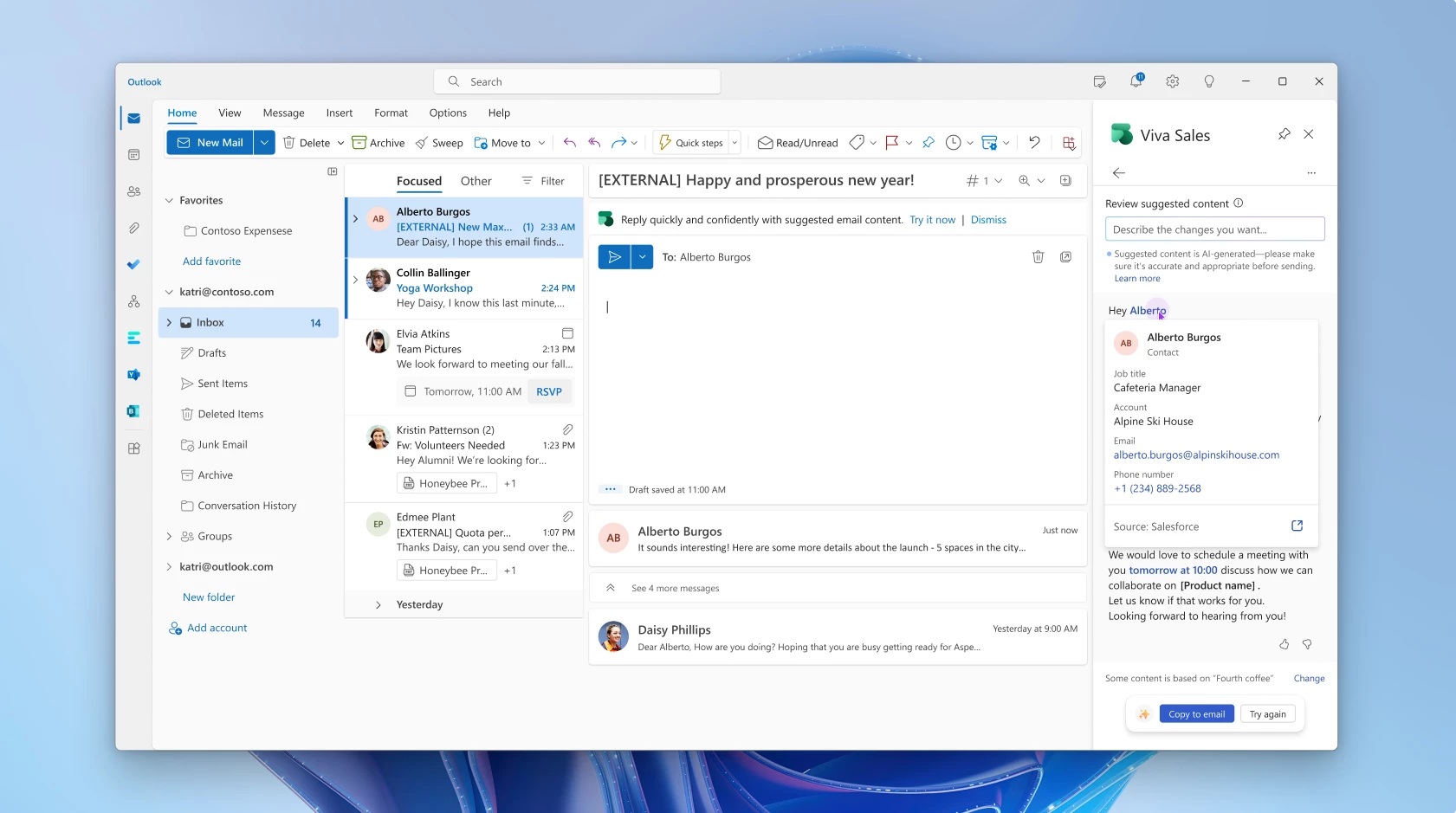
Understand the data sources behind generated replies: Sellers can now hover over any highlighted areas of text to view the data sources behind generated replies. This provides sellers with valuable context and transparency regarding where the embedded information comes from, such as any previous meetings or sales data from the CRM.
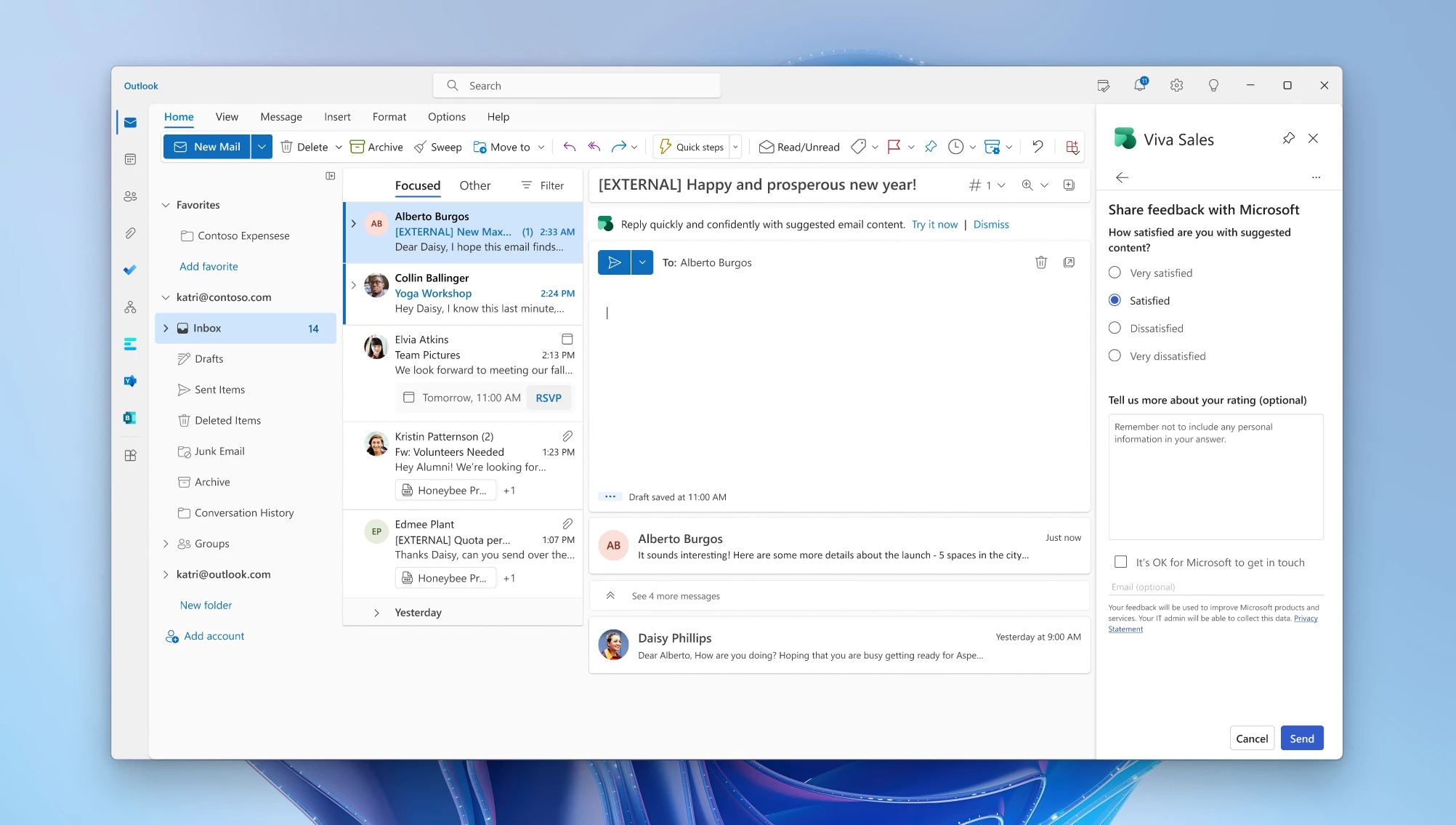
Improve future replies by providing feedback: Finally, a new feedback mechanism allows sellers to rate the AI-generated content with a thumbs-up or thumbs-down. This helps refine and improve future replies to ensure that Viva Sales continues to adapt to the unique needs of each seller.
Meeting summarization: Quickly and easily send follow-up emails after meetings
One of the best practices for sellers is to follow up on meetings and customer interactions with a clear summary, including the relevant action items or next steps. This takes time to compile, and in the busy world of a seller, manual tasks like this can take days to get to, or are sometimes forgotten. We want to increase the buyer-seller connection by providing quick seller responsiveness, demonstrating the priority of the relationship without needing to hunt out the information to create a personalized response.
With the help of Copilot in Viva Sales, alongside the insight from the call and CRM, we can automate to help jump-start the seller into action.
We use the existing conversation intelligence technology in Viva Sales to provide sellers with meeting insights, together with CRM data and the GPT copilot technology. This creates a super-simple way for sellers to generate meaningful meeting summaries:
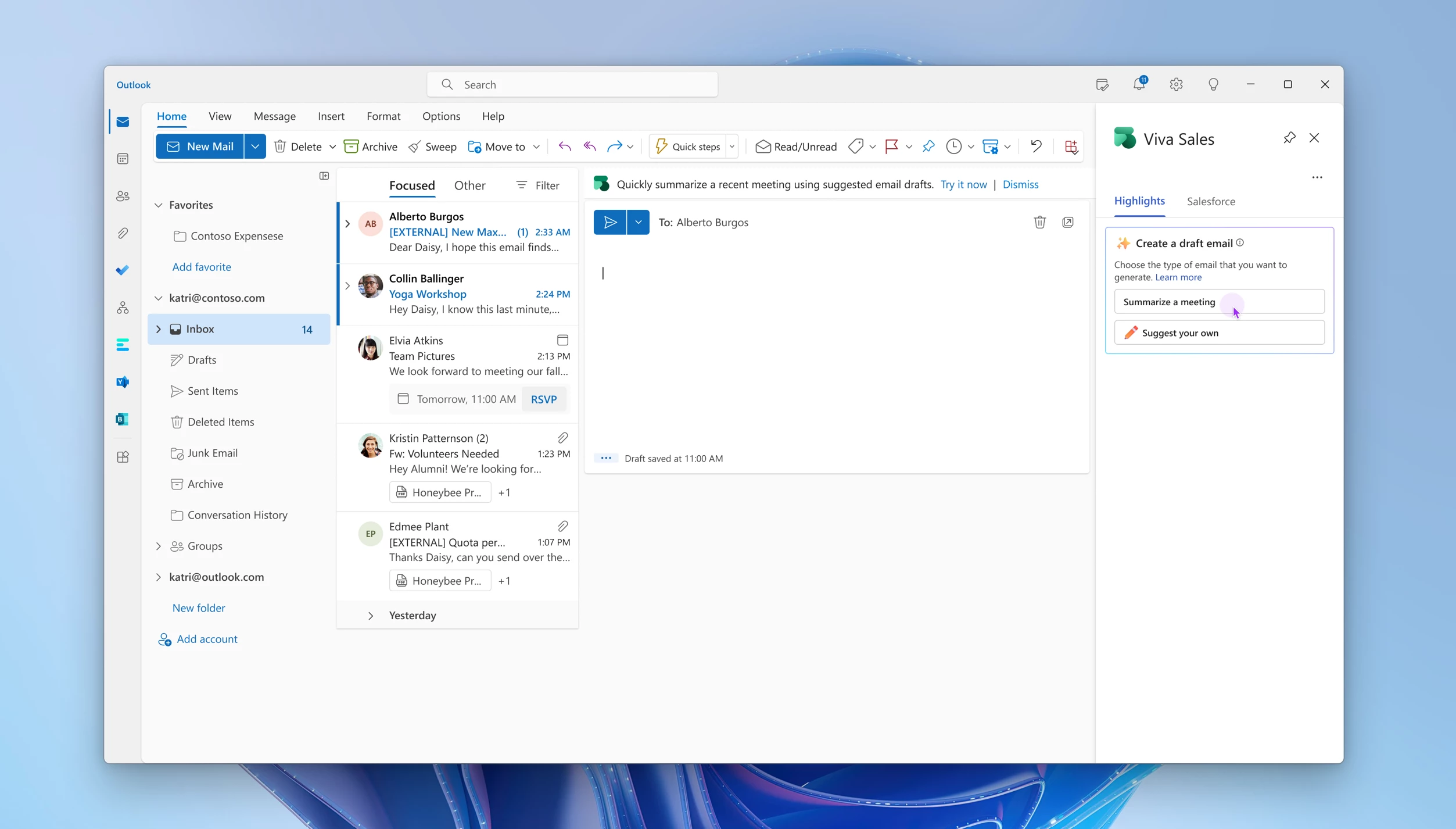
Start composing an email and launch Viva Sales.
Confirm the relevant meeting to get follow-up content.
Receive the summary email recommendation that refers to topics you discussed and action items you both committed to, and puts all of this in a well-formed email for your review. It even includes relevant data from your CRM to enrich the reference points.
Simply add the recommendation to your email, edit to your liking, and send.
The major difference between this experience from our intelligent meeting recaps in Microsoft Teams is how the magic happens in the seller’s inbox, connected to CRM data, in the context and tone of a customer conversation. There is no need to switch screens, and minimal email composition is required. The seller can make minor edits, all from within Outlook.
Watch the Copilot in Viva Sales demo below:
This embed requires accepting cookies from the embed’s site to view the embed. Activate the link to accept cookies and view the embedded content.
With a monthly release cycle, Viva Sales brings innovation to delight sellers. In addition to the above-mentioned features, we have some exciting updates due over the coming months.
Learn more about Viva Sales
Copilot in Viva Sales is a powerful AI-boosted application that can help sellers to be more efficient, productive, and effective. By providing personalized insights, automating routine tasks, and helping sellers to prioritize their efforts, the available solutions can help sellers to close more deals and grow their businesses. If you are a seller looking to take your sales game to the next level, consider giving Viva Sales a try.
If you are not yet a Viva Sales customer, check out our Viva Sales webpage where you can get a free 30-day trial.
Pricing and licensing can be found here, and note that all Microsoft Dynamics 365 Sales Enterprise and Premium licensed customers will have Viva Sales available at no additional cost.A great reason to get started today!
This article is contributed. See the original author and article here.
Hello everyone, I’m Basel Kablawi, PM on the Azure Edge and Platform – Core Networking team, here to announce the latest updates to the physical network switch requirements!
Our ecosystem of physical switches is designed to help ensure the compatibility and reliability of network switches with Azure Stack HCI, Microsoft’s hyperconverged infrastructure solution. By participating in this program, vendors can validate that their physical switches meet the network requirements for rock-solid interoperability with Azure Stack HCI solutions.
In this blog, we’ll discuss how we’re reclassifying the physical network switches that meet the requirements of Azure Stack HCIto answer the following questions, such as:
“Do I need a datacenter switch for every deployment architecture?”
“Does my management and compute switch need storage capabilities?”
“Are all 22H2 requirements needed for switchless configurations?”
And other related questions…
One of the core benefits of this program is helping you have a seamless deployment and operational experience. This eliminates the risk of switch compatibility issues that increase deployment and troubleshooting times. You know that when you select a physical switch, Azure Stack HCI has everything it needs for the highest quality experience.
Our previous approach required all devices to support each network requirement, regardless of the type of traffic the switch was used for. We heard your feedback, and this led us to update how we think about physical switches connected to Azure Stack HCI nodes.
What are we changing?
As with the recent change we made to network adapters, physical switches will now be aligned based on the traffic type that they carry. This means more, low-cost and high-quality devices will be available for selection over time. The traffic types are as follows:
Management traffic
Compute traffic – This can be broken down into two categories:
Standard virtual machine traffic
SDN enabled virtual machine traffic
Storage traffic
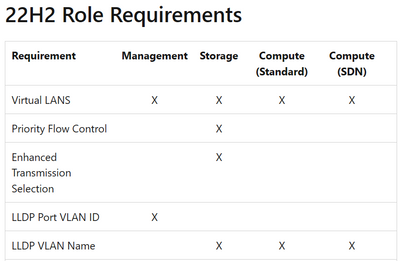
Here’s an example of the new structure which shows how the specific requirements map to a device carrying a certain type of network traffic:
For an updated mapping of the requirements, please see the documentation on our requirements page.
What does this mean for me?
This change is intended to expand our switch ecosystem by adding more validated switches.With this new approach, there is no more “one size fits all”. You simply pick a switch that has the required capabilities for your specific role types.
What if my switchisn’t listed in the catalog?
If you are utilizing a switch that currently is not on the list, please contact your physical switch vendor.
Is my device still validated for Azure Stack HCI?
All devices listed (21H2/22H2) at the time of this blog are still validated for Azure Stack HCI. Previously certified devices met all the requirements for each role type and as a result remain validated with these changes. All future devices will be validatedaccording to our updated requirements and testing tool results.
Summary
With the changes to our switch program, you can use the new validation structure to identify the best switches for your intended workloads, configuration, and more.
As always, if you have feedback, please leave a comment in the chat below.
This article is contributed. See the original author and article here.
With the rapid advance of Generative AI, as demonstrated by Microsoft, understandably folks are excited! Generative AI has tremendous promise in workload reduction in content creation. For folks working on company Intranets, organizational knowledge management, and more, the need for help is great. Oftentimes these are teams that have part-time roles and are often understaffed.
In this HLS Show Me How video I show how organizations can begin to leverage Microsoft Bing Generative AI with Microsoft Viva… today! Specifically, I show enhancing a Microsoft Viva Topics page with Generative AI content that can then be reviewed and edited. Although I show this action within Topics the same method is applicable in any aspect of Microsoft Viva, such as news in Connections, where content authoring is done.
*During the making of this video I show using the Developer Edition of Microsoft Edge. Literally as soon as I finished and went to post this using my production instance of the Microsoft Edge browser that edition was updated and now includes the Bing component with Generative AI!
This article is contributed. See the original author and article here.
It’s the dawn of a new era in customer experience where AI is transforming the way businesses connect with their audiences. Microsoft is proud to be at the forefront of this shift, using Azure OpenAI Service to empower marketers with new levels of efficiency and effectiveness. With Copilot in Microsoft Dynamics 365 Marketing and Dynamics 365 Customer Insights, marketers can now take advantage of the latest next-generation AI-powered tools to learn more about their customers, create targeted customer segments, and generate personalized content. These cutting-edge features increase productivity that could have taken hours or weeks to produce, empowering anyone on your team to uncover new data insights and create high-quality email content.
At Microsoft, we believe every business should have the ability to harness the power of next-generation AI. That’s why we’re excited about Copilot in Dynamics 365 and Azure OpenAI Service enabling our customers to do more with less by using these new technologies to be more productive. This is just the beginning, and we can’t wait to see where this technology will take us in the future. Here are just a few of the Copilot capabilities we will release in public preview in the coming weeks within Dynamics 365 Marketing and Customer Insights.
Discover more about your customers, faster
Today, customers expect hyper-personalization from the brands they interact with, which requires marketers to have a deep understanding of their customers. However, this knowledge is often locked away in data platforms and managed by data and analytics teams. Accessing this data and analyzing it using SQL queries can take weeks, delaying marketers from delivering the personalized experiences that customers demand.
The exciting new Copilot feature in Dynamics 365 Customer Insights allows data analysts and marketers to engage directly with customer data using natural language. This saves time for data analysts, allowing them to type the query in their own words instead of identifying the query in SQL. This feature democratizes access to insights, allowing marketers to ask questions using everyday language and receive instant answers, without needing to have the knowledge of SQL programming. With simple prompts, marketers can explore, understand, and predict customer preferences and needs in near real time, reducing the reliance on the data and analytics team to provide them with the customer insights they need.
Copilot enables marketers to create targeted customer experiences and interactions that are informed by data-driven decision making. With access to the natural language data discovery feature in Customer Insights, they can build confidence by validating and discovering customer insights for their marketing strategies. For example, a marketer can ask Copilot how many of their customers fit the profile of currently residing in Washington, DC, who are over the age of 25, who have also attended a promotional event in the last six months. With just a few clicks, Copilot will present the results of their query, including the number of customers that match the attributes or behaviors, as well as other useful information such as the customer lifetime value, product preferences, or average purchase price. Copilot in Dynamics 365 Customer Insights removes the barrier of needing to craft queries in SQL to get a deeper understanding of customers, enabling marketers to speed and scale the delivery of hyper-personalized experiences that customers expect.
This embed requires accepting cookies from the embed’s site to view the embed. Activate the link to accept cookies and view the embedded content.
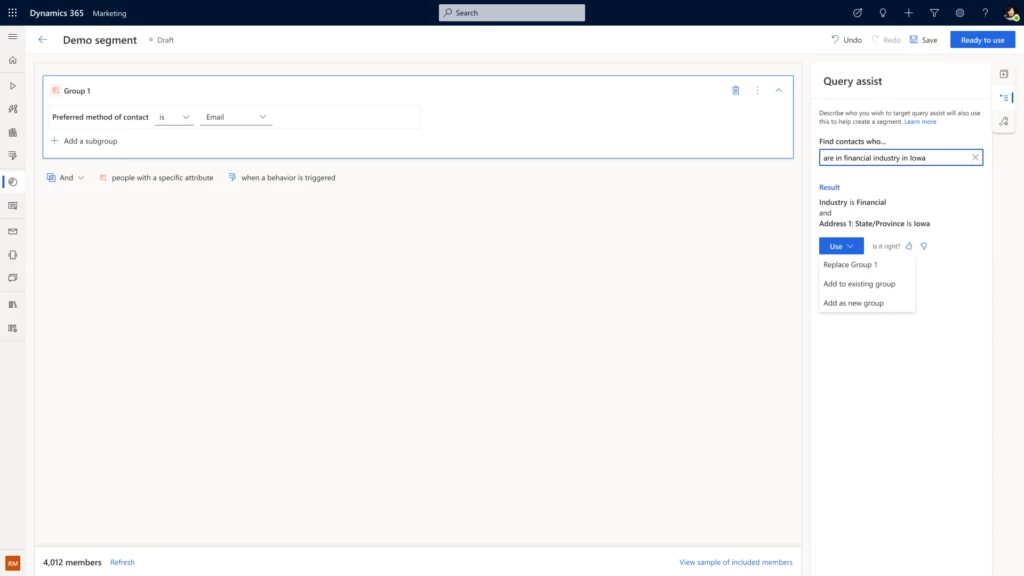
But that’s not allthe work to target the right audience just got easier for marketers, as they can now bypass the time-consuming process of manually building customer segments. With query assist, a new Copilot feature in Dynamics 365 Marketing, marketers can take the guesswork out of targeting the right audience by simply describing the segment in their own words. From there, query assist builds the segment that meets the marketers’ request and enables them to quickly review and modify the list before their next email campaign.
Previously, marketers had to rely on that one person in the company who understands data models and queries to create the target segment. With generative AI targeting, marketers can now quickly go from planning to execution.
Craft captivating content with ease
Finally, we are excited to share the release of our other Copilot in Dynamics 365 Marketing capability, content ideas, which harnesses next-generation AI to offer unparalleled assistance to marketers in their content creation efforts. Content ideas uses AI to generate content, allowing marketers to save time while still providing engaging and relevant emails for their target audience.
To create this powerful capability, we spent more than 10 months working with hundreds of preview customers, gathering and analyzing marketing emails from the public domain to tune our AI model. The result is a highly accurate and reliable content idea engine that uses Azure OpenAI Service to generate content ideas that marketers can easily edit, personalize, and send to their customers. With the Copilot content ideas feature, marketers can spend less time on copywriting and more time on strategic marketing efforts.
This embed requires accepting cookies from the embed’s site to view the embed. Activate the link to accept cookies and view the embedded content.
The benefits of using Copilot in Dynamics 365 Marketing and Customer Insights are clearreduced time spent on marketing tasks, improved efficiency, and higher quality content that connect marketing teams with their customers. And let’s not forget the excitement of working with cutting-edge technology that’s paving the way for a new era of marketing.
Join the waiting list for the Copilot in Dynamics 365 Customer Insights preview today. And visit Dynamics 365 Customer Insights to learn more about our customer data platform and sign up for a free trial.
Finally, to learn more about the depth and breadth of all the new Copilot features that are bringing next-generation AI to every line of business across Dynamics 365, please check out our announcement blog.
This article is contributed. See the original author and article here.
Today we are excited to announce the public preview of near real-time custom detections in Microsoft 365 Defender. This new frequency will allow you to respond to threats faster with automated responses and gain valuable time in stopping attacks and protecting your organization.
Automation is key to keeping up with attackers
While Microsoft’s eXtended Detection and Response (XDR) solution helps prioritize response activities and provides a unified experience that allows for more effective investigation at the incident level, the increasing volume and speed of sophisticated attacks remains challenging.
That’s why automation is becoming an increasingly important tool in optimizing the SOC process. Automating response actions for common alerts can help you stay on top of threats, protect your organization more effectively, and reduce response times. If you want to get started in Microsoft 365 Defender, check out this post.
For effective protection, most organizations have custom detection mechanisms in place that are unique to the requirements of their environment, but in order for these automations to be as effective as possible, the speed of detection is critical.
Detect in near real-time, respond in near real-time
To address the need for faster detections and response, we are thrilled to announce that you can now create custom detection rules that run in near real-time, in addition to existing frequencies ranging from every 24 hours to every hour. These detections can be integrated with the broad set of Microsoft 365 Defender across email, endpoint, and identity, leading to faster response times and faster mitigation of threats.
This means your custom logic will run and evaluate all available signals and alerts faster than ever before and will trigger your predefined response action immediately, once a match is detected.
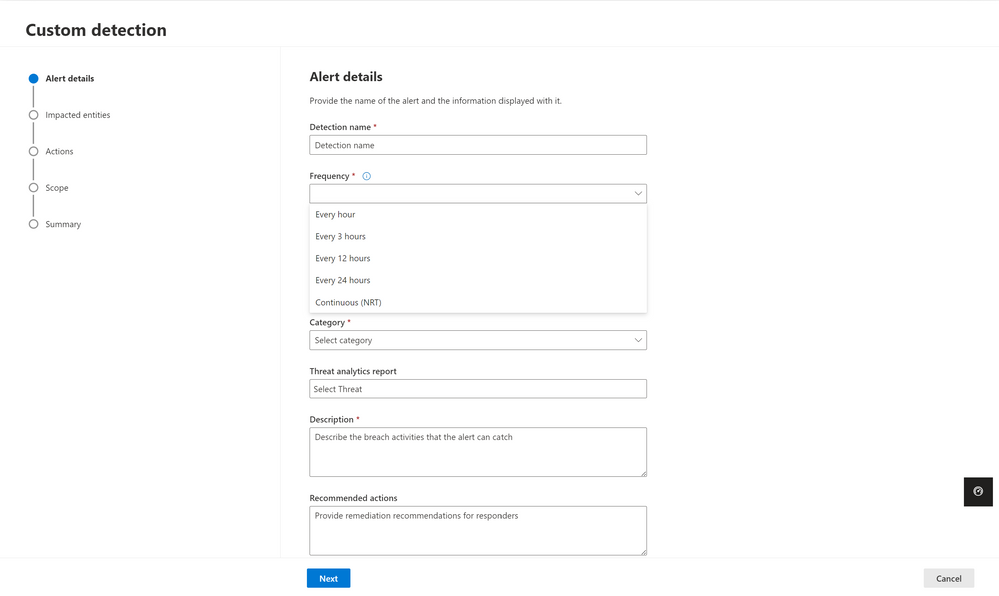
This new frequency will be available in Microsoft 365 Defender as Continuous (NRT). Image 1 shows the configuration wizard for custom detection rules in Microsoft 365 Defender and the various frequency options you can choose from, including near real-time (NRT).
Image 1: Custom detection wizard with the frequency dropdown opened, new frequency of Continuous (NRT) is available.
When you configure a rule using the Continuous (NRT) frequency, the query is compared to every single event that gets into the service, and if there is a match, an alert is triggered. You can use the continuous frequency for queries referencing one table and using operators from the list of supported KQL operators.
Top use cases for custom detections and automated response actions
Monitoring for recent vulnerabilities
A common use case for a near real-time custom detection rule that we see with customers is monitoring for events that might indicate threat activity related to a recently disclosed vulnerability. For instance, you can use the DeviceProcessEvents table to look for the malicious string needed to exploit the Log4j vulnerability and configure remediation actions to run automatically on targeted devices, like initiating investigation on the device:
DeviceProcessEvents
| where ProcessCommandLine matches regex @'(?i)${jndi:(ldap|http|https|ldaps|dns|rmi|iiop)://(${([a-z]){1,20}:([a-z]){1,20}})?(([a-zA-Z0-9]|-){2,100})?(.([a-zA-Z0-9]|-){2,100})?.([a-zA-Z0-9]|-){2,100}.([a-z0-9]){2,20}(/).*}'
or InitiatingProcessCommandLine matches regex @'(?i)${jndi:(ldap|http|https|ldaps|dns|rmi|iiop)://(${([a-z]){1,20}:([a-z]){1,20}})?(([a-zA-Z0-9]|-){2,100})?(.([a-zA-Z0-9]|-){2,100})?.([a-zA-Z0-9]|-){2,100}.([a-z0-9]){2,20}(/).*}'
Detect and remove unwanted emails
Another use case is to look for unwanted emails, that may not necessarily be malicious but have been defined by the organization as unwanted and need to be automatically removed as soon as they are delivered. This empowers security admins to more easily manage mail flows from a security lens and can be done by configuring a Soft Delete remediation action:
EmailEvents
| where Subject contains "This account has been suspended!"
| where SenderFromAddress == "malicious@sender.com"
| where UrlCount > 0
An example of another scenario is to look for messages that spoof the recipient from a particular IP subnet and blocking this activity.
EmailEvents
| where SenderIPv4 startswith "xx.xx.xx." and SenderFromAddress == RecipientEmailAddress
Automation is critical to creating efficiencies in your SOC, but the speed of detection is fundamental to an effective response and keeping your organization safe.
The ability to define custom rules for near real-time detections is in public preview starting today and will enable your defenders to create effective response mechanisms with the breadth of Microsoft 365 Defender’s XDR signal across endpoints, email and more.
Learn more
Check out our documentation and explore how near real-time custom detections can enhance your SOC’s detection and response processes
Wondering which tables are supported by near real-time detections? Find them here.
Near real-time detections are available in public preview starting today. We would love to know what you think. Share your feedback with us in the Microsoft 365 Defender portal or by emailing AHfeedback@microsoft.com.





Recent Comments