by Contributed | Apr 21, 2021 | Technology
This article is contributed. See the original author and article here.
The tempdb is a system database that holds the temporary user objects and internal objects.
Azure SQL DB
In Azure SQL DB tempdb is not visible under System Databases after connecting with SSMS but it is still important in order to avoid workload problems due to the limitations that it has. This limitations are different with the service level objective that we choose between:
For DTU purchase model the limits will be this and for vCore we can find the TempDB max data size (GB) under each service objective here.
Azure Managed Instance
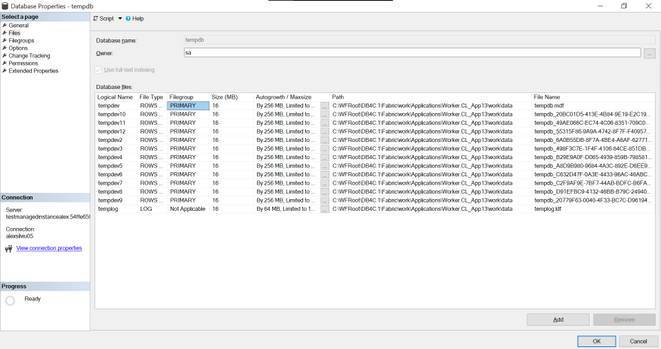
In Managed Instance tempdb is visible and it is split in 12 data files and 1 log file:
All system databases and user databases are counted as used storage size as compared to the maximum storage size of the instance.
To check the values for this sizes we can run this query:
select top 1
    used_storage_gb = storage_space_used_mb/1024,
    max_storage_size_gb = reserved_storage_mb/1024
from sys.server_resource_stats order by start_time desc
For Managed Instance we have two service tiers: General Purpose and Business Critical for which the max tempdb size is:
General Purpose |
Business Critical |
Limited to 24 GB/vCore (96 – 1,920 GB) and currently available instance storage size.
Add more vCores to get more TempDB space.
Log file size is limited to 120 GB. |
Up to currently available instance storage size. |
Issues due to tempdb usage
When executing a huge transaction with million of rows and high tempdb usage we might get the following error message:
Msg 40197, Level: 20, State: 1, Procedure storedProcedureName, the service has encountered an error processing your request. Please try again. Error code 1104
This does not give too much information but by executing the following:
select * from sys.messages where message_id = 1104
we will get more context on it:
TEMPDB ran out of space during spilling. Create space by dropping objects and/or rewrite the query to consume fewer rows. If the issue still persists, consider upgrading to a higher service level objective.
Some other errors that we might get:
- 3958 Transaction aborted when accessing versioned row. Requested versioned row was not found. Your tempdb is probably out of space. Please refer to BOL on how to configure tempdb for versioning.
- 3959 Version store is full. New versions could not be added. A transaction that needs to access the version store may be rolled back. Please refer to BOL on how to configure tempdb for versioning.
- 3966 Transaction is rolled back when accessing version store. It was marked as a victim because it may need the row versions that have already been removed to make space in tempdb. Not enough disk space allocated for tempdb, or transaction running for too long and may potentially need the version that has been removed to make space in the version store. Allocate more space for tempdb, or make transactions shorter.
- log for database ‘tempdb’ is full due to ‘ACTIVE_TRANSACTION’ and the holdup lsn is (196:136:33).
To investigate this ones this queries should be useful:
dbcc sqlperf(logspace)

select name, log_reuse_wait_desc, * from sys.databases

SELECT * FROM tempdb.sys.dm_db_file_space_usage
GO

Select * from sys.dm_tran_version_store_space_usage
GO

SELECT * FROM sys.dm_exec_requests where open_transaction_count > 0
go
ACTIVE_TRANSACTION:
SQL Server will return a log_reuse_wait_desc value of ACTIVE_ TRANSACTION if it runs out of virtual log files because of an open transaction. Open transactions prevent virtual log file reuse, because the information in the log records for that transaction might be required to execute a rollback operation.
To prevent this log reuse wait type, make sure you design you transactions to be as short lived as possible and never require end user interaction while a transaction is open.
To reduce tempdb utilization we will need to look at the common tempdb usage areas which are:
- Temp tables
- Table variables
- Table-valued parameters
- Version store usage (associated with long running transactions)
- Queries that have query plans that use sorts, hash joins, and spools
To identify top queries that are using temporary tables and table variables we can use this query
To monitor the tempdb utilization the below query can be run with a 15 minute delay (it will print “high tempdb utilization” if the usage exceeds 90%):
DECLARE @size BIGINT
DECLARE @maxsize BIGINT
DECLARE @pctused BIGINT
DECLARE @unallocated BIGINT
DECLARE @used BIGINT

SELECT @size = Sum (size),
       @maxsize = Sum (max_size)
FROM   tempdb.sys.database_files
WHERE  type_desc = 'ROWS'

SELECT @unallocated = Sum (unallocated_extent_page_count)
FROM   tempdb.sys.dm_db_file_space_usage

SELECT @used = @size - @unallocated

SELECT @pctused = Ceiling (( @used * 100 ) / @maxsize)

--select @used, @pctused
IF ( @pctUsed > 90 )
  BEGIN
      PRINT Cast (Getutcdate() AS NVARCHAR(50))
            + N': high tempdb utilization'
  END
GO
Other useful links
by Contributed | Apr 21, 2021 | Technology
This article is contributed. See the original author and article here.
SharePoint Syntex brings advanced AI-powered content management to Microsoft 365. During Microsoft Ignite last month, we highlighted new capabilities in Syntex that can help you scale your expertise and turn content into knowledge.. And now, we have even more new capabilities to share, which we’ve outlined below.
Developer Support
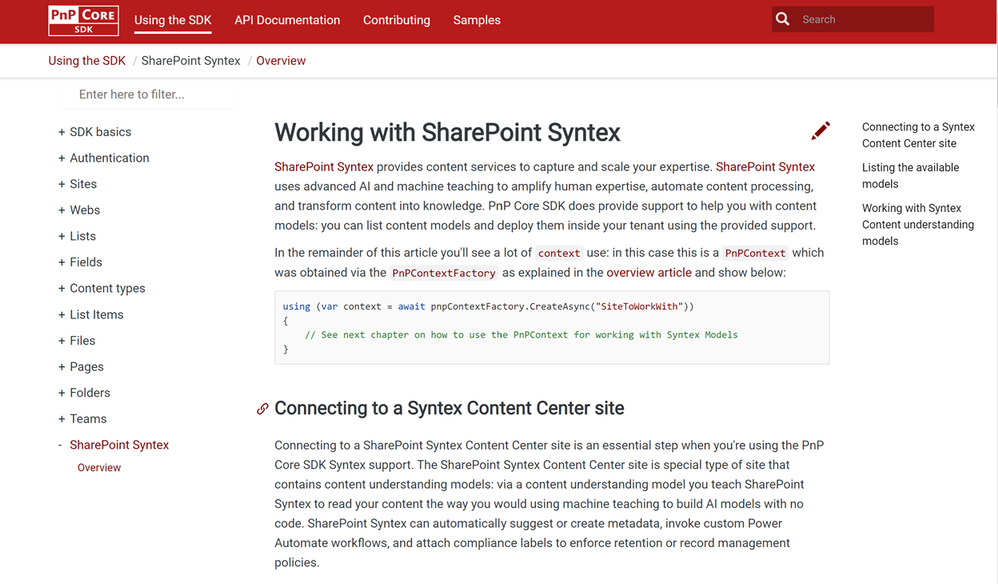
Patterns and Practices Core SDK Syntex API support
A summary of what’s included/supported:
- Checking whether a site is a Syntex Content Center site
- Listing the content understanding models in a Syntex Content Center site
- Publishing or unpublishing a content understanding model from a library (supports batching)
- For a given model list the libraries to which the model was published
- Classify and extract existing content:
- A single file can be classified & extracted.
- A library can be classified and extracted – by default previously classified and extracted files are skipped, but there’s an option to re-process all the files in a library.
Patterns and Practices PowerShell Syntex Support
Administrators and developers can now mange, export and import custom models using PowerShell cmdlets and scripts. These enhancements will help you manage releases across development/test/production systems, or for packaging and reusing models across multiple customer environments, especially for our CSPP (Content Services Partner Program) partners.
You can find SharePoint Syntex support in PnP PowerShell (which uses the implementation):
NOTE: the above five cmdlets are specific to SharePoint Syntex, but there are also changes done to other cmdlets to enable Syntex content understanding model export and import:
- Get-PnPSiteTemplate: updated to handle content understanding model export. Using Get-PnPSiteTemplate -Out MyModels.pnp -Handlers SyntexModels all models of a Content Center site are exported.
- Invoke-PnPSiteTemplate: updated to handle content understanding model import. Using Invoke-PnPSiteTemplate -Path .MyModels.pnp the exported models are imported again.
Document understanding model management.
Models need to grow and change over time, so we’ve also added new features to manage document understanding models:
- Extractor rename: You can rename entity extractors, mapping them to new or existing columns.
- Model rename: You can rename a published model, mapping them to new or existing content types.
- Model copy: You can duplicate a model and its training fields. Also, you can add the copy to a new library, or use the copy as the basis or template for a new model.
Custom environment support for form processing models
Previously, we only supported training and hosting Syntex form processing models built in AI Builder in the default Power Platform environment. If you have created additional environments, you can now provision those with the Syntex app and select that environment in the Admin Center set-up.
License enforcement
We know license enforcement is crucial to help IT staff align usage to entitlements. If you’re not licensed, or your Syntex licensing (including trials) expires or is canceled:
- You won’t see the content center template when creating new sites in the Microsoft 365 admin center.
- In the Content Center, you’ll no longer see options for model creation or editing. In libraries with published models, you’ll no longer have access to the model details panel, the classify and extract ribbon, and the AI Builder link for form processing; you won’t be able to process files on upload.
- You’ll also receive notifications regarding your license in the notification banner and as an exception message during form processing.
Also, if you reactivate your license, you’ll be able to resume working with your models and content centers as before.
While we’re excited to share these product updates, there are many more to come as we continue to gather and act on feedback from our customers, partners, and internal team members.
To stay up to date on product announcements each month, please subscribe to our newsletter. Thank you.
by Contributed | Apr 21, 2021 | Technology
This article is contributed. See the original author and article here.
At-scale data processing systems typically store a single table in a data lake as multiple files. This concept is represented in Azure Purview by using resource sets. A resource set is a single object in the data catalog that represents a large number of assets in storage. To learn more, see the resource set documentation.
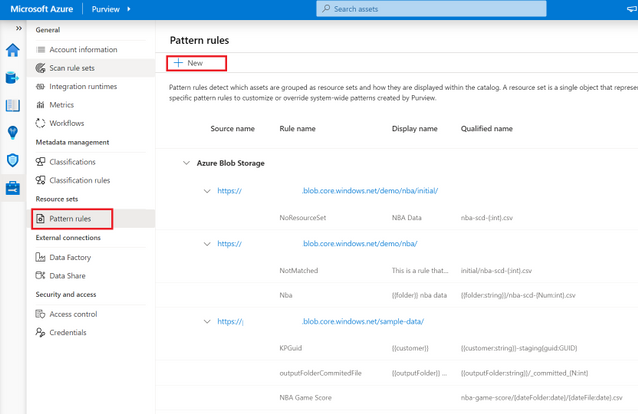
When scanning a storage account, Azure Purview uses a set of defined patterns to determine if a group of assets is a resource set. In some cases, Azure Purview’s resource set grouping may not accurately reflect your data estate. Resource set pattern rules allow you to customize or override how Azure Purview detects which assets are grouped as resource sets and how they are displayed within the catalog.
Pattern rules are currently supported in public preview in the following source types:
- Azure Data Lake Storage Gen2
- Azure Blob Storage
- Azure Files
To learn more on how to create resource set pattern rules, see our step-by-step how-to documentation!

by Contributed | Apr 21, 2021 | Technology
This article is contributed. See the original author and article here.
Azure Purview, the unified data governance service that helps customers maximize the business value of data is now available in the UK South and Australia East, in public preview. Get started by creating a Purview account, see Quickstart: Create an Azure Purview account in the Azure portal.
For the full set of regions that Azure Purview is currently available in as a public preview offering, see Azure Purview Availability.
by Contributed | Apr 21, 2021 | Technology
This article is contributed. See the original author and article here.
Initial Update: Wednesday, 21 April 2021 17:57 UTC
We are aware of issues within Application Insights and are actively investigating. Some customers may experience data access issue and delayed or missed alerts.
- Work Around: None
- Next Update: Before 04/21 21:00 UTC
We are working hard to resolve this issue and apologize for any inconvenience.
-Saika


Recent Comments