![[Guest Blog] A Journey of Firsts in Mixed Reality](https://www.drware.com/wp-content/uploads/2021/04/fb_image-172-600x675.jpeg)
by Contributed | Apr 22, 2021 | Technology
This article is contributed. See the original author and article here.
This guest blog was written by Kimberly Castro, Program Manager in Microsoft’s Cloud + AI division. She shares about her career journey transitioning from the military into in the world of mixed reality as part of our Humans of Mixed Reality series.
I knew I wanted to be a part of Mixed Reality the first time I heard about it. I had just finished my interview loop with Microsoft when I heard that one more team wanted to talk to me before leaving. Shortly after, which actually felt like an eternity due to interview nerves, I was in a focus room with Miguel Sussffalich. After a few questions, he started telling me everything he could about the IVAS program.
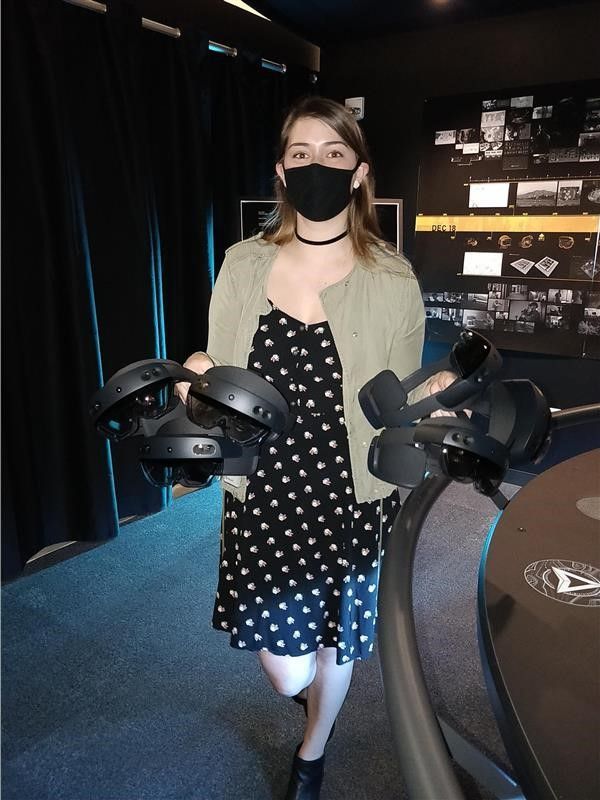
Admittedly I was late to the game. I had never put on a VR/AR/MR headset, never heard of the HoloLens, and if I’m completely honest, I’d never used a Microsoft product aside from the Office Suite. You see, I grew up in an Apple household. You’re probably wondering how someone like me even managed to land an interview at Microsoft in the first place, especially coming from a rather non-traditional tech background.
After graduating from the University of Arizona in 2013, I enlisted in the Army as a Linguist. I spent the next two years learning Mandarin Chinese and eventually found myself in the Special Operations Command working Intelligence, Surveillance, and Reconnaissance (ISR) missions. After one more year, I started doing similar work at the NSA. At that point, I started seeing myself in a government contractor position once fulfilling my enlistment contract. It would’ve been an incredibly natural and easy transition to make. Not a whole year had passed when the Army said it was time for me to move again – my 7th move in 5 years. I was extremely frustrated to have to pack up my life and travel across the country again, but I had always wanted to spend time in the Pacific Northwest – and it ended up being my best move yet.
As the end of my contract was nearing, I received approval to participate in the Microsoft Software and Systems Academy (MSSA), a transition program for active duty military and veterans, which is essentially a C# bootcamp. Upon completing MSSA you are guaranteed a first-round interview in the form of a phone screening with Microsoft. I did well enough at the first round to be invited back to participate in a full interview loop.
I was sitting across from Miguel, learning about the IVAS program for the first time. He told me about a synthetic training environment where soldiers could practice clearing an enemy and a hostage-filled building safely and effectively. I was immediately transported back six years to basic training, where I first experienced the military’s Glass House training drill. Glass House is a generous term – in reality, it is just tape placed in a square on the ground, in a field, with a door-sized opening. “Rooms” were extended or added with more tape to alter the scenario, making an already limited training environment increasingly vague and less effective. You and your team members would have to imagine the walls, the roof, the enemy, the hostages, everything. The drill sergeants would yell out increasingly complex instructions, and eventually, your team would fail, reset, and try again. Of course, there was no way to know if you missed an enemy or pointed your weapon at a hostage or team member by accident, just whatever the drill sergeants could see. Additionally, with all the imagining that had to be done, it was impossible to realistically create the stress levels that an experience like that would entail in real-life. Essentially it wasn’t the best way to train, but it was all we had.
As soon as Miguel paused, I said, “Oh, this is going to save lives,” and from then on I was hooked.
I graduated from the MSSA program with offers from three different teams within Microsoft and an offer from another company. None of the other scopes of work came close to the experience I knew Mixed Reality was going to provide. So, in January of 2020, I joined the Delaware team as a program manager. I was just as excited as I was terrified. I was so sure people would quickly find out I was a fraud who tricked her way into Microsoft – over a year later, and I still have moments when I feel like this. I like to joke that it’s not imposter syndrome because I’m actually an imposter (I know, I know).
Within mere days of joining the team, I experienced my first hologram. A friend slapped a HoloLens 2 device on my head and showed me a bunch of cute animals dancing around. He explained that I could resize the figures and place them wherever I wanted in the physical space. I think I stayed in device for about an hour playing with everything I could; it felt like magic. I would’ve stayed for longer, but I suddenly remembered that I was in the middle of the dev space yelling out, “This is so cool!” every few minutes while people were working. To this day, one of my favorite things to do is run demonstrations to show off what is possible with Mixed Reality. I love seeing people experience the magic of their first hologram or surprising someone who has seen it all before by dropping them in the middle of New York City or the bottom of the Red Sea.
Another aspect I enjoy is customer focus and human-centered design. The infinite feedback loop and drive to figure out what someone needs, particularly when they themselves don’t know, really resonates with me. Accomplishing that gives me the same feeling as snapping the last puzzle piece into place; it’s a satisfying completion. This puzzle, however, is infinite.
The public sector has been the perfect place for me to dive in because I can really understand the user – after all, I used to be one. It’s incredibly comfortable to speak the same language as the customer, and I am so excited to have the opportunity to continue in this space. In the future, I would enjoy getting into the commercial and consumer or entertainment studios as well. I would love to help create something that furthers scientific research or builds something solely for a user’s enjoyment. Again, I love the public sector, it’s the perfect place for me to learn and grow, but I will want to take a step back from life and death situations one day.
It’s difficult to express how much I’ve learned over the last year and yet I know I’ve barely scratched the surface. I feel so privileged to work with artists, musicians, designers, and engineers every single day. I have never considered myself a creative type, but working in this space with these incredibly talented individuals has, for the first time, sparked a passion to create in my professional and personal life.
I hope you will discover an exciting new world with mixed reality too – the possibilities are endless!
#MixedReality #CareerJourneys
by Contributed | Apr 22, 2021 | Technology
This article is contributed. See the original author and article here.
By Masaki Iwamaru – Service Engineer | Microsoft Endpoint Manager – Intune
Box for EMM is an app for the iOS platform developed by Box Inc. The Box for EMM app is intended for enterprise customers with mobile device management (MDM) solutions such as Microsoft Endpoint Manager – Microsoft Intune. The app provides secure access to data in Box cloud storage workspace with iOS devices.
When you integrate Box for EMM app with Intune, you can apply app protection policies (APP). This will enable the data protection features of the app built with the Intune App SDK. You can control data transfer between apps, restrict copy-paste between apps, set access requirements, and force conditional launch settings.
This blog post provides you a step-by-step guide on integrating Box for EMM app with Intune.
Note
There is a separate Box app that can be used for both personal and enterprise use. This article focuses on the Box for EMM app, which has supported Intune since 2015. Both the Box for EMM and Box app can access the same cloud storage space provided by the Box EMM Enterprise workspace.
Steps to integrate Box for EMM with Intune
Step 1. Add and deploy Box for EMM app to your employees.
Deploy the app using Intune. If end users install Box for EMM from the App Store and you haven’t deployed it to users or devices, they will not be able to sign-in to the app because the required app configuration policy is not applicable (see step 2).
To add Box for EMM to Intune:
- Sign into the Microsoft Endpoint Manager admin center.
- Go to Apps > iOS/iPadOS.
- Select + Add, choose iOS store app from the dropdown list, and then Select.
- Select Search the App Store and enter Box for EMM.
- Select to add the app to Intune.
After you add the app to Intune, deploy it by assigning the app to users and devices. Learn more about deploying apps in this article.
Tip
You can also deploy the Box for EMM app that’s purchased through the Apple Volume Purchasing Program (VPP).
Step 2. Create and deploy an app configuration policy.
This is a required configuration for the Box for EMM app. Otherwise end users won’t be able to sign into the app.
- Go to Apps > App configuration policies to create an app configuration policy.
- Select + Add and choose Managed devices from the list.
Note
Be aware you need to create and deploy an app configuration policy using a managed device. Managed apps won’t work for the Box for EMM app.
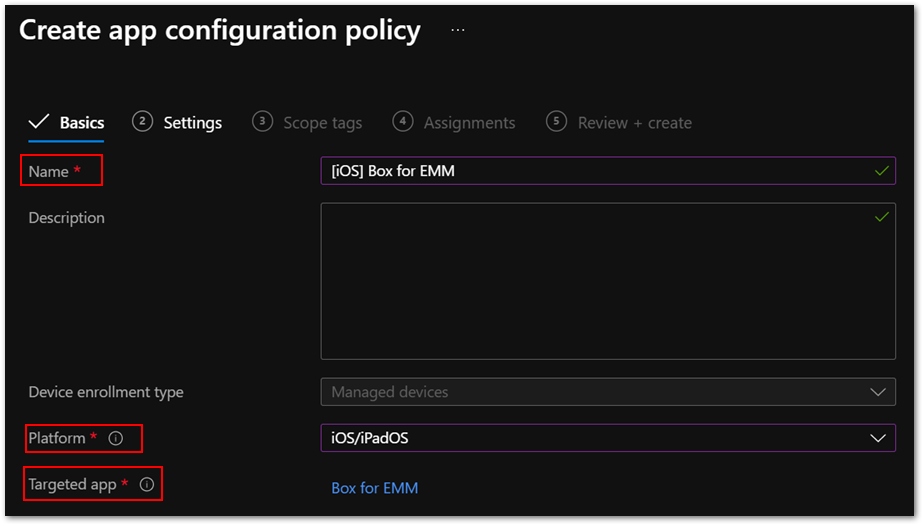
- Enter a policy name in Name and choose iOS/iPadOS from the Platform list.
- For Targeted app, Select app, and then choose Box for EMM from the list.
Figure 1. Box for EMM policy in the Microsoft Endpoint Manager admin center
Go to the Settings tab.
Choose Use configuration designer from the Configuration settings format list and specify the following values from the XML property list.
Configuration key
|
Value type
|
Configuration value
|
Public ID
|
String
|
<The value provided by Box.com>
|
Management ID
|
String
|
AnyString
|
Intune Enterprise
|
String
|
1
|
com.box.mdm.oneTimeToken
|
String
|
AnyString
|
userprincipalname
|
String
|
{{userprincipalname}}
|
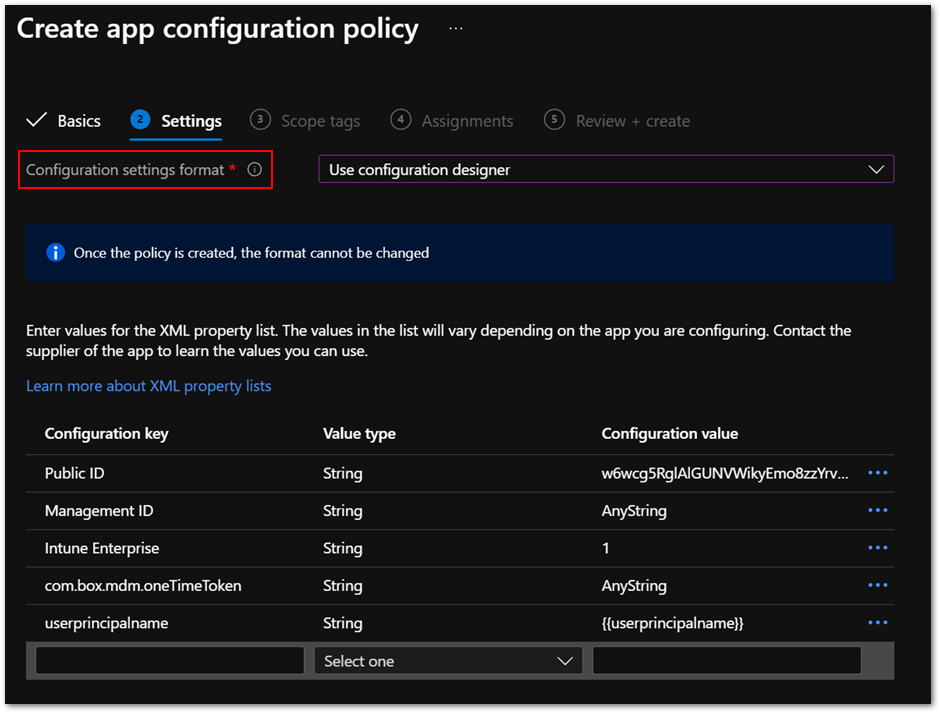 Figure 2. App configuration policy settings
- Then deploy the policy to users and devices. These assignments are usually identical to the ones for the Box for EMM app.
Step 3. Create and deploy an app protection policy (APP) for the Box for EMM app.
You can create a new app protection policy for iOS and iPad operating systems (OS) or use an existing one. Here are a few best practices:
- Make sure that the Box for EMM app is included in the Targeted apps list of the policy.
- Set Target to apps on all device types to Yes in app protection policies to avoid misconfigurations. If you set it to No, you might need to deploy the IntuneMAMUPN key. This often overlooked by administrators, so I recommend setting it to Yes.
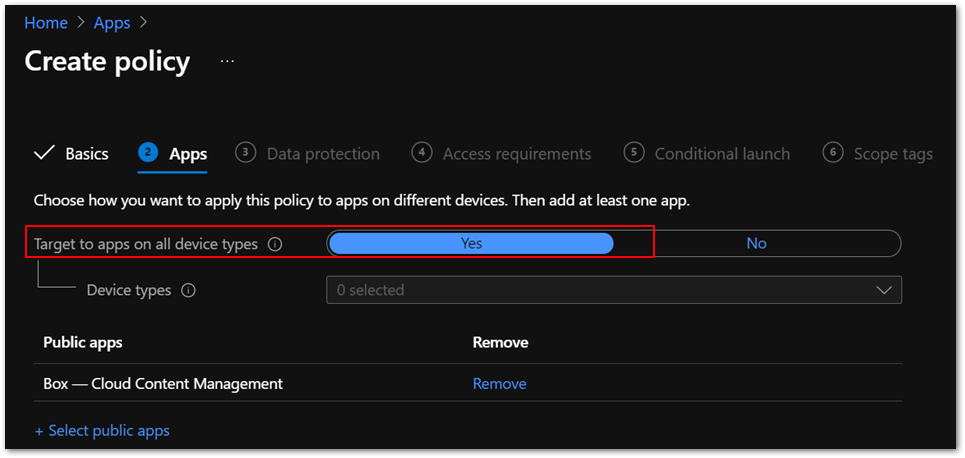 Figure 3. App configuration policy settings
- Make sure the policy is assigned to the correct users. App protection policies should be assigned to users instead of devices.
Step 4. install the Box for EMM app to iOS/iPadOS using Intune.
Make sure both the app and the app configuration policy are deployed. You can check deployment status in the Microsoft Endpoint Manager admin center.
Step 5. Launch the Box for EMM app.
You will see the Microsoft Azure Active Directory (Azure AD) sign-in screen. The user name is automatically populated. It should be the same as the user who enrolled the device. Enter the password for the user and app protection policy will be applied. Then you will see an app restart request.
Step 6. Relaunch the app.
When you relaunch the app, it might ask you to set an app PIN. Then you will see a login screen for the Box for EMM app. Sign in with your Box account. Now you can use the app with Intune app protection.
Frequently asked questions (FAQs)
In summary, here are common issues to be aware of when you’re integrating Box for EMM app with Intune:
The Box for EMM app is not installed on iOS devices.
Make sure you assigned the app to the correct groups. You can check app installation status in Device install status in each app or Managed Apps in each device.
If you use VPP for app deployment, make sure the VPP token is valid, and you have enough app licenses.
App configuration policy for Box for EMM app shows Not applicable.
Ensure that the Box for EMM app is installed using Intune instead of the App Store.
Check that the app configuration policy targets the Box for EMM app that you are deploying. Sometimes it targets the incorrect applicationID of the same app name because you have multiple Box for EMM apps in the Microsoft Endpoint Manager admin center or you have deleted and re-added the app.
Note
The app configuration policy type should be Managed devices instead of Managed apps.
App protection policy is not applied after sign-in.
Make sure the policy is assigned to correct users. App protection policy should be assigned to users instead of devices.
Be sure that Target to apps on all device types is set to Yes.
It can take time for the policy to be applied if end users are signed-in to the app before the policy assignment. This article provides more information about expected policy delivery timing.
How can I get Public ID for my Box tenant?
Public ID is provided by Box, Inc. for your tenant. Contact Box support for this information
- Should I set up single sign-on (SSO) between Azure AD and Box service?
You can use Box for EMM features without SSO integration. While it is optional, SSO provides a simplified and excellent user experience. Check out this article to learn about SSO integration guidance.
I want to allow access with Box for EMM app only while blocking personal Box app.
You can use the iOS device restriction profile to hide and disable the Box for EMM app. The Show or hide apps setting is applicable only to supervised iOS devices.
There is also a setting for enabling and disabling Official Box Apps in Box Admin Console – Apps.
I want to disable Files app functionality on iOS devices to prevent unintended file sharing.
Intune doesn’t have this setting. There is a setting for disabling Files app functionality in Box Admin Console – Enterprise Settings – Mobile.
Are there recommended settings for the Box for EMM app?
The following recommended settings allow end users to open, modify, and save files directly in Box storage with Microsoft Office applications.
Setting name
|
Value
|
Send Org data to other apps
|
Policy managed apps with OS sharing
|
Receive data from other apps
|
All Apps with incoming Org Data
|
Save copies of Org data
|
Block
|
Allow user to save copies to selected services
|
Select locations you want to save org data into
|
We also recommend adding the following key/value pair in the app configuration policy.
Key
|
Value (is you’re using Intune as the MDM)
|
IntuneMAMUPN
|
{{UserPrincipalName}}
|
The actual value specified for the IntuneMAMUPN key depends on the MDM provider you are using. You can find examples of the value you should enter for a third-party MDM provider in this article.
More info and feedback
For further resources on this subject, please see the links below.
iOS/iPadOS app protection policy settings
Validate your app protection policy setup
Create and deploy app protection policies
Set up app protection policies for iOS devices
Let us know if you have any questions by replying to this post or reaching out to @IntuneSuppTeam on Twitter.


Recent Comments