by Contributed | Apr 26, 2021 | Technology
This article is contributed. See the original author and article here.
Hello, dear readers! My name is Hélder Pinto and I am sharing here some tips about how to leverage NSG Flow Logs and Traffic Analytics to improve your Azure network security hygiene and, at the end, simplify your NSG rules and, more importantly, uncover security vulnerabilities.
Introduction
Traffic Analytics is an Azure-native service that allows you to get insights about the Azure Virtual Network flows originated by or targeted to your applications. For example, identifying network activity hot spots, security threats or network usage patterns is made very easy by navigating over the several ready-made Traffic Analytics dashboards. This service depends on the Flow Logs generated by the network activity evaluated by Network Security Group (NSG) rules. Whenever a network flow tries to go from A to B in your network, it generates a log for the NSG rule that allows/denies the flow. Traffic Analytics is not enabled by default and you must turn it on for each NSG. You can read more details about Traffic Analytics here.
Traffic Analytics dashboards are built on top of the logs that are collected at least every hour into a Log Analytics workspace. If you drill down some of its charts, you’ll notice that everything depends on the AzureNetworkAnalytics_CL custom log table. Of course, these flow logs can be used for other purposes besides feeding Traffic Analytics dashboards. In this article, I’ll demonstrate how to leverage Traffic Analytics logs to improve your Azure network security hygiene and, at the end, simplify your NSG rules and, more importantly, uncover security vulnerabilities.
The problem
When managing NSGs, inbound/outbound rules are added/updated as new services are onboarded into the Virtual Network. Sometimes, rules are changed temporarily to debug a failing flow. Meanwhile, services and network interfaces are decommissioned, temporary rules are not needed anymore, but too frequently NSG rules are not updated after those changes. As time goes by, it is not uncommon to find NSG rules for which we don’t know the justification at all or, in many cases, containing IP address-based sources/destinations that are not easy to identify. As a result, motivated by the fear of breaking something, we let those rules hanging around.
This negligence in network security hygiene sometimes originates vulnerabilities that have a dire impact in your Azure assets. Some examples:
- An outbound allow rule for Azure SQL that is not needed anymore and that can be exploited for data exfiltration.
- A deny rule that is never hit because someone inserted a permissive allow rule with higher priority.
- An RDP allow rule for a specific source/destination that is never hit because, again, someone added a higher priority rule that suppresses its effect.
Even if some unneeded NSG rule is innoxious, it is a general best practice to keep your Azure resources as optimized and clean as possible – the cleaner your environment, the more manageable it is.
NSG Optimization Workbook
Based on Azure Resource Graph and on the AzureNetworkAnalytics_CL Log Analytics table generated by Traffic Analytics, I built an Azure Monitor workbook that helps you spot NSG rules that haven’t been used for a given period, i.e., good candidates for cleanup or maybe a symptom that something is wrong with your NSG setup.
The workbook starts by showing you:
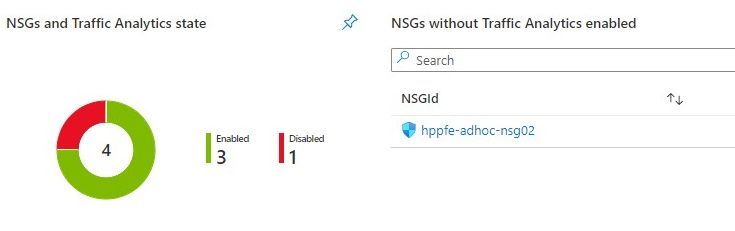
- which NSGs do not have Traffic Analytics enabled – this means no visibility over their flows.
- which NSGs have been inactive, i.e., not generating any flow logs – maybe these NSGs were associated to subnets or network interfaces that were decommissioned.
Workbook tiles with a summary of Traffic Analytics state in all NSGs
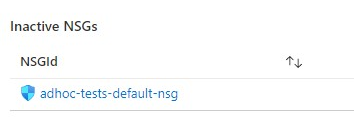 Workbook tile listing NSGs that have not been generating flow logs (inactive)
If you scroll down a bit more, you’ll also get details about NSG rules that have been inactive for the period specified as parameter. These rules are not generating NSG Flow Logs and this may be a symptom of some misconfiguration or, at least, of some lack of security hygiene.
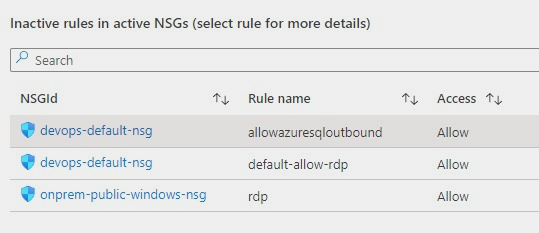 Workbook tile with a list of NSG rules that have not been used by network traffic
If you select a rule from the list, you get statistics about other rules in the same NSG that are generating flows, which may give you a hint for the reason why that rule has not generated any log lately.
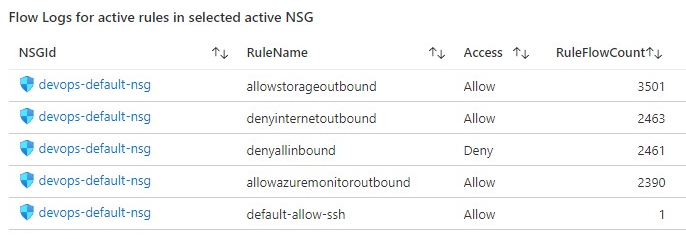 Workbook tile with the statistics for all the NSG rules that have generating traffic for the NSG where the inactive rule sits in
Deploying the Workbook
The NSG Optimization workbook can be found at the address below:
https://github.com/helderpinto/azure-wellarchitected-toolkit/blob/main/security/workbooks/nsg-optimization.json
For instructions on how to setup a workbook, check the Azure Monitor documentation. Once in Azure Monitor Workbooks, you must create a new Workbook and, in edit mode, click on the Advanced Editor button (see picture below) and replace the gallery template code by the one you find in the GitHub URL above. After applying the workbook code, you should see the dashboard described in this article. The workbook looks quite simple but the logic behind is somewhat complex and, depending on the volume of your NSG Flow Logs and on the NSG activity time range you chose, it may take a while to fully load each table. Don’t forget to save your workbook!
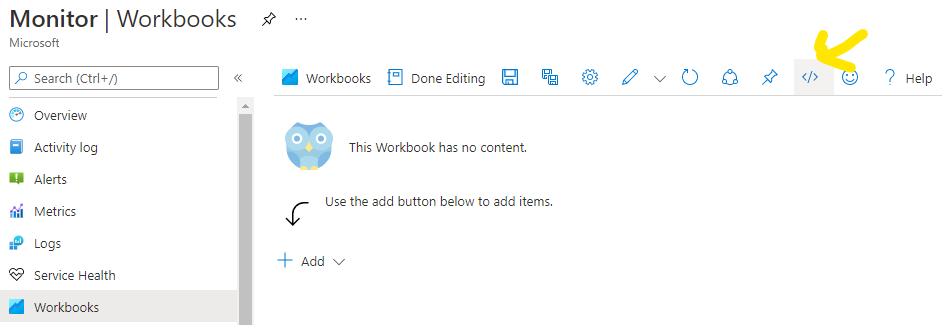 Screenshot of the Workbooks user interface for creating a new workbook from existing code
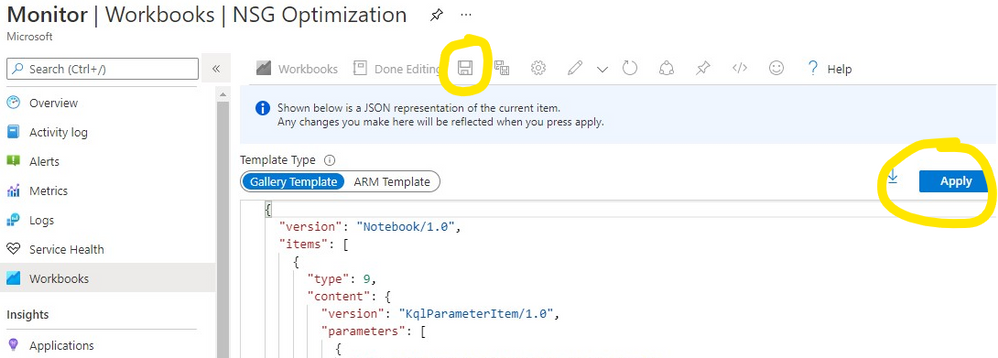 Screenshot of the Workbooks user interface for applying and saving a new workbook from existing code
Conclusion
As we saw in this article, keeping a good network security hygiene may save you from troubles. Some of these potential issues come out of unneeded or obsolete network security rules defined in your NSGs. The NSG Optimization Workbook here described will help you uncover NSGs or NSG rules that have not been used over a specific time range, based on Traffic Analytics logs. An NSG rule that has not generated flow logs is probably a symptom of some misconfiguration. So, go turn on Traffic Analytics, deploy the NSG Optimization Workbook and give a start to your NSG spring cleanup! :smiling_face_with_smiling_eyes:

by Contributed | Apr 26, 2021 | Technology
This article is contributed. See the original author and article here.
Which community project do you maintain?
yo teams
How does it help people?
yo teams helps developers kickstart their Teams extensibility projects by providing an easy way to create the first Teams App all the way to scaffolding a solution that can be deployed, scaled and maintained.
What have you been working on lately?
yo teams is continuously evolving based on feedback and real-world feedback and experience from the community. As of lately we’ve been focused on making it easier and faster to create a project and at the same keep a high level of flexibility for those developers who wants to control and manage everything themselves.
What do you do at work?
I’m the global innovation lead for Modern Workplace at Avanade
Why are you a part of the M365 community?
Because I learn new stuff all the time – the benefits of a community is the diversity of different voices and opinions. This eventually makes me become better in what I do, and I hope that others learn from what I do.
What was you first community contribution?
My first true open source community contribution was in the form of a web part for SharePoint 2007/WSS 3.0, called the ChartPart
One tip for someone who’d like to start contributing
Just do it. You never know what you might learn and who you might learn to know.
by Contributed | Apr 25, 2021 | Technology
This article is contributed. See the original author and article here.
In the previous post, I introduced the very early stage of Project Bicep. At that time, it was the version of 0.1.x, but now it’s updated to 0.3.x. You can use it for production, and many features keep being introduced. Throughout this post, I’m going to discuss new features added since the last post.
Azure CLI Integration
While Bicep CLI works as a stand-alone tool, it’s been integrated with Azure CLI from v2.20.0 and later. Therefore, you can run bicep in either way.
    # Bicep CLI

    bicep build azuredeploy.bicep
    # Azure CLI

    az bicep build –file azuredeploy.bicep
NOTE: Although Bicep CLI could build multiple files by v0.2.x, it’s now only able to build one file at a time from v0.3.x. Therefore, if you want to build multiple files, you should do it differently. Here’s a sample PowerShell script, for example.
    Get-ChildItem -Path **/*.bicep -Recurse | ForEach-Object {

        az bicep build –file $_.FullName

    }
Because of the Azure CLI integration, you can also provision resources through the bicep file like below:
    # ARM template file

    az deployment group create

        –name

        –resource-group

        –template-file azuredeploy.json

        –parameters @azuredeploy.parameters.json
    # Bicep file

    az deployment group create

        –name

        –resource-group

        –template-file azuredeploy.bicep

        –parameters @azuredeploy.parameters.json
Bicep Decompiling
From v0.2.59, Bicep CLI can convert ARM templates to bicep files. It’s particularly important because still many ARM templates out there have been running and need maintenance. Run the following command for decompiling.
    # Bicep CLI

    bicep decompile azuredeploy.json
    # Azure CLI

    az bicep decompile –file azuredeploy.json
NOTE: If your ARM template contains a copy attribute, bicep can’t decompile it as of this writing. In the later version, it should be possible.
Decorators on Parameters
Writing parameters has become more articulate than v0.1.x, using the decorators. For example, there are only several possible SKU values of a Storage Account available, so using the @allowed decorator like below makes the code better readability.
    // Without decorators

    param storageAccountSku string {

      allowd: [

        ‘Standard_GRS’

        ‘Standard_LRS’

      ]

      default: ‘Standard_LRS’

    }
    // With decorators

    @allowed([

      ‘Standard_GRS’

      ‘Standard_LRS’

    ])

    param storageAccountSku string = ‘Standard_LRS’
Conditional Resources
You can use ternary operations for attributes. What if you can conditionally declare a resource itself using conditions? Let’s have a look. The following code says if the location is only Korea Central, the Azure App Service resource can be provisioned.
    param location = resourceGroup().location
    resource webapp ‘Microsoft.Web/sites@2020-12-01’ = if (location == ‘koreacentral’) {

      …

    }
Loops
While ARM templates use both copy attribute and copyIndex() function for iterations, bicep uses the for…in loop. Have a look at the code below. You can declare Azure App Service instances using the array parameter through the for…in loop.
    param webapps array = [

      ‘dev’

      ‘test’

      ‘prod’

    ]
    // Use array only

    resource webapp ‘Microsoft.Web/sites@2020-12-01’ = [for name in webapps: {

      name: ‘my-webapp-${name}’

      …

    }]
You can also use both array and index at the same time.
    // Use both array and index

    resource webapp ‘Microsoft.Web/sites@2020-12-01’ = [for (name, index) in webapps: {

      name: ‘my-webapp-${name}-${index + 1}’

      …

    }]
Instead of the array, you can use the range() function in the loop.
    // Use range

    resource webapp ‘Microsoft.Web/sites@2020-12-01’ = [for i in range(0, 10): {

      name: ‘my-webapp-${index + 1}’

      …

    }]
Please note that you MUST use the array expression ([…]) outside the for…in loop because it declares the array of the resources. Bicep will do the rest.
Modules
Personally, I love this part. While ARM templates use the linked template, bicep uses the module keyword for modularisation. Here’s the example for Azure Function app provisioning. For this, you need at least Storage Account, Consumption Plan and Azure Functions resources. Each resource can be individually declared as a module, and the orchestration bicep file calls each module. Each module should work independently, of course.
Storage Account
    // storageAccount.bicep

    param resourceName string

    param location string = resourceGroup().location
    resource st ‘Microsoft.Storage/storageAccounts@2021-02-01’ = {

      name: resourceName

      location: location

      …

    }
    output id string = st.id

    output name string = st.name
Consumption Plan
    // consumptionPlan.bicep

    param resourceName string

    param location string = resourceGroup().location
    resource csplan ‘Microsoft.Web/serverfarms@2020-12-01’ = {

      name: resourceName

      location: location

      …

    }
    output id string = csplan.id

    output name string = csplan.name
Azure Functions
    // functionApp.bicep

    param resourceName string

    param location string = resourceGroup().location

    param storageAccountId string

    param storageAccountName string

    param consumptionPlanId string
    resource fncapp ‘Microsoft.Web/sites@2020-12-01’ = {

      name: resourceName

      location: location

      …

      properties: {

        serverFarmId: consumptionPlanId

        …

        siteConfig: {

          appSettings: [

            {

              name: ‘AzureWebJobsStorage’

              value: ‘DefaultEndpointsProtocol=https;AccountName=${storageAccountName};EndpointSuffix=${environment().suffixes.storage};AccountKey=${listKeys(storageAccountId, ‘2021-02-01′).keys[0].value}’

            }

            …

          ]

        }

      }

    }
    output id string = fncapp.id

    output name string = fncapp.name
Modules Orchestration
Here’s the orchestration bicep file to combine modules. All you need to do is to declare a module, refer to the module location and pass parameters. Based on the references between modules, dependencies are automatically calculated.
    // azuredeploy.bicep

    param resourceName string

    param location string = resourceGroup().location
    module st ‘./storage-account.bicep’ = {

      name: ‘StorageAccountProvisioning’

      params: {

        name: resourceName

        location: location

      }

    }
    module csplan ‘./consumption-plan.bicep’ = {

      name: ‘ConsumptionPlanProvisioning’

      params: {

        name: resourceName

        location: location

      }

    }
    module fncapp ‘./function-app.bicep’ = {

      name: ‘FunctionAppProvisioning’

      params: {

        name: resourceName

        location: location

        storageAccountId: st.outputs.id

        storageAccountName: st.outputs.name

        consumptionPlanId: csplan.outputs.id

      }

    }
NOTE: Unfortunately, as of this writing, referencing to external URL is not supported yet, unlike linked ARM templates.
So far, we’ve briefly looked at the new features of Project Bicep. As Bicep is one of the most rapidly growing toolsets in Azure, keep using it for your resource management.
This article was originally published on Dev Kimchi.
by Contributed | Apr 25, 2021 | Technology
This article is contributed. See the original author and article here.
Header picture for article “What I (as a non dev) learned as I created my first Power App”
I like to share my very own experiences while building my first canvas app. I have no tech background and at the beginning I thought that I could never do it. But now, looking back, I’ve learned so many things. Not only about functions and Power Apps syntax, but about the process of building apps, learning from failure and community.
I hope you find that helpful, get inspiration or learn anything from it.
Let’s dive into the topic, without any further delay: Here are 9 things I’ve learned while building my first canvas app. Why only 9? Why not 10? Because I want to leave room for improvement ;)
1. Canvas App vs Model driven app
The first question I had for myself was “Do I want to build a model driven app or a canvas app”? And since I had no idea at all, I tried to go for a model driven app. The app will be modelled around your data, so it sounds like this would be a lot easier than starting from scratch, right?
For several cases that remains true, but actually it depends from which mindset you’re coming. If you’re familiar with your data and have an idea about how data may be presented within an app, model driven apps are your way to go. It makes it really easy to design an app with little clicks.
BUT
If you come from a non-tech background, like I did, maybe a canvas app is the better choice. I had a very clear image in my mind, how the app was supposed to look and perform. If you start with a model driven app you must customize it heavily until it suits your needs/ideas. And I actually found out, that while customizing it, I was deleting and editing connections, that came automatically. And then everything broke. Nothing worked anymore and it left me so frustrated.
For me it was so much easier to start with a canvas app. There is nothing there, just the plain white canvas. And that had two very important effects:
1. I was forced to build the app step by step and let it grow over time.
2. I learned how the connections, items and bits worked from the very beginning.
Let’s get into those two aspects a little bit deeper, shall we?
2. Scavenger Hunt. Build your app bit by bit
If you build your app step by step you are forced to think about an MVP in the very beginning. I don’t talk about the Microsoft Most Valuable Player, but a Minimal Viable Product. Ask yourself: What is the basic functionality that my app needs to work? That is a very important question at the beginning. After you’ve created your MVP you can add functionality and features step by step.
And that leads to a much more fulfilling learning experience. You will have multiple tiny success experiences and your confidence will grow. You will get the feeling, while your app grows and gets more functionality, it will become YOUR baby. Your thing, that you created out of nothing. There’s hardly a related feeling.
3. It’s Trial and Error all the time
Start with a canvas app and add functionality piece by piece. If something doesn’t work, you know exactly what you did, before it broke (at least in theory). That makes troubleshooting so much easier. If you start with a model driven app, you have no idea where to even begin with looking for possible problems.
But in your own canvas app, you can recreate the steps you’ve taken, before something stopped working.
And you will experience this over and over again: It’s trial and error. Get comfortable with the feeling, that this may be long way. Frustration and anger are natural parts of this and it’s perfectly fine. When you solved a problem that seems impossible to even understand at the beginning, that’s the moment when you really learn how these things work.
Get used to it and embrace failure as THE way of learning.
4. You’re constantly reading Microsoft Docs. All the time
Usually I have an idea in my mind, what I want my app to do. Then I start to google, if this is even possible, I’ll find the right function and read on Microsoft Docs how this works. I try it out. Doesn’t’ work? Back to Microsoft Docs. Are all the circumstances okay? Did you use the same data source as MS docs describes it? Try it out again. Still not working? Back to reading MS docs.
Actually, I found myself more time reading instructions, than really working in my app, but that is part of the process, too. Even people who are familiar with Power Apps and are deep into the topic have to check up things again and again. MS docs has (nearly) all the information you need to make this work. It’s all in there, but you have to be prepared to dig into this. Really deep.
5. Knowing about the Power Apps Community is crucial
MS docs may have the answer to your problem, but quite often I couldn’t find the right answer, or I didn’t understand the answer at all (no tech background, remember?). That is frustrating. So much.
But you can be sure about one thing: Somebody has been at exactly that point, where you are right now. And that’s where community comes into play. There are so many amazing people out there who love to share their knowledge, give you hints and tricks. There are blogs, video tutorials, the Power Apps community forum and an endless list of other sources, where you can get help.
Next to MS docs this is the most useful source of information, by far. Quite often these people don’t give you a plain manual but describe their problem and their solution. That makes it easier to understand it yourself.
6. Find someone who can take you by hand
MS docs and the community are awesome. Hands down. But I found myself in a couple of situations where I wasn’t really able to explain my problem (I didn’t know this at this point yet). And that would make even the best manual/explanation/tutorial useless.
THIS CRAP ISN’T WORKING AND I DON’T KNOW WHY. I DON’T EVEN KNOW WHERE TO GET HELP ANYMORE
I’ve screamed something like this a thousand times, I swear. At least. And do you know what helps? If you can talk to someone, who’s been there. If you struggle to solve your problem on your own (even with a good tutorial at hand), reach out and talk to people. Even better, if you can show them what’s not working and where you are at the moment.
If you spend some time building your app you sometimes struggle to see the obvious. A view from someone uninvolved is so important. I found myself emotionally involved and too frustrated to remain calm and clear. My view was too narrow and too focused to see new ways to the solution.
And quite often I shared my screen with someone and before I even explained my problem, the other person knew what was wrong. I was just buried too deep into my problems and views.
And believe me, there are far more people out there, who are happy to take your hand and show you a couple if things than you may believe. I had to overcome myself to ask not only for help, but for people showing me how things work. But the member of the communities are eager to help. Shall I tell you, why so many of them are happy, if they can help you and show you stuff?
If you teach, you’ll learn. If you explain something to somebody else, you are forced to explain it in a way that the other person understands. And therefore, you must learn, how to describe things from different perspectives. Teachers don’t just give away their knowledge, they’re gaining experience and get deeper into the topic themselves.
It’s a win-win situation.
7. Always insert, create, make!
“Nothing will work, unless you do!” – Maya Angelou
Try things out. Insert a function, create a button, make things work. As I mentioned earlier, building an app is trial and error and therefore you have to do something. Every action you make, everything that you try out, makes you better. Makes you understand more things. Lets you learn.
So, before you google and read for ours, go out there and try things out. Yes, it may be frustrating, but that is part of the learning process and it’s actually good for you.
If you are building a canvas app, you can undo every step you take, so there is actually little risk to try things out. Click and see, what happens. It will teach you a lot.
Here is a little trick that I found especially useful: Always make a button. What do I mean by that? For every new function I want to try out I make a new button. It doesn’t look good, but it gives me the possibility to test a functionality in an own, separated environment. There are no other functions on that button but the one I want to test. If it works, I copy the code and paste it into the place, where I originally wanted it.
8. Form follows function. Make it work, then make it pretty
I think this point should be obvious from what I explained earlier, but this was hard for me to learn. You take care of the functionality first; then you work on the looks and the interface. Of course I wanted to create a pretty app right away, but that didn’t work out at all.
I ended up with a lot of different buttons, shapes and text all over the place. But everything worked.
From this point on I had all the possibilities to make it pretty and didn’t need to worry about any functionality anymore. That was a relieving point while creating my first app.
If you focus on the functionality first, you focus on the backend first (frontend: the layer the user sees and uses; backend: the functionality layer that no user should ever see). When the backend works, you can take care about the frontend.
You have a lot of possibilities to make a working app look nice. The other way around, getting a nice-looking app to work is way more difficult.
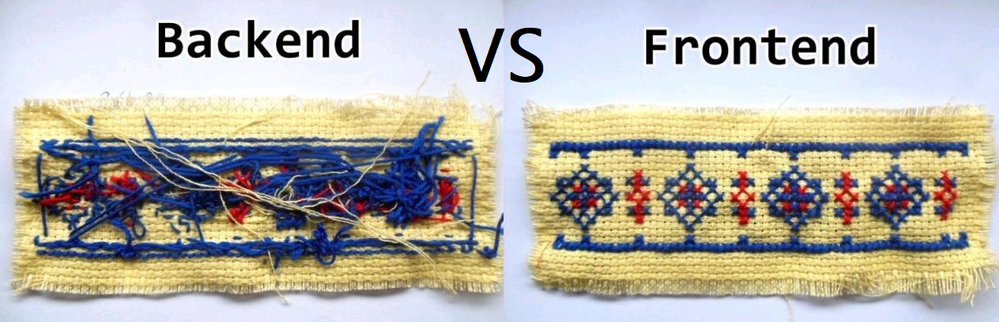 Compare frontend and Backend
9. Give back to the community. Tell others, what and how you did it
Maybe that is one of the most important parts. I talked a lot about the community, about resources to learn online, about getting help from the community. And all of this only works, if there’s content to learn from.
I guess many people might feel intimidated because their first app doesn’t look that beautiful or offers not that much of functionality.
But that doesn’t matter.
You created something, you learned something and you should be proud of it, so tell people about it. There are many, many people who want to hear about it. And those are thankful for the opportunity to learn from you and your experiences. There are many people out there, just starting, just as you did. Help them, teach them, learn from that experience.
The community thrives from content that is at every level of expertise. Your experiences matters and can help a lot of people.
Give a little bit back, because I’m sure you needed help as well.
That is how we all progress and grow. That is community


Recent Comments