by Contributed | Jan 6, 2021 | Technology
This article is contributed. See the original author and article here.
One of the most common challenge faced by developers while maintaining source code on Azure resources is: how to store and retrieve the secrets without having to save any credentials whatsoever. Moreover, this is strictly discouraged in accordance with Defence-in-depth approach.
Managed identities on Azure solve this challenge by assigning service principals to the identities on Azure AD.
To understand how it works, let’s build a setup with Ubuntu VM running on Azure, Key Vault to fetch secrets, and Azure AAD to register the VM as a managed identity.
For brevity, I have already spun up a Ubuntu 18.04 VM.
1. Let’s create a AKV account and save dummy credentials on it, which needs to be fetched by application running on VM.
PS C:WINDOWSsystem32> New-AzKeyVault -Name "dummy-keyvault" -ResourceGroupName "ManagedIdentityLab" -Location "East US2"


Vault Name                          : dummy-keyvault
Resource Group Name                 : ManagedIdentityLab
Location                            : East US2
Resource ID                         : /subscriptions/<redacted>/resourceGroups/ManagedIdentityLab/providers/Microsoft.KeyVault/vaults/dummy-keyvault
Vault URI                           : https://dummy-keyvault.vault.azure.net/

PS C:WINDOWSsystem32> $secretvalue = ConvertTo-SecureString 'abc@123' -AsPlainText -Force
PS C:WINDOWSsystem32> $secret = Set-AzKeyVaultSecret -VaultName 'dummy-keyvault' -Name 'ExamplePassword' -SecretValue $secretvalue
2. Now, let’s assign a system-assigned identity to the ubuntu VM, so that applications running on it will use this identity to access other Azure resources like AKV.
PS C:WINDOWSsystem32> $vm = Get-AzVM -ResourceGroupName ManagedIdentityLab -Name  vm-running-app

PS C:WINDOWSsystem32> Update-AzVM -ResourceGroupName ManagedIdentityLab -VM $vm -IdentityType SystemAssigned

RequestId IsSuccessStatusCode StatusCode ReasonPhrase
--------- ------------------- ---------- ------------
                         True         OK OK
PS C:WINDOWSsystem32> $spID = (Get-AzVM -ResourceGroupName ManagedIdentityLab  -Name vm-running-app).identity.principalid
PS C:WINDOWSsystem32> $spID
f9733206-1fcb-42c9-abc9-a75d1b68d52b
3. Now we can assign this principal ID Reader access to Azure Key Vault we created in first step. We do this by assigning RBAC role: Reader to the principal ID assigned to the VM in step 2.
PS C:WINDOWSsystem32> New-AzRoleAssignment -ObjectId $spID -RoleDefinitionName "Reader" -Scope /subscriptions/<redacted>/resourceGroups/ManagedIdentityLab/providers/Microsoft.KeyVault/vaults/dummy-keyvault


RoleAssignmentId   : /subscriptions/<redacted>/resourceGroups/ManagedIdentityLab/providers/Microsoft.KeyVault/vaults/dummy-keyvault/providers/Microsoft.Authorization/roleAssignments/780e1100-f4a0-44a8-a8ee-79c5
                     588c3e17
Scope              : /subscriptions/<redacted>/resourceGroups/ManagedIdentityLab/providers/Microsoft.KeyVault/vaults/dummy-keyvault
DisplayName        : vm-running-app
SignInName         :
RoleDefinitionName : Reader
RoleDefinitionId   : acdd72a7-3385-48ef-bd32-f606fba81ae7
ObjectId           : f9733206-1fcb-42c9-abc9-a75d1b68d52b
ObjectType         : ServicePrincipal
CanDelegate        : False
Description        :
ConditionVersion   :
Condition          :

PS C:WINDOWSsystem32>
4. We are now all set to access the keyvault from the python3 interactive shell on ubuntu VM
>>> from azure.identity import ManagedIdentityCredential
>>> credentials=ManagedIdentityCredential()
>>> import os
>>> import cmd
>>> keyVaultName = os.environ["KEY_VAULT_NAME"]
>>> KVUri = f"https://{keyVaultName}.vault.azure.net"
>>> from azure.keyvault.secrets import SecretClient
>>> client = SecretClient(vault_url=KVUri, credential=credentials)
>>> retrieved_secret = client.get_secret("ExamplePassword")
>>>
>>> retrieved_secret
<KeyVaultSecret [https://dummy-keyvault.vault.azure.net/secrets/ExamplePassword/4d1ef64abc4d4c2e8741df66ee0f0065]>
>>> retrieved_secret.
retrieved_secret.id          retrieved_secret.name        retrieved_secret.properties  retrieved_secret.value
>>> retrieved_secret.value
'abc@123'
>>>
Voila! We can fetch the secret from the AKV without having to store the secret anywhere. The class ManagedIdentityCredential in azure-identity package fetches the VM’s managed identity client ID.
The magic that happens behind the scene is described below:
1. As soon as the client.get_secret method is called to fetch secret from AKV, an http request is made to the AKV url. The response back is http 401 error, since the request header does not have a valid token.
INFO:azure.core.pipeline.policies.http_logging_policy:Request URL: 'https://dummy-keyvault.vault.azure.net/secrets/ExamplePassword/?api-version=REDACTED'
INFO:azure.core.pipeline.policies.http_logging_policy:Request method: 'GET'
INFO:azure.core.pipeline.policies.http_logging_policy:Response status: 401
2. Post this failure, another request is made to the AAD to get the token for the managed identity associated with the ubuntu VM. The response returned back is the access token :
INFO:azure.core.pipeline.policies.http_logging_policy:Request URL: 'http://169.254.169.254/metadata/identity/oauth2/token?api-version=REDACTED&resource=REDACTED'
INFO:azure.core.pipeline.policies.http_logging_policy:Request method: 'GET'
INFO:azure.core.pipeline.policies.http_logging_policy:Response status: 200
INFO:azure.core.pipeline.policies.http_logging_policy:Response headers:

    "response": {
        "access_token": "********",
        "client_id": "1699a4a0-2f2a-4696-b483-dd32a950349a",
        "expires_in": "85295",
        "expires_on": 1610038816,
        "ext_expires_in": "86399",
        "not_before": "1609952116",
        "resource": "https://vault.azure.net",
        "token_type": "Bearer"
    },
    "scope": [
        "https://vault.azure.net/.default"
    ]
}
3. Finally, the access token retrieved from step 2 is used in the header to reattempt step 1. When AKV receives the request this time, it validates the access token against AAD. Since the access token is valid, the request is allowed to read the secret and we get a http 200 response back.
INFO:azure.identity._internal.decorators:ManagedIdentityCredential.get_token succeeded
INFO:azure.core.pipeline.policies.http_logging_policy:Request URL: 'https://dummy-keyvault.vault.azure.net/secrets/ExamplePassword/?api-version=REDACTED'
INFO:azure.core.pipeline.policies.http_logging_policy:Request method: 'GET'
INFO:azure.core.pipeline.policies.http_logging_policy:Request headers:
INFO:azure.core.pipeline.policies.http_logging_policy:Response status: 200
To summarize, managed identity allows the apps running on Azure resources to authenticate against AAD without having to store credentials. This is super convenient and compliant, also eliminates the need to rotate the client secret upon compromise or expiration.
by Contributed | Jan 6, 2021 | Technology
This article is contributed. See the original author and article here.
Starting today, Data Exposed will be going live every Wednesday at 9AM PT on LearnTV. Every 4 weeks (mostly the first week of each month), we’ll do a News Update. We’ll include product updates, videos, blogs, etc. as well as upcoming events and things to look out for. We’ve included an iCal file, so you can add a reminder to tune in live to your calendar.
Data Exposed will continue to release new, shorter episodes on Thursdays at 9AM PT, plus #MVPTuesday episodes once a month. We’re expanding so we can further our connection with you, our SQL community and #sqlfamily.
Along with the News Update on Data Exposed Live, you can read this blog to get the guide and links to all the things discussed in the show. We’re looking forward to 2021, here’s your first update:
Product updates
To get a comprehensive update on what’s new in Azure SQL Managed Instance, I highly recommend you check out the Live session we did in December: https://aka.ms/sqlmi-live-dec20. This session featured so many updates and even insights on what’s coming in 2021.
Machine Learning in Azure SQL Managed Instance officially became generally available with support for R and Python. For more information, see here: https://aka.ms/managed-instance-machine-learning. And, in case you missed it (ICYMI), in late 2020, Machine Learning Services actually introduced open sourcing for R and Python custom runtime. This is a great addition that will help you bring newer version of R and Python that you may be using in your organization.
In December, the general availability of Azure Data Share snapshot-based sharing for Azure SQL Database and Azure Synapse Analytics happened. This integration enables you to share database tables and views from Azure SQL Database and Dedicated SQL pool (formerly Azure SQL DW), and share tables from Synapse workspace dedicated SQL pool. You can now share structured data stored in relational databases and data warehouse easily and securely between internal departments, with external partners, vendors, or customers for collaboration. More info on how to do that here.
Transparent Data Encryption (TDE) has been available across all deployment options of Azure SQL for a while, but in December the team announced public preview for TDE with customer-managed keys for Azure SQL Database Hyperscale.
Finally, Mara Steiu, Program Manager, came on the show to talk to us about Private Link for Azure SQL Data Sync, which recently went into a public preview for Azure SQL Database.
Additionally, the latest Azure Data Studio update was released in November. Make sure you’re up to date and get the full details in the release blog here.
Videos
Data Platform Summit(DPS) took place in December online over the course of 72 hours, plus two days of pre-cons and post-cons. Microsoft had a great showing.
We released a TON of new Data Exposed episodes to round out the year. Here is the list, or you can just see the playlist we created with all the episodes!
- Top Reasons Your On-premises SQL Server Instance Can Benefit from Azure, Amit Banerjee
- Getting Started with DevOps for Azure SQL, Arvind Shyamsundar
- MVP EDITION – How to Automate Disaster Recovery in SQL Server On-Prem, Chrissy LeMaire
- Use Azure Pipelines for Azure SQL Deployments, Arvind Shyamsundar
- Understanding High-Performant, Hybrid Data Integration Using Azure Data Factory, Abishek Narain
- MVP EDITION – The A to S of Azure Data Studio, Warwick Rudd
- Elastic Jobs in Azure SQL Database – Part 3, Kate Smith
- Elastic Jobs in Azure SQL Database – Part 4, Kate Smith
- Elastic Jobs in Azure SQL Database – Part 5, Kate Smith
Blogs
As always, our team is busy writing blogs to share with you all. Blogs contain announcements, tips and tricks, deep dives, and more. Here’s the list I have of SQL-related topics you might want to check out.
- Azure Blog
- SQL Server Techcommunity
- Azure SQL Tech Community
- Azure SQL Devs’ Corner
- Azure Database Support (SQL-related posts)
*This includes the General Availability announcement for Azure Synapse Analytics, as well as the Preview announcement for Azure Purview.
Upcoming events
As always, there are several events coming up this month. Here are a few to put on your calendar and register for:
1/10: Multicloud Meetup
Azure SQL Database Networking using Private Link and connecting with PAAS, Anna Hoffman
1/20: Azure Webinar Series: Four Ways to Take Your Data Security to the Next Level
1/29: C# Corner SQL Virtual Conference
Learn Azure SQL Database through Demos, Anna Hoffman
Develop Best Practices for Azure SQL: Avoiding common pitfalls when using the Cloud Database, Davide Mauri
Executable Troubleshooting Guides with Notebook for SQL People, Julie Koesmarno & Aaron Nelson
SQL Server 2019 Big Data Clusters Architecture, Buck Woody
SQL Projects for Database Development, Drew Skwiers-Koballa
Data Replication Options in Azure SQL / SQL Server, Mara Steiu
In addition to these upcoming events, here’s the schedule for Data Exposed Live this month:
1/13: Deep Dive: Enterprise Data Integration Simplified with Azure Data Factory
1/20: Something Old, Something New: Two Data Scientists Walk Into a Bar? What Are the Odds? with Buck Woody
1/27: Azure SQL February 2021 Updates
Tune in every Wednesday at 9AM PT to interact with us live: aka.ms/LearnTV
Find any episodes you missed on-demand: aka.ms/dataexposedlive
Coming up on February 3, join our first-ever Data Exposed Special, Around the Clock with Azure SQL and Azure Data Factory: an engineering event focused on Azure SQL and Azure Data Factory – with the idea that Azure Data Factory can do a lot of things, but it does Azure SQL really well! Register today!
Featured Microsoft Learn Module
Learn with us! This month I highlighted the Introduction to Azure SQL module. Check it out!
Anna’s pick of the month: books!
Near the end of November, two Azure SQL-related books were published.
Azure SQL Revealed was written by Bob Ward to help SQL Server professionals translate their knowledge to Azure SQL. Practical Azure SQL Database for Modern Developers, written by Davide Mauri, Silvano Coriani, Sanjay Mishra, Jovan Popovic, and I, was written to help developers (including those new to SQL Server) get the most out of Azure SQL Database and Azure SQL Managed Instance. These are great complementary resources, and I can’t recommend them enough!
Until next month…
That’s it for now! Be sure to check back next month for the latest updates, and tune into Data Exposed Live every Wednesday at 9AM PST on LearnTV. We also release new episodes on Thursdays at 9AM PST and new #MVPTuesday episodes on the second Tuesday of every month at 9AM PST at aka.ms/DataExposedyt.
Having trouble keeping up? Be sure to follow us on Twitter to get the latest updates on everything, @AzureSQL. You can also download the iCal link with a recurring invite!
We hope to see you next time, on Data Exposed.
–Anna and Marisa
by Contributed | Jan 6, 2021 | Technology
This article is contributed. See the original author and article here.
As we continue listening to students and educators, we have heard many requests for OneNote integration with H5P, the tool that allows people to create, share and reuse interactive content. The OneNote binder metaphor, and the ability to easily embed H5P interactive pages in OneNote, organize them, or distribute to others in OneNote Class Notebook, seemed like a great match. Today we are excited to announce the integration between H5P and OneNote.
Educators around the world use H5P to create interactive learning resources and digital materials for their classroom. There are hundreds of H5P templates available to pick from and teachers and students can create interactive presentations, infographics and escape rooms easily and no programming or design skills required. H5P aims to change the way we communicate, from static, boring content, to interactive, engaging presentations and materials. Visual, interactive content is normally hard and expensive to develop. But with H5P creating interactive content becomes, fun, simple and affordable for everyone.
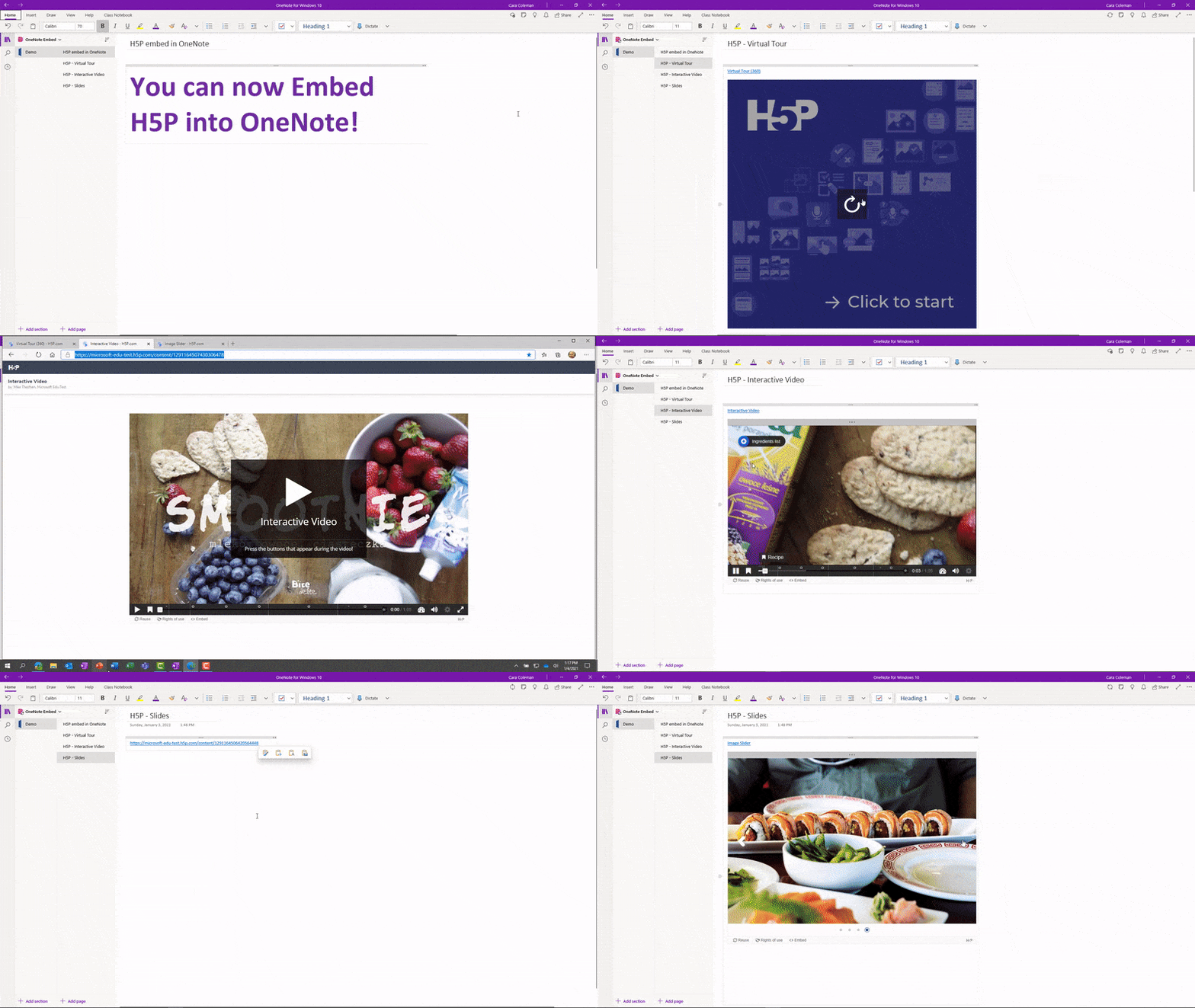
As of today, you can now paste any H5P.com URL on to a OneNote page and it will render it as a live interactive embed. You can now create pages, section, and even entire notebooks chock-full of H5P! A great way to make learning more fun and easy, together.
To see some examples or how easy this is to do, see the example video of an H5P in OneNote. This integration works in OneNote Windows 10, Online, Mac, iPad, Android, and 2016
Demo of H5P content embedded in OneNote
We hope you enjoy this new integration to bring together two great apps that students and educators love!
Mike Tholfsen
Microsoft Education Product Manager
@mtholfsen
by Contributed | Jan 6, 2021 | Technology
This article is contributed. See the original author and article here.
Starting today, Data Exposed will be going live every Wednesday at 9AM PT on LearnTV. Every 4 weeks (mostly the first week of each month), we’ll do a News Update. We’ll include product updates, videos, blogs, etc. as well as upcoming events and things to look out for. We’ve included an iCal file, so you can add a reminder to tune in live to your calendar.
Data Exposed will continue to release new, shorter episodes on Thursdays at 9AM PT, plus #MVPTuesday episodes once a month. We’re expanding so we can further our connection with you, our SQL community and #sqlfamily.
Along with the News Update on Data Exposed Live, you can read this blog to get the guide and links to all the things discussed in the show. We’re looking forward to 2021, here’s your first update:
Product updates
To get a comprehensive update on what’s new in Azure SQL Managed Instance, I highly recommend you check out the Live session we did in December: https://aka.ms/sqlmi-live-dec20. This session featured so many updates and even insights on what’s coming in 2021.
Machine Learning in Azure SQL Managed Instance officially became generally available with support for R and Python. For more information, see here: https://aka.ms/managed-instance-machine-learning. And, in case you missed it (ICYMI), in late 2020, Machine Learning Services actually introduced open sourcing for R and Python custom runtime. This is a great addition that will help you bring newer version of R and Python that you may be using in your organization.
In December, the general availability of Azure Data Share snapshot-based sharing for Azure SQL Database and Azure Synapse Analytics happened. This integration enables you to share database tables and views from Azure SQL Database and Dedicated SQL pool (formerly Azure SQL DW), and share tables from Synapse workspace dedicated SQL pool. You can now share structured data stored in relational databases and data warehouse easily and securely between internal departments, with external partners, vendors, or customers for collaboration. More info on how to do that here.
Transparent Data Encryption (TDE) has been available across all deployment options of Azure SQL for a while, but in December the team announced public preview for TDE with customer-managed keys for Azure SQL Database Hyperscale.
Finally, Mara Steiu, Program Manager, came on the show to talk to us about Private Link for Azure SQL Data Sync, which recently went into a public preview for Azure SQL Database.
Additionally, the latest Azure Data Studio update was released in November. Make sure you’re up to date and get the full details in the release blog here.
Videos
Data Platform Summit(DPS) took place in December online over the course of 72 hours, plus two days of pre-cons and post-cons. Microsoft had a great showing.
We released a TON of new Data Exposed episodes to round out the year. Here is the list, or you can just see the playlist we created with all the episodes!
- Top Reasons Your On-premises SQL Server Instance Can Benefit from Azure, Amit Banerjee
- Getting Started with DevOps for Azure SQL, Arvind Shyamsundar
- MVP EDITION – How to Automate Disaster Recovery in SQL Server On-Prem, Chrissy LeMaire
- Use Azure Pipelines for Azure SQL Deployments, Arvind Shyamsundar
- Understanding High-Performant, Hybrid Data Integration Using Azure Data Factory, Abishek Narain
- MVP EDITION – The A to S of Azure Data Studio, Warwick Rudd
- Elastic Jobs in Azure SQL Database – Part 3, Kate Smith
- Elastic Jobs in Azure SQL Database – Part 4, Kate Smith
- Elastic Jobs in Azure SQL Database – Part 5, Kate Smith
Blogs
As always, our team is busy writing blogs to share with you all. Blogs contain announcements, tips and tricks, deep dives, and more. Here’s the list I have of SQL-related topics you might want to check out.
- Azure Blog
- SQL Server Techcommunity
- Azure SQL Tech Community
- Azure SQL Devs’ Corner
- Azure Database Support (SQL-related posts)
*This includes the General Availability announcement for Azure Synapse Analytics, as well as the Preview announcement for Azure Purview.
Upcoming events
As always, there are several events coming up this month. Here are a few to put on your calendar and register for:
1/10: Multicloud Meetup
Azure SQL Database Networking using Private Link and connecting with PAAS, Anna Hoffman
1/20: Azure Webinar Series: Four Ways to Take Your Data Security to the Next Level
1/29: SQL Virtual Conference
Learn Azure SQL Database through Demos, Anna Hoffman
Develop Best Practices for Azure SQL: Avoiding common pitfalls when using the Cloud Database, Davide Mauri
Executable Troubleshooting Guides with Notebook for SQL People, Julie Koesmarno & Aaron Nelson
SQL Server 2019 Big Data Clusters Architecture, Buck Woody
SQL Projects for Database Development, Drew Skwiers-Koballa
Data Replication Options in Azure SQL / SQL Server, Mara Steiu
In addition to these upcoming events, here’s the schedule for Data Exposed Live this month:
1/13: Deep Dive: Enterprise Data Integration Simplified with Azure Data Factory
1/20: Something Old, Something New: Two Data Scientists Walk Into a Bar? What Are the Odds? with Buck Woody
1/27: Azure SQL February 2021 Updates
Tune in every Wednesday at 9AM PT to interact with us live: aka.ms/LearnTV
Find any episodes you missed on-demand: aka.ms/dataexposedlive
Coming up on February 3, join our first-ever Data Exposed Special, Around the Clock with Azure SQL and Azure Data Factory: an engineering event focused on Azure SQL and Azure Data Factory – with the idea that Azure Data Factory can do a lot of things, but it does Azure SQL really well! Register today!
Featured Microsoft Learn Module
Learn with us! This month I highlighted the Introduction to Azure SQL module. Check it out!
Anna’s pick of the month: books!
Near the end of November, two Azure SQL-related books were published.
Azure SQL Revealed was written by Bob Ward to help SQL Server professionals translate their knowledge to Azure SQL. Practical Azure SQL Database for Modern Developers, written by Davide Mauri, Silvano Coriani, Sanjay Mishra, Jovan Popovic, and I, was written to help developers (including those new to SQL Server) get the most out of Azure SQL Database and Azure SQL Managed Instance. These are great complementary resources, and I can’t recommend them enough!
Until next month…
That’s it for now! Be sure to check back next month for the latest updates, and tune into Data Exposed Live every Wednesday at 9AM PST on LearnTV. We also release new episodes on Thursdays at 9AM PST and new #MVPTuesday episodes on the second Tuesday of every month at 9AM PST at aka.ms/DataExposedyt.
Having trouble keeping up? Be sure to follow us on Twitter to get the latest updates on everything, @AzureSQL. You can also download the iCal link with a recurring invite!
We hope to see you next time, on Data Exposed.
–Anna and Marisa
by Contributed | Jan 6, 2021 | Technology
This article is contributed. See the original author and article here.
What’s a Coding Pack?
Coding Packs are specialized installs of Visual Studio Code that are pre-configured for specific coding environments. They are designed to help students and educators ramp up on VS Code more quickly by automating editor and environment configuration. Coding Packs are a single download that performs the following when installed:
- Installs VS Code
- Installs a specific runtime (Python, Java, etc.)
- Installs essential extensions
- Ensures installs happen under the user scope so as not to require administrator permissions.
Coding Packs
There are over 72 million students learning Computer Science today in college/university settings. Students and new learners want to use real-world tools in their courses, but these tools come out of the box with an intimidating amount of detail. We want Visual Studio Code to help students get started coding easily and quickly.
We’ve heard from students and educators alike that valuable course time is wasted at the beginning of each semester getting set up on their computers with the proper programming environment and development tools. For instance, we heard from one professor teaching a CS 101 course that “set up for their students normally takes 5 class periods, because there’s a lot of complexity, such as dealing with multiple versions of Python.” Another professor said they would prefer a version of VS Code specifically set up for a Python installation.
We also noticed that students who are learning to code but aren’t used to VS Code often get confused by the concept of extensions and further set–up once they install the correct extension. To address these pain points, we’ve created Coding Packs for Python and Java that include everything you need to start coding in those languages.
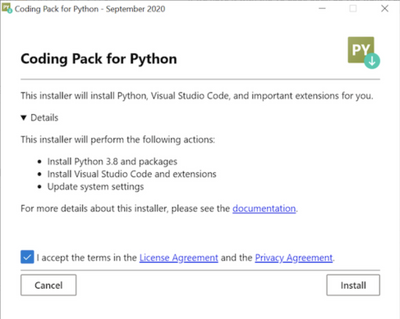
The Coding Pack for Python will download everything you need to start coding in Python all at once, so you don’t have to worry about installing a bunch of different software yourself. It will install:
- Python 3.8 and add it to your PATH
- Visual Studio Code and the Python extension in VS Code
- Python packages including, jupyter, numpy, sklearn, pandas, and matplotlib
These components will be installed on the user scope instead of system, so that no admin privileges are required. Note, that the Coding Pack for Python is only available on Windows currently.
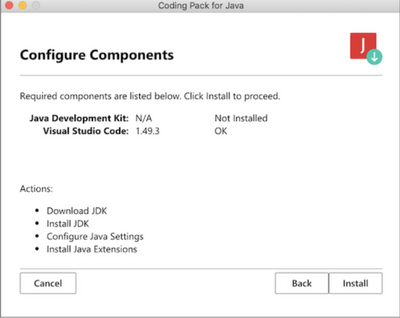
Similarly, the Coding Pack for Java will download everything you need to get started with Java, all at once. We know it can be frustrating to figure out which JDK to download and how to get it on your computer, so the Coding Pack for Java will install:
- Java Development Kit (JDK) and add it to the PATH
- Visual Studio Code and the Java extension pack in VS Code
Specifically it will install the OpenJDK11 on your machine and update any related environment settings. The Coding Pack for Java is available for Mac and Windows.
For more educational resources about VS Code, please see our website. If you have any questions or feedback about the installers, please feel free to open an issue on the Python VS Code repository or Java VS Code repository.
Useful links:
Coding Pack downloads
Microsoft Learn modules on Getting Started with Visual Studio Code
Video on how to leverage these installers in an educational context
Start your 2021 year right with these free and convenient Coding Packs!


Recent Comments