
by Contributed | Dec 1, 2020 | Office 365
This article is contributed. See the original author and article here.
Earlier this year, IT leaders around the globe were forced to reprioritize their roadmaps, resources, and budgets to equip employees for remote work practically overnight. Suddenly, the use of video communications skyrocketed. People adjusted quickly to moving meetings online, but one of the most notable challenges driven by the shift to remote work has been…
The post Restore and maintain personal connections with new Microsoft Teams Calling features appeared first on Microsoft 365 Blog.
Brought to you by Dr. Ware, Microsoft Office 365 Silver Partner, Charleston SC.
by Contributed | Dec 1, 2020 | Azure, Microsoft, Technology
This article is contributed. See the original author and article here.
The most important testing you’ll do
On Azure Sphere, the Retail Evaluation Azure Sphere OS (Retail Eval) feed gives you the opportunity to test your devices for compatibility against a soon-to-be-released update of the Azure Sphere OS. During the Retail Eval phase you have 2-3 weeks to ensure that there are no compatibility issues before the new version of the Azure Sphere OS is promoted to the Retail Azure Sphere OS (Retail) feed. Retail Eval is your last chance to find issues before the new OS is deployed broadly.
Call to action
Our ask is to have some subset of your devices running the Retail Eval OS, and have representative applications or tests running on these devices. You’ll need to put those devices in a default or custom device group that receives the Retail Eval feed, as described in the online documentation.
If you encounter any compatibility issues, contact your Microsoft Technical Account Manager (TAM) immediately so that we can assess and address the issue before we release the OS software to the Retail feed. Additionally, the devices can be moved back to Retail if need be.
The benefit to being on Retail Eval
Above and beyond simply doing additional device compatibility testing of your application, running on Retail Eval allows you to potentially find issues with the soon-to-be-released version of the Azure Sphere OS that could impact your device. While the Azure Sphere OS team does extensive testing to eliminate the chances of incompatibility, issues can happen. The Azure Sphere OS team does not want your device adversely impacted either. So, if there is an issue in the OS, we can investigate, and if necessary, delay promotion of Retail Eval to Retail. Our goal with Retail Eval is to ensure that any compatibility issues on your devices are found and fixed before the OS goes to Retail.
Why does Azure Sphere do automatic OS updates?
It’s useful to remember why Azure Sphere does automatic OS updates—and, as a corollary, why it’s important to verify that your devices continue to run correctly after the OS updates. Renewable security is one of the Seven Properties of Highly Secured Devices, which states that by continually improving the security of our operating system, your devices are provided with defense against even the most recently emerged classes of attacks. Automatic OS updates are how we deliver the improvements to ensure your devices have renewable security.
The Azure Sphere OS team spends considerable energy identifying potential threats and improving the protections in the OS. We make use of best-of-breed open source components and regularly update them. We invite security researchers and red teams to find vulnerabilities so that we can address them. We detail some of our fixes from these in our blogs, such as our recent security blog articles on 20.07, 20.08, and 20.09. These OS updates provide critical protection for the security of your devices, and we do our best to ensure that there is no adverse impact to device compatibility. But we give you the final say, with Retail Eval, to ensure that your devices still behave in a way consistent with your expectations before broad OS update deployment to Retail.
https://forms.office.com/Pages/ResponsePage.aspx?id=v4j5cvGGr0GRqy180BHbR0b7TbsyPK1Boum5wrGT8dNUMkFHQ1E3U1c2WjJOMDNRSlpZM1FWNURWTC4u&embed=true
by Contributed | Dec 1, 2020 | Azure, Microsoft, Technology
This article is contributed. See the original author and article here.
Howdy folks,
It’s awesome to hear from many of you that Azure AD Application Proxy helps you in providing secure remote access to critical on-premises applications and reducing load from existing VPN solutions. We’ve also heard about the need for Application Proxy to support more of your applications, including those that use headers for authentication, such as Peoplesoft, NetWeaver Portal, and WebCenter.
Today we’re announcing the public preview of Application Proxy support for applications that use header-based authentication. Using this preview, you can benefit from:
- Wide list of attributes and transformations for header based auth: All header values available are based on standard claims that are issued by Azure AD. This means that all attributes and transformations available for configuring claims for SAML or OIDC applications are also available to be used as header values.
- Secure and seamless access: These apps benefit from all the capabilities of Application Proxy, including single sign-on as well as enforcing pre-authentication and Conditional Access policies like requiring Multi-Factor Authentication (MFA) or using a compliant device before users can access these apps.
- No changes to your apps are needed: You can use your existing Application Proxy connectors and no added software needs to be installed.
Thanks to all the customers who have provided feedback in developing this capability. Here’s what one customer had to say about their experience using Application Proxy for their header-based authentication:
“App Proxy header-based auth support allowed us to migrate our header-based workloads to Azure AD, moving us one step closer to a unified view for application access and authentication. We have been able to retire our 3rd party header-based auth tools and simplify our SSO landscape. And it’s saved us a small fortune! Thank you.” – Barney Delaney, IAM Architect, Mondelez
Getting started
To connect a header-based authentication application to Application Proxy, you’ll need to make sure you have Application Proxy enabled in your tenant and have at least one connector installed. For steps on how to do install a connector, follow our tutorial here.
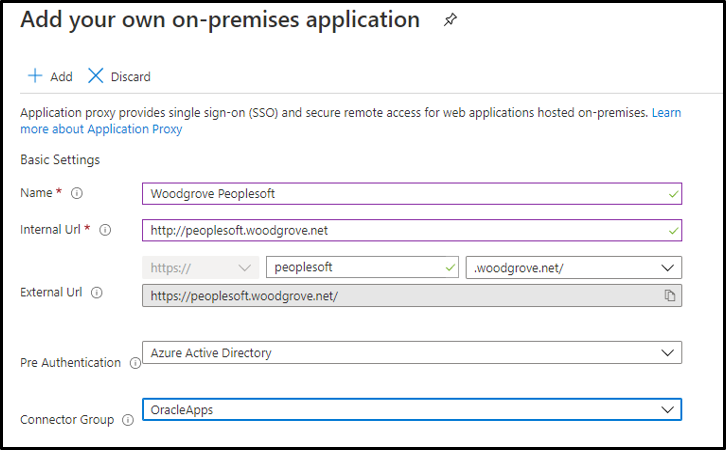
- First add a new application and configure Application Proxy for remote access by filling out the fields:
- Name: Display name for the application
- Internal URL: The URL used to access the application from inside your private network. This can be at the root path of the app or as granular as needed.
- External URL: The URL used to access the application remotely from the internet.
- Pre-authentication: Set to Azure Active Directory which ensures that all users must authenticate to access the app and Conditional Access policies are enforced.
- Connector Group: Select the connector group with line of site to the application.
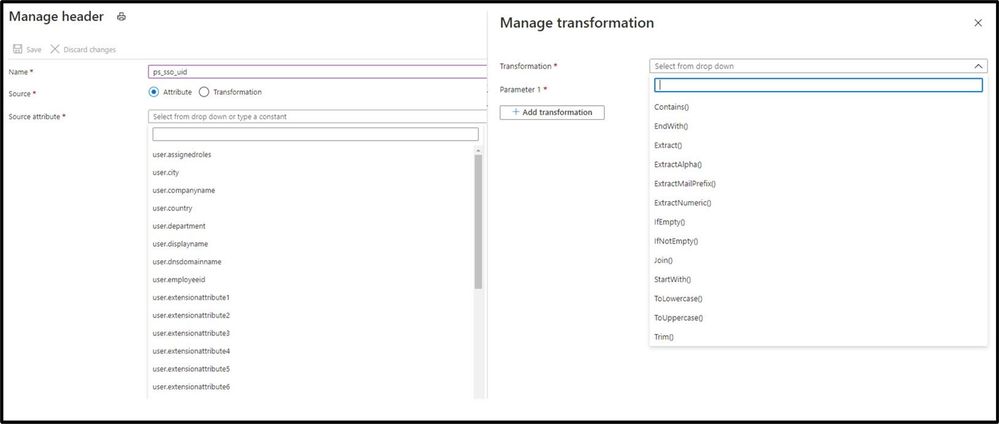
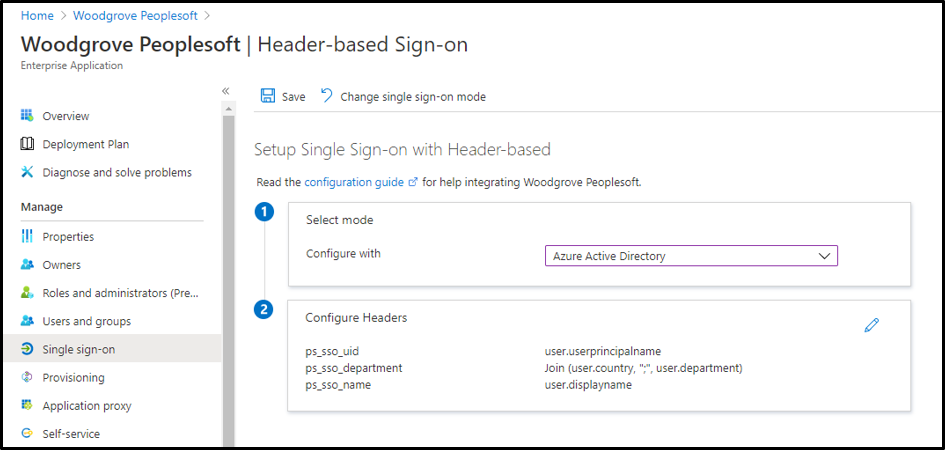
- Enable header-based authentication as the single sign-on mode for the application. You can configure any attribute synced to Azure AD as a header. You can also use transformations to craft the exact header value the application needs.
- After configuration, the app can now be launched from the My Apps portal just like any other cloud application or directly via the external URL.
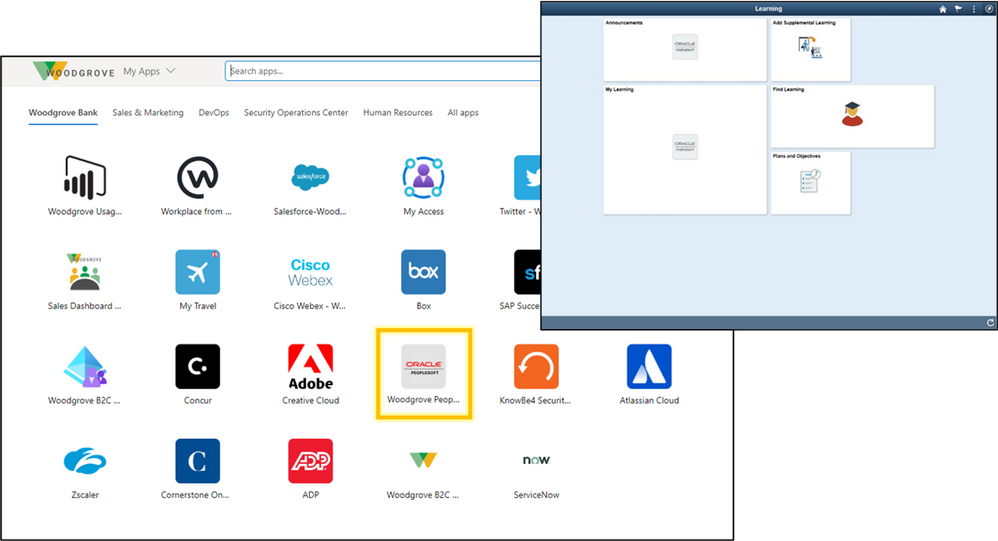
In just a few steps, you’ve enabled the app for remote access from any browser or device, enabled single sign-on for header-based authentication, and protected the app with any Conditional Access policies you’ve assigned to the app. To learn more, check out our technical documentation.
Making it easier to connect your header-based authentication applications to Azure AD is just another step we are taking to helping you secure and manage all the apps your organization uses. We are excited to keep releasing new functionality and updates to make this journey even easier based on your feedback and suggestions.
As always, we’d love to hear from you. Please let us know what you think in the comments below or on the Azure AD feedback forum.
Best regards,
Alex Simons (twitter: @alex_a_simons)
Corporate Vice President Program Management
Microsoft Identity Division
by Contributed | Dec 1, 2020 | Azure, Microsoft, Technology
This article is contributed. See the original author and article here.
Learn how to leverage SQL Server on Azure virtual machine to improve your elasticity and business continuity for your on-premises SQL Server instances. Discover how the new benefits allow you to reduce your overall TCO while improving your uptime ONLY on Azure on this episode of Data Exposed with Amit Banerjee.
by Contributed | Dec 1, 2020 | Azure, Microsoft, Technology
This article is contributed. See the original author and article here.
Final Update: Tuesday, 01 December 2020 16:35 UTC
We’ve confirmed that all systems are back to normal with no customer impact as of 12/1, 16:30 UTC. Our logs show the incident started on 12/1, 13:35 UTC and that during the 2 Hours & 55 minutes that it took to resolve the issue customers using Application Insights and/or Azure Log Analytics in West Europe may have experienced latency/failures when accessing application data and misfired/failed alerts for these resources.
Root Cause: The failure was due to a backend service that became unhealthy due to high CPU usage causing impact to these services.
Incident Timeline: 2 Hours & 55 minutes – 12/1, 13:35 UTC through 12/1, 16:30 UTC
We understand that customers rely on Azure Monitor as a critical service and apologize for any impact this incident caused.
-Ian


Recent Comments