by Contributed | Dec 1, 2020 | Technology
This article is contributed. See the original author and article here.
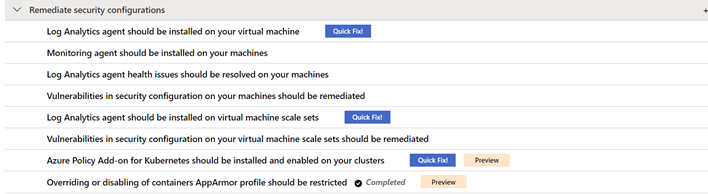
Thanks for tuning back into our Azure Security Center (ASC) Controls Series, where we dive into different Secure Controls within ASC’s Secure Score. This post is dedicated to the Remediate Security Configurations Secure Control. As previously mentioned, organizations face different kinds of threats and the need to keep infrastructure, apps and devices secure is essential across the business. Misconfigurations at any level in infrastructure, operating systems (OS) and network appliances lead to a heightened risk of attack. This secure control enables Azure Security Center to list possible misconfigurations within your environment. Remediate Security Configurations can provide a maximum four-point score increase to your secure score.
By the time this blog was written, Remediate Security Configurations includes the following recommendations:
- Log Analytics agent should be installed on your virtual machines
- Log Analytics agent health issues should be resolved on your machines
- Vulnerabilities in security configuration on your machines should be remediated.
- Log Analytics agent should be installed on virtual machine scale sets
- Vulnerabilities in security configuration on your virtual machine scale sets should be remediated
- Azure Policy Add-on for Kubernetes should be installed and enabled on your clusters(preview)
- Overriding or disabling of containers AppArmor profile should be restricted (preview)
- Log Analytics agent should be installed on your Linux-based Azure Arc machines (Preview)
- Log Analytics agent should be installed on your Windows-based Azure Arc machines (Preview)
Explanation of recommendations
Every organization’s environment is made up of resources that need to be kept secure to maintain the security hygiene of the company. For a more in-depth look at how ASC can help you maintain those resources, keep reading!
Log Analytics Agent should be installed on your virtual machine
Security center monitors and collects data from virtual machines (VMs) using the Log Analytics Agent. The agent reads security-related configurations and event logs from the machines, then copies only the necessary data to your Log Analytics workspace. Data collection from the agent is essential in giving Security Center visibility into missing updates, misconfigured OS security settings, endpoint protection status and health, and threat protection. Data collection is only needed for compute resources. Configuring auto-provisioning on these machines is recommended. By turning auto provisioning on, Security Center will deploy the Log Analytics Agent on all Azure VMs and any VMs that are created in the future within the same subscription.
While it is recommended that the agent’s installation is to be done automatically, it can also be installed manually. When manually installing the agent on an Azure VM, make sure to download the latest version of the agent to ensure that it functions properly.
Log analytics agent health issues should be resolved on your machines.
Aside from just installing the agent, it also needs to be configured correctly to make sure that your machines are being properly monitored. In case you’re wondering how you would know if the agent is set up correctly, this recommendation is here to tell you! When viewing this recommendation, as shown below, Azure Security Center will include the Unhealthy Resources tab to show which VMs do not have the Agent properly installed. If any agents were manually installed, you must verify that the latest version of the agent is in use. After confirming that you’re using the latest version of the agent, check the “Reason” column to guide you in remediating your machine.

Vulnerabilities in security configuration on your machines should be remediated.
This recommendation covers the security configuration of your machines. Here we are focusing on the vulnerability of the machine’s operating system (OS).
Clicking on this recommendation will take you to the screen below. This page gives you information about the specific VMs in your environment and their OS configurations that do not align with ASC’s recommended settings. VMs in the environment below have failed 246 total OS configuration rules. The number of failed rules are provided by each type of machine, Linux or Windows. The rules are also broken down into severity and type.
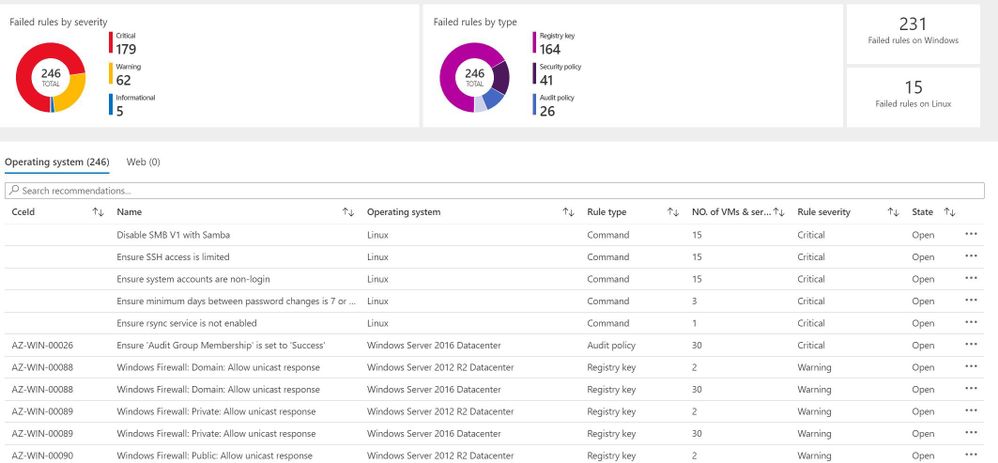
In the Operating System tab, the column titled “State” shows the state of the OS’s vulnerability. The state here will be listed as “open” because the vulnerability has not yet been resolved. Security Center uses Common Configuration Enumeration (CCE) which assigns a unique identifier, as shown in the CCeId tab, to different security-related system configuration issues.
Log Analytics agent should be installed on virtual machine scale sets
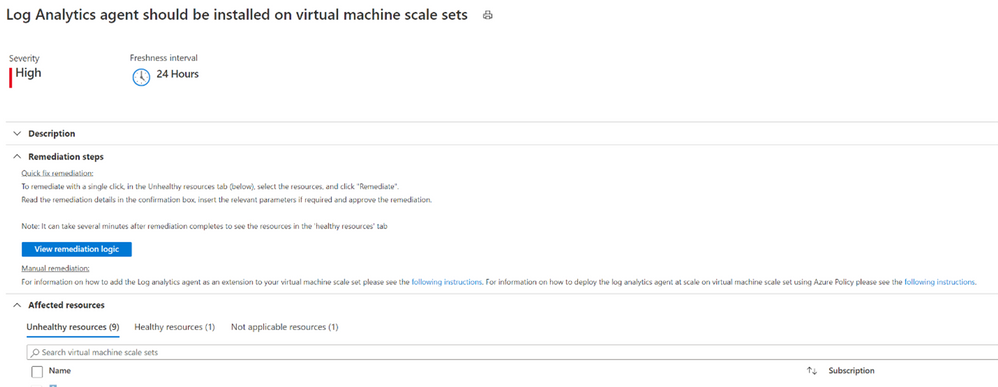
We have encountered our good friend, the Log Analytics Agent, once again. If you’re looking to bypass the redundancy of updating numerous virtual machines in your environment one by one, virtual machine scale sets are the way to go! Virtual machine scale sets enable you to manage, update and configure multiple virtual machines as a unit. Scale sets can support up to 1,000 VM instances and up to 600 instances if you choose to create and upload your own custom virtual machine images. In order to give Security Center access into the security configurations of your scale sets and an accurate look into your environment’s security hygiene, the Log Analytics agent should also be installed on your virtual machine scale sets. Auto-provisioning of the agent for Azure virtual machine scale sets is currently not available.
Vulnerabilities in security configuration on your machines should be remediated.
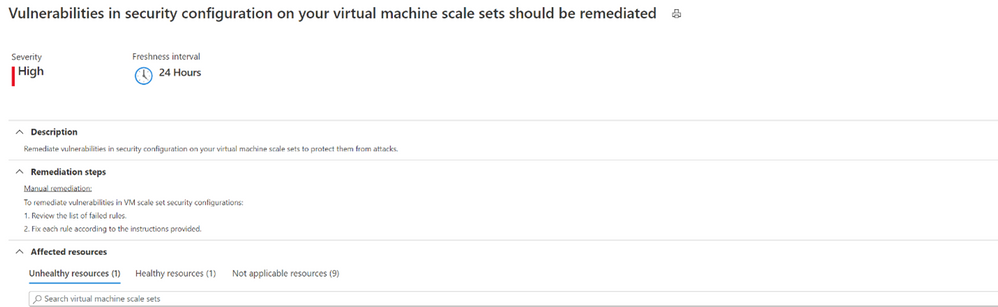
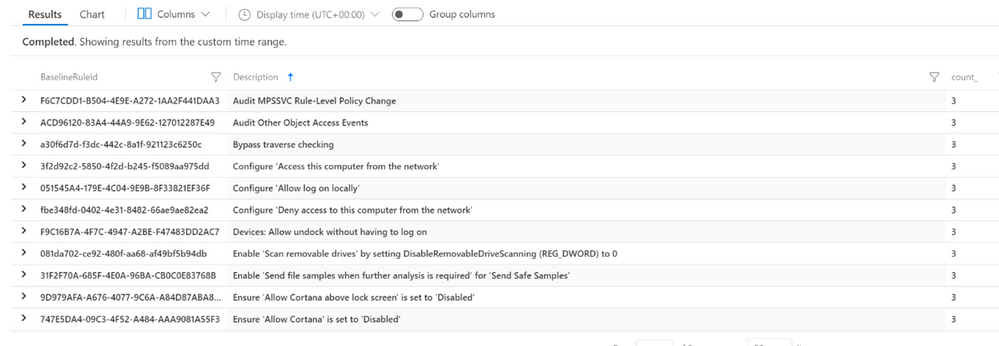
Remediating security configurations on VMs doesn’t stop at the machine itself. Vulnerabilities in the security configuration of VM scale sets are also significant to prevent them from attacks. By clicking on the unhealthy scale set listed in the recommendation, ASC will then give you a list of rules and descriptions that your scale sets did not meet.
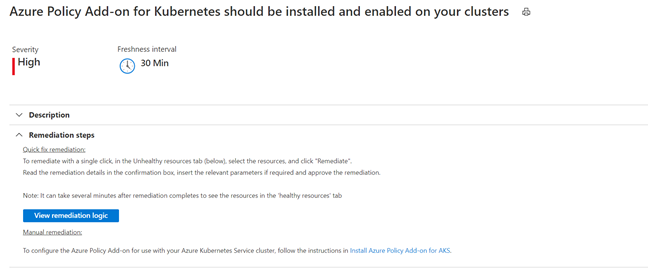
Azure Policy Add-on for Kubernetes should be installed and enabled on your clusters (Preview)
Azure Policy for Kubernetes clusters safeguards your clusters by managing and reporting their compliance state. The Add-on policy uses Gatekeeper v3 of Open Policy Agent (OPA) to communicate any policies that have been assigned to the clusters, apply those policies to your Kubernetes cluster and report the details back to Azure Policy.
This remediation comes with a Quick Fix button that allows you to deploy Azure Policy Add on for AKS with only a couple of clicks. The installation can also be completed manually. Azure policy provides the option to assign built-in policy definitions to you Kubernetes clusters where you see fit.
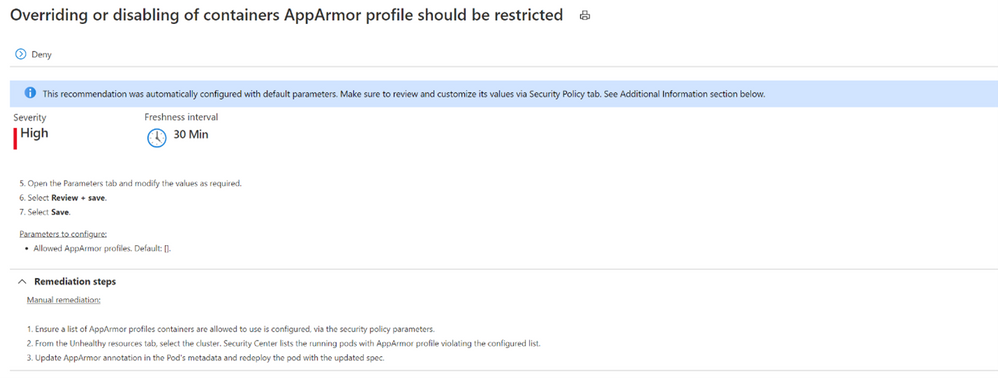
Overriding or disabling of containers AppArmor profile should be restricted (Preview)
Application Armor, or AppArmor, is a Linux security module which protects an OS and its applications from both external and internal security threats. A system administrator can restrict a program’s capabilities by associating it with an AppArmor security profile. The security profile protects against attacks by limiting access and privileges of different resources. In order to protect your containers running on your Kubernetes cluster, they need to be limited to allowed AppArmor profiles only.
Log Analytics agent should be installed on your Linux-based Azure Arc machines (Preview)
Linux-based machines onboarded through Azure Arc should also have the Log Analytics Agent. Although the machine uploaded through Azure Arc may be a VM hosted on-premises or in another Cloud Solution Provider (CSP), it still needs the Log Analytics Agent for Azure Security Center to monitor its security configuration and workloads. The Quick Fix button can install the agent through a single click, or you can manually install the agent by following the remediation steps.
Log Analytics agent should be installed on your Windows-based Azure Arc machines (Preview)
Like Linux-based machines, Windows-based machines onboarded through Azure Arc also need to have the Log Analytics Agent. A Quick Fix button is also available here to install the agent as well as the option to manually install it on Windows-based machines.
Conclusion
The Remediate security configurations control is not a one-time fix. As you continue to onboard machines into your environment, these recommendations should be re-visited to make sure you’re keeping up with the security hygiene of your machines. Improving the security hygiene of your VMs and infrastructure is another great step forward in improving your overall security posture and increasing your secure score.
Acknowledgements
Reviewer: Yuri Diogenes, Principal PM for ASC CxE Team
Contributor: @Kerinne Browne
Thank you so much for assisting me in writing this blog post!
by Contributed | Dec 1, 2020 | Azure, Microsoft, Technology
This article is contributed. See the original author and article here.
Hi All,
The AKS on Azure Stack HCI team has been hard at work responding to feedback from you all, and adding new features and functionality. Today we are releasing the AKS on Azure Stack HCI December Update.
You can evaluate the AKS on Azure Stack HCI December Update by registering for the Public Preview here: https://aka.ms/AKS-HCI-Evaluate (If you have already downloaded AKS on Azure Stack HCI – this evaluation link has now been updated with the December Update)
Some of the new changes in the AKS on Azure Stack HCI December Update include:
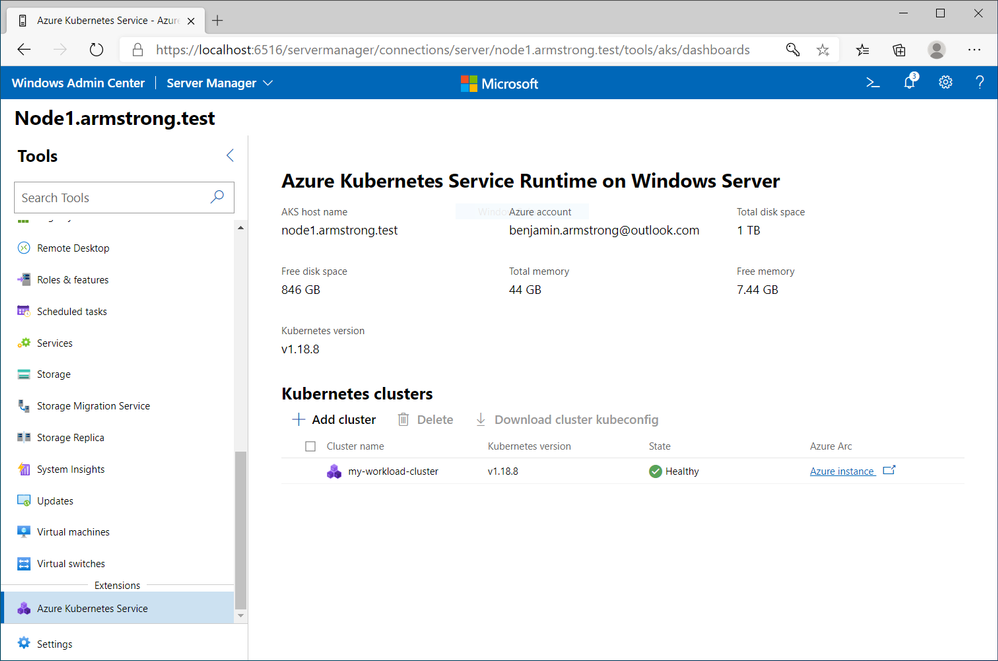
Workload Cluster Management Dashboard in Windows Admin Center
With the December update, AKS on Azure Stack HCI now provides you with a dashboard where you can:
- View any workload clusters you have deployed
- Connect to their Arc management pages
- Download the kubeconfig file for the cluster
- Create new workload clusters
- Delete existing workload clusters
We will be expanding the capabilities of this dashboard overtime.
Naming Scheme Update for AKS on Azure Stack HCI worker nodes
As people have been integrating AKS on Azure Stack HCI into their environments, there were some challenges encountered with our naming scheme for worker nodes. Specifically as people needed to join them to a domain to enable GMSA for Windows Containers. With the December update AKS on Azure Stack HCI worker node naming is now more domain friendly.
Windows Server 2019 Host Support
When we launched the first public preview of AKS on Azure Stack HCI – we only supported deployment on top of new Azure Stack HCI systems. However, some users have been asking for the ability to deploy AKS on Azure Stack HCI on Windows Server 2019. With this release we are now adding support for running AKS on Azure Stack HCI on any Windows Server 2019 cluster that has Hyper-V enabled, with a cluster shared volume configured for storage.
There have been several other changes and fixes that you can read about in the December Update release notes (Release December 2020 Update · Azure/aks-hci (github.com))
Once you have downloaded and installed the AKS on Azure Stack HCI December Update – you can report any issues you encounter, and track future feature work on our GitHub Project at https://github.com/Azure/aks-hci
I look forward to hearing from you all!
Cheers,
Ben
by Contributed | Dec 1, 2020 | Azure, Microsoft, Technology
This article is contributed. See the original author and article here.
Flexible Server is a new deployment option for Azure Database for PostgreSQL that gives you the control you need with multiple configuration parameters for fine-grained database tuning along with a simpler developer experience to accelerate end-to-end deployment. With Flexible Server, you will also have a new way to optimize cost with stop/start capabilities. The ability to stop/start the Flexible Server when needed is ideal for development or test scenarios where it’s not necessary to run your database 24×7. When Flexible Server is stopped, you only pay for storage, and you can easily start it back up with just a click in the Azure portal.
Azure Automation delivers a cloud-based automation and configuration service that supports consistent management across your Azure and non-Azure environments. It comprises process automation, configuration management, update management, shared capabilities, and heterogeneous features. Automation gives you complete control during deployment, operations, and decommissioning of workloads and resources. The Azure Automation Process Automation feature supports several types of runbooks such as Graphical, PowerShell, Python. Other options for automation include PowerShell runbook, Azure Functions timer trigger, Azure Logic Apps. Here is a guide to choose the right integration and automation services in Azure.
Runbooks support storing, editing, and testing the scripts in the portal directly. Python is a general-purpose, versatile, and popular programming language. In this blog, we will see how we can leverage Azure Automation Python runbook to auto start/stop a Flexible Server on weekend days (Saturdays and Sundays).
Prerequisites
Steps
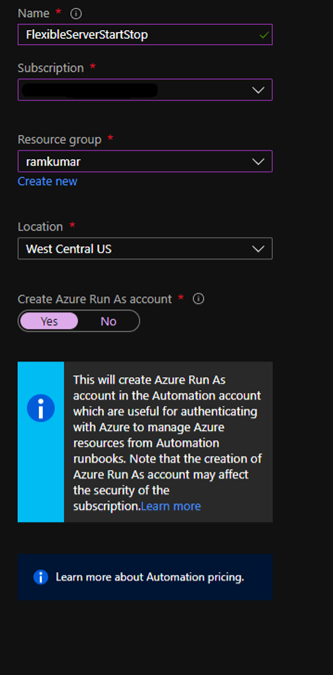
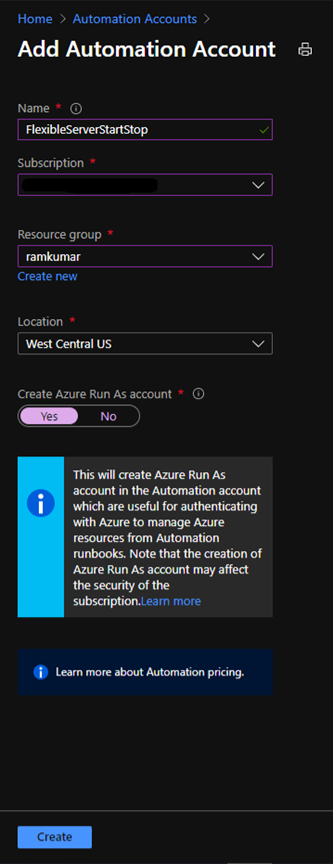
1. Create a new Azure Automation account with Azure Run As account at:
https://ms.portal.azure.com/#create/Microsoft.AutomationAccount
NOTE: An Azure Run As Account by default has the Contributor role to your entire subscription. You can limit Run As account permissions if required. Also, all users with access to the Automation Account can also use this Azure Run As Account.
2. After you successfully create the Azure Automation account, navigate to Runbooks.
Here you can already see some sample runbooks.

3. Let’s create a new python runbook by selecting+ Create a runbook.
4. Provide the runbook details, and then select Create.
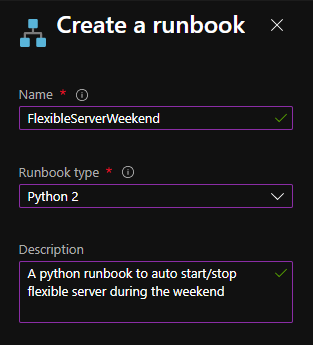
After the python runbook is created successfully, an Edit screen appears, similar to the image below.
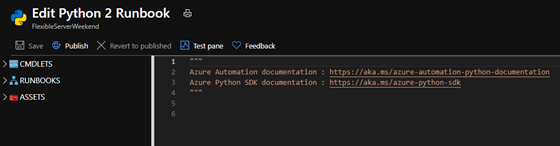
5. Copy paste the below python script. Fill in appropriate values for your Flexible Server’s subscription_id, resource_group, and server_name, and then select Save.
import azure.mgmt.resource
import requests
import automationassets
from msrestazure.azure_cloud import AZURE_PUBLIC_CLOUD
from datetime import datetime

def get_token(runas_connection, resource_url, authority_url):
    """ Returns credentials to authenticate against Azure resoruce manager """
    from OpenSSL import crypto
    from msrestazure import azure_active_directory
    import adal

    # Get the Azure Automation RunAs service principal certificate
    cert = automationassets.get_automation_certificate("AzureRunAsCertificate")
    pks12_cert = crypto.load_pkcs12(cert)
    pem_pkey = crypto.dump_privatekey(crypto.FILETYPE_PEM, pks12_cert.get_privatekey())

    # Get run as connection information for the Azure Automation service principal
    application_id = runas_connection["ApplicationId"]
    thumbprint = runas_connection["CertificateThumbprint"]
    tenant_id = runas_connection["TenantId"]

    # Authenticate with service principal certificate
    authority_full_url = (authority_url + '/' + tenant_id)
    context = adal.AuthenticationContext(authority_full_url)
    return context.acquire_token_with_client_certificate(
            resource_url,
            application_id,
            pem_pkey,
            thumbprint)['accessToken']

action = ''
day_of_week = datetime.today().strftime('%A')
if day_of_week == 'Saturday':
    action = 'stop'
elif day_of_week == 'Monday':
    action = 'start'

subscription_id = '<SUBSCRIPTION_ID>'
resource_group = '<RESOURCE_GROUP>'
server_name = '<SERVER_NAME>'

if action:
    print 'Today is ' + day_of_week + '. Executing ' + action + ' server'
    runas_connection = automationassets.get_automation_connection("AzureRunAsConnection")
    resource_url = AZURE_PUBLIC_CLOUD.endpoints.active_directory_resource_id
    authority_url = AZURE_PUBLIC_CLOUD.endpoints.active_directory
    resourceManager_url = AZURE_PUBLIC_CLOUD.endpoints.resource_manager
    auth_token=get_token(runas_connection, resource_url, authority_url)
    url = 'https://management.azure.com/subscriptions/' + subscription_id + '/resourceGroups/' + resource_group + '/providers/Microsoft.DBforPostgreSQL/flexibleServers/' + server_name + '/' + action + '?api-version=2020-02-14-preview'
    response = requests.post(url, json={}, headers={'Authorization': 'Bearer ' + auth_token})
    print(response.json())
else:
    print 'Today is ' + day_of_week + '. No action taken'
After you save this, you can test the python script using “Test Pane”. When the script works fine, then select Publish.
Next, we need to schedule this runbook to run every day using Schedules.
6. On the runbook Overview blade, select Link to schedule.

7. Select Link a schedule to your runbook.
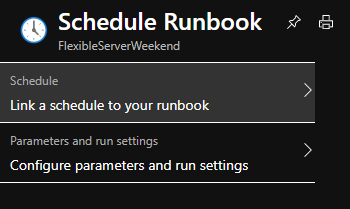
8. Select Create a new schedule.
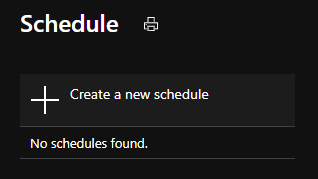
9. Create a schedule to run every day at 12:00 AM using the following parameters
10. Select Create and verify that the schedule has been successfully created and verify that the Status is “On“.
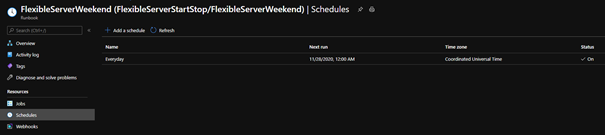
After following these steps, Azure Automation will run the Python runbook every day at 12:00 AM. The python script will stop the Flexible Server if it’s a Saturday and start the server if it’s a Monday. This is all based on the UTC time zone, but you can easily modify it to fit the time zone of your choice. You can also use the holidays Python package to auto start/stop Flexible Server during the holidays.
If you want to dive deeper, the new Flexible Server documentation is a great place to find out more. You can also visit our website to learn more about our Azure Database for PostgreSQL managed service. We’re always eager to hear your feedback, so please reach out via email using the Ask Azure DB for PostgreSQL alias.
by Contributed | Dec 1, 2020 | Technology
This article is contributed. See the original author and article here.
This blog post was co-authored by:
Aditya Joshi, Senior Software Engineer, Microsoft Defender for Endpoint
Tino Morenz, Senior Software Engineer, Enterprise Data Protection
The Azure Defender team is excited to share that the Fileless Attack Detection for Linux Preview, which we announced earlier this year, is now generally available for all Azure VMs and non-Azure machines enrolled in Azure Defender.
Fileless Attack Detection for Linux periodically scans your machine and extracts insights directly from the memory of processes. Automated memory forensic techniques identify fileless attack toolkits, techniques, and behaviors. This detection capability identifies attacker payloads that persist within the memory of compromised processes and perform malicious activities.
See below for an example fileless attack from our preview program, a description of detection capabilities, and an overview of the onboarding process.
Real-world attack pattern from our preview program
In our continuous monitoring of fileless attacks we often encounter malware components, exhibiting in-memory ELF and shellcode payloads that are in the initial stages of being weaponized by attackers.
In this example, a customer’s VM is infected with malware that is attempting to blend in as standard system security components.
- The first component of the malware is the binary /usr/bin/.securetty/.esd-644/auditd, running from the user’s bin location under hidden folders. On disk, the file has been packed with UPX and contains no section headers.
- The malware filename is auditd, which is the userspace component of the Linux Auditing System. In addition, the commandline for the malware is “/usr/sbin/abrtd”. This path is associated with the Automatic Bug Reporting Tool, a daemon that watches for application crashes.
- Accompanying the masquerading auditd is another payload impersonating anacron, a system utility used to execute commands periodically.
- The second payload runs with the commandline “/usr/sbin/anacron -s” and runs as the file name devkit-power-daemon to impersonate the DeviceKit-power daemon. The malware also maintains a persistent outgoing TCP connection to port 53, which is typically associated with DNS queries.
Detecting the attack
- Fileless Attack Detection begins by identifying dynamically allocated code segments that are not backed by the filesystem. In this case, this scan identifies a 32-bit ELF in an anonymous executable region of memory.
- Next our detector scans these segments for specific behaviors and indicators. Packed malware, such as in this case, obfuscates its contents on disk, but often exhibits malicious indicators in-memory.
- The in-memory ELF analysis identifies numerous syscalls to perform system operations for process control, dynamic memory allocation, signal handling and changing thread context. Some of the syscalls identified include clone, epoll_create, getpid, gettid, kill, mmap, munmap, rt_sigaction, rt_sigprocmask, set_thread_area, sigaltstack, and tgkill.
Fileless attack detection capabilities
Fileless Attack Detection for Linux scans the memory of all processes for shellcode, malicious injected ELF executables, and well-known toolkits. Toolkits include crypto mining software.
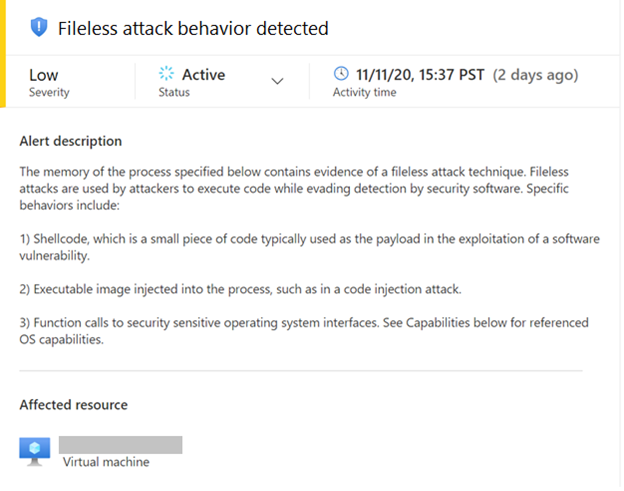
Here is an example alert:
The alerts contain information to assist with triaging and correlation activities, which include process metadata:
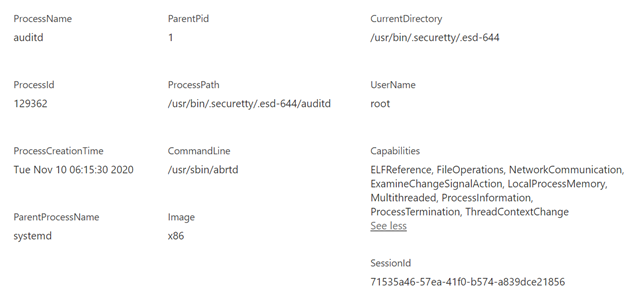
We plan to add and refine alert capabilities over time. Additional alert types will be documented here.
Process memory scanning is non-invasive and does not affect the other processes on the system. Most scans run in less than five seconds. The privacy of your data is protected throughout this procedure as all memory analysis is performed on the host itself. Scan results contain only security-relevant metadata and details of suspicious payloads.
Onboarding details
This capability is automatically deployed to your Linux machines as an extension to the Log Analytics Agent for Linux, which is also known as the OMS Agent. This agent supports the Linux OS distributions described in this document. Azure VMs and non-Azure machines must be enrolled in Azure Defender to benefit from this detection capability.
To learn more about Azure Defender, visit the Azure Defender Page.

by Contributed | Dec 1, 2020 | Technology
This article is contributed. See the original author and article here.
On World AIDS Day, Elizabeth Glasier Pediatric AIDS Foundation (EGPAF) Informatics Officer Ts’epo Ntelane shares how data tools are helping to end AIDS in Lesotho.
by Ts’epo Ntelane
Mhealth and Informatics Officer
Elizabeth Glaser Pediatric AIDS Foundation
Growing up in Lesotho means having an early awareness of HIV. Our small, proudly independent nation was hit hard by the HIV pandemic. During the early 2000s, HIV was like a raging fire burning across our plains and mountains. It touched virtually every family with the grief of losing loved ones.
Over the past decade, the pandemic has begun to come under control, and yet Lesotho still has the second highest HIV prevalence rate in the world. Twenty-five percent of the people in Lesotho are living with HIV—but the emphasis now is on living. People are living with HIV, rather than dying.
 An HIV support group meets in rural Lesotho. Photo by Eric Bond/EGPAF
December 1 is World AIDS Day.
Today, I take pride in being a member of the coalition that has brought Lesotho out of the dark times. When people think about combatting infectious diseases like HIV, they often picture the health workers at clinics and hospitals testing and treating patients. They don’t think about people like me, sitting in an office crunching numbers and developing charts. But a big part of our success here in Lesotho has happened because our work is driven by accurate data.
Not long ago, we relied on paper records collected at health centers throughout Lesotho, which created delays in data analysis and reporting. Now that we have implemented a client-tracking application, we are able to use Microsoft Power BI to really understand what is happening on the ground—with specificity and nuance.
 Although Lesotho is a relatively small country, there are often great distances between villages and cities. Photo by Eric Bond/EGPAF
As a senior mhealth and informatics officer at the Elizabeth Glaser Pediatric AIDS Foundation (EGPAF), I help aggregate data from the health centers around Lesotho and build them into easy-to-understand reports and dashboards. It makes us nimble and laser-focused on reaching the individuals who need our services the most.
Accurate, up-to-date information helps us quickly identify risks and opportunities so that we can save lives. For example, let’s say that we have 100 people at a health center who are on HIV treatment, but we can see that only 30 of them have achieved viral suppression (meaning that HIV is no longer a threat to their health). The data in our Power BI reports and dashboards can help isolate the issue and craft an intervention to bridge the gap.
It is essential that a person living with HIV take daily medication. Through our tracking system, we are able to identify clients who have missed their appointments or are failing to pick up their medication, and we quickly follow up to get them back on treatment.
The supply chain presents another potential gap in achieving our goal to eliminate AIDS. Through our data management in Power BI, we can know exactly how many patients are served by any health center and exactly how many supplies are at that location for testing and treating HIV. We also see local trends in the transmission rates. This helps us anticipate needs and adjust if we discern any slowdowns in the supply chain so that we always have supplies on hand to test for HIV and an adequate stock of lifesaving medicine.
 Dedicated health workers administer HIV services and collect data to help us steer our programs. Photo by Eric Bond/EGPAF
One unique initiative we implemented in Lesotho was to prominently display a Power BI dashboard on large screens in our reception area, boardroom, and other key offices. Now, every person in our office is aware of our most important programmatic numbers.
At EGPAF, I’ve been able to grow professionally in my use of Power BI. In 2019, we received a training from Patrick LeBlanc from Microsoft. I also participate in EGPAF’s internal Power BI Learning Group, a community of practice of Power BI developers, in which we share resources and help each other with challenges. In July, I presented to the group regarding our data validation work and shared details of how we are connecting to one of our in-country data systems through Power BI.
 The Lesotho Informatics team relaxes during a break from Power BI training.
In addition to Power BI, we use the integrated tools of M365, particularly SharePoint, to manage and share data and knowledge with our EGPAF colleagues throughout Africa, the United States, and Switzerland.
I can say that I am in love with data and with the power that it brings to decision-making and to our individual beneficiaries. Lesotho has gone from being ravaged by AIDS to reaching or surpassing global targets established by UNAIDS and the World Health Organization.
![]()
As a Mosotho, I am excited and really proud to be making an impact in the battle against this monster. My pride comes from feeling that every time when I get into the office, I am a soldier on the front line of the battle against AIDS.


Recent Comments