by Contributed | Dec 2, 2020 | Technology
This article is contributed. See the original author and article here.
Every so often I have been asked “how it is possible to log and review the logs when Developers change objects but do not have access to the SQL Audit?”.
Now, even a security person like me should try to understand the real motivation for this before jumping to the conclusion that Auditing is the only right solution.
So first let’s understand the potential motivations:
What is the purpose?
Very often, the background is simply to keep a record of who changed which database-objects to answer typical question like:
- “Did anyone change any index lately?”
- “I thought we had an Index here on this table, did anyone drop it?”
- “Who changed my proc?” (Although I would advise to keep a record of all changes within the header of any module as a best practice)
- “When did the last deployment run/stop?”
- “My old SQL-Function code is gone; does anyone have a copy?”
The motivation is roughly about troubleshooting schema-changes. The aim is not to detect security breaches or even tamper-proof security investigations.
If that is the case, my advice here is to not use Auditing at all for such purpose.
The Auditing feature in SQL Server and Azure SQL Database is really meant to be used by security personae, or Administrators with high privileges:
- The ability to create change, stop and remove Audits is collected under one permission: either ALTER ANY SERVER AUDIT or ALTER ANY DATABASE AUDIT, depending on the scope.
- To read the audit result, at a minimum the ALTER ANY SERVER AUDIT is required for Audits to the Application or Security Log but CONTROL SERVER for Audits to a file. In Azure SQL Database CONTROL DATABASE is when using the system function sys.fn_get_audit_file to read from a File target in Blob Storage. Event Hub or Log Analytics are accessed outside from the SQL engine and not controlled with SQL-permissions.
The above request is much more easily fulfilled with a simple solution that allows the results of the DDL-activities to be stored directly within a database table. This will provide a convenient way to understand what scripts or ad-hoc changes to a database schema happened – but it will not serve as measure against eval actors/attackers.
Security-Note
If the requirement is, to provide an Audit trail for Security and Compliance reasons, out of reach for normal Database Developers or anyone accessing SQL Server alone, then SQL Auditing is the right solution. DDL Triggers and local tables can be easily tampered with once an attacker elevated to basic datawriter or ddl_admin-level permissions.
The solution
If you need to support your Engineering team with a simple record of all DDL statements (Data Definition Language) run against a database, then I recommend using DDL Triggers.
A DDL Trigger is comparable to a stored procedure except it gets activated when any DDL event for which it was created occurs. The list of Events that can be used is here: DDL Events – SQL Server | Microsoft Docs.
Personal anecdote
Over the years working on customer systems, I personally found it to be invaluable and as best practice equipped any database that I designed with such a small trigger and DDL-log-table, just in case. It has helped many times to quickly solve issues with deployments scripts, non-scripted changes to the systems, problems with Source Control and simply getting answers quickly.
The concept is almost trivial and because DDL changes are usually not in performance-critical code-paths, the theoretical overhead on the DDL statement-runtimes is not relevant. (Unless frequent schema-changes are part of a performance-sensitive workload – in which case I would then question if using DDL is a good idea at all in such a place. Note that temporary tables are not caught by DDL Triggers.)
If we want to log “almost any DDL statement”, we can use the keyword DDL_DATABASE_LEVEL_EVENTS and then within the body of the trigger we can ignore certain events.
Note
Events that typically make sense to ignore are: regular Index Rebuild, Reorganize and Update Statistics – routines.
– Rebuild and Reorganize are both covered by the ALTER_INDEX event. But I would recommend keeping an eye on ALTER INDEX … DISABLE, therefore in my example you will find a bit of logic to exclude only ALTER INDEX that is not caused by the DISABLE-option. (“Enable” would be done via a Rebuild, so unfortunately there is a small gap: we will not know when the Index is enabled again. If this turns out to be important, include the Rebuild-option as well, but expect a high volume of events in that case.)
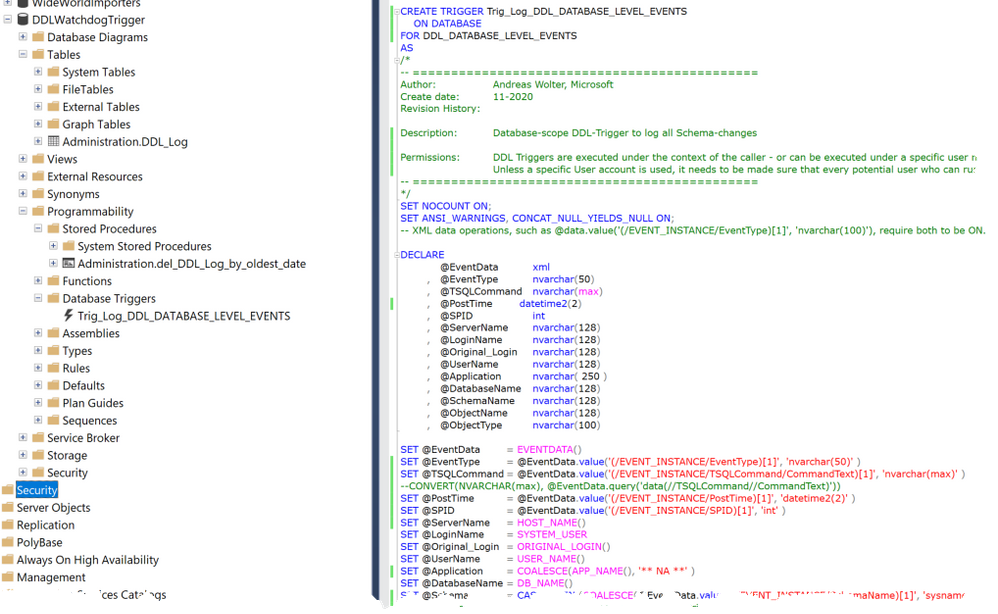
Inside the Trigger we have access to the EVENTDATA()-Function which returns the details on the event in xml-format. The trigger-code extracts the most useful data from it.
The so captured events can then be written to a local database table, which is much more convenient for the purpose of troubleshooting than having to go to a Security Audit.
Note
If you are interested in the Set-Options used when the command was run (this can be useful for debugging purposes), then the SetOptions-Node below TSQLCommand comes in handy.
Finally, we need to make sure that the Trigger will succeed in writing to the table even if the User who triggered the event may not have explicit permissions to write to any table. To keep this example simple my code grants INSERT onto the dedicated table to public. This is the easy way and sufficient for many scenarios. If you need extra security, I recommend using a special account for impersonation during the trigger execution only, using the EXECUTE AS-clause. At the end of the script, you will find an example of how to go about that. That way you can make sure to have least privileges applied and only when really needed.
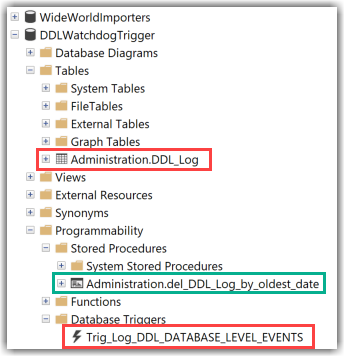
Attached you can find the T-SQL Script which will create the following objects:
- A Database-Level DDL Trigger
- A Table in a dedicated Schema
- A stored procedure to purge data from the table when needed.
Also, I include a Script with some queries to test.
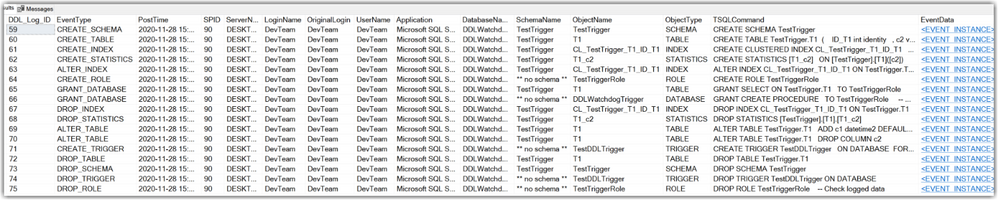
This is how the results in the table look like after running some DDL-commands:
Documentation-links:
I hope you find this script a useful example.
Let me know in the comments how you solve similar requirements in the comments below.
Andreas
by Contributed | Dec 2, 2020 | Technology
This article is contributed. See the original author and article here.
Security baseline for Microsoft Edge version 87
We are pleased to announce the enterprise-ready release of the security baseline for Microsoft Edge, version 87!
We have reviewed the new settings in Microsoft Edge version 87 and determined that there are no additional security settings that require enforcement. The settings from the Microsoft Edge version 85 package continue to be our recommended baseline. That baseline package can be downloaded from the Microsoft Security Compliance Toolkit.
Microsoft Edge version 87 introduced 15 new computer settings, 15 new user settings, and removed 1 setting. We have attached a spreadsheet listing the new settings to make it easier for you to find them.
As a friendly reminder, all available settings for Microsoft Edge are documented here, and all available settings for Microsoft Edge Update are documented here.
Please continue to give us feedback through the Security Baselines Discussion site or this post.
by Contributed | Dec 2, 2020 | Technology
This article is contributed. See the original author and article here.
We recently released the next preview/beta of the Microsoft Drivers for PHP for SQL Server, version 5.9.0-beta2. This preview/beta release has been built with PHP 7.3+ and tested on all supported platforms.
Note: We have changed from “preview” to “beta” versioning terminology in order to support the new Pickle distribution channel. Pickle supports PECL packages so the drivers for PHP will be available via both channels.
Notable items about this release include:
Added
- Support for PHP 8.0
- Support for Pickle
Removed
- Dropped support for PHP 7.2
Fixed
- Pull Request #1205 – minimized compilation warnings on Linux and macOS
- Pull Request #1209 – fixed a bug in fetching varbinary max fields as char or wide chars
- Issue #1210 – switched from preview to beta terminology to enable Pickle support
- Issue #1213 – the MACOSX_DEPLOYMENT_TARGET in config files caused linker errors in macOS Big Sur – Pull Request #1215
Limitations
- No support for inout / output params when using sql_variant type
- No support for inout / output params when formatting decimal values
- In Linux and macOS, setlocale() only takes effect if it is invoked before the first connection. Attempting to set the locale after connecting will not work
- Always Encrypted requires MS ODBC Driver 17+
- Only Windows Certificate Store and Azure Key Vault are supported. Custom Keystores are not yet supported
- Issue #716 – With Always Encrypted enabled, named parameters in subqueries are not supported
- Issue #1050 – With Always Encrypted enabled, insertion requires the column list for any tables with identity columns
- Always Encrypted limitations
Known Issues
- This preview release requires ODBC Driver 17.4.2 or above. Otherwise, a warning about failing to set an attribute may be suppressed when using an older ODBC driver.
- Connection pooling on Linux or macOS is not recommended with unixODBC < 2.3.7
- When pooling is enabled in Linux or macOS:
- unixODBC <= 2.3.4 (Linux and macOS) might not return proper diagnostic information, such as error messages, warnings and informative messages.
- due to this unixODBC bug, fetch large data (such as xml, binary) as streams as a workaround. See the examples here.
Survey
Let us know how we are doing and how you use our drivers by taking our pulse survey.
Install
- On Linux and macOS run the commands below:
sudo pecl install sqlsrv-5.9.0beta2
sudo pecl install pdo_sqlsrv-5.9.0beta2
- To download Windows DLLs for PHP 7.3 or above from the PECL repository, please navigate to SQLSRV or PDO_SQLSRV.
- Direct downloads for released binaries can also be found at the Github release tag.
David Engel



Recent Comments