Getting Started with DevOps for Azure SQL | Data Exposed
This article is contributed. See the original author and article here.

This article is contributed. See the original author and article here.
This article is contributed. See the original author and article here.
Many features requested through Microsoft UserVoice appear on the Microsoft 365 Public Roadmap when they are in development, rolling out, or being launched. If you follow UserVoice, submit suggestions for new capabilities, continue to vote on other users’ feature requests, or track which submissions receive the most votes. If you don’t follow this forum, come join and help us make Project better.
Feedback on existing features is also welcomed! If you have feedback, submit it by using the ‘Feedback’ button in Project for the web. Make sure to include your email so we can contact you directly with any follow up questions or comments. Your comments on our blog posts are also monitored, so let us know what you think about this or other articles.
Your feedback is especially important now, as we look back on all we’ve done in 2020 and look forward to what we can build in 2021. Your feedback is so important to help us decide what we do moving forward.
New Features:
Upcoming Features:
Answers to top questions:
Q: Is the ability to add Projects to private channels in Teams on the roadmap?
A: There are no present plans to complete this work. However, we would love to hear from you about how this impacts your workflow so we can understand your needs in Teams.
Q: Are there license requirements to use the Project & Roadmap apps in Teams?
A: Users with an active Project subscription (Project Plan 1, Project Plan 3, or Project Plan 5) can create and edit projects. A Project Plan 3 or Project Plan 5 subscription users can create or edit roadmaps. All Office 365 users should be able to view Projects/Roadmaps shared within Teams in a read-only mode.
This article is contributed. See the original author and article here.
Claire Bonaci
You’re watching the Microsoft US health and life sciences, confessions of health geeks podcast, a show that offers Industry Insight from the health geeks and data freaks of the US health and life sciences industry team. I’m your host Claire Bonaci. Today we continue our health plan series with Sam Robinson, our national director for US health plans. Sam recently spoke at the International Federation of health plans COVID-19 series, and on this episode, we discuss how health plans can be more proactive in adapting to this new normal. Hi, Sam, welcome to Episode Two of the health plan series.
Sam Robinson
Claire, thanks for having me back.
Claire Bonaci
Yeah, of course. So two weeks ago, you spoke at the International Federation of health plans COVID-19 series. And I’d love to learn a little bit more about that. Can you tell us what your key message was and what the attendees were most interested in?
Sam Robinson
Sure. It was a fantastic conference, obviously held virtually over Teams. So I was very pleased by that. And we had a to z, I can’t think of who the A health plan was. But all the way through Zimbabwe so Chile, a Zimbabwe, South Africa, New Zealand, and what the common theme was across all of these health plans are, what are we going to do? How do we stay in business? Are we gonna stay in business? So if you’re a CEO of a health plan, right now, your board is saying, What are you doing? And what are you doing? The right answer is not nothing, or the same, or hoping things turn out? So the major theme and question for most of them is, what should we be focused on from a digitization standpoint, to lead us into the future and frankly, to survive the current. That really brought us down to the framework that I think you’ve heard a lot from Satya on down about responding to the crisis is the first stage, we are now in a recover phase, if you will, with some and some are still in respond. But then you will move into a reimagined phase, which won’t be optional, you’ll need to reimagine your business or you won’t have a business. And as we talked to the health plans, what they were really focused on or what we focused my message on was, you need to respond. But that response should have at its heart, a reimagine. And so start with the end in mind. And the end is a reimagined. So there was a lot of efforts that are going on right now and health plans before COVID, if you remember back that far, that really led to where they are now. And those same efforts, especially the digitization efforts, are if anything accelerated because of the crisis. And that’s a good thing. And it will allow them to move to where they had to be anyway, is a reimagined state of business, where virtual is not a part of what they do is not an alternative to an in person, it is a core part of every business line that they need to recover from.
Claire Bonaci
So really great answer, I love that you bring up that a lot of these health plans were already doing efforts with virtual health and health, they were already kind of doing that to begin with. But now it’s really reimagining that new normal. So can you give us some examples of how virtual health would be affected by the changes that these health plans are making?
Sam Robinson
Sure. For years, we’ve heard about it focused on the member. Member first member 360 total health of the member moving from a payment to a care navigator. All these things are the same general theme is we care about our members, and we want to service our members in a new and unique way. All of those efforts started pre COVID and virtual health being one of them. What was virtual health, really just a different service they were paying for. In COVID, we’re now paying the same so in person we call that parody or paying parody. That’s a real respond reaction. It will still pay for it. Do it your way. What the health plans are looking to the future saying is how do we make virtual health a real part of our care management plans? How do we use virtual health as part of how we go to market? So imagine oncology case, you might have 20 visits in a given treatment cycle to the oncologist not to treatment, points of treatment, but to the oncologist. Can some of those be virtual? Absolutely. But does that virtual mean the same as a in person visit? Absolutely not. It has to be optimized for the virtual experience, maybe a pre survey, a post survey whether it happened. Maybe the pre survey asks, How are you feeling how are you dealing with the therapies? Are there anything we could do for you? Do you have any major questions you want us to answer that’s reviewed by the doctor while you’re in the waiting room, the electronic waiting room, and when you go in, it’s a much more meaningful conversation. Much like we’re having right now. And that’s part of your overall plan. And guess what the parody will go away, I’m not going to pay the same for that five minute conversation that it would for an inpatient visit, where I’m using resources and office time, etc. There’s a lot of negotiation. And what we’re seeing is, when you bake virtual care into a value based plan, it can be very powerful, most, most importantly, as an effective treatment plan, but secondarily, for the consumer who can sit here in our homes, just like we are now to do that appointment. And lastly, whether they like it or not, for the providers, right now, fee for services left them high and dry. There’s a lot of providers going out of business waiting for patients to walk in their door, or trying to supplement with the virtual health that they can. A Value Based Payment Program, paying, for example, a bundled payment for an oncology treatment, will keep them in business longer, and is frankly, a much more sustainable model for our economy, and to keep the providers there that we need when we need them.
Claire Bonaci
So one area I’m interested in as well is behavioral health. So how is that really being affected right now?
Sam Robinson
Very great question. We’ve always suffered from are having a decent, you know, Behavioral Health Network. While there’s Magellan and other others out there that are, you know, outsourcing that the individual health plans have always wanted to get more control over a Mental Health Network, run a Mental Health Network, and frankly, bake it into, like the oncology care plan we just talked about, we all know the evidence is there. If we add behavioral health screening, if we have behavioral health visits into a care plan, we’re going to get better outcomes. It’s just that simple. And it’s a very cost effective way to get best outcomes. The issue is, if you’re sick, if you’re going through treatment, you don’t really feel like dragging yourself into an office. If we can move that to a tele mental health visit, we really can expand not only what’s happening out there in the world mental health, which is underserved. But we can also get better outcomes and better member satisfaction. The trick is very state specific right now. And so you have to build up those networks. But I think this is the time that now that you have this behavioral health possibility in front of you, you’re going to see plans invest a lot in building up their own mental health networks, working with the mental health plan providers, and building that into those virtual health visits into many, many more. And of course, we don’t have to legislate to get that mental health cross state, just like we did with the relaxed rules on regular visits and primary visits, we need to do the same thing on telehealth.
Claire Bonaci
That’s great. I’m really looking forward to that change, actually. So if you had to choose one other area health plan to focus on right now to be more proactive, what would it be?
Sam Robinson
Sure, the general area that it would say you should focus on is everything, anywhere, you’re dropping the paper, anything that’s not digitized. But specifically, you know, think about what’s coming up, we have open enrollment coming up my my open enrollment is around the corner, if you don’t have a way to do that virtually, you’re really going to drop your memberships think let’s take one population, the Medicare Advantage population, typically, I will do phone trees, I will do lots of ways to get to those folks. They also probably drive an RV up and just park it and say come on in, that’s not going to happen. Or go to a local community center and have a mass meeting. That’s not going to happen on many fronts, right? So how do you take that meeting concept? bring people in and make the virtual experience, not only as good as an in person experience, but better? How do you deal with the technology limitations of that population, and still allow them to have a differentiated experience. If you focus there, like everything we’ve talked about within the member, then you’re gonna have a much better outcome and you’ll get to that reimagined stage much faster.
Claire Bonaci
So really just being proactive reimagining the new normal from every stage of virtual on every stage of the patient engagement. So that’s great. Thanks so much, Sam. This has been insightful and I’m really looking forward to Episode Three of the health plan series next month.
Sam Robinson
Thank you, Claire. Good speaking to you again.
Claire Bonaci
Thank you all for watching. We look forward to having Sam back next month. Please feel free to leave us questions or comments below. And check back soon for more content from the HLS industry team.
This article is contributed. See the original author and article here.
In today’s digital economy, delivering an exceptional customer experience across every touchpoint has quickly become a competitive differentiator. Most organizations realize if they hope to remain successful they must effectively leverage the vast amounts of data available to them in order to support the personalized engagement that customers expect. According to McKinsey, organizations that harness customer data for insights can achieve revenue gains of 5 to 10 percent and reduce costs by 15 to 25 percent within two or three years. Yet, with the numerous applications and systems organizations use across multiple lines of business, it can be challenging enough to unify all of this data to gain a single source of truth and insights, let alone make those insights actionable.
Microsoft Dynamics 365 Customer Insights is a customer data platform (CDP) built to help organizations do just that. Connecting seamlessly to systems of engagement across lines of business and vendors, Dynamics 365 Customer Insights offers data activation on your own termsadding value and complementing your existing investments. Moreover, it allows data to flow both waysfirst ingesting and interpreting all of the data from your various systems, applying artificial intelligence (AI) to derive insights, and then activating those insights directly to the line of business applications that enable action.
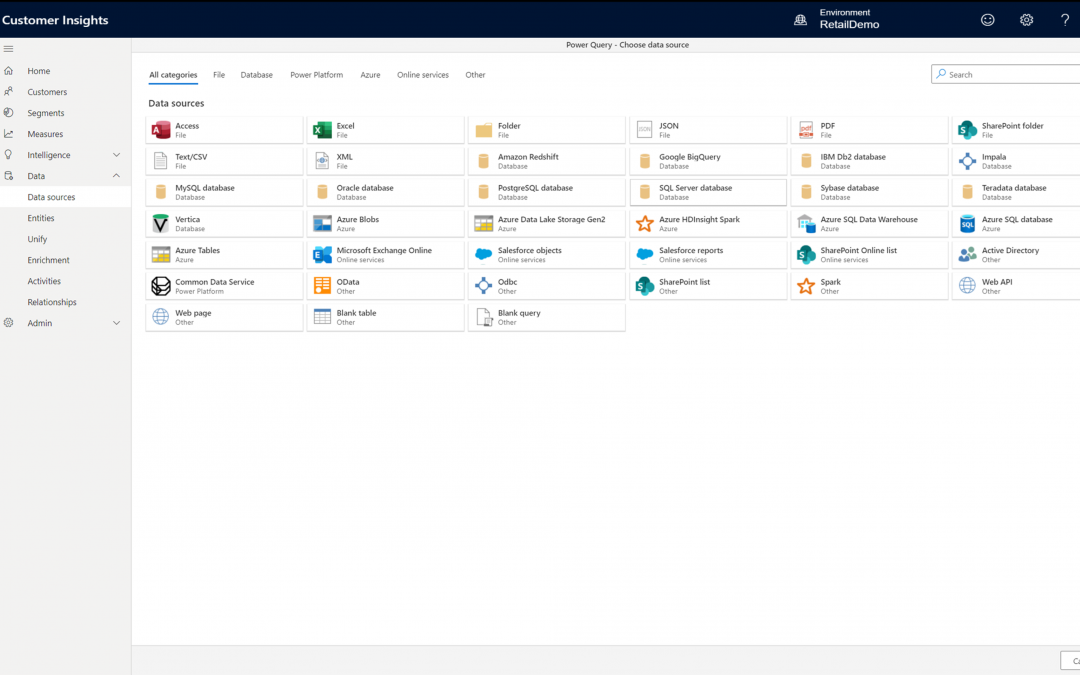
Dynamics 365 Customer Insights reduces the time it takes to collect data from all your business applications, vendors, and engagement sources. Pre-built connectors simplify the process of pulling in data from first- and third-party data sources such as Microsoft Dynamics 365, Microsoft Azure SQL Database, Microsoft Azure Blob Storage, Salesforce, and SAP. The engagement insights (preview) capability in Dynamics 365 Customer Insights captures signals from websites, mobile apps, and connected products. Once the data is ingested, it’s a three-step process to map, match, and merge the data into a single, unified view of every customer.
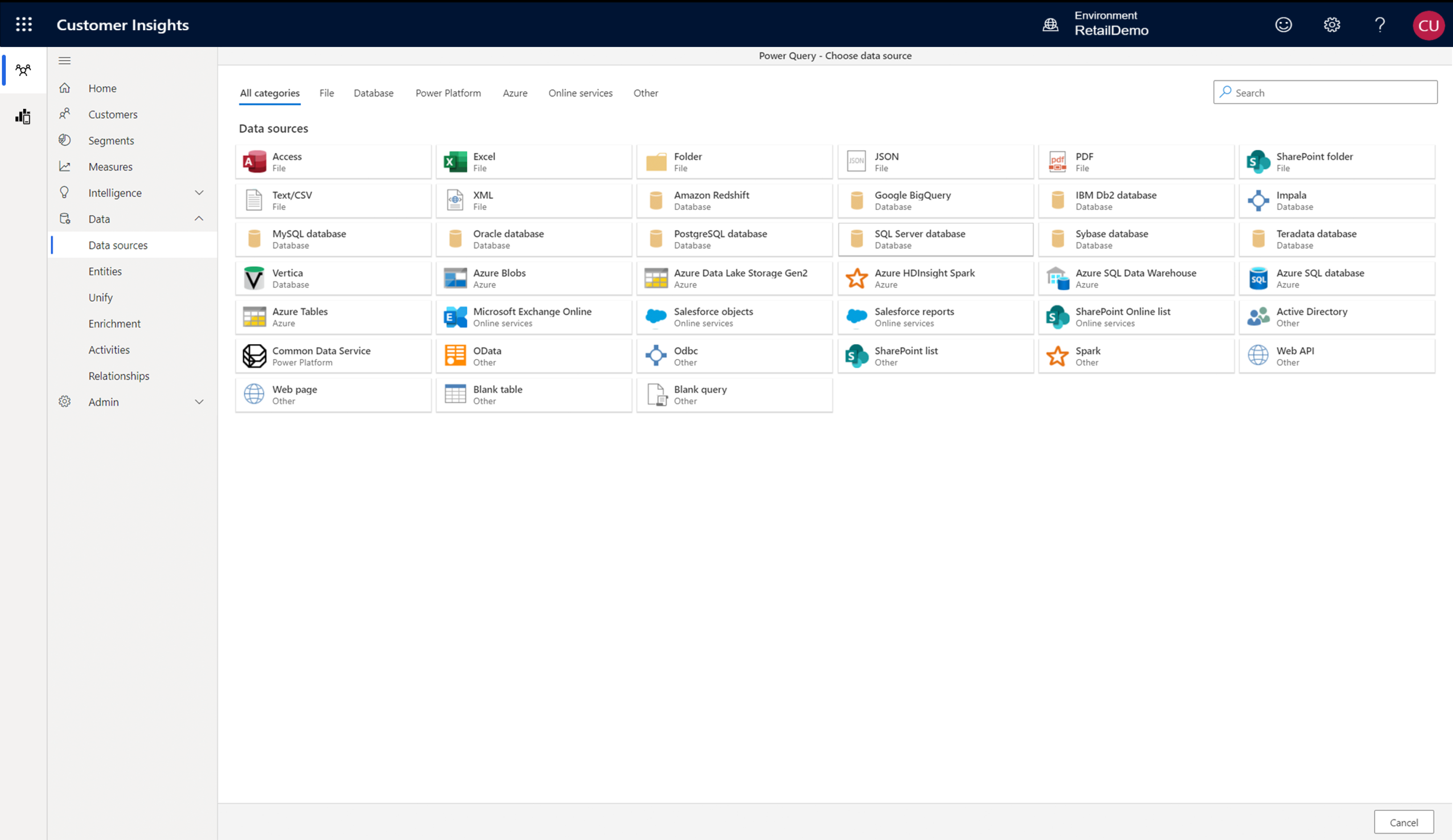
Dynamics 365 Customer Insights helps your organization surface insights directly within the applications and systems your organization uses every day to enable action across all lines of business. Export the unified profiles, measures, or segments to the applications relevant to your business. Provide your marketing team with the customer segments for targeted lead generation, enable sales team with cross-sell and upsell recommendations, and empower customer service to provide pro-active omnichannel support. A rich collection of APIs allows you to connect Dynamics 365 Customer Insights to third-party solutions or your own applications, like CRMs, email automation tools, social media platforms, POS, ERP, and more.
Dynamics 365 Customer Insights connects the data within your organization, but it can also scale and support your resources on demand. Pre-built connectors to Microsoft Power Platform solutions make extending even easier, providing more ways to orchestrate and personalize your unique customer journey.
Campari Group, a global spirits manufacturer, used Dynamics 365 Customer Insights to unite a technology stack that spanned multiple systems and vendors and used the insights to enhance the value that the company derives from its data. Campari Group has grown rapidly through acquisitions, each bringing with it another IT landscape to integrate including CRM systems from SAP and Salesforce; web experience and content management systems such as Adobe Creative Cloud, WordPress, and Drupal; analytics platforms and tools like SAP Analytics Cloud, Google Analytics, and Power BI; and marketing automation platforms and social media tools such as HubSpot, Sprinklr, Eventbrite, and Constant Contact.
Campari Group established API connectors to the numerous data sources that the company draws from, including social media, event marketing, and Wi-Fi connection databases. They quickly began to benefit, thanks to the out-of-the-box, AI-driven data segmentation capabilities of Dynamics 365 Customer Insights.
“In just two weeks, we connected all of the data points in Customer Insights and deployed our first email marketing automation campaign against those segments in the United States,” says Chad Niemuth, Vice President, Global ITMarketing and Sales at Campari Group. “We then rolled out to the United Kingdom in two weeks and Australia in two weeks. With Dynamics 365, we’re able to be very agile and continuously roll out new capabilities for our campaigns.”
Take a guided tour to see how your organization can use Dynamics 365 Customer Insights to unlock insights and drive personalized customer experiences.
Join our on-demand webinar, “Deliver connected experiences with customer data platforms” to learn the role of AI and machine learning in a customer data strategy, how to shape a customer journey that extends beyond marketing, and more.
The post Unify ecosystem-wide data with a flexible customer data platform appeared first on Microsoft Dynamics 365 Blog.
Brought to you by Dr. Ware, Microsoft Office 365 Silver Partner, Charleston SC.

This article is contributed. See the original author and article here.
Today we are releasing to our Beta customers a new capability that will revolutionize how you build formulas in Excel. Excel formulas are the world’s most widely used programming language, yet one of the more basic principles in programming has been missing, and that is the ability to use the formula language to define your own re-usable functions.
Simply put, LAMBDA allows you to define your own custom functions using Excel’s formula language. Excel already allows you to define custom functions, but only by writing them in an entirely different language such as JavaScript. In contrast, LAMBDA allows you to define a custom function in Excel’s own formula language. Moreover, one function can call another, so there is no limit to the power you can deploy with a single function call. For folks with a computer science background, you’re probably already familiar with the concept of lambdas, and the introduction of LAMBDA makes the Excel formula language Turing Complete…
With LAMBDA, you can take any formula you’ve built in Excel and wrap it up in a LAMBDA function and give it a name (like “MYFUNCTION”). Then anywhere in your sheet, you can refer to MYFUNCTION, re-using that custom function throughout your sheet. I’ll show a couple examples below.
Reusable functions is reason enough to start taking advantage of LAMBDA, but there’s one more thing… you can do recursion. If you create a LAMBDA called MYFUNCTION for example, you can call MYFUNCTION within the definition of MYFUNCTION. This is something that before, was only possible in Excel through script (like VBA/JavaScript). I’ll also show an example below of how you can leverage this to build things that were not possible before without writing script.
One of the more challenging parts of working with formulas in Excel is that you often get fairly complex formulas that are re-used numerous times through the sheet (often by just copy/pasting). This can make it hard for others to read and understand what’s going on, put you more at risk of errors, and make it hard to find and fix the errors. With LAMBDA, you have re-use and composability. Create libraries for any pieces of logic you plan to use multiple times. It offers convenience and reduces the risk of errors.
For example, imagine I have a list of station IDs, where the state is encoded in the ID, and I want to pull that value out:
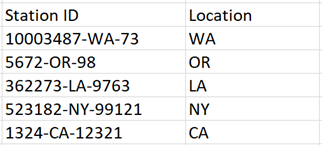
There are many ways to do this with Excel functions, here’s how I did it (I’m sure many of you have much more efficient ways to doing this… forgive me… I know for example the team would remind me I should take advantage of the LET function)
=LEFT(RIGHT(B18,LEN(B18)-FIND(“-“,B18)),FIND(“-“,RIGHT(B18,LEN(B18)-FIND(“-“,B18)))-1)
If I take that formula and copy it down the column, I can get the results shown in the table above.
There are two challenges with this approach:
Using LAMBDA, I can create a function named GETLOCATION, and put the formula logic in the definition for that function.
=LAMBDA(stationID, LEFT(RIGHT(stationID,LEN(stationID)-FIND(“-“,stationID)),FIND(“-“,RIGHT(stationID,LEN(stationID)-FIND(“-“,stationID)))-1))
Notice I specify the arguments my function will take (in this case stationID) and the logic for my function. Now in my spreadsheet, I can simply write GETLOCATION as a formula and reference the cell that has the stationID, just like any other Excel function. If I notice I have an error, I fix it in one place, and everywhere that uses that function is fixed.
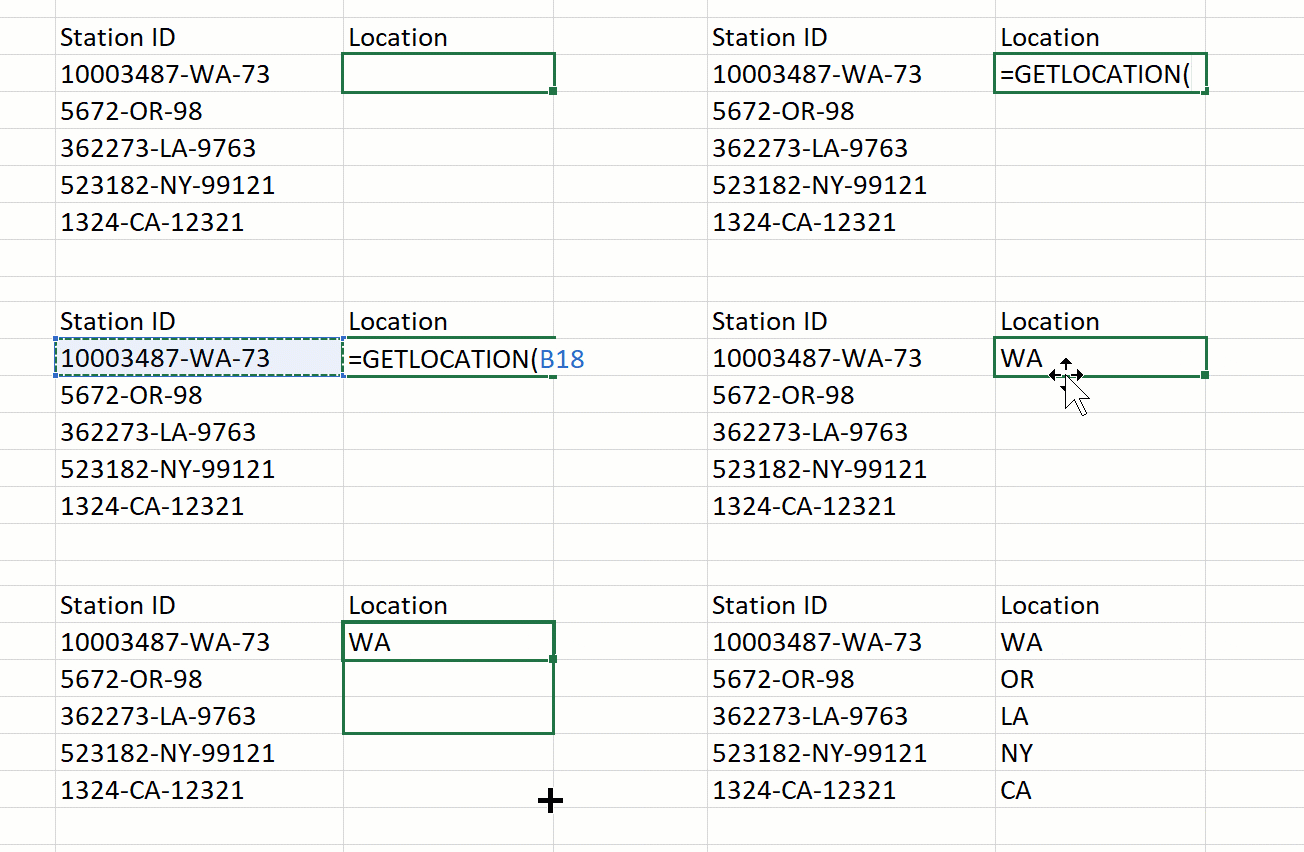
Another added benefit, is that I can now compose that function with additional logic. For example, if I had a table of tax rates for each location, I could write this simple formula to return the rate based on the stationID.
=XLOOKUP(GETLOCATION(B18), table1[locations], table1[tax]).
OK, lot’s more to drill into here around how you can use this capability to build up a rich set of function libraries, make your sheets easier to understand and less error prone, etc. These functions can even take data types as arguments. We’ll post an example later of a custom function that takes two cities as input and calculates the distance between them using the geo coordinates and the radius of the earth to perform the calculation.
Let’s shift into the other big impact this will have on what you can build in Excel. This one is a bit more complex, but is pretty revolutionary for us… recursion.
One of the big missing pieces in Excel formulas has been the ability to loop… to repeat over a set of logic at a dynamically defined interval. There are ways that you can manually configure the interval at which Excel recalculates to mimic this to an extent, but it’s not inherent to the formula language. That changes with LAMBDA.
Let’s take an example, albeit a bit contrived, but it’s a simple way to get the point across.
Imagine I have a set of strings, and I want to specify which characters should be removed from those strings dynamically:

Because the set of characters you’re specifying are not static, there really isn’t any good way of doing this. If you knew it was always a fixed set of characters, you could do a ton of nested logic, but that would be pretty complex and error prone to author. Not to mention, if the number of characters to be removed was larger than what you’d accounted for, it would fail.
With LAMBDA, we can create a function called REPLACECHARS that references itself allowing you to iterate over the list of characters to be removed:
=LAMBDA(textString, illegalChars,
     IF(illegalChars=””, textstring,
       REPLACECHARS(
       SUBSTITUTE(textString, LEFT(illegalChars, 1), “”),
       RIGHT(illegalChars, LEN(illegalChars)-1)
)))
Notice that in the definition of REPLACECHARS, there is a reference to REPLACECHARS. The IF statement says if there are no more illegal characters, return the input textString, and otherwise remove each occurrence of the leftmost character in illegalChars. Recursion kicks in with the request to call REPLACECHARS again with the updated string, and the rest of illegalChars. This means it will keep calling itself until it has parsed over every character to be removed, giving the desired result.

If you’ve been following the Excel improvements over the past couple years, you probably noticed two significant improvements with the type of data you can work with in Excel:
Functions can take data types and arrays as arguments, and they can also return results as data types and arrays. The same is true with the lambdas you build.
Let’s take an example… I have a list of cities, and I want to calculate the total distance I’d travel if I were to go to each city in order.
We’ll post the code for this one in a later post, but it’s pretty basic:
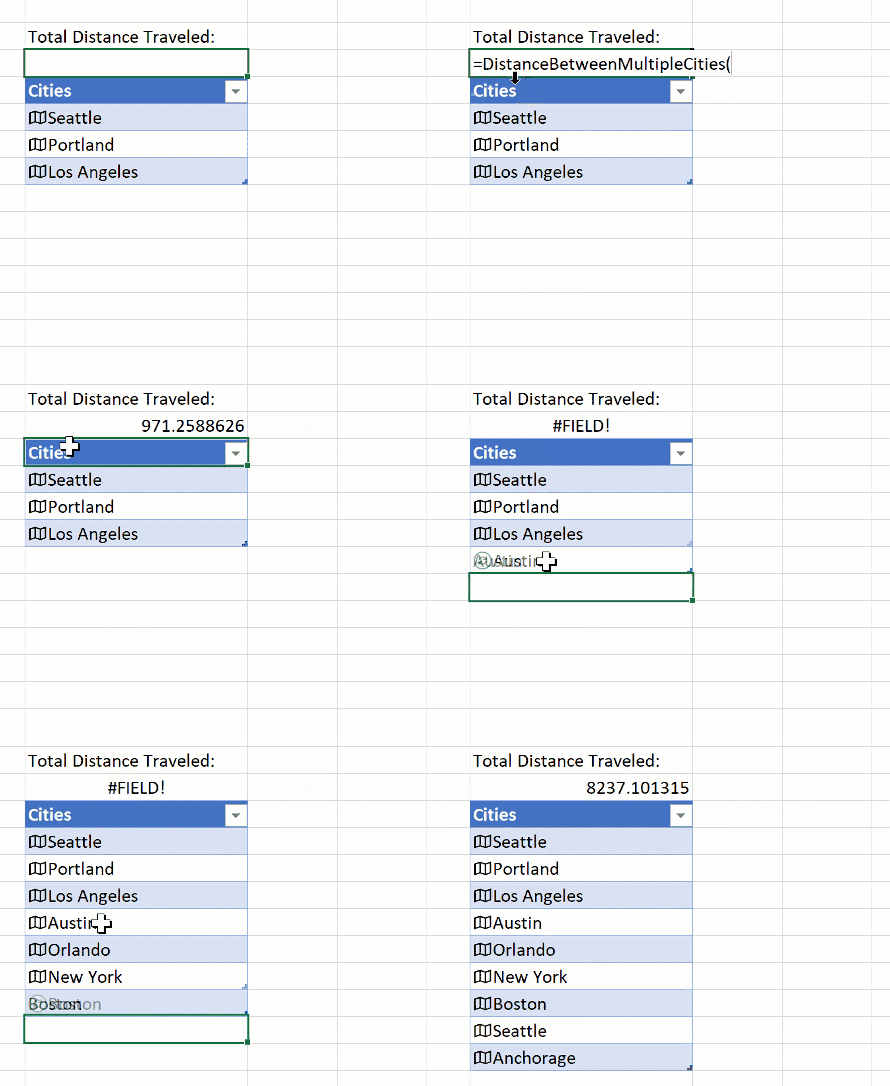
If you are in our Beta program, you can try it now yourself. We’d love your feedback as we continue to improve on this new capability.
| Note: The lambda function is available to members of the Insiders: Beta program running Windows and Mac builds of Excel. Learn more about how to become an Insider here |
There are three key pieces of =LAMBDA to understand:
Let’s look at an example which creates a basic lambda function.
Suppose we have the following formula:
=LAMBDA(x+122)
In this, x is the argument you can pass in when calling the LAMBDA, and x+122 is the logic.
For example, suppose you called the lambda and input the value 1 for x, Excel would do the following calculation:
1 + 122
Which, as we all know:
1 + 122 = 123But how do you use these? If you’ve been pasting our examples into Excel, you may have noticed some #CALC! errors. To resolve those, you’ll need to learn the next step.
To give your LAMBDA a name so it can be re-used, you will want to make use of the Name Manager.
The Name Manager can be found in the Ribbon by going to:
Formulas > Name Manager
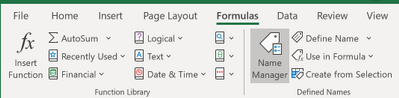
Once you open the Name Manager you will see the following window
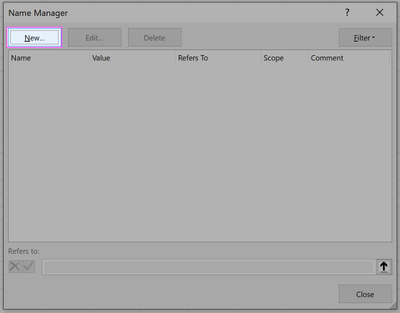
From this point you’ll want to create a new entry (New…) and fill out the associated fields
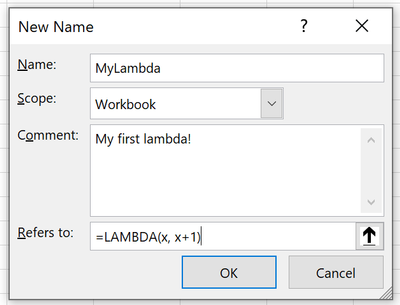
Name: The Name of your function
Comment: A description and associated tooltip which will be shown when calling your function
Refers to: Your lambda function definition
Once you’re done, you can hit “OK” to store your lambda and you should see the definition returned in the resultant window.
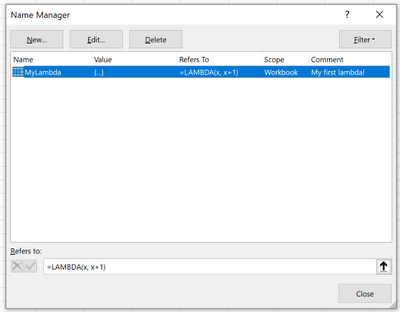
And that’s it! Now you can make use of your newly crafted custom function in the workbook by calling it by its name.
To put it simply, you call a lambda function the same way you call native functions in Excel.
To illustrate this, lets revisit the previous example and show how to call MYLAMBDA with a value.
=MYLAMBDA(122)
Which of course returns the value:
123
One last thing to note, is that you can call a lambda without naming it. If we hadn’t named the previous formula, and just authored it in the grid, we could call it like this:
=LAMBDA(x, x+122)(1)
This passes in 1 for x, which returns
123
As you’ve probably noticed, we are improving the product on a regular basis. The desktop version of Excel for Windows & Mac updates monthly, and the web app much more frequently than that. We have a ton of improvements already planned for LAMBDA, but we’re looking to you for feedback along the way. One that I can tell you gets me every time is the experience of editing in the name manager… definitely lots of room for improvement there. We’ll also add some more array manipulation functions in the coming months that will help you build even more powerful lambdas taking more advantage of dynamic arrays.
Join the Office Insider Program and choose the Beta Channel to get early access to LAMBDA in Excel.
To give feedback and suggestions, click Help > Feedback, and Add #LAMBDA in your feedback so that we can easily find input about the feature. You can also post in the Excel Tech Community.
Stay connected with us. Join our Excel Tech Community and check out this LAMBDA sample. Let us know what you think and we’d love to see what you build with LAMBDA!
To learn more about LAMBDA, please check out our help article and in the meantime we are excited to hear more from you about the LAMBDA formulas you have created!

Recent Comments