3 unique success stories—building resilience into the supply chain

3 unique success stories—building resilience into the supply chain

This article is contributed. See the original author and article here.

Even before the pandemic, organizations across industries, from manufacturing to retailers, felt the squeeze to modernize supply chain operations. The historic supply chain shock of 2020 has accelerated the need to both respond to immediate disruptions while building resilience into every layer of the supply chain.

In the past, rapidly overhauling a supply chain operation has been no easy feat. Today, cloud solutions like Microsoft Dynamics 365 Supply Chain Management are dramatically shortening the time and effort to get up and running on a modern, intelligent cloud-based solutionreducing a once-massive months long effort to just weeks.

Let’s look at three organizations that transformed supply chain operations in a remarkably short time, while building in a level of resilience that provides the agility to weather any future disruption.

Wahl Clipper Corporation

In 1911, Leo J. Wahl invented the first practical electric hair clipper. One hundred years later, the Wahl family is carrying forward the tradition of innovation and superior service with 3,000 associates and a partner network that distributes product in virtually every country worldwide.

With different on-premises enterprise resource planning (ERP) systems across global locations, the team faced increasing challenges managing the complexities of a global supply chain. “The system we’ve been using for the last 30 years: we’ve outgrown it. It can’t keep up with the changing business needs that we have,” explained Brian Wahl, CEO. Among the culprits of inefficiencydata inconsistencies across offices. Our data wasn’t rationalized,” according to John Payton, Director of Information Technology. “It didn’t mean the same thing in each country or in each ERP system.”

By migrating to a single cloud platform, Wahl is able to execute uniformly across global resources instead of operating as individual units tied to disparate systems.

“We can already see that Dynamics 365, along with Office, is allowing us to process information, to move information to people much more quickly in a way that they can understand, absorb and make decisions on almost immediately. So we really appreciate the integration of those products along with the balance of Microsoft’s vision around the modern workplace, of having other tools available to us like Power BI and Power Apps, and we can bring solutions to the business in hours that used to take us days or weeks previously.”Brian Wahl, CEO

Takeaway

Fractured point solutions and siloed, disparate data sources can be a major source of inefficiency as organizations scale supply chain operations in the digital age. By migrating on-premises and legacy solutions to Microsoft Dynamics 365, Wahl Clipper Corporation broke down technological barriers to deliver a universally agile, collaborative and insight-driven way of doing business across global operations. Harmonized data available across point solutions, including Microsoft Office, enables faster decision making and opportunities to collaborate and share information more freely. And access to Microsoft Power Platform drives the speed and agility to solve challenges more effectively by enabling those closest to problems to solve them.

Read additional details on how this hair clipper manufacturer migrated to the cloud to adapt to growing business needs and innovations.

The JB Hi-Fi Group

Fulfilling bulky commercial goods can be trickya logistical puzzle that requires an efficient warehousing, inventory management, and fulfillment that can keep product moving. For JB Hi-Fi, a modern warehouse management system is essential to fulfill an extensive range of consumer electronics, appliances, and home entertainment products across 300 JB Hi-Fi and The Good Guys retail locations in Australia and New Zealand.

JB Hi-Fi needed a new warehouse management system to boost the efficiency of inventory flow, management of back-of-house processes such as goods storage, and route to market for big and bulky goods. The modern system needed to ensure data transparency across the organization, as well as seamlessly coordinate logistics across two retailers, each with unique point of sale systems and unique stock codes.

Thanks to Dynamics 365 Supply Chain Management, JB Hi-Fi not only found an intelligent solution that met all the Group’s needs but was able to deploy the solution for warehouse management in Sydney in just four months.

“It’s definitely an accelerated timeframe for this type of project, but it is actually quite achievable with a modern tech stackthe fact that the core environment is cloud based, software as a service. You can integrate quickly to Azure.”Simon Page, Technology Director

In addition to a faster time to value, Dynamics 365 provided the agility to seamlessly integrate with JB Hi-Fi and The Good Guys host systemssolving the logistical challenge posed by two separate systems for each retailer.

“One of the things we had to do is focus on the end process that the customer experiences. All the stages that an order flows through and a delivery flows through, right from where the sales person is having a conversation through to getting it to your door, that process needed to be harmonized for both brands. We’ve effectively managed to do that by creating this group model, which then translates back into statuses that the host systems understand without having to rewrite all the host systems.”Simon Page, Technology Director

Takeaway

With Dynamics 365 Supply Chain Management in place as the warehouse management foundations, JB Hi-Fi Group can focus all its efforts to ensure bulky goods are warehoused, picked, dispatched, and delivered safely, efficiently, and fastand in the process ensure it remains at the forefront of modern retail. The move has also made the business more resilient to disruptions, including COVID-19. The Group has been able to support a shift in how people shopped during lockdown, while seamlessly delivering from warehouses and stores.

Read additional details how JB Hi-Fi accelerates efficiency and customer experiences in the transformation to cloud native warehouse management.

Invitalia

Invitalia coordinates economic development in Italy. When COVID-19 spread to Italy, the agency took on additional responsibility for coordinating the acquisition and distribution of personal protective equipment (PPE), medicines, medical devices, and other supplies from international suppliers. Invitalia took over the program at a critical time: international buyers were chasing a limited supply of equipment. Adding to the complexity, each hospital in Italy ordered medical supplies in a decentralized, unstructured way, causing procurement delays and frequent partial or missing orders.

In need of a logistics platform capable of simplifying the complex process of purchasing and distributing PPE and COVID-19 supplies, Invitalia rapidly deployed Dynamics 365 Supply Chain Management. Microsoft Services and Agic Technology, a Microsoft Gold Partner, helped them set up a system for managing hundreds of international suppliers and transporting equipment to hospitals injust two weeks.

Takeaway

Invitalia was able to achieve remarkable time to value with Dynamics 365 Supply Chain Management, providing a centralized solution that helps the agency assess medical needs across the country and then quickly provision and distribute critical medical equipment. They’ve also adopted a platform that delivers the agility to easily extend across other departments and uses.

“It will be straight forward to expand our use of Dynamics 365 into other areas of public administration. It connects easily with other Microsoft products, giving us the opportunity to create end-to-end solutions for enterprise resource planning.”Fabrizio Bellezza, Chief Information Officer

Read additional details how Invitalia streamlines procurement and distribution of vital medical supplies with Dynamics 365 Supply Chain Management.

Build resiliency into your supply chain

These three stories bring to life how modern, cloud-based intelligent solutions can deliver versatility, scalability, and rapid time to value, even during a globally-disruptive events. We’ll share more stories from the supply chain frontlines in the next few weeks. Until then, learn more about Dynamics 365 Supply Chain Management, see what’s new and planned in the next few months, learn how to build resilience with an agile supply chain, and contact us to today to see a demo or start a free trial.

The post 3 unique success stories—building resilience into the supply chain appeared first on Microsoft Dynamics 365 Blog.

Brought to you by Dr. Ware, Microsoft Office 365 Silver Partner, Charleston SC.

MQTT 5 enhances device connectivity to IoT Hub

This article is contributed. See the original author and article here.

Azure IoT Hub now supports MQTT 5 in public preview. MQTT 5 is the newest version of the protocol and includes many enhancements over version 3.1.1. We’re excited to announce this new IoT Hub capability – it doesn’t replace the existing MQTT 3.1.1 support.


Why MQTT 5


Among all the enhancements, I’m most excited about MQTT 5’s robust support for reason codes. That is, you will be provided with much more clarity on if things are going right, and if not, what’s wrong. For example, if you hit one of IoT Hub’s throttling limits, MQTT 5 protocol has a built-in reason code to tell you about it directly in response:


Request:


-> PUBLISH
    QoS: 1
    Packet_Id: 31
    Topic: $iothub/telemetry
    @myProperty1: My String Value # optional
    creation-time: 1600987195320 # optional
    @ No_Rules-ForUser-PROPERTIES: Any UTF-8 string value # optional
    Payload: <data>


Response (throttled):


<- PUBACK
    Packet_Id: 31
    Reason_Code: 151
    status: 0501


Here, the reason code 151 is the pre-defined code for “quota exceeded” as per spec, and you’ll find the explanation for the 501 status in our docs. The client has much more visibility compared to the MQTT 3.1.1 days, where you may even need to go to our diagnostic logs to get the root cause of an issue!


This is just one example. MQTT 5 for IoT Hub also includes enhancements like:


  • Support for reauthentication before SAS token expiration without disconnecting

  • User properties to store custom key value pairs

  • C2D commands will no longer get purged in absence of subscription from device – they’ll remain queued up until device subscribes or they expire

  • And more!


Getting started


To get started, you’ll need to create a brand new IoT hub with preview mode enabled. This is temporary limitation – once we’re out of preview it will be available to existing IoT hubs as well.


Then, check out our docs on setting up your client for the preview:


40% smaller TLS handshake with ECC cert for IoT Hub

This article is contributed. See the original author and article here.

Azure IoT Hub’s Elliptic Curve Cryptography (ECC) server TLS certificate, also known as ECDSA certificate, is now in public preview. Compared to the normal RSA server cert, TLS handshake with ECC cert uses less data, is less computationally intensive, and is faster – all meaningful benefits to constrained IoT devices.


RSA vs ECC certificates


While offering equivalent cryptographic security to RSA certificates, ECC certificates use smaller key sizes. This following table (source: RFC 4492) shows the comparison between the approximate key sizes (in bits):


Symmetric ECC RSA
80 163 1024
112 233 2048
128 283 3072
192 409 7680
256 571 15360


Smaller key sizes result in smaller certificate size and less data usage for TLS handshake. This is particularly important for IoT devices due to their smaller profiles and memory (such as RTOS devices) and to support use cases in network limited environments (such as cargo ships and remote areas).


IoT Hub results


We ran some experiments for the ECC (256 bits) vs. RSA (2048 bits) certificates for this IoT Hub preview. We found that the TLS handshake data usage went from ~4500 bytes to ~2700 bytes, 40% less! Not only will you be getting the reduction on your bandwidth bills, the savings on battery, computation costs, and memory should not be overlooked. For example, in Azure RTOS, we saw a possible 4KB reduction in TLS stack memory footprint if ECC is used. Such a reduction is significant for a device with limited memory as it opens up the possibility of re-using that memory for other purposes not previously possible.


Getting started


To get started,


  1. You’ll need to create a brand new IoT hub with preview mode enabled. This is temporary limitation – once we’re out of preview it will be available to existing IoT hubs as well.

  2. Follow our docs to prefer ECDSA cipher suites in order to tell IoT Hub to present the ECC cert. 

How to Host a Virtual PowerPoint Party this Holiday Season!

How to Host a Virtual PowerPoint Party this Holiday Season!

This article is contributed. See the original author and article here.

What is a PowerPoint Party?

Yes, it is a real thing! The PowerPoint party has been growing in popularity since COVID required social distancing began, but PowerPoint parties have been entertaining people long before 2020. PowerPoint Parties are a great way to interact with your family this holiday season! Everyone invited to your party is asked to prepare a short presentation on a topic of their choice, or assigned in advance by the group, and they will present their PowerPoint to the group on their The topics can be fun and lighthearted – we all need that in unprecedented times like this!

How to get a PowerPoint Party planned…

Below are some steps for you to follow to successfully throw an online gathering like this!

  1. Plan a theme: Throw a virtual game night, online happy hour, formalized “vent session” or watch party!
  2. Create your deck (and help inspire your friends to create their PowerPoint with these easy templates and tools….

This is an accessible PowerPoint Party template to get you started: PowerPoint party (office.com)

Here are some additional fun templates that may get your creative

  1. Make it more visually appealing – this isn’t your Father’s PowerPoint

You can use additional PowerPoint features like zoom and morph to make your slides more visually appealing and compelling for your virtual audience!

  1. Get your party started!

Naturally, we share our presentations via Microsoft Teams. But, you can host a PowerPoint party on the video conferencing platform of your choice. For the best Teams experience, share using PowerPoint sharing in Teams via the share tray. This will provide you with the best experience for both you and your audience: Share content in a meeting in Teams – Office Support (microsoft.com)

  1. Have Fun!!

aneoanou_0-1607123002223.png

  1. Repeat often!

All in all, PowerPoint Parties are a great way to connect with friends, family, or colleagues over the holidays. Whether you’re planning an online shower, virtual birthday party, or just hanging out, PowerPoint has got you covered.

What’s new in Teams Phones | December 2020

What’s new in Teams Phones | December 2020

This article is contributed. See the original author and article here.

The Teams devices portfolio strives to give users options based on the space they use for work, the kind of collaboration they engage in, and their personal preferences for when and how they choose to get things done. We are constantly working to provide an intuitive and familiar experience for Teams on every device type, and this means carrying over the great features we have for meetings and calling into the phone experience as well. This month we’ve got some great updates that bring together the features users love in Teams meetings into the Teams phone app and more to keep users productive and secure.


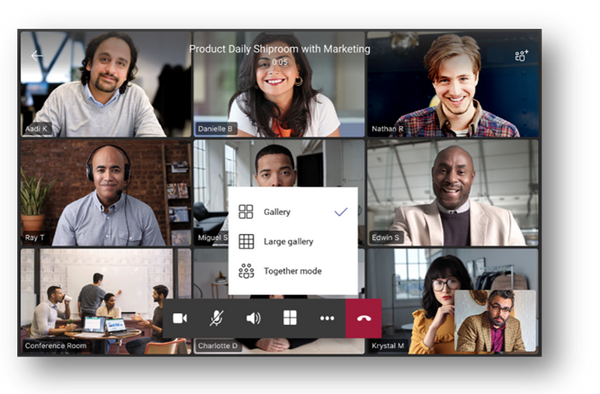
1. Video Enhancements for Teams meetings: 3×3 Layout, together mode, gallery view and background blur


Teams phones now support a new video layout including 3×3 gallery view, large gallery view for more participants and Together Mode. Using 3×3, users can see the video feeds of up to 9 meetings participants at a time. For even larger meetings, enable large gallery view to show up to 49 participants. Teams phones will also support Together Mode, a revolutionary meeting experience where participants are transported to a virtual shared space.


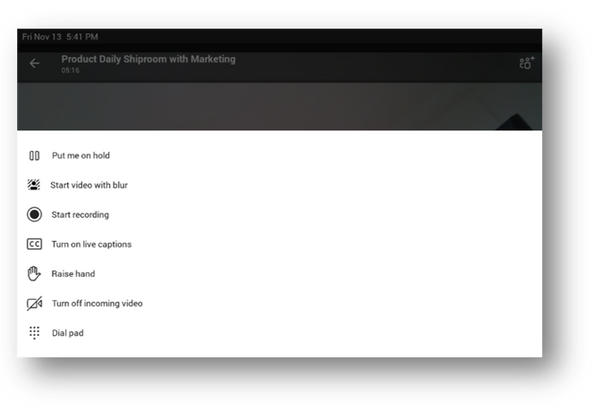
No matter which style of meeting you select you can always enable background blur to reduce distractions and obscure any imagery found in a video setting.


3x3 gallery view cropped.png


Teams and SPcropped.png


2. Meet Now on Phones


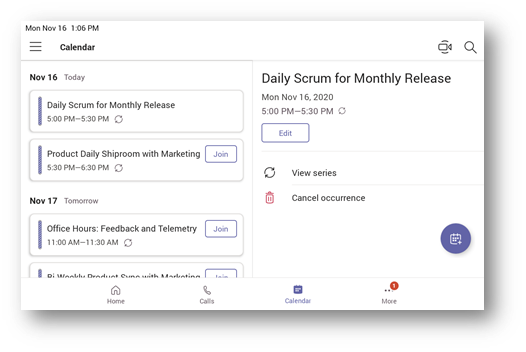
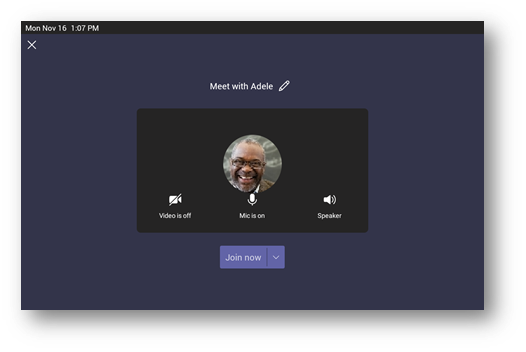
Sometimes, the need to collaborate with a teammate can pop up at unscheduled times; it is easier to get clarity or talk through a few quick details with the new instant meeting feature on Teams phones. Users can select “meet now” in their calendar interface to easily start a meeting and add a participant.


Meet now.png


meet with Adele.png


3. Screensharing on Select Audio Phones


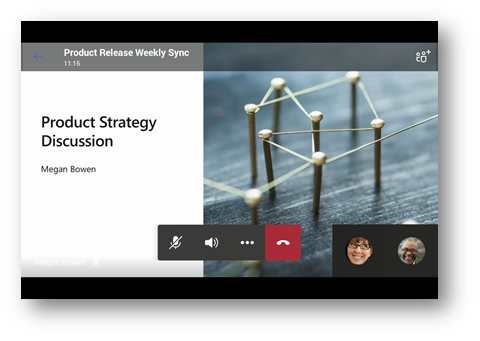
With this update some models of touch screen audio phones meeting the minimum hardware requirements will now allow user to see content that is being presented or shared by others during calls and meetings.


screensharing.png


4. Spotlight


From a desktop client, presenters can pin an individual feed for all attendees to see during a Team meeting. The spotlighted video will be the main video the Teams phone user will see on their screen. For more information, see here.


5. Request to Speak


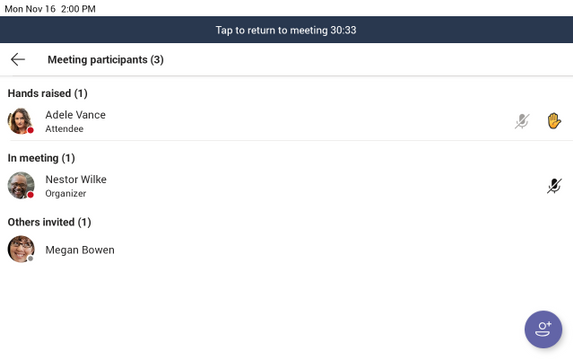
The hard mute functionality allows you to prevent attendees from unmuting themselves. This can be switched on or off from within the meeting, and individually for attendees who put up their hand to speak.


Request to Speak.png


In addition to meetings functionality, there are some exciting core updates to Teams phones coming out this month.


6. Sidecar Support *Beta Release*


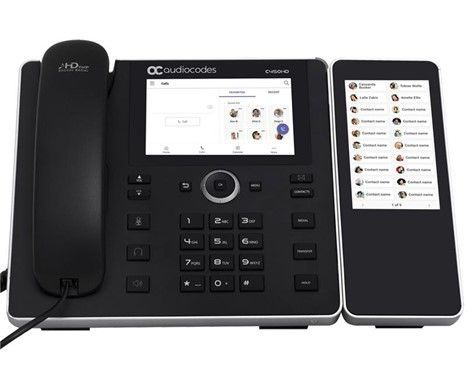
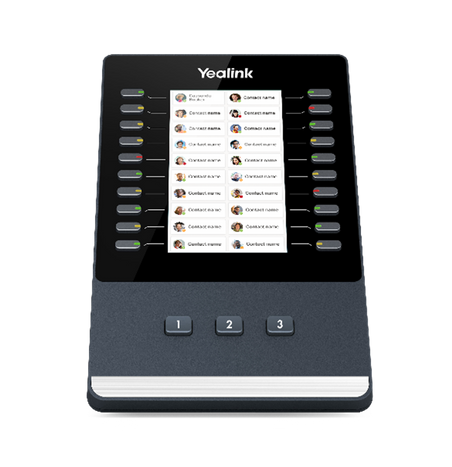
Sidecars are an efficient way for a phone user to reach frequently used contacts on a desk phone. They are an accessory to a Teams phone with hardware buttons that can be linked to speed dial contacts. A user can select and pin the names of any contacts in the Teams phone to the screen of the sidecar so that calls can be made with one click and it is clear whether a contact is available or not at-a-glance with LED indicators. Teams will support sidecars with touch or non-touch enabled hardware.


Now Teams supports sidecar functionality on the Yealink EXP50, and the Audiocodes C450HD with the expansion module in beta release.


Teams phone.jpg


teams side car.png


7. Phones in Microsoft 365 Government – GCC


Microsoft Teams phones application is ready to be deployed in the Microsoft 365 Government – GCC environment. For more information, see here. Please check with your vendors for any hardware compliance questions.


8. Policy changes to enable/disable HomeScreen and BetterTogether


There will be two new settings (AllowHomeScreen and AllowBetterTogether) added to the TeamsIPPhone policy that will allow tenant admins to enable/disable home screen and better together on Teams phones. See here for more information.


9. Proximity based meeting join on Teams conference room phones


Proximity based meeting join for an available Microsoft Teams conference phone is supported from this update. The Microsoft Teams client on your PC and mobile detect proximity of the conference phone via the BLE beacon transmitted by the phone and allow you to add the phone easily to the meeting from your pre-join screen on your desktop or mobile client. When a user adds the conference phone to the meeting, the phone would auto accept the incoming meeting request. For more information, see here.


As always you can shop our robust portfolio of Teams certified devices, including a wide array of calling endpoints at the Teams marketplace!