Announcing Preview for SAP on Azure Deployment Automation Framework

This article is contributed. See the original author and article here.

The SAP on Azure group is excited announce the preview for SAP on Azure Deployment Automation Framework. This introduces an extensible framework that will modularly address the complexities of running SAP on Azure.


Some of the largest enterprises in the world currently run their SAP solutions on Microsoft Azure. Since these SAP applications are mission critical, even a brief delay or disruption of service can have a significant business impact on an organization.


Today the journey to deploying an SAP system is a manual process. This can quickly become costly due to divergence in resources and configuration, or discrepancies introduced through human error. To reduce this impact, improve consistency, and reduce lead times, we are approaching the SAP deployment as an opportunity to define the SAP Infrastructure as Code (IaC) and capture the configuration activities as Configuration as Code (CaC).


To help our customers effectively deploy their infrastructure for SAP on Azure repeatably and consistently, we are providing the IaC (Infrastructure as Code) and CaC (Configuration as Code) code repository that will utilize the industry leading offerings such as, Terraform and Ansible respectively.


Key Capabilities of SAP on Azure Deployment Automation Framework


  • Deploy multiple SAP SIDs consistently

  • Securely managed keys with Key Vault

  • Deploy and configure for High Availability (HA)

  • IaaS –  Infrastructure as Code (IaC)

    • Logically partitionable by environment, region, and virtual network

    • Availability Zone support where appropriate

    • SAP HANA and AnyDB configuration support

    • Distributed application tier deployment


  • Configuration – Configuration as Code (CaC)

    • SAP HANA database install

    • Pacemaker configuration for SAP HANA with HSR


Benefits of SAP on Azure Deployment Automation Framework


Reviewable code: delivering the tools as IaC and CaC via open source, allows organizations and teams to preview the definition of what Azure resources will be created and how the VM OS will be configured. In the world of DevOps, this allows the code to be approved prior to execution.


Deployment Consistency: IaC and CaC allow, not only the IaaS to be deployed consistently and repeatably, but also define the post deployment system administration activities to follow a procedural set of steps that will be consistent and repeatable. Both tools function idempotently, which becomes part of drift detection and correction.


Configurable: The IaC and CaC modules provide standard functionality. However, the functionality can easily be configured through inputted parameters. Changes delivered over time will enhance and extend functionality. Some examples of supported configurations include: Number of application servers, high-availability in the database and/or application tier, enabling/disabling of either database or application tier, overriding default naming standard, and the ability to bring some of your own resources in certain instances.


Drift detection and correction; With tools that apply the IaC and CaC idempotently, we can detect when the deployed resources have drifted from their state as defined by the tools. When detected, a choice may be made to apply the desired state to resolve any drift.


Strategy


We have chosen to take an open source approach to establish a framework of Infrastructure as Code (IaC) and Configuration as Code (CaC). This framework provides the structure that allows an E2E workflow to be executed on by industry leading automation tools and is easily extendable.


  • Terraform – is the swiss army knife of IaC tools. It is not only idempotent, Terraform is completely cloud-agnostic and helps you tackle large infrastructure for complex distributed applications. Terraform automation is orchestrated in varying degrees with the focus on the core plan/apply cycle.


  • Ansible – Provides a “radically simple” IT automation engine. It is designed for multi-tier deployments and uses no agents. Ansible is a strong fit for configuration management, application deployment, and intra-service orchestration by describing how all the systems inter-relate. Ansible is one of the more flexible CaC tools on the market right now.


At this stage of the release, the IaC and CaC are offered as BYOO (Bring Your Own Orchestration). This means that you will provide the governance around the execution of the automation. We provide a framework workflow that can function out of the box, with a defined set of manual executions. It can also fit in to a more mature, customer provided, Orchestration environment.


Vision


The SAP on Azure Automation Framework over time will automate many more tasks than just deployment. We plan to continuously improve this framework to meet all your deployment automation needs and expand support for more infrastructure and post-deployment configurations. Stay tuned for updates.


Pricing and Availability


The tools being developed are meant to accelerate the customers adoption of Azure for SAP deployments. As such, these tools are offered free of charge.


Learn more


To learn more about the product, check out the GitHub repository and documentation in the preview branch at: https://github.com/Azure/sap-hana/tree/beta/v2.3


To get started, we have provided some bootstrapping instructions and a self-paced workshop to deploy the IaaS for a 1 or more SAP system deployments.


Feedback


We plan to continuously improve this framework to meet all your deployment automation needs. We welcome all feedback and can be reached at: sap-hana@microsoft.com
SQL Server Big Data Clusters CU8 release surfaces Encryption at Rest capabilities and more

SQL Server Big Data Clusters CU8 release surfaces Encryption at Rest capabilities and more

This article is contributed. See the original author and article here.

SQL Server Big Data Clusters (BDC) is a new capability brought to market as part of the SQL Server 2019 release. BDC extends SQL Server’s analytical capabilities beyond in-database processing of transactional and analytical workloads by uniting the SQL engine with Apache Spark and Apache Hadoop to create a single, secure and unified data platform. BDC is available exclusively to run on Linux containers, orchestrated by Kubernetes, and can be deployed in multiple-cloud providers or on-premises.


The availability of the latest cumulative update (CU8) for SQL Server 2019 BDC includes several fixes, optimizations and adds two main capabilities for SQL Server BDC:


  • Encryption at Rest experiences for SQL Server and HDFS

  • Oracle Proxy Authentication Support on Data Virtualization.


We’ve also surfaced a number of documentation articles to help you plan and deploy more advanced Active Directory enabled BDC scenarios on Azure Kubernetes Services (AKS).


This announcement blog highlights some of the major improvements, provides additional context to better understand the design behind these capabilities, and points you to relevant resources to learn more and get you started.


Encryption at Rest on SQL Server Big Data Clusters


Starting on SQL Server Big Data Clusters CU8, a comprehensive encryption at rest feature set is available to provide application level encryption to all data stored in the platform. This enables application level encryption capability allows administrators to securely encrypt data on both SQL Server and HDFS services of BDC to comply with desired enterprise-grade requirements. If your organization needs to enable encryption at rest, read all concepts and guidelines in our new documentation set for the feature.


Oracle Proxy Authentication support


As a modern data platform, BDC have long supported Oracle as one of its Data Virtualization sources. In order to support more enterprise-grade compliant scenarios, we’ve enabled Oracle Proxy Authentication support to provide fine grained access control. A proxy user connects to the Oracle database using its credentials and impersonates another user in the database. To learn how to enable this feature on your Oracle connection scenarios, read the updated documentation article here.


A proxy user can be configured to have limited access compared to the user being impersonated. For example, a proxy user can be allowed to connect using a specific database role of the user being impersonated. The identity of the user connecting to Oracle database through proxy user is preserved in the connection, even if multiple users are connecting using proxy authentication. This enables Oracle to enforce access control and to audit actions taken on behalf of the actual user.


Azure Data Studio Operational Notebooks for SQL Server BDC CU8


Along the Cumulative Update 8 we are also releasing an updated set of Operation Notebooks to Azure Data Studio. This update contains a new section of notebooks for managing Encryption at Rest, adds endpoint certificate rotation and include many fixes.


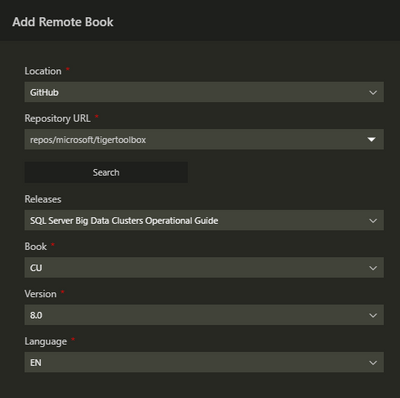
In order to get the latest version of the notebooks, either install the latest Azure Data Studio or use the “Add Remote Jupyter Book” feature as highlighted bellow.  Using the Command Palette (Shift + Cmd + P), find and execute the “Jupyter Books: Add Remote Jupyter Book” command.


Fill out the information as displayed in the screenshot bellow, the click the “Add” button at the botton of the pane.


DaniBunny_0-1607380333594.png


Active Directory enabled SQL Server BDC on Azure Kubernetes Services (AKS)


SQL Server Big Data Clusters have always supported Active Directory (AD) enabled deployment mode for Identity and Access Management (IAM). Yet, IAM on Azure Kubernetes Service (AKS) has been challenging because of industry-standard protocols such as OAuth 2.0 and OpenID Connect which are widely supported by Microsoft identity platform yet are not supported on SQL Server.


We are pleased to announce that you can now deploy a big data cluster (BDC) in AD mode while deploying in Azure Kubernetes Service (AKS). Learn more about how to plan Active Directory integration for BDC on AKS and how to Deploy SQL Server Big Data Clusters in AD mode on Azure Kubernetes Services (AKS) hand-by-hand follow the links to our documentation page.


Private BDC cluster with further egress traffic restriction using user-defined Route table ( UDRs ) on Azure Kubernetes Service (AKS)


To complement the above platform security enhancements regarding deployment of BDC in Active Directory mode on AKS, we are pleased to announce that we added support for deploying BDC in Azure Kubernetes Service (AKS) private cluster for both AD and non-AD clusters, it makes sure the network traffic between API server and node pools remains on the private network only. The control plane or API server has internal IP addresses in an AKS private cluster. You can find how to Deploy BDC in Azure Kubernetes Service (AKS) private cluster step-by-step here.  


Leverage this configuration will help our customer restrict use of public IP addresses in enterprise networking environment. Furthermore, to restrict the additional hops are required for egress traffic, we also provide guidance on restricting egress traffic of Big Data Clusters (BDC) clusters in Azure Kubernetes Service (AKS) private cluster, please refer to this article on our documentation page. To know more about how to manage an Azure Kubernetes Service (AKS) private cluster with SQL Server big data clusters (BDC) deployed in Azure in here.


SQL Server BDC team hears your feedback


If you would like to help make BDC an even better analytics platform, please share any recommendations or report issues through our feedback page. SQL Server engineering team is thoroughly going through the reported suggestions. They are valuable input for us, that is being considered when planning and prioritizing the next set of improvements. We are committed to ensuring that SQL Server enhancements are based on customer experiences, so we build robust solutions that meet real production requirements in terms of functionality, security, scalability, and performance.


Ready to learn more?


With SQL Server 2019 CU8 updates, BDC continues to simplify the security, deployment, and management of your key data workloads. 


Check out the SQL Server CU8 release notes for BDC to learn more about all the improvements available with the latest update. For a technical deep-dive on Big Data Clusters, read the documentation and visit our GitHub repository.


To get started using Encryption at Rest on BDC, follow the instructions on our documentation page


What's New: 80 out of the box hunting queries!

What's New: 80 out of the box hunting queries!

This article is contributed. See the original author and article here.

This installment is part of a broader series to keep you up to date with the latest features in Azure Sentinel. The installments will be bite-sized to enable you to easily digest the new content.


This post was written in collaboration with @JulianGonzalez.


Introduction:


Threat hunting is a powerful way for the SOC to reduce organizational risk, but it’s commonly portrayed and seen as a complex and mysterious art form for deep experts only, which can be counterproductive. Sophisticated cybercriminals burrow their way into network caverns, avoiding detection for weeks or even months, as they gather information and escalate privileges. If you wait until these advanced persistent threats (APT) become visible, it can be costly and time-consuming to address. In today’s cybersecurity landscape, SOC analysts need controls and integrated toolsets to search, filter, and pivot through their telemetry to derive relevant insights faster.


Taken into account, we are delighted to announce that we have introduced 80 new hunting queries that can empower your SOC analyst to reduce the gaps in your current detection coverage and ignite new hunting leads. 


Hunting queries included:


The following queries are designed to help you find suspicious activity in your environment, and whilst many are likely to return legitimate activity as well as potentially malicious activity, they can be useful in guiding your hunting. If after running these queries you are confident with the results you could consider converting them to analytics or add hunting results to existing or new incidents. 


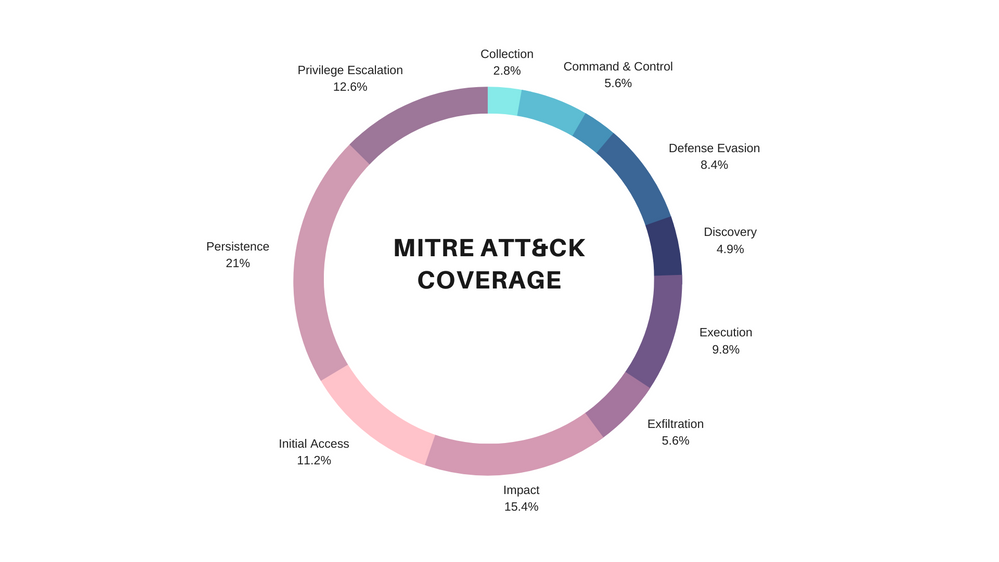
The figure below illustrates the diversification and threat hunting coverage the new hunting queries provide across the MITRE ATT&CK framework matrix:


Blue Pie Chart Presentation.png


Feel free to expand the spoiler below to view the new list of out the box hunting queries and the MITRE ATT&CK tactics that are covered:


Spoiler (Highlight to read)

List of New Hunting Queries

Hunting Query                                                                  MITRE ATT&CK Tactic


 Azure DevOps- Project visibility changed to public  { Collection } {  }
 Azure DevOps- Project visibility changed to public  { Collection } { T1213 }
 Non-owner mailbox login activity  { Collection Exfiltration } {  }
 Non-owner mailbox login activity  { Collection Exfiltration } { T1114 T1020 }
 Potential DGA detected  { CommandAndControl } {  }
 Detect beacon like pattern based on repetitive time intervals in Wire Data Traffic  { CommandAndControl } {  }
 Potential DGA detected  { CommandAndControl } { T1483 T1008 }
 Detect beacon like pattern based on repetitive time intervals in Wire Data Traffic  { CommandAndControl } { T1043 T1065 }
 DNS – domain anomalous lookup increase  { CommandAndControl Exfiltration } {  }
 RareDNSLookupWithDataTransfer  { CommandAndControl Exfiltration } {  }
 DNS – domain anomalous lookup increase  { CommandAndControl Exfiltration } { T1483 T1008 T1048 }
 RareDNSLookupWithDataTransfer  { CommandAndControl Exfiltration } { T1043 T1048 }
 Failed service logon attempt by user account with available AuditData  { CredentialAccess } {  }
 Permutations on logon attempts by UserPrincipalNames indicating potential brute force  { CredentialAccess } {  }
 Failed service logon attempt by user account with available AuditData  { CredentialAccess } { T1110 }
 Permutations on logon attempts by UserPrincipalNames indicating potential brute force  { CredentialAccess } { T1110 }
 Azure storage key enumeration  { Discovery } {  }
 Azure storage key enumeration  { Discovery } { T1087 }
 Cscript script daily summary breakdown  { Execution } {  }
 Least Common Parent And Child Process Pairs  { Execution } {  }
 Least Common Processes by Command Line  { Execution } {  }
 New processes observed in last 24 hours  { Execution } {  }
 Entropy for Processes for a given Host  { Execution } {  }
 Rare Process Path  { Execution } {  }
 Uncommon processes – bottom 5%  { Execution } {  }
 Cscript script daily summary breakdown  { Execution } {  }
 Least Common Parent And Child Process Pairs  { Execution } {  }
 Least Common Processes by Command Line  { Execution } {  }
 New processes observed in last 24 hours  { Execution } {  }
 Entropy for Processes for a given Host  { Execution } {  }
 Rare Process Path  { Execution } {  }
 Uncommon processes – bottom 5%  { Execution } {  }
 New PowerShell scripts encoded on the commandline  { Execution CommandAndControl } {  }
 New PowerShell scripts encoded on the commandline  { Execution CommandAndControl } {  }
 Powershell or non-browser mailbox login activity  { Execution Persistence Collection } { T1059 T1098 T1114 }
 Hosts running a rare process with commandline  { Execution Persistence Discovery LateralMovement Collection } {  }
 Hosts running a rare process with commandline  { Execution Persistence Discovery LateralMovement Collection } {  }
 GitHub OAuth App Restrictions Disabled  { Exfiltration } {  }
 GitHub OAuth App Restrictions Disabled  { Exfiltration } { T1537 }
 Azure Sentinel Connectors Administrative Operations  { Impact } {  }
 Azure Sentinel Workbooks Administrative Operations  { Impact } {  }
 Azure Virtual Network Subnets Administrative Operations  { Impact } {  }
 Common deployed resources  { Impact } {  }
 Anomalous Password Reset  { Impact } {  }
 Signin Logs with expanded Conditional Access Policies  { Impact } {  }
 Multiple Teams deleted by a single user  { Impact } {  }
 Preview – TI map File entity to OfficeActivity Event  { Impact } {  }
 Preview – TI map File entity to Security Event  { Impact } {  }
 Preview – TI map File entity to Syslog Event  { Impact } {  }
 Preview – TI map File entity to VMConnection Event  { Impact } {  }
 Azure Sentinel Connectors Administrative Operations  { Impact } { T1496 }
 Azure Sentinel Workbooks Administrative Operations  { Impact } { T1496 }
 Azure Virtual Network Subnets Administrative Operations  { Impact } { T1496 }
 Common deployed resources  { Impact } { T1496 }
 Anomalous Password Reset  { Impact } { T1531 }
 Signin Logs with expanded Conditional Access Policies  { Impact } {  }
 Multiple Teams deleted by a single user  { Impact } { T1485 T1489 }
 Preview – TI map File entity to OfficeActivity Event  { Impact } {  }
 Preview – TI map File entity to Security Event  { Impact } {  }
 Preview – TI map File entity to Syslog Event  { Impact } {  }
 Preview – TI map File entity to VMConnection Event  { Impact } {  }
 Failed Login Attempt by Expired account  { InitialAccess } {  }
 User added to Team and immediately uploads file  { InitialAccess } {  }
 Attempts to sign in to disabled accounts by IP address  { InitialAccess } {  }
 Azure Active Directory signins from new locations  { InitialAccess } {  }
 Same IP address with multiple csUserAgent  { InitialAccess } {  }
 Rare User Agent strings  { InitialAccess } {  }
 New time zone observed  { InitialAccess } {  }
 Failed Login Attempt by Expired account  { InitialAccess } { T1078 }
 User added to Team and immediately uploads file  { InitialAccess } { T1566 }
 Attempts to sign in to disabled accounts by IP address  { InitialAccess } { T1078 }
 Azure Active Directory signins from new locations  { InitialAccess } { T1078 }
 Same IP address with multiple csUserAgent  { InitialAccess } { T1190 }
 Rare User Agent strings  { InitialAccess } { T1190 }
 New time zone observed  { InitialAccess } { T1078 }
 Suspicious credential token access of valid IAM Roles  { InitialAccess DefenseEvasion } {  }
 Suspicious credential token access of valid IAM Roles  { InitialAccess DefenseEvasion } { T1078 }
 Anomalous AAD Account Creation  { Persistence } {  }
 Anomalous Role Assignment  { Persistence } {  }
 External user from a new organisation added  { Persistence } {  }
 New User created on SQL Server  { Persistence } {  }
 New domain added to Whitelist  { Persistence } {  }
 Anomalous AAD Account Creation  { Persistence } { T1136 }
 Anomalous Role Assignment  { Persistence } { T1098 }
 External user from a new organisation added  { Persistence } { T1136 }
 New User created on SQL Server  { Persistence } { T1136 }
 New domain added to Whitelist  { Persistence } { T1098 }
 Azure DevOps- Guest users access enabled  { Persistence DefenseEvasion } {  }
 Azure DevOps- Public project created  { Persistence DefenseEvasion } {  }
 Azure DevOps- Guest users access enabled  { Persistence DefenseEvasion } { T1098 T1089 }
 Azure DevOps- Public project created  { Persistence DefenseEvasion } { T1098 T1089 }
 Alerts related to IP  { Persistence Discovery LateralMovement Collection } {  }
 Alerts related to IP  { Persistence Discovery LateralMovement Collection } {  }
 Crypto currency miners EXECVE  { Persistence Execution } {  }
 Crypto currency miners EXECVE  { Persistence Execution } { T1059 T1053 }
 Rare Audit activity initiated by App  { Persistence LateralMovement } {  }
 Rare Audit activity initiated by App  { Persistence LateralMovement } { T1136 }
 User Granted Access and Grants others Access  { Persistence PrivilegeEscalation } {  }
 User created by unauthorized user  { Persistence PrivilegeEscalation } {  }
 User added to SQL Server SecurityAdmin Group  { Persistence PrivilegeEscalation } {  }
 User Granted Access and Grants others Access  { Persistence PrivilegeEscalation } { T1098 T1078 }
 User created by unauthorized user  { Persistence PrivilegeEscalation } { T1098 T1078 }
 User added to SQL Server SecurityAdmin Group  { Persistence PrivilegeEscalation } { T1098 T1078 }
 User Granted Access and associated audit activity  { Persistence PrivilegeEscalation Impact } {  }
 User removed from SQL Server Roles  { Persistence PrivilegeEscalation Impact } {  }
 User Granted Access and associated audit activity  { Persistence PrivilegeEscalation Impact } { T1098 T1078 T1496 }
 User removed from SQL Server Roles  { Persistence PrivilegeEscalation Impact } { T1098 T1078 T1496 }
 Privileged role attached to Instance  { PrivilegeEscalation } {  }
 Anomalous Login to Devices  { PrivilegeEscalation } {  }
 User made Owner of multiple teams  { PrivilegeEscalation } {  }
 Privileged role attached to Instance  { PrivilegeEscalation } { T1098 }
 Anomalous Login to Devices  { PrivilegeEscalation } { T1078 }
 User made Owner of multiple teams  { PrivilegeEscalation } { T1078 }
 Tracking Privileged Account Rare Activity  { PrivilegeEscalation Discovery } {  }
 Tracking Privileged Account Rare Activity  { PrivilegeEscalation Discovery } { T1078 T1087 }
List of New Hunting QueriesHunting Query                                                                  MITRE ATT&CK Tactic

 Azure DevOps- Project visibility changed to public 
{ Collection }
{  }

 Azure DevOps- Project visibility changed to public 
{ Collection }
{ T1213 }

 Non-owner mailbox login activity 
{ Collection Exfiltration }
{  }

 Non-owner mailbox login activity 
{ Collection Exfiltration }
{ T1114 T1020 }

 Potential DGA detected 
{ CommandAndControl }
{  }

 Detect beacon like pattern based on repetitive time intervals in Wire Data Traffic 
{ CommandAndControl }
{  }

 Potential DGA detected 
{ CommandAndControl }
{ T1483 T1008 }

 Detect beacon like pattern based on repetitive time intervals in Wire Data Traffic 
{ CommandAndControl }
{ T1043 T1065 }

 DNS – domain anomalous lookup increase 
{ CommandAndControl Exfiltration }
{  }

 RareDNSLookupWithDataTransfer 
{ CommandAndControl Exfiltration }
{  }

 DNS – domain anomalous lookup increase 
{ CommandAndControl Exfiltration }
{ T1483 T1008 T1048 }

 RareDNSLookupWithDataTransfer 
{ CommandAndControl Exfiltration }
{ T1043 T1048 }

 Failed service logon attempt by user account with available AuditData 
{ CredentialAccess }
{  }

 Permutations on logon attempts by UserPrincipalNames indicating potential brute force 
{ CredentialAccess }
{  }

 Failed service logon attempt by user account with available AuditData 
{ CredentialAccess }
{ T1110 }

 Permutations on logon attempts by UserPrincipalNames indicating potential brute force 
{ CredentialAccess }
{ T1110 }

 Azure storage key enumeration 
{ Discovery }
{  }

 Azure storage key enumeration 
{ Discovery }
{ T1087 }

 Cscript script daily summary breakdown 
{ Execution }
{  }

 Least Common Parent And Child Process Pairs 
{ Execution }
{  }

 Least Common Processes by Command Line 
{ Execution }
{  }

 New processes observed in last 24 hours 
{ Execution }
{  }

 Entropy for Processes for a given Host 
{ Execution }
{  }

 Rare Process Path 
{ Execution }
{  }

 Uncommon processes – bottom 5% 
{ Execution }
{  }

 Cscript script daily summary breakdown 
{ Execution }
{  }

 Least Common Parent And Child Process Pairs 
{ Execution }
{  }

 Least Common Processes by Command Line 
{ Execution }
{  }

 New processes observed in last 24 hours 
{ Execution }
{  }

 Entropy for Processes for a given Host 
{ Execution }
{  }

 Rare Process Path 
{ Execution }
{  }

 Uncommon processes – bottom 5% 
{ Execution }
{  }

 New PowerShell scripts encoded on the commandline 
{ Execution CommandAndControl }
{  }

 New PowerShell scripts encoded on the commandline 
{ Execution CommandAndControl }
{  }

 Powershell or non-browser mailbox login activity 
{ Execution Persistence Collection }
{ T1059 T1098 T1114 }

 Hosts running a rare process with commandline 
{ Execution Persistence Discovery LateralMovement Collection }
{  }

 Hosts running a rare process with commandline 
{ Execution Persistence Discovery LateralMovement Collection }
{  }

 GitHub OAuth App Restrictions Disabled 
{ Exfiltration }
{  }

 GitHub OAuth App Restrictions Disabled 
{ Exfiltration }
{ T1537 }

 Azure Sentinel Connectors Administrative Operations 
{ Impact }
{  }

 Azure Sentinel Workbooks Administrative Operations 
{ Impact }
{  }

 Azure Virtual Network Subnets Administrative Operations 
{ Impact }
{  }

 Common deployed resources 
{ Impact }
{  }

 Anomalous Password Reset 
{ Impact }
{  }

 Signin Logs with expanded Conditional Access Policies 
{ Impact }
{  }

 Multiple Teams deleted by a single user 
{ Impact }
{  }

 Preview – TI map File entity to OfficeActivity Event 
{ Impact }
{  }

 Preview – TI map File entity to Security Event 
{ Impact }
{  }

 Preview – TI map File entity to Syslog Event 
{ Impact }
{  }

 Preview – TI map File entity to VMConnection Event 
{ Impact }
{  }

 Azure Sentinel Connectors Administrative Operations 
{ Impact }
{ T1496 }

 Azure Sentinel Workbooks Administrative Operations 
{ Impact }
{ T1496 }

 Azure Virtual Network Subnets Administrative Operations 
{ Impact }
{ T1496 }

 Common deployed resources 
{ Impact }
{ T1496 }

 Anomalous Password Reset 
{ Impact }
{ T1531 }

 Signin Logs with expanded Conditional Access Policies 
{ Impact }
{  }

 Multiple Teams deleted by a single user 
{ Impact }
{ T1485 T1489 }

 Preview – TI map File entity to OfficeActivity Event 
{ Impact }
{  }

 Preview – TI map File entity to Security Event 
{ Impact }
{  }

 Preview – TI map File entity to Syslog Event 
{ Impact }
{  }

 Preview – TI map File entity to VMConnection Event 
{ Impact }
{  }

 Failed Login Attempt by Expired account 
{ InitialAccess }
{  }

 User added to Team and immediately uploads file 
{ InitialAccess }
{  }

 Attempts to sign in to disabled accounts by IP address 
{ InitialAccess }
{  }

 Azure Active Directory signins from new locations 
{ InitialAccess }
{  }

 Same IP address with multiple csUserAgent 
{ InitialAccess }
{  }

 Rare User Agent strings 
{ InitialAccess }
{  }

 New time zone observed 
{ InitialAccess }
{  }

 Failed Login Attempt by Expired account 
{ InitialAccess }
{ T1078 }

 User added to Team and immediately uploads file 
{ InitialAccess }
{ T1566 }

 Attempts to sign in to disabled accounts by IP address 
{ InitialAccess }
{ T1078 }

 Azure Active Directory signins from new locations 
{ InitialAccess }
{ T1078 }

 Same IP address with multiple csUserAgent 
{ InitialAccess }
{ T1190 }

 Rare User Agent strings 
{ InitialAccess }
{ T1190 }

 New time zone observed 
{ InitialAccess }
{ T1078 }

 Suspicious credential token access of valid IAM Roles 
{ InitialAccess DefenseEvasion }
{  }

 Suspicious credential token access of valid IAM Roles 
{ InitialAccess DefenseEvasion }
{ T1078 }

 Anomalous AAD Account Creation 
{ Persistence }
{  }

 Anomalous Role Assignment 
{ Persistence }
{  }

 External user from a new organisation added 
{ Persistence }
{  }

 New User created on SQL Server 
{ Persistence }
{  }

 New domain added to Whitelist 
{ Persistence }
{  }

 Anomalous AAD Account Creation 
{ Persistence }
{ T1136 }

 Anomalous Role Assignment 
{ Persistence }
{ T1098 }

 External user from a new organisation added 
{ Persistence }
{ T1136 }

 New User created on SQL Server 
{ Persistence }
{ T1136 }

 New domain added to Whitelist 
{ Persistence }
{ T1098 }

 Azure DevOps- Guest users access enabled 
{ Persistence DefenseEvasion }
{  }

 Azure DevOps- Public project created 
{ Persistence DefenseEvasion }
{  }

 Azure DevOps- Guest users access enabled 
{ Persistence DefenseEvasion }
{ T1098 T1089 }

 Azure DevOps- Public project created 
{ Persistence DefenseEvasion }
{ T1098 T1089 }

 Alerts related to IP 
{ Persistence Discovery LateralMovement Collection }
{  }

 Alerts related to IP 
{ Persistence Discovery LateralMovement Collection }
{  }

 Crypto currency miners EXECVE 
{ Persistence Execution }
{  }

 Crypto currency miners EXECVE 
{ Persistence Execution }
{ T1059 T1053 }

 Rare Audit activity initiated by App 
{ Persistence LateralMovement }
{  }

 Rare Audit activity initiated by App 
{ Persistence LateralMovement }
{ T1136 }

 User Granted Access and Grants others Access 
{ Persistence PrivilegeEscalation }
{  }

 User created by unauthorized user 
{ Persistence PrivilegeEscalation }
{  }

 User added to SQL Server SecurityAdmin Group 
{ Persistence PrivilegeEscalation }
{  }

 User Granted Access and Grants others Access 
{ Persistence PrivilegeEscalation }
{ T1098 T1078 }

 User created by unauthorized user 
{ Persistence PrivilegeEscalation }
{ T1098 T1078 }

 User added to SQL Server SecurityAdmin Group 
{ Persistence PrivilegeEscalation }
{ T1098 T1078 }

 User Granted Access and associated audit activity 
{ Persistence PrivilegeEscalation Impact }
{  }

 User removed from SQL Server Roles 
{ Persistence PrivilegeEscalation Impact }
{  }

 User Granted Access and associated audit activity 
{ Persistence PrivilegeEscalation Impact }
{ T1098 T1078 T1496 }

 User removed from SQL Server Roles 
{ Persistence PrivilegeEscalation Impact }
{ T1098 T1078 T1496 }

 Privileged role attached to Instance 
{ PrivilegeEscalation }
{  }

 Anomalous Login to Devices 
{ PrivilegeEscalation }
{  }

 User made Owner of multiple teams 
{ PrivilegeEscalation }
{  }

 Privileged role attached to Instance 
{ PrivilegeEscalation }
{ T1098 }

 Anomalous Login to Devices 
{ PrivilegeEscalation }
{ T1078 }

 User made Owner of multiple teams 
{ PrivilegeEscalation }
{ T1078 }

 Tracking Privileged Account Rare Activity 
{ PrivilegeEscalation Discovery }
{  }

 Tracking Privileged Account Rare Activity 
{ PrivilegeEscalation Discovery }
{ T1078 T1087 }


How to access the new hunting queries:


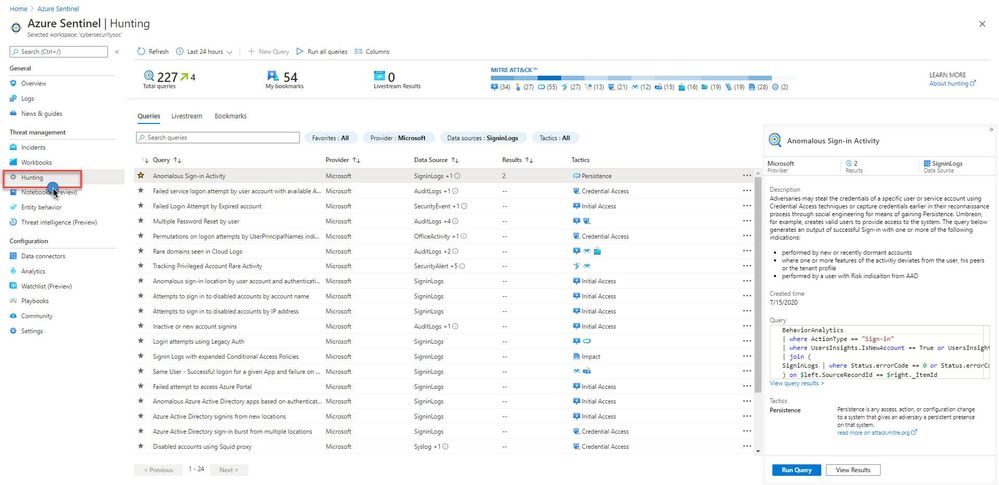
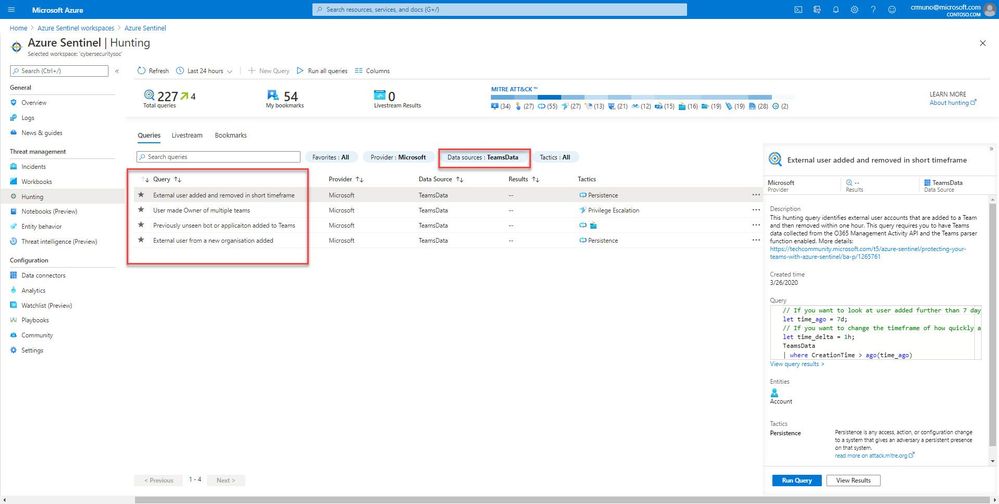
All of the queries are available via the Hunting UI page. For this example, I will demonstrate how to filter the new Microsoft Teams hunting queries. To learn more, see article on the new Microsoft Teams data connector (Preview).


Navigate to the Azure Sentinel console, and select “Hunting” under the Threat Management area


Hunting1.jpg


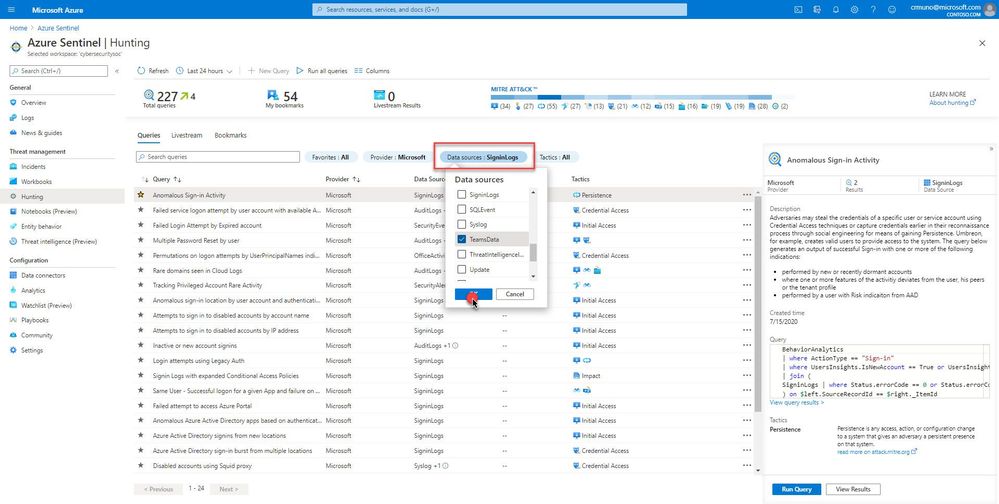
Next, use the filter pills to filter the data source (TeamsData) for the hunting query. In this example, we are highlighting hunting queries that satisfy several use cases for Microsoft Teams:


hunting2.jpg


teams3.jpg


Example: Previously unseen bot or application added to Microsoft Teams


As an example, this hunting query helps identify new, and potentially unapproved applications or bots being added to Microsoft Teams. This query requires you to have Microsoft Teams data ingesting into Azure Sentinel. Ensure you have the relevant data collectors configured for the target hunting queries. Visit here (Connect data sources to Azure Sentinel | Microsoft Docs) for more information.


// If you have more than 14 days worth of Teams data change this value
let data_date = 14d;
let historical_bots = (
TeamsData
| where CreationTime > ago(data_date)
| where isnotempty(AddOnName)
| project AddOnName);
TeamsData
| where CreationTime > ago(1d)
// Look for add-ins we have never seen before
| where AddOnName in (historical_bots)
// Uncomment the following line to map query entities is you plan to use this as a detection query
//| extend timestamp = CreationTime, AccountCustomEntity = UserId


Get started today!


Our threat hunting teams across Microsoft contribute queries, playbooks, workbooks, and notebooks to the Azure Sentinel Community, including specific hunting queries that your teams can adapt and use.


You can also contribute new connectors, workbooks, analytics and more in Azure Sentinel. Get started now by joining the Azure Sentinel Threat Hunters GitHub community!


Happy Hunting! :cool:

SharePoint 2010 Workflows to O365

SharePoint 2010 Workflows to O365

This article is contributed. See the original author and article here.


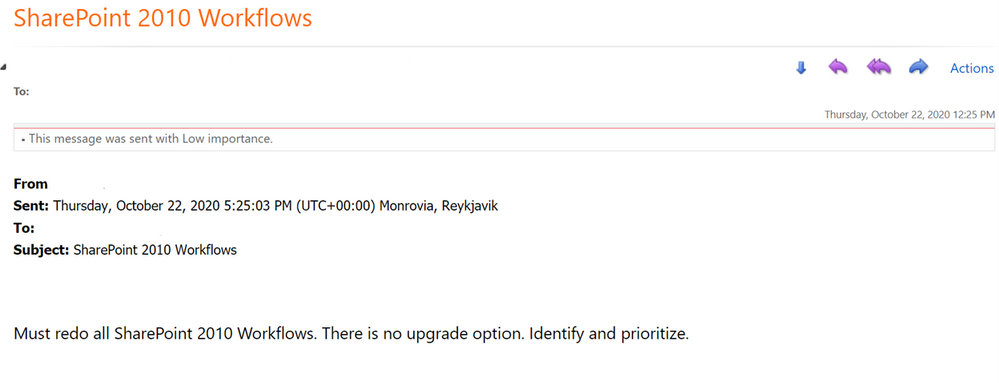
If you haven’t heard already, SharePoint 2010 Workflows will be completely deprecated in O365 by November 2020SharePoint 2010 Workflow Retirement. This How-To will walk you through the process of Exporting and Importing your workflows from one tenant to another. If you find yourself in a situation where:  


  • You currently do not have an O365 Subscription but have a demo tenant or possibly a CVR tenant 


  • You will be migrating to O365 after or relatively close to the retirement date 

  • You have workflows that are important business process, and you cannot afford for them to down while you recreate them from scratch 


Follow me through this How-To to give you ideas on how you can get a leg up on Workflow Migrations from SharePoint 2010 or SharePoint 2013 to O365


*Currently this solution is available in GCC and GCC High tenants. 


Initial SharePoint List 


I am going to start by creating a simple list that keeps track of issues. This list will help us keep track of the SharePoint 2010 Workflow issue. I am not going to spend any time talking about the details of the list because it will take away from the article, however, if you would like to know more about how to create a list and what they are all about you can go here 


Let me set the stage to help you better understand how all this will work 


  • Created a new list in Microsoft TEAMS 

  • I used the “Issue Tracker” template and called it “O365 Migration” 


  • I added a new item and assigned the “Issue” to myself 


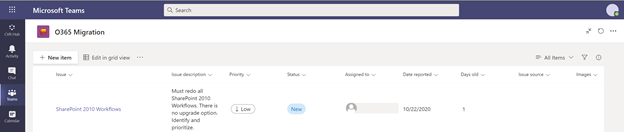
My “O365 Migration” list looks like this: 


Microsoft TeamsMicrosoft Teams


Create Data Connections 


There is more than one way to get to Power Automate. For our purpose, we will navigate to Power Automate using the following URL which points to a GCC TenantPower Automate in GCC. For a commercial tenant you will want to navigate to: Power Automate Commercial 


We need to navigate to Power Automate and login. 


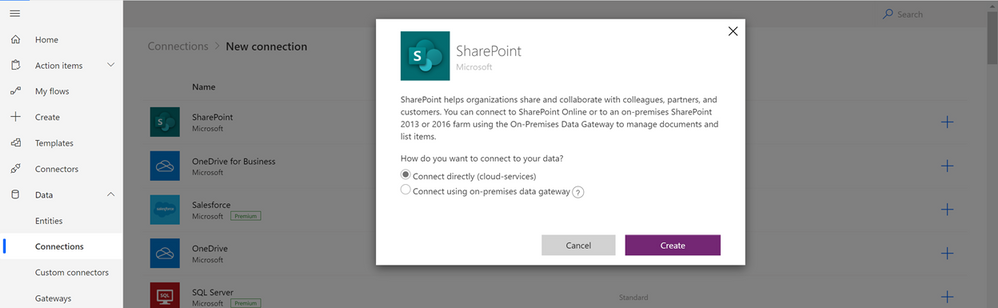
The first thing we need to do is connect to our data. Our data is the “O365 Migration” list in SharePoint Online (SPO)On the right-hand menu click on “Data” and then “Connections. For this How-To, we are going to assume that you don’t have any connections created yet (if you do have a connection already created for your SPO then you can skip the following few steps:


  • In the Ribbon click on “New connection” 

  • Select “SharePoint 


  • “Connect directly (cloud services)”. 

  • Click on “Create” 

  • You will be asked to authenticate 

  • Your connection to SharePoint should now be listed 


 ConnectionToSharePoint.png


Creating A New Workflow  


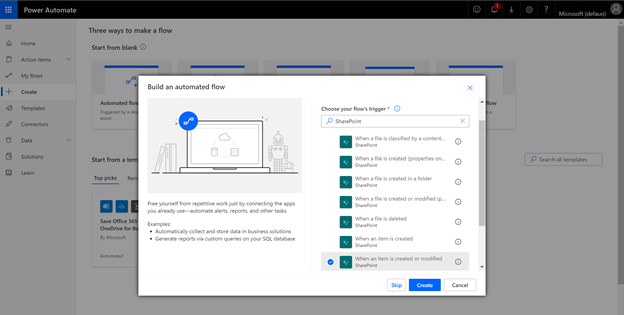
Once we have our data connection to SharePoint we need to click on “Create” on the left-hand menu and then on “Automated Flow”. This will bring up a pop-up window which will allow you to select the type of workflow you want to create. In our scenario, we want to send an email to the user(s) who gets assigned an issue, therefore, we will select “When an item is created or modified. 


 New FlowNew Flow


Adding Workflow Steps 


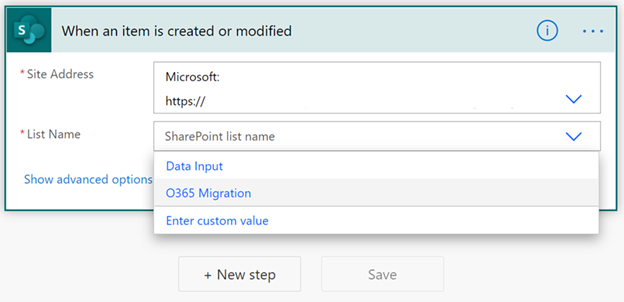
Your workflow canvas should consist of only one Step: “When an item is created or modified”.  To configure this step, click on the pull-down arrow from the Site Addresses” rowBecause we created the data connection on a previous step, your site should be listed as an optionSelect the List Name to complete configuring this step.


WhenItemIsCreatedModified.png


To complete our workflow, we need to be able to send an email to the user(s) who gets assigned the task. Click on the “New Step” button and filter by O365 to quickly find the “Send an email (V2)” step. 


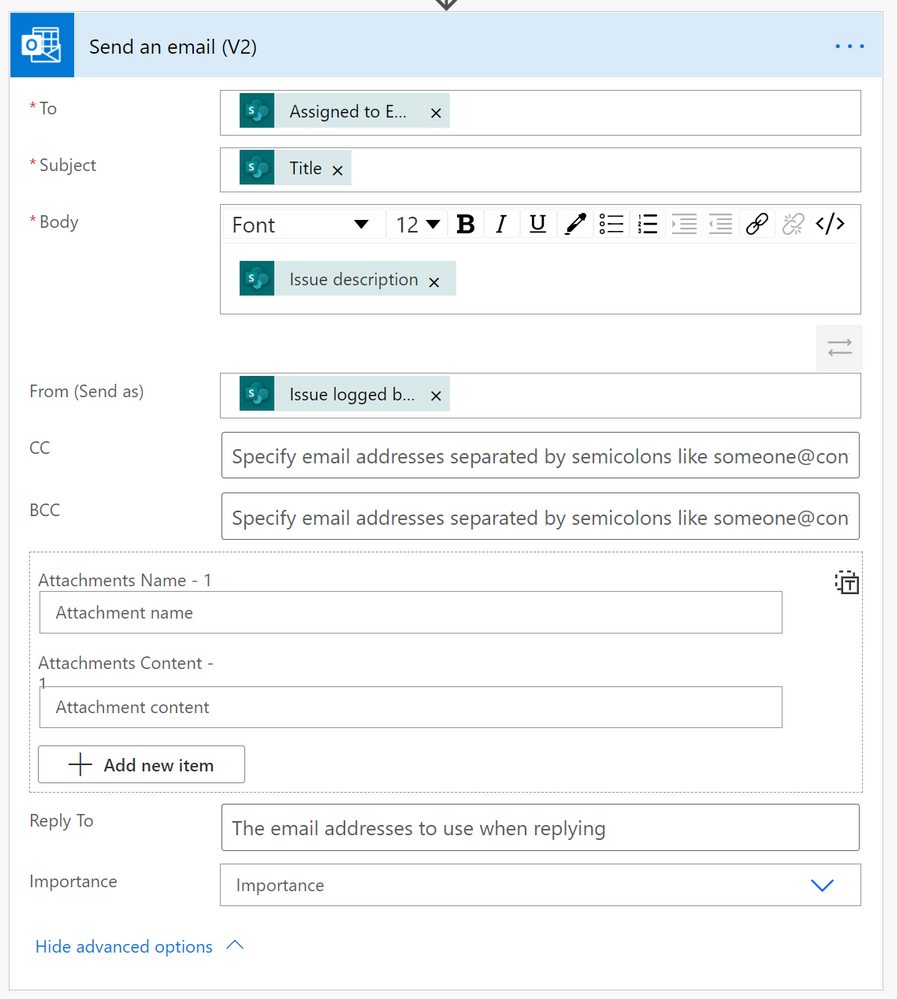
  • Once the step is added, click on the “To” field (textbox) to display the “Dynamic Content” pane to the right. In the Dynamic Content options, search for “Assigned to Email under the “When an item is created or modified” header. This field has the email of the user that we want to send the email to. 

  • Moving over to the “Subject” field, click on the textbox to display the “Dynamic Content” pane. Under the “When and item is created or modified” header select “Title” to display the title of the task as the “Subject” of the email.

  • In the next few steps, you will follow the steps above to get the “Dynamic Content” pane to display. In the “Body” field select “Issue Description. 

  • In the “From (Send as)” field select the “Issue logged by Email. This will let the user know who assigned the task to them. 

  • Finally, the “Send as email (V2)” should look very similar to the image below: 


Send EmailSend Email


Flow Checker 


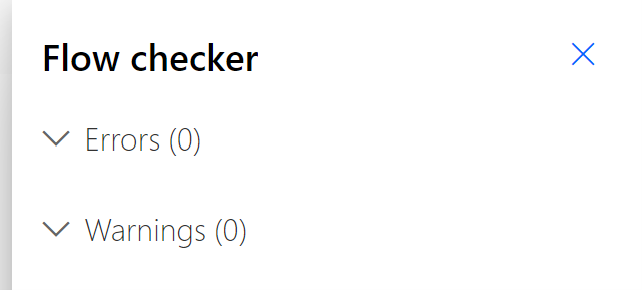
This is the extent of our workflow. Like I said, nothing big, just a simple workflow to start testing our idea with. Now we need to make sure that our workflow follows Microsoft’s flow best practices by clicking on “Flow Checker” on the upper right hand corner of your window. If you are lucky, you will have the same results I did. 


FlowChecker.png


Test Flow 


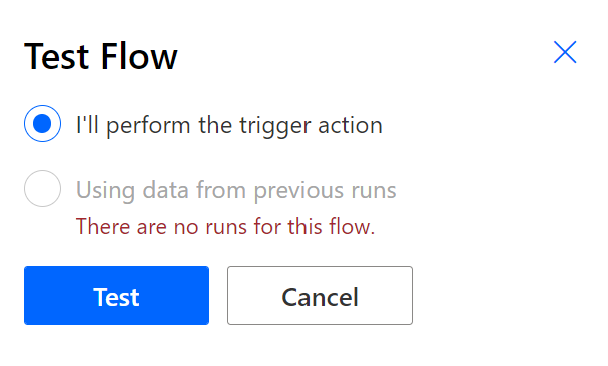
Now we get to test the workflow with actual data. Click on “Test” on the top right-hand corner of your screen to start testing your workflow. If this is your first time testing your workflow, the only option that will be available will be the first one: “I’ll perform the trigger action”. Once you have tested the flow at least once, the other option will be available to you. 


Test FlowTest Flow


Because we have to “trigger” the workflow ourselves we must navigate to TEAMS immediately after clicking on the “Test” button. In TEAMS we need to create a new list item. Make sure that you have assigned the task to a valid email and have entered a valid email to the assigned to field. Once you have created the new item, go back to your workflow, and see that it was successful.  


Test ResultsTest Results


The email that the user will receive should resemble the following: 


EmailConfirmation.png


Export Workflow 


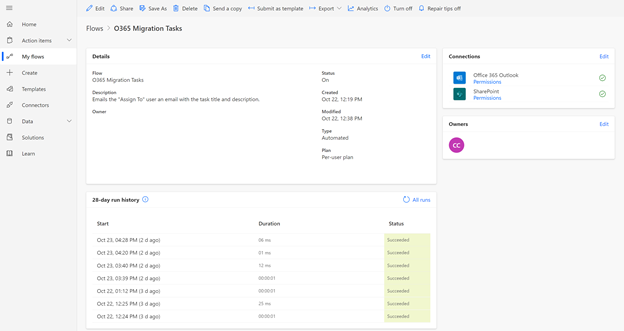
On the left navigation pane, select “My flows”, then click on the workflow you just created. You should see something like the image below. 


ExportPowerAutomate.png


Click on “Export” on the top of the image, then “Package (zip)”. 


PackageZip.png


Export Package 


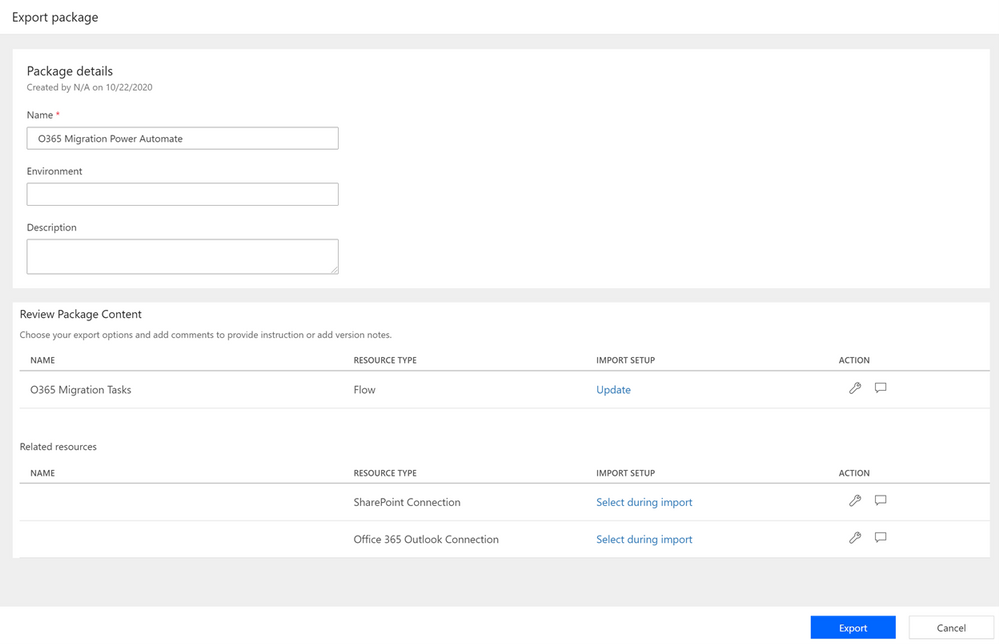
In the “Export package” page fill out the “Name”, “Environment”, and the “Description” details under the “Page details” header. 


Export PackageExport Package


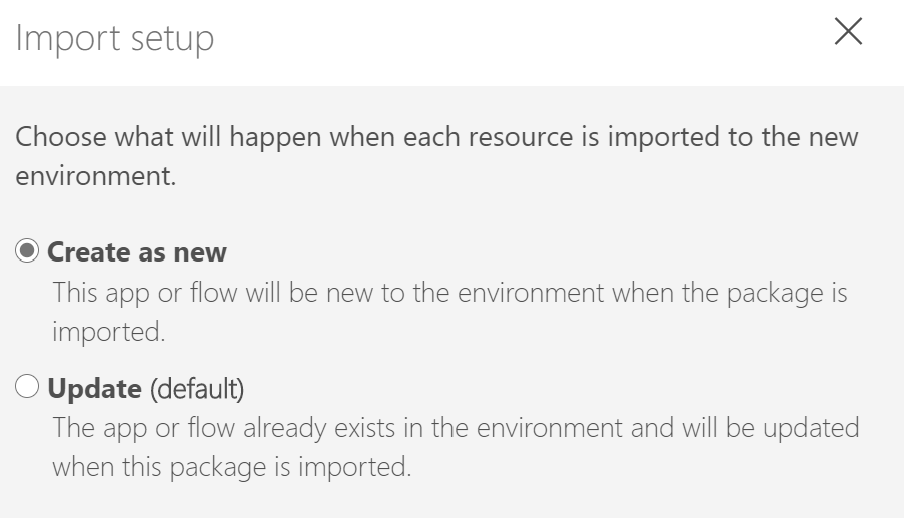
In the “Review Package Content” section, pay close attention to “Import Setup”. We are going to be moving the workflow from one tenant to another, and therefore, we cannot “Upgrade” the workflow. To change this setting, click on the ‘Wrench” icon to the right or simply click on “Update. When the window displays, select the “Create as new” option 


ImportSetup.png


 ReviewPackage.png


Another section we need to make sure we modify is the “Related resources” section. It is important to make sure that the setting for this feature is set to “Select during import” for all of the connections that your workflow is using. We are using two, a SharePoint connection, and an Office 365 connection to be able to send out the email. Both of our settings are set correctly. 


Related ResourcesRelated Resources


Finally, once it all looks good and everything is filled in hit the “Export” button at the button to save the file locally. Make a note of the where the file, the package, gets saved to because we will need the file on the next steps. 


Import Workflow 


We are almost done with this How-To. We now need to import our flow to our new tenant but before we do that, we need to make sure of a few things: 


  1. We need to make sure that the list we are going to use the workflow with exist

  2. That the connections to SharePoint is available in our new tenant 

  3. And finally, that the connection to O365 Outlook is available in our new tenant 


For simplification, I have created the same type of list, Issue Tracker, using TEAMS, on a different tenant making sure the fields are the same and the name of the list is the same. 


To verify that the Data Connections have been made, simply click on “Data” and then on “Connections” on the left side menuIf you see the following connections listed, you have nothing else to do. You can move on to the next step. 


CheckDataConnections.png


 If those connections are not listed, you will have to create them. We walked through the steps above on how to create the connections here 


Upload Zip File 


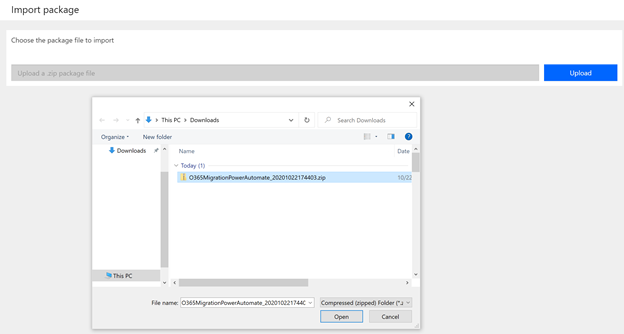
Navigate and login to your other tenant. On the left navigation pane, click on “My flows” and this time click on “Import” on the ribbon. Click on the blue “Upload” button and navigate to the location of the zip file that you exported in the previous step. Select the zip file, click on open. The “Upload” button will change to “Uploading” to indicate the file is being uploaded. 


Upload Zip FileUpload Zip File


 Import PackageImport Package


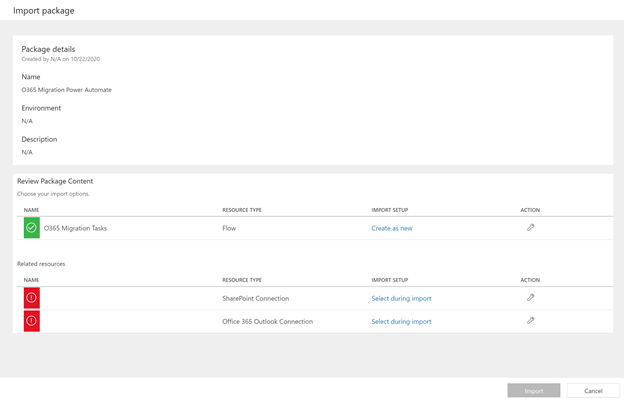
After the file gets imported your screen should look similar to this one: 


Import Package ScreenImport Package Screen


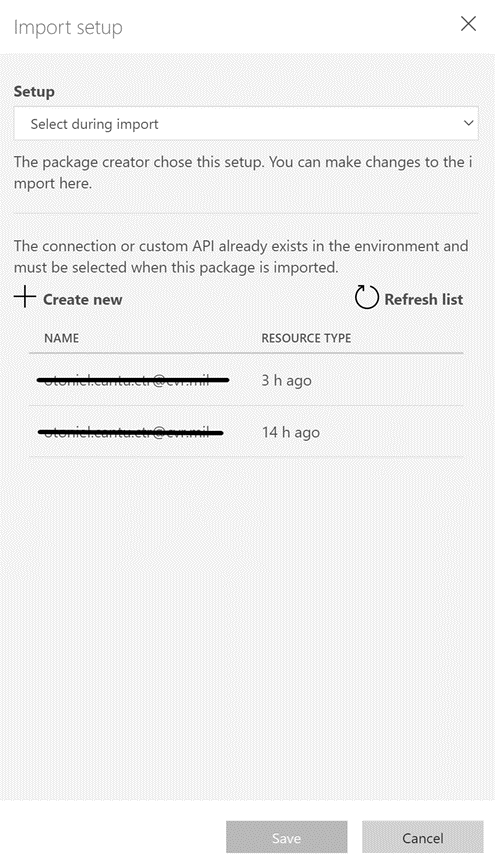
The only changes we will have to modify here, and they are very importantare the two errors showing under “Related resources”. Those errors mean that the Data Connections that it is expecting to see don’t exist. We must tell the import process of the new Data Connections we have created.  


Click on “Select during import” for the “SharePoint Connection” and select the connection that connects to SharePoint. Then click on “Select during import” to choose the Office 365 connection. 


Import PackageImport Package


Finally, click on the “Import” button at the bottom of the screenAfter the system finishes trying to import the workflow you will see an error: 


Import FailedImport Failed


The error is self-explanatory: one of the resources did not migrate. To fix this issue and complete the import simply click on “Save as a new flow. Once it is done creating the import as a new workflow you will see the following screen: 


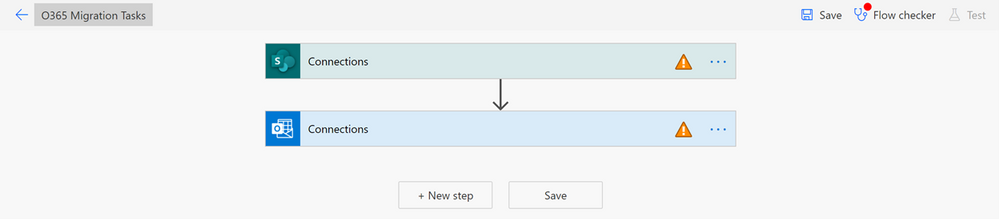
Flow ErrorsFlow Errors


This screen tells you one very important thing: Although the flow doesn’t work in its current state, it is, however, imported. The import did what we hoped it would do and that is to move an existing workflow from one tenant to another. 


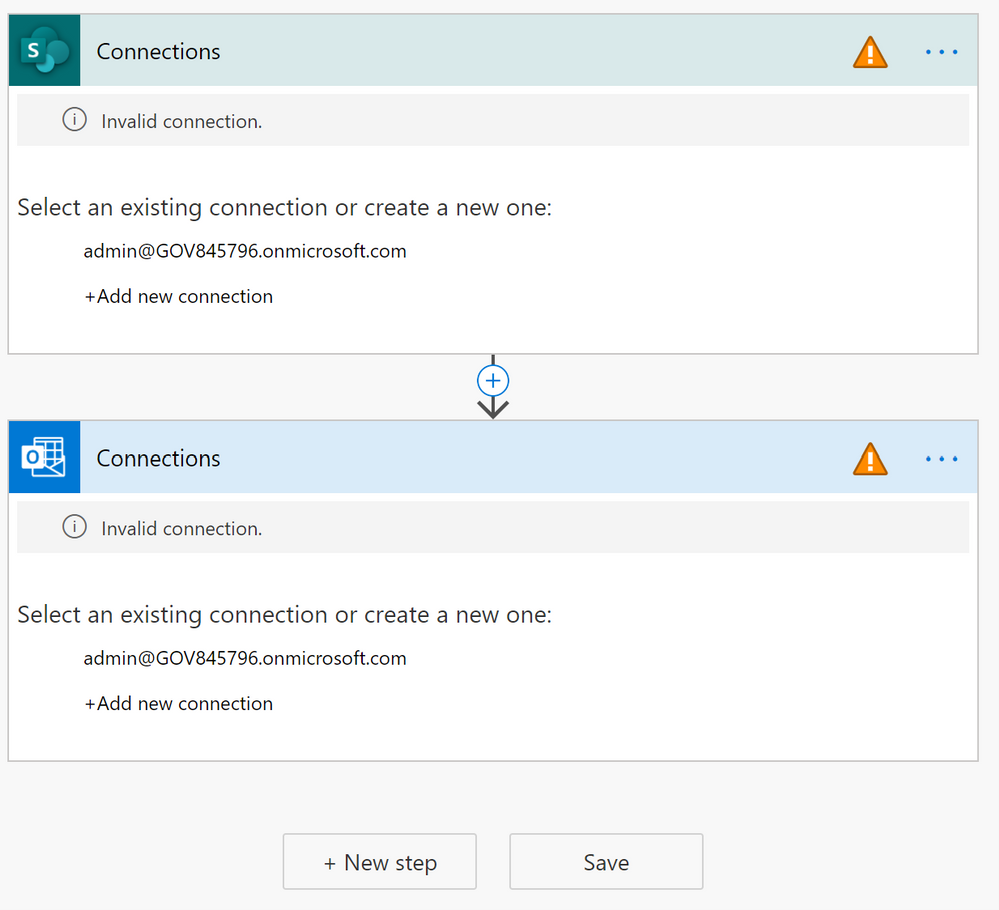
To fix the warnings that are displayed click on each step and point to the correct data connection. 


ConnectionsConnections


The SharePoint data connection will have to be configured to point to the new SharePoint Site and List. Without this step, the flow will remain pointing to the old URL and not work as expected. 


The only thing left to do is test, test, and test again. 


I hope this was helpful for you. Please comment on this article if it is! If you need additional support or information reach out Power Automate Support by going to their site.  


Additional Resources 


CI CD in Azure Synapse Analytics Part 1

CI CD in Azure Synapse Analytics Part 1

This article is contributed. See the original author and article here.

I was helping a friend earlier today with their Azure Synapse Studio CI / CD integration.  They had followed our Docs page Source control in Azure Synapse Studio and then they shared errors they were seeing in their release pipeline during deployment. 

We took a step back to discuss what they wanted to do, and it looked like they were too far in the weeds for ADO.  So I walked through creating an Azure DevOps Project, connecting Git to my Azure Synapse Studio, and then creating a branch and pushing some changes.  We’ll push changes in a follow up blog post.  Today we cover the basics.

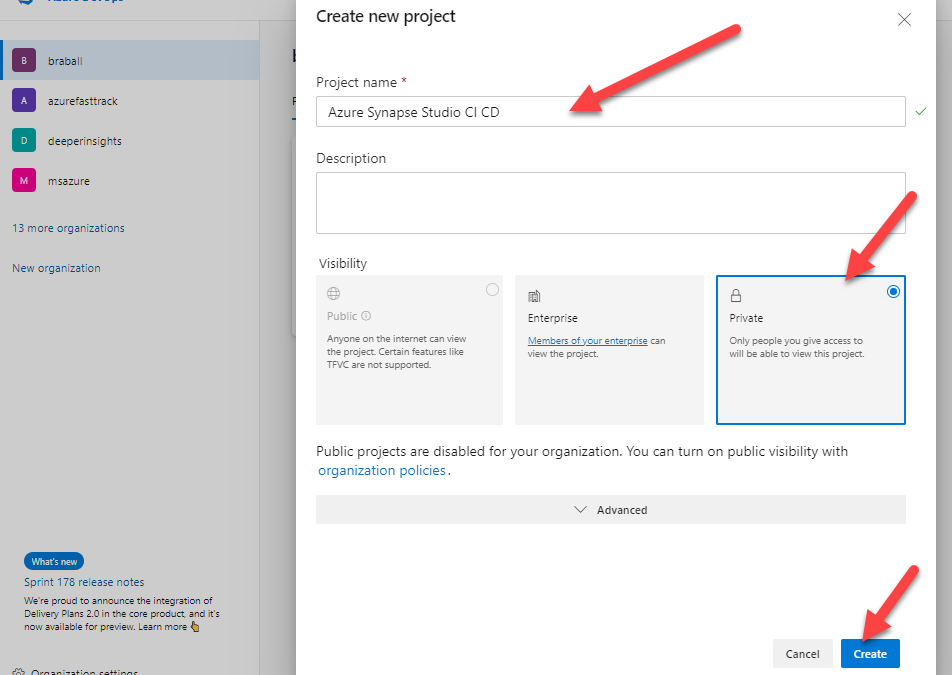
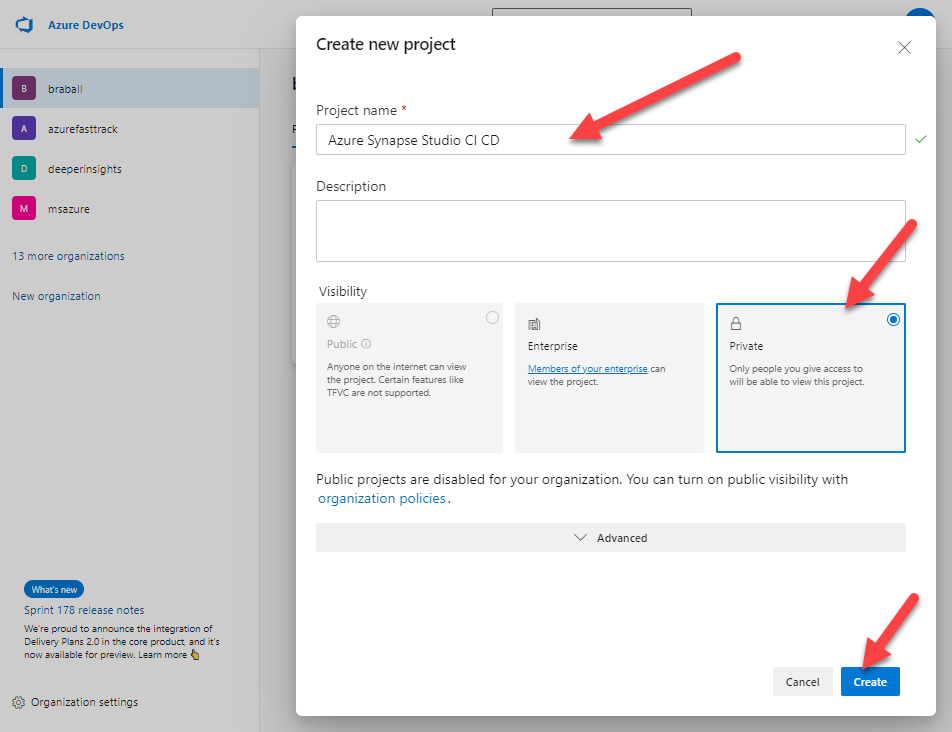
First let’s navigate to Projects – Home (azure.com).  We will create a New Project and title it Azure Synapse Studio CI CD.  I’m going to mark this repo private because it’s just for us.

Create New ADO Project.png


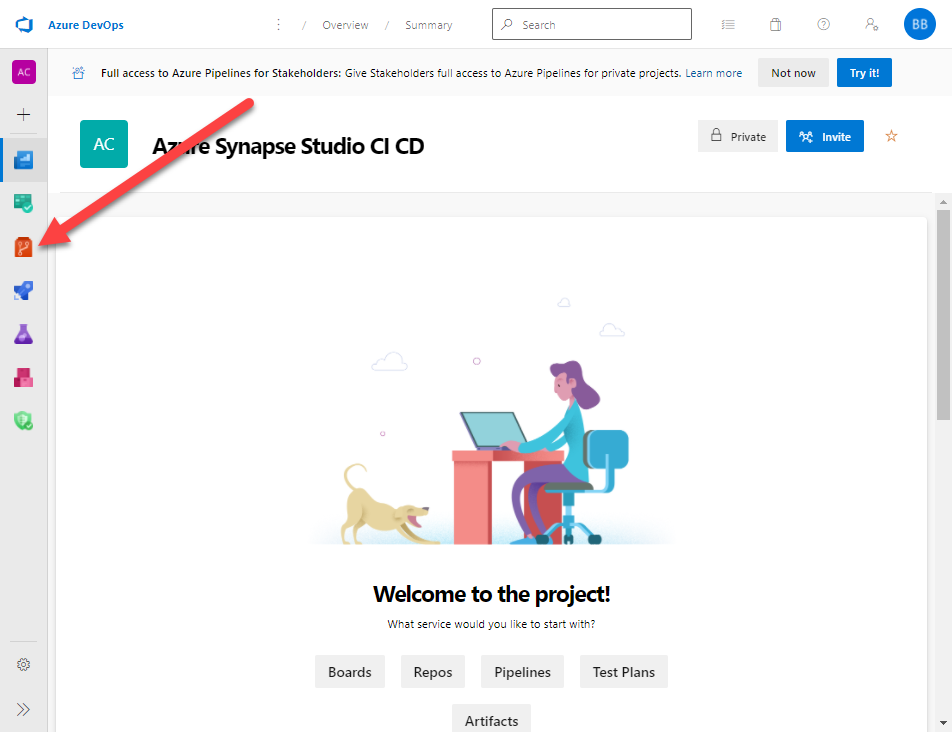
Now I will click on the Repos menu.


Repos.png


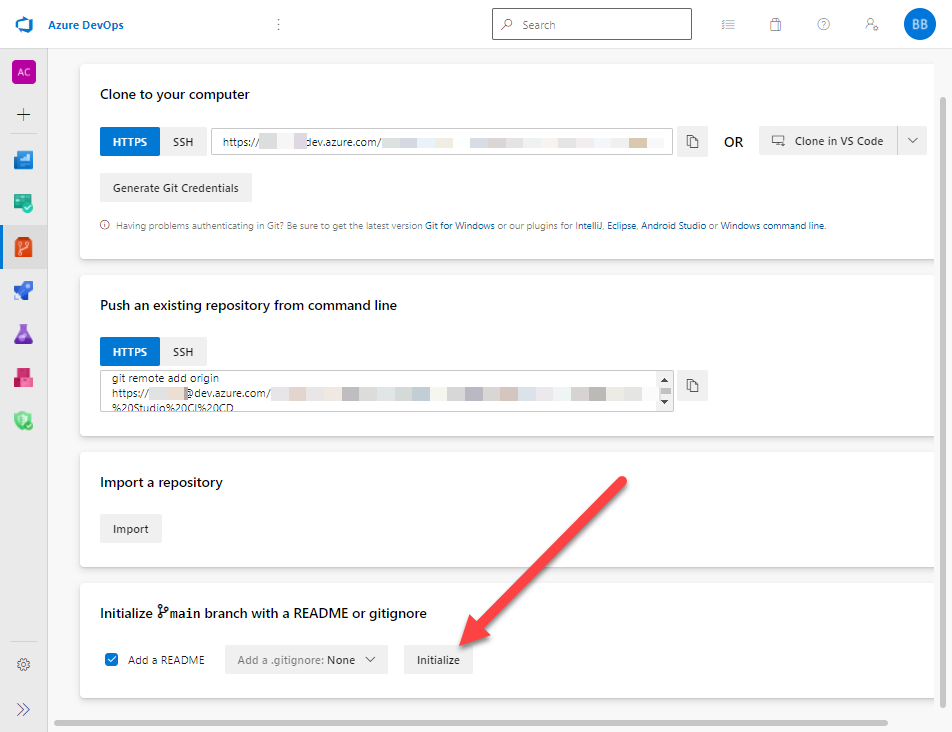
Next I will go to the bottom of the page.  I want to select Initialize main branch with a README or gitignore.  I will click Initialize.


Initialize.png


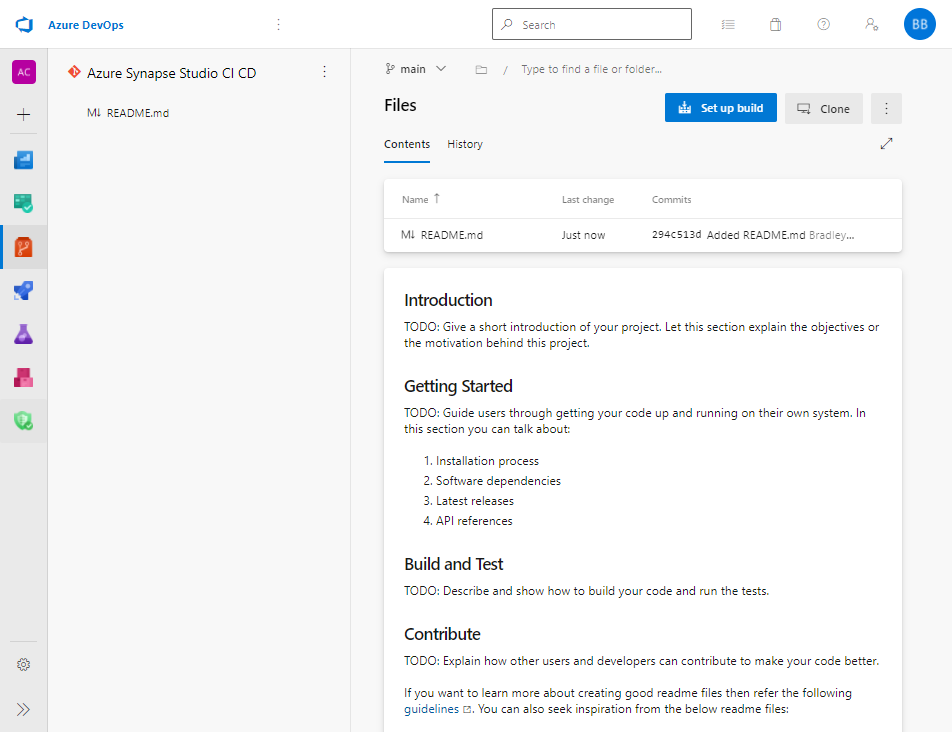
At this point I have a Repo that is initialized.


initalized repo.png


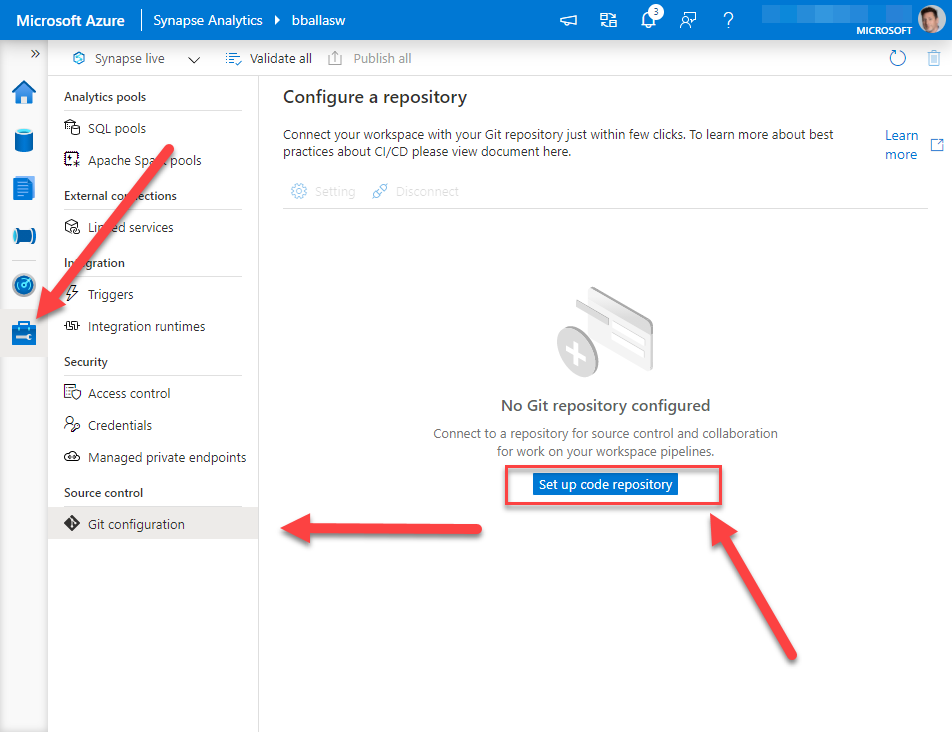
Now we can connect this to our Azure Synapse Studio.  Let us travel over to https://web.azuresynapse.net/ and log into our Azure Synapse Studio.  After we login we need to navigate to the Manage screen.  If you are not on the Git configuration page, navigate there.  


Connect Azure Synapse Studio.png


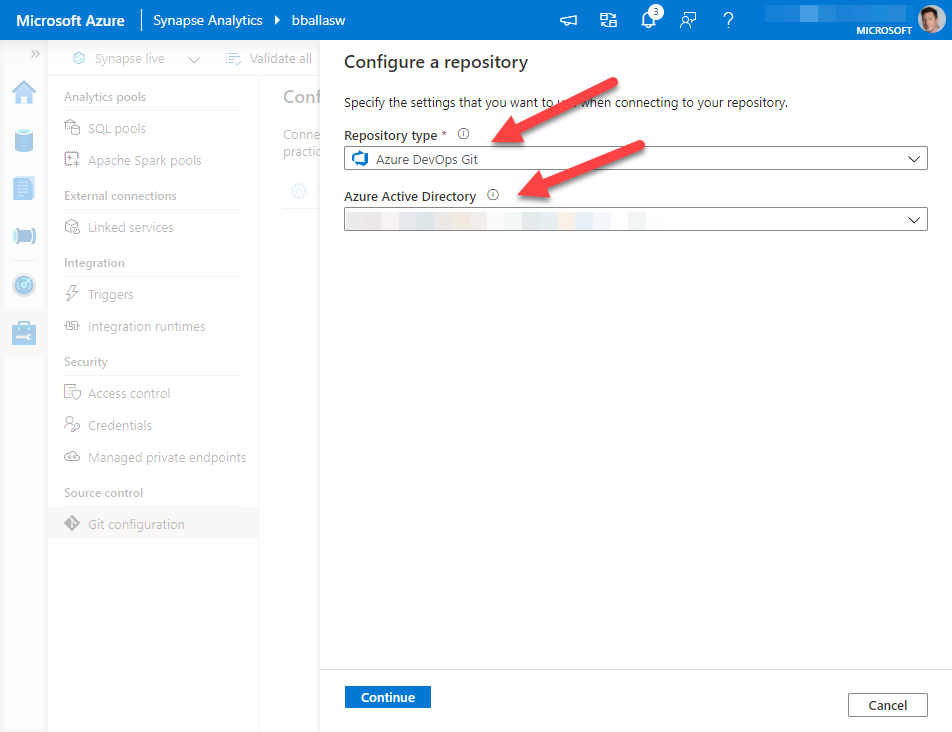
Next we want to click on Set up code repository.  You can select Azure DevOps Git or GitHub.  For this blog we will be selecting Azure DevOps Git.  Then select your organizations Azure Active Directory tenant. *a quick side note, make sure the AAD account you are using to connect to Azure DevOps is the same account that has permissions to your Azure Synapse Studio workspace.

Then click Continue.
Connect Azure Synapse Studio2.png


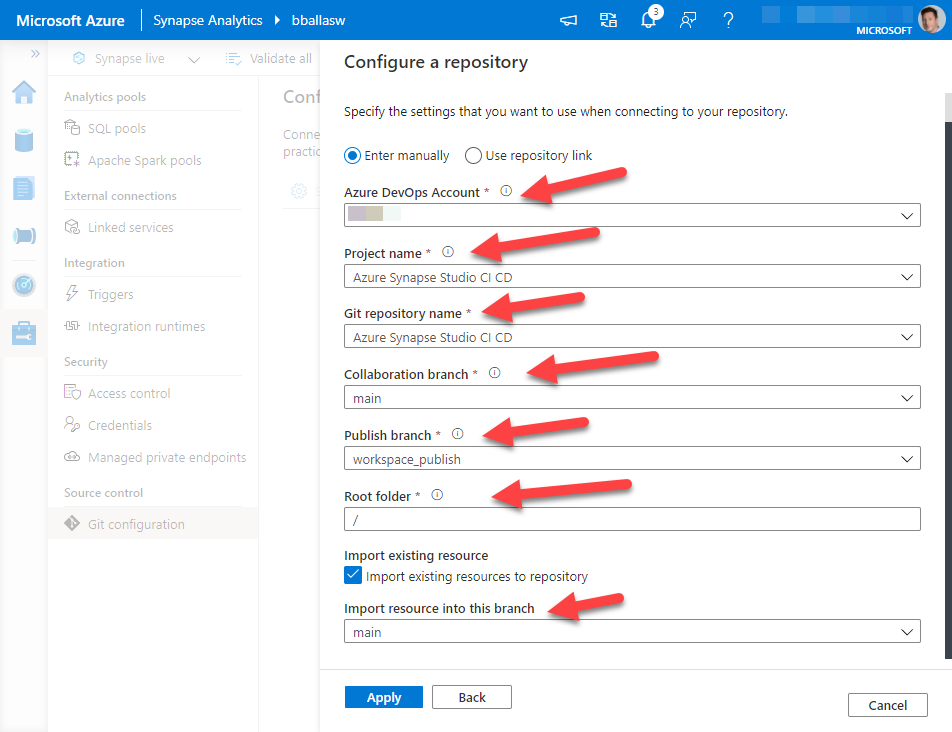
Select the Azure DevOps Account that our organization is using. The Project and Git repository name are the same, and are the Project Name we created earlier.

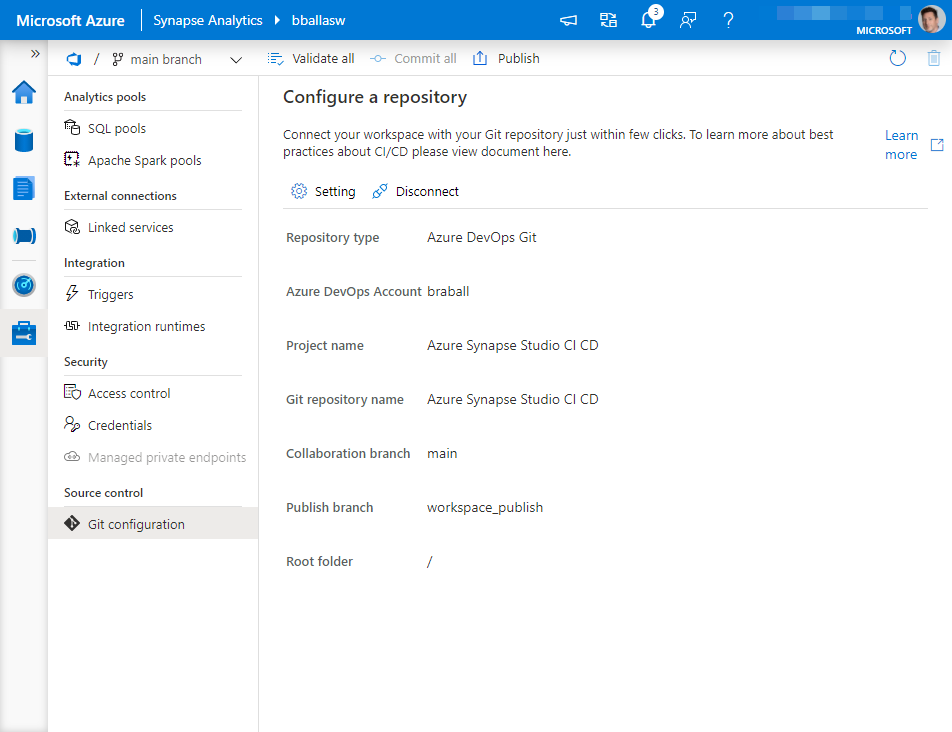
My collaboration branch is main, my Publish branch is workspace_publish, my Root folder is the default, I have checked import existing resources to repository.


As this is my initial commit I want to commit this to my main branch.


Then I click Apply.


*Another note: your company will have a DevOps environment, and specific rules on how you want things to connect.  If I’m doing anything that makes you scream from a developer philosophy, please find me on Twitter under BuckWoody_MSFT …. also don’t tell Buck I did this …. I’m not Buck.


Connect Azure Synapse Studio3.png
At this point in time your Azure DevOps Git Rep should be connected.


Connect Azure Synapse Studio4.png


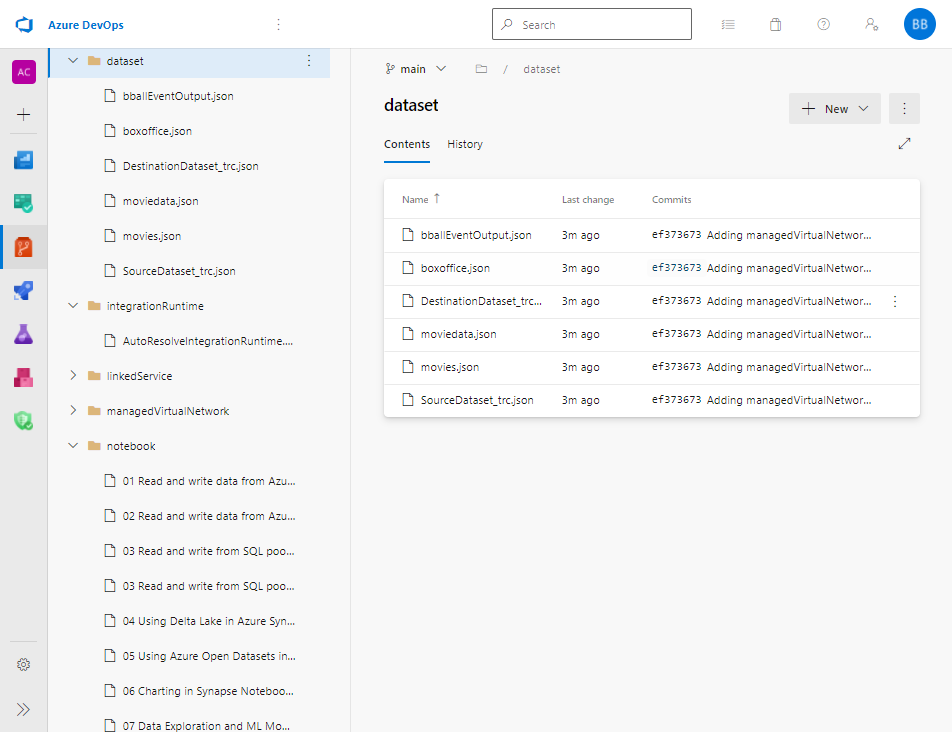
If we go to our Azure DevOps Repo we should see that it is populated with objects from our Azure Synapse Studio.


ADO Populated.png


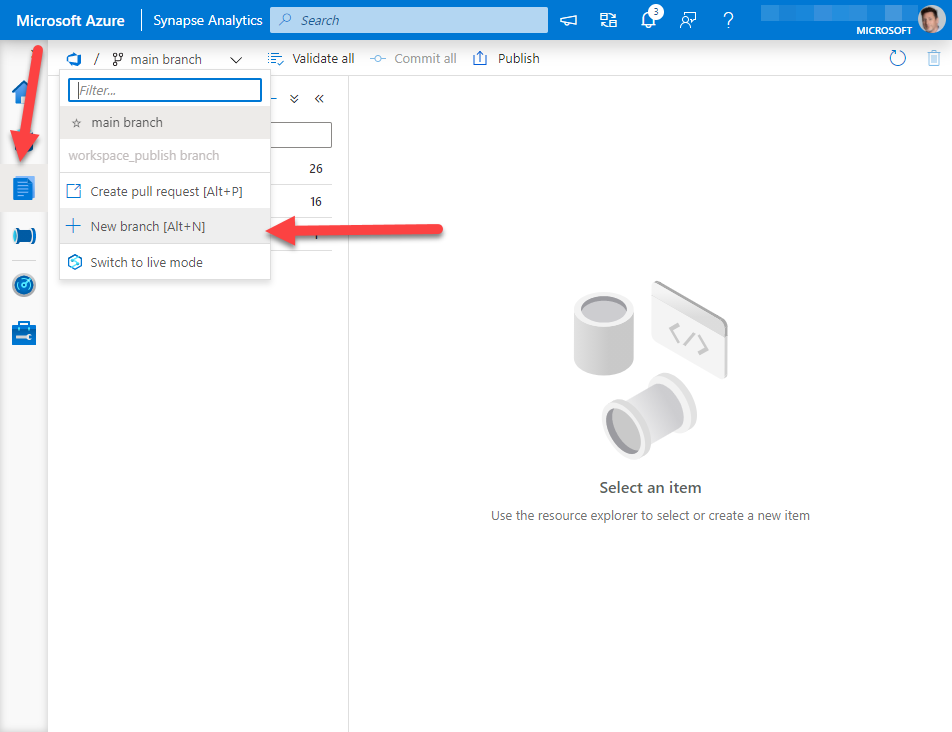
Back in Azure Synapse Studio, we can navigate to the develop pane, create a new branch to ensure any changes I make will not be automatically deployed against my main version of Azure Synapse Studio.
final.png


This is what we will tackle next time.