by Contributed | Dec 10, 2020 | Technology
This article is contributed. See the original author and article here.
Written by Cosmos Darwin, Senior PM Lead on the Azure Edge & Platform team at Microsoft. Follow him on Twitter @cosmosdarwin.
Today we’re announcing the general availability of Azure Stack HCI, the new subscription service for hyperconverged infrastructure from Microsoft Azure. As the pace of digital transformation accelerates, IT organizations are grappling with how to manage infrastructure that spans the cloud and on-premises. Consistent hybrid tools and experiences have never been more important. Azure Stack HCI brings together the familiarity and flexibility of on-premises virtualization with powerful new hybrid capabilities. With Azure Stack HCI, you can run virtual machines, containers, and select Azure services on-premises with management, billing, and support through the Azure cloud.
Ready for production
General availability means that Azure Stack HCI is ready for production use. Based on your feedback during the Public Preview and our own internal measurement, version 20H2 is the most robust release of our software-defined infrastructure stack that has ever shipped. The Azure Stack HCI operating system is available worldwide, in 18 languages. The Azure Stack HCI cloud service is available in three Azure regions, East US, West Europe, and Southeast Asia, with more regions planned every few weeks going forward. Resources are no longer labeled ‘Preview’ in the Azure Portal, and there are new and updated management extensions for Windows Admin Center available in the extension feed.
Starting today, production-level technical support for Azure Stack HCI is available from Azure Support. Whether you’re experiencing an issue or just have a question, our dedicated team of engineers are standing by and ready to help. They’ve been training and drilling for months to provide the best support experience possible, in close collaboration with our solution partners.
Partner solutions and Integrated Systems
The most important news today is that partner solutions are ready for purchase, including a new kind of solution called an ‘Integrated System’.
Integrated Systems are the fastest and easiest way to get up and running with Azure Stack HCI. Every Integrated System is jointly engineered and supported by Microsoft and the solution partner to deliver a seamless appliance-like experience. You can order an Integrated System directly from the solution partner as a multi-node configuration with the Azure Stack HCI software preinstalled. Every Integrated System offers Windows Admin Center management extensions, including (at least) new snap-in extensions for full stack updates during deployment and during cluster-aware updating. With an Integrated System, software, firmware, and drivers are constantly tested and re-tested together to ensure compatibility and optimum performance.
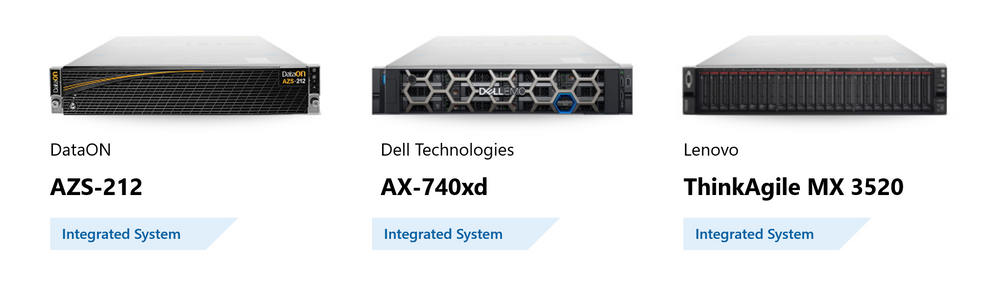
Integrated Systems are available today from DataON, Dell Technologies, and Lenovo:
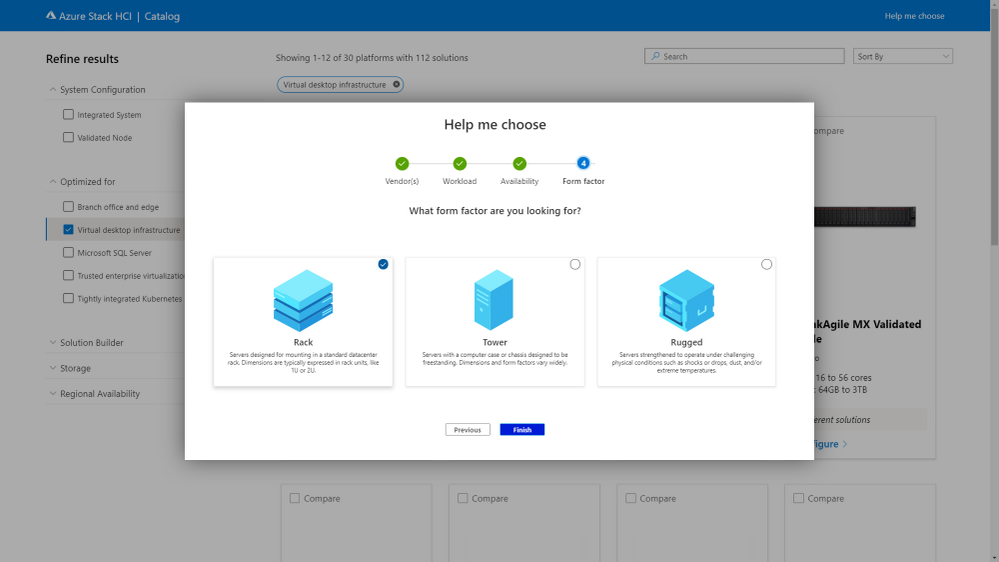
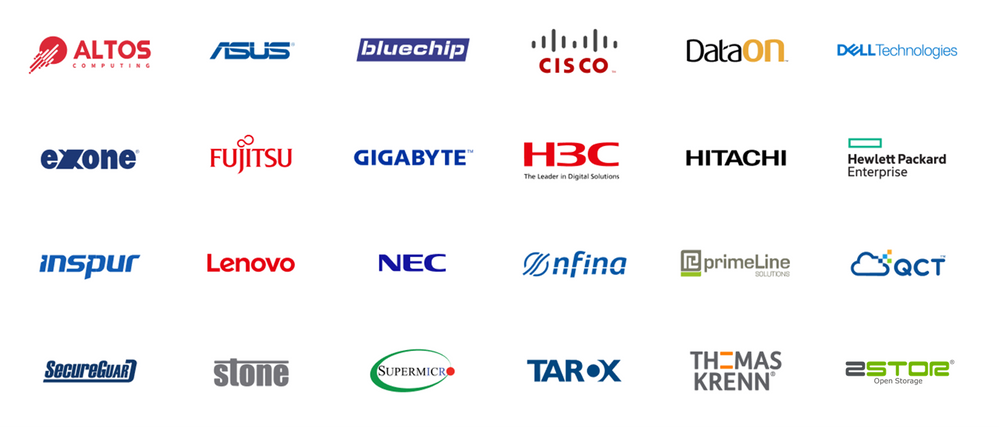
In addition to Integrated Systems, there are more than 200 pre-validated nodes for Azure Stack HCI from 24 solution partners worldwide. This broad selection lets you choose the right hardware for your needs, from the partner who offers the best service and support in your region. Solutions are available from 2 to 16 nodes in a variety of form factors, ranging from very small – with just 4 cores and 64 GiB of memory – up to very large, with 256 cores, 8 TiB of memory, and over 1,000 TB of storage.
Check out the all-new Azure Stack HCI solutions catalog for more details:
Today we’re also announcing a new validation program to officially recognize third-party software utilities such as backup and monitoring agents that are permitted to run directly on the Azure Stack HCI host operating system. The first five participating vendors are Altaro, Commvault, Datadog, Veeam, and Veritas.

Roadmap sneak peek
General availability is just the beginning. Because Azure Stack HCI is a subscription service, it will continuously get better as regular feature updates unlock new capabilities for all subscribers. This is a significant and exciting departure from traditional on-premises software. In the coming months, you can look forward to new regions, new partners, new solutions, and most of all, new features!
Here’s a first look at some features coming in 2021:
Restart in seconds with kernel soft reboot
To minimize the disruptiveness of software updates in Azure datacenters, our engineers developed a unique technology called ‘kernel soft reboot’ that makes it possible to reboot the host operating system while bypassing the lengthy pre-boot sequence, like firmware initialization and hardware power-on self-test. Reboot duration is reduced by up to 10 times compared to a classic reboot.
Check out this astonishing demo using an AX-740xd Integrated System:
Kernel soft reboot is coming to the Azure Stack HCI operating system in 2021.
Manage from the cloud with Azure Arc
In early 2021, every Azure Stack HCI host node will become Arc-enabled by default to facilitate management from the Azure Portal. With Azure Arc, cloud capabilities such as Azure Monitor, Azure Policy, and select Extensions are just a click away. For example, you can use Azure Policy to configure monitoring across all your Azure Stack HCI nodes, even if you have thousands of clusters in different locations around the world.
Because Azure Stack HCI is an extension of Azure, management built-ins that are included free on Azure are also included on Azure Stack HCI. For example, you’ll get unlimited use of services like Azure Policy and Configuration Management at no additional charge (as opposed to their regular off-Azure pricing).
Here’s an early look at the Azure Arc integration coming to Azure Stack HCI in 2021:
Intent-driven host networking
Based on your feedback and inspired by how we operate our own Azure datacenters, the new feature ‘Network ATC’ provides intent-based control to simplify and automate host networking configuration for Azure Stack HCI. With just one command, you can configure every physical adapter, the virtual switch, VLANs, RDMA, and more, across every node in an Azure Stack HCI cluster. Beyond initial configuration, Network ATC ensures consistency by detecting and correcting configuration drift, so you can be confident that your networking matches the validated and supported best practices from Microsoft. Take a look:
Network ATC is coming to Azure Stack HCI in 2021.
GPU management
In Azure, we use partitioning technology built on SR-IOV to securely deliver GPU acceleration to virtual desktops and other virtual machines. Over the next several feature updates, these innovative GPU technologies are coming to Azure Stack HCI, complete with friendly administrator management in Windows Admin Center:
Note for Preview customers
If you’re already running the Public Preview of Azure Stack HCI, just apply the latest over-the-air updates to reach OS build number 17784.1408 (KB4592441) or later. You don’t need to reinstall to transition to the GA build, although you do need to re-register. Active subscriptions will receive an email notification in January 2021 that regular-price billing will start soon. For more information, visit Azure.com/Pricing.
Thank you!
General availability is an important step toward realizing our vision with Azure Stack HCI: to bring together the familiarity and flexibility of on-premises virtualization with powerful new hybrid capabilities, as a subscription service that continuously gets better over time. On behalf of the team in Redmond, I’m grateful for all your feedback during Public Preview, and we hope you’ll keep it coming in the new year.
We can’t wait to see the incredible things you’ll do with Azure Stack HCI.
– Cosmos
To get started, please visit Azure.com/HCI.

by Contributed | Dec 10, 2020 | Dynamics 365, Microsoft 365, Technology
This article is contributed. See the original author and article here.
With the global disruption of the pandemic, healthcare organizations are particularly challenged to promote telehealth services and engage patients and providers while adhering to strict compliance and security regulations. Marketing automation and customer relationship management (CRM) tools such as Microsoft Dynamics 365 Marketing and Microsoft Dynamics 365 Customer Insights are expanding the ways in which healthcare organizations can create communications that are personalized and relevant while respecting those regulations.
A centralized system must be secure and speedy
Sharing information across its health network is at the center of Healthdirect Australia’s mission. The nonprofit helps a population of more than 25 million Australians access the right healthcare at the right time by providing government-funded telehealth services through helplines, video calls, an online symptom checker, and a mobile app. It also delivers information to other health organizations about benefits for their customers, including service enhancements, product launches, and other advances.
To build a reliable and flexible engagement platform that could distribute information while maintaining data privacy, Healthdirect Australia chose to move to Dynamics 365 Marketing.
“We needed a centralized system to help us improve consistency and remove the risk of content duplication,” said James Harris, Marketing Manager of Healthdirect Australia. With that system now in place, the organization is further extending its value, as Dynamics 365 Marketing is being used to increase productivity by bringing HealthdirectAustralia’s data together in one place.
“Before using Dynamics 365 Marketing, we couldn’t adequately scale our communications,” says Harris. “Now, we can scale as required to share information and quickly provide Primary Health Networks with the latest messaging about our services. Our speed of delivery has gone from weeks to days [and] we’re able to get our message out to the right contacts much more quickly than we could before. When COVID-19 hit, we used Dynamics 365 Marketing to communicate with the Primary Health Networks, which then distributed that information to health workers on the front line.”
One industry, many concerns
The complexities, dynamics, and regulatory concerns of healthcare organizations are increasingly finding solutions in powerful marketing automation and CRM products.
Microsoft is moving quickly and strongly to meet the demands and requirements of healthcare’s fast-tracked transition to digital. Although many organizations were focused on digital transformation even before the global health crisis of 2020, the pandemic drove rapid innovation from solution providers. Dynamics 365 Marketing and Dynamics 365 Customer Insights increased their focus on the unique needs of healthcare in extraordinary circumstances.
Perhaps the most impact will come from Microsoft‘sfirst industry-specific cloud offering, Microsoft Cloud for Healthcare. This initiative willenhance patient engagement, empower health team collaboration, improve clinical and operational insights, and make it faster and easier to provide more efficient care. Significantly, Microsoft Cloud for Healthcareis designed with the regulatory guidelines that healthcare is bound by in mind. It helps ensure the end-to-end security, compliance, and interoperability of health data.
Commitment to compliance
Whenever an organization is dealing with people’s healthcare information, security and compliance are top-of-mind concerns. Those organizations should know that Dynamics 365 Marketing helps them meet HIPAA-compliance at the highest level. Microsoft Dynamics 365, along with other Dynamics 365 apps and Microsoft solutions, has received certification for the HITRUST CSF as Microsoft is one of the first hyperscale cloud service providers to receive this certification.
At the company level, this means one large concern is a checked box.
“Because Microsoft helps keep Dynamics 365 Marketing compliant with data protection standards in the Australian Government Information Security Manual, we have complete peace of mind that its data security meets our requirements.”Paul Noone, Office 365 Administrator and Developer, Healthdirect Australia
Stop the siloing: information-sharing made secure
Complying with patient record confidentiality while striving for more personalized in-patient communications is a key challenge of the digital transformation of healthcare, due to the sensitivity of the personal information being handled, including patient demographics and medical histories.
Like many healthcare providers, Dayton Children’s Hospital in Dayton, Ohio used a siloed approach, storing clinical information in one system, managing call logs in another, and handling web registrations and marketing contacts in another.
However, the separation of information hampered both the care teams and the marketing team. Dayton Children’s Hospital decided to address the situation using Dynamics 365 Customer Insights to close the gap and establish a scalable, highly-secure, and HIPAA-compliant data foundation that spanned both clinical and marketing information.
Now, the Dynamics 365 Customer Insights foundation allows the marketing team to easily create new dynamic segments based on patient age, guarantor’s address, and other relevant personal activity information such as sports-related injuries. Those segments can then be pushed to Dynamics 365 Marketing for marketing campaigns.
As a result, Dayton Children’s Hospital has gained the ability to give its marketing campaigns the information to create personalized messaging while being fully confident of its HIPAA compliance: a closed-loop marketing process between Dynamics 365 Marketing and Dynamics 365 Customer Insights.
A successful healthcare organization has information management challenges as part of its ongoing operations. Optimizing all its information to communicate and serve patients while providing safeguards for privacy is a delicate balance that is readily achievable using Dynamics 365.
Learn more
The post How healthcare organizations can share information securely appeared first on Microsoft Dynamics 365 Blog.
Brought to you by Dr. Ware, Microsoft Office 365 Silver Partner, Charleston SC.
by Contributed | Dec 10, 2020 | Technology
This article is contributed. See the original author and article here.
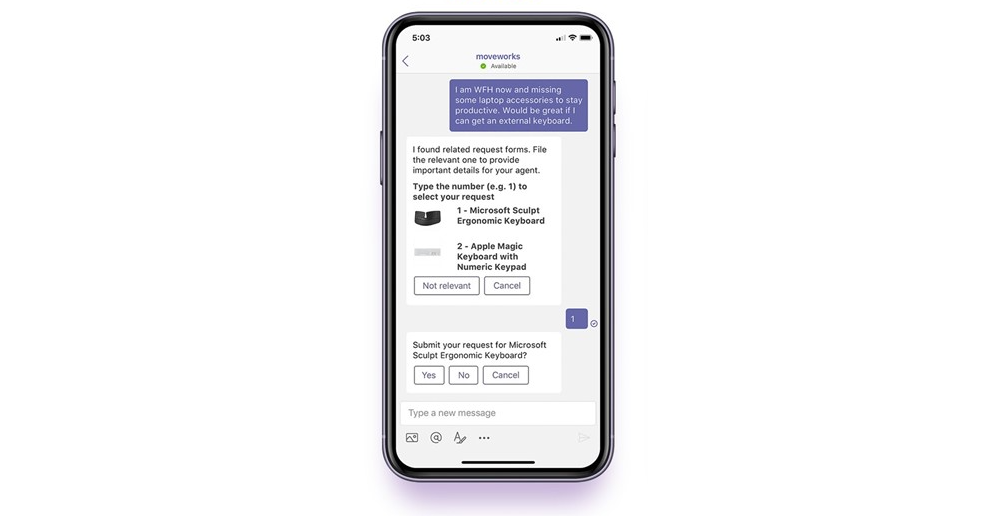
Microsoft Teams is excited to announce that AppSource now includes Moveworks, the world-leader in AI-powered IT support.
Moveworks is a conversational AI chatbot that allows employees to resolve their tech issues directly in Teams, instantly and autonomously, with no involvement from your IT team. Unlike conventional chatbots, Moveworks leverages advanced natural language understanding, or NLU, to determine exactly what employees are requesting—no matter how they phrase those requests.
“By helping to quickly resolve employees’ IT issues within Microsoft Teams, Moveworks allows companies to work faster. And in a world that now relies on technology to collaborate, it’s never been more critical to provide real-time, location-agnostic tech help.”
— Mike Ammerlaan, Director, Microsoft 365 Ecosystem, Microsoft
Behind the scenes, Moveworks takes action and retrieves knowledge by integrating with other enterprise systems, such as Active Directory, SharePoint, and Microsoft 365. These deep integrations enable the Moveworks bot to deliver end-to-end resolution for a wide range of IT issues:
- Provisioning and deprovisioning software licenses
- Unlocking accounts and resetting passwords
- Creating and editing distribution lists
- Serving up answers to troubleshooting questions
- Ordering devices and accessories for the home office
- …And much more.
Before Moveworks became available on AppSource, fully deploying the bot still took just eight weeks. But by downloading Moveworks at the click of a button, you can shrink that time-to-value even further—thanks to these added capabilities:
- Rapidly roll out the bot to your workforce
- Access the latest Moveworks features on Teams faster
- Build your custom bot avatar, alongside Moveworks’ design team
- Easily contact Moveworks Support for rapid assistance
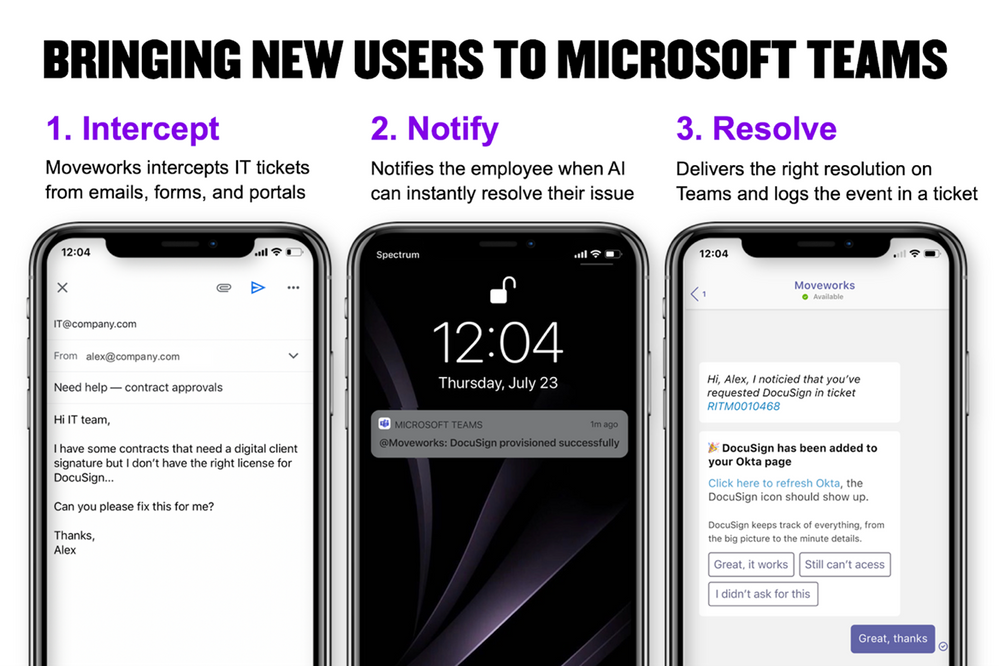
For enterprise Teams customers like Equinix, Moveworks has significantly enhanced the Teams platform in two distinct ways. First, Moveworks allows Equinix employees already using Teams to fix their tech problems—from accessing software to editing email lists to unlocking accounts—via quick, painless conversations with the AI chatbot. And second, Moveworks intercepts IT issues submitted through other channels and then resolves those issues on Teams, bringing new users to the platform.
You can read Equinix’s success story here.
Reimagining your virtual workplace
Particularly in this new normal of remote work, the ability to remain productive anywhere and anytime defines successful employees. But without a physical office or access to in-person help, these employees often don’t know where to find critical resources.
With Microsoft Teams, however, every key team member, workflow, and file is consolidated in a single place. And by adding Moveworks to Teams, getting IT support is just as simple.
“Microsoft Teams is a powerful platform, and Moveworks makes it even more valuable. It’s a symbiotic relationship.”
— Greg Ogle, VP of Global IT Infrastructure, Equinix
by Contributed | Dec 10, 2020 | Technology
This article is contributed. See the original author and article here.
Today’s urgent need to optimize and transform service desk support across internal departments such as IT, HR, and Sales has led to a dynamic new partnership between Microsoft Teams and Aisera’s AI Service Desk. The agile technologies of Conversational AI, NLU, Cognitive Search, Unsupervised NLP, and Conversational RPA combined with Teams’ ability for employees to connect and collaborate seamlessly, underscores the growing trend of work from anywhere.
Service desks were previously unable to meet the demands of offering a five-star employee experience—bogged down by manual processes, lack of self-service and automation, and long waits to resolve support requests. Previously, employees had to wait an average of three days to get their internal IT or HR issues resolved, as support desks were stretched thin and unable to meet business Service-Level Agreements (SLAs). This problem was amplified during the pandemic, leaving many internal support organizations unprepared.
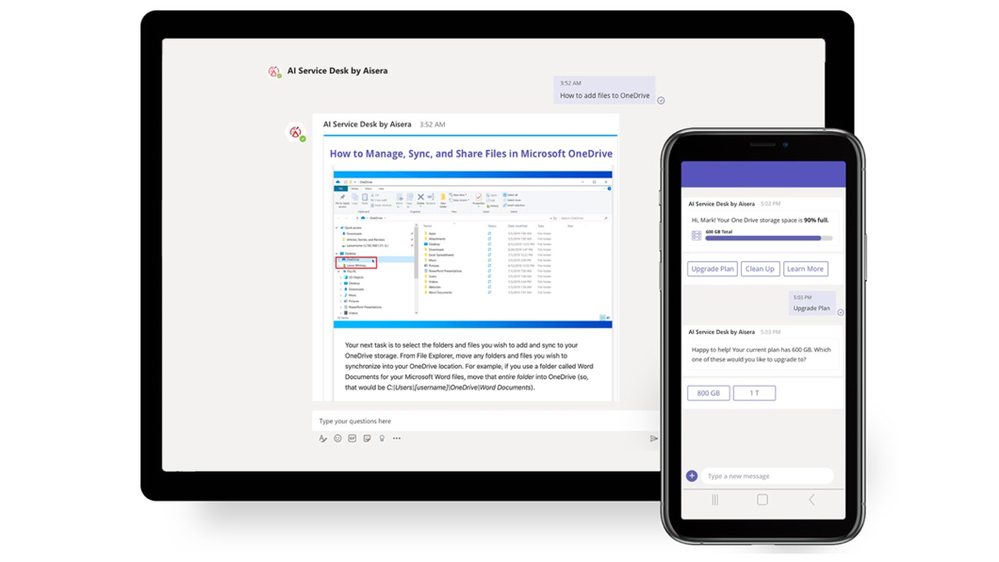
Aisera’s AI Service Desk, integrated with Microsoft Teams, takes advantage of cutting-edge AI collaboration technology and dramatically improves employee support experience. Now, employees are freed from long wait times that once characterized the service desk. Aisera on Teams provides instant resolutions of employee requests, thus making employees more productive.
Auto-resolve support requests in seconds, not days
With the growing emergence of Teams as a preferred channel for employee communication, Aisera’s integration fits perfectly into IT service desk environments for ITSM automation. Aisera serves as a go-to IT and HR channel for employees that don’t force users to log into service desk environments and portals. Here, using AI, their requests are auto-resolved in seconds.
Building the ultimate support hub
The convenient central interface created by unifying Aisera with Teams has propelled employee productivity to unprecedented levels. Aisera’s agility in resolving issues is founded on a virtual assistant using Conversational AI, NLU, Cognitive Search, Unsupervised NLP, and Conversational RPA in a scalable, cloud-native AI technology platform. Moreover, Aisera’s conversational RPA technology acts as the AI-driven workflow automation engine, which enables MS Teams with automation for user workflows and tasks.
Employees can leverage pre-built integrations to Microsoft products from Active Directory, Office 365, SharePoint, Knowledge Bases, Dynamics 365, and leading ticketing systems, including Service Now, JIRA Service Desk, and BMC.
Teams adoption rates soar with Aisera’s Conversational AI
The ability of MS Teams integration to transform self-service has been instrumental in automating internal services and boosting service desk productivity. Customers have reported an increase in user engagement, with proactive notifications and a substantial decrease in tickets created through Teams via AI-powered auto-resolution. The results? Employee satisfaction has improved by 70 percent, agent productivity has doubled—and average resolution rates improved by 90 percent in many cases—a significant key performance indicator of Service Desk efficiency.
by Contributed | Dec 10, 2020 | Technology
This article is contributed. See the original author and article here.
Resilience is a theme that has emerged from all over the world as we find ways to cope, learn, and grow through these unusual times. We have good news for people who would like to start a career or who already work in technology: Research shows that the pandemic has accelerated digitization to the tune of a projected 149 million new jobs in tech by 2025.1
In-demand tech jobs by 2025:
- 98M new jobs projected in software development
- 23M in cloud and data roles
- 20M in data analysis, machine learning, and AI
- 6M in cyber security
- 1M in privacy and trust
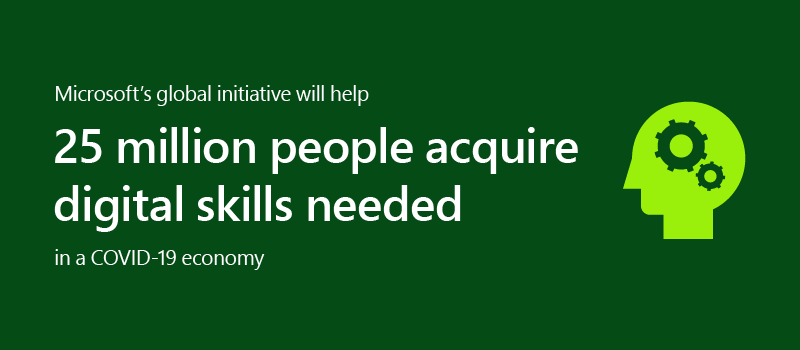
In contrast, since 2008 employer-paid training has declined steadily.2 So how can you keep up with the training and certifications you need to grow into these high-demand roles? This is an encouraging opportunity to take charge of your own career growth through available training resources. Recently, we launched an initiative to help people worldwide acquire the digital skills needed in a COVID-19 economy.
It’s the right time to get skilled
Where are you in your career stage? Maybe you’re happily employed and the pandemic has not significantly impacted your career path. If so, this is a good opportunity to keep your skills relevant with training or explorations in new areas to ensure you’re current. Maybe you’re actively looking for a new role. Do you need to strengthen skills to be a prime candidate? Perhaps you’re a recent graduate and want to build specific skills for a role you’re interested in. Or maybe you’re growing in your career and want to take the next steps to become an expert in your field. Wherever you are in your current career stage, using this time of change to improve your skills can help you stay ahead.
Get role-based tech training
We’ve been building a portfolio of technical role-based training and certifications designed to help you stay current and be future-ready. Role-based training focuses on department objectives rather than product knowledge. For example, training and certification for a cloud administrator covers a broad set of products including data management and analytics, system properties and provisioning rules, VMs and even resource management, just to name a few. This helps provide a valuable set of skills to be successful in a job role, and in turn, makes you valuable as an employee or partner.
Learn in the style that fits best
Everyone learns differently. To meet people where they are, Microsoft Learn provides a range of learning modalities, often combined to create a personalized experience. This method empowers you to grow in a way that fits you best:
- Self-paced learning on Microsoft Learn helps build practical jobs skills with free, step-by-step, bite-sized tutorials and modules. Learning paths offer interactive coding environments right in the browser.
- Training events provide unique upskilling experiences, combining presentations with demonstrations, discussions, and hands-on workshops virtually and/or in person.
- Instructor-led training with Learning Partners, using Microsoft Official Courses taught by Microsoft Certified Trainers, brings customized training plans and dedicated personal attention and support to quickly advance technical expertise.
Keep moving forward
Continuous learning is a key signal of resilience and staying ahead. Just as Microsoft training is aligned with roles, Microsoft Certifications are designed to validate that those in-demand talents exist. Microsoft Certification validates technical knowledge and the ability to demonstrate real-world skills, recognition that can help you aim for your next career step. Continue learning and growing, even during a pandemic. Explore Microsoft Learn to find your path forward.
Related post:
1 Microsoft Data Science, utilizing LinkedIn Data. Methodology and assumptions can be found in the white paper “Methodology: Digitization Capacity of the World Economy.”
2 Council of Economic Advisers calculations of data from Census Bureau, Survey of Income and Program Participation. Microsoft CELA Data Science and Analytics.


Recent Comments