by Contributed | Dec 10, 2020 | Technology
This article is contributed. See the original author and article here.
Problem Statement
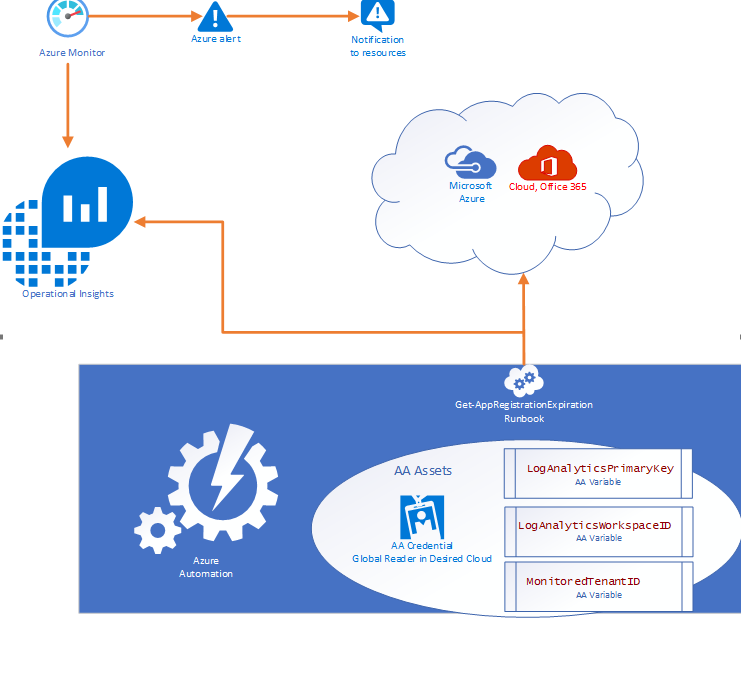
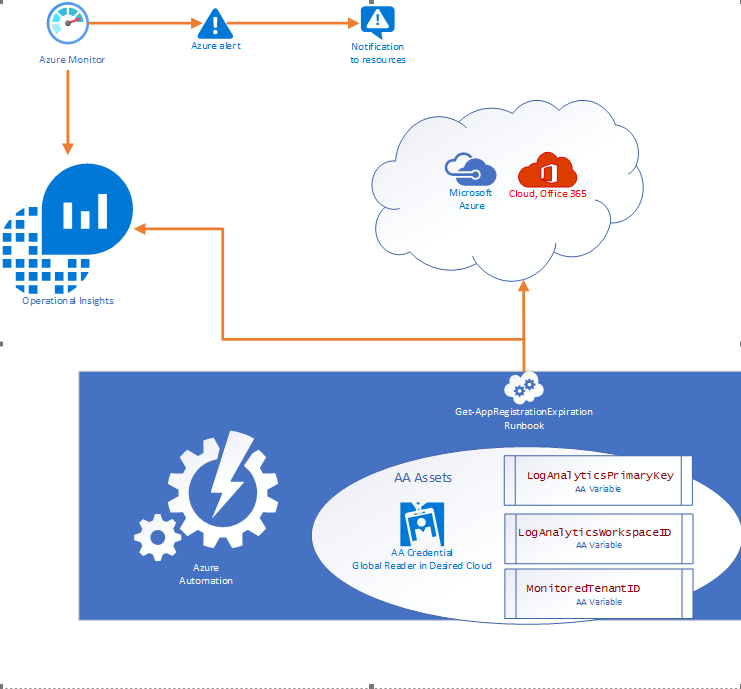
Azure services do not have a native feature to report on expiring App registrations. Without a solution in place to monitor and notify on expiration of these SPN’s solutions ranging from Custom Apps, and DevOps CICD Pipelines too orchestration engines like Azure Automation and Logic Apps, can and will cease to function without notice.
- Purpose of this solution: To provide an automated mechanism of calculating and ingesting the expiration dates into Log Analytics and automatically notify resources when expiration is within threshold.
- Requisites: This solution consists of:
- 1 Runbook consisting of the PowerShell script in this document.
- 2 Automation Variables containing the Log Analytics Workspace ID and the Log Analytics Primary Key.
- 1 SPN in the monitored cloud environment with Global Reader role.
Solution Overview
The solution is designed to be cross tenant and requires an App RegistrationSPN in the desired environment with Global Reader rights. Utilizing Azure Automation (AA) and AA resources like Variables and Credentials our runbook pulls an array of SPN’s from the environment and calculates the time until expiration before using our custom function to send the data to a Log Analytics Workspace. Finally, Azure Monitor alerts can be triggered based on a Kusto query to notify resources that there are SPN’s within the threshold for expiration.
Where can I get this solution
The solution is documented in detail on my GitHub repo and available for consumption immediately.
https://github.com/Cj-Scott/Get-AppRegistrationExpiration
by Contributed | Dec 10, 2020 | Technology
This article is contributed. See the original author and article here.
Final Update: Thursday, 10 December 2020 22:29 UTC
We’ve confirmed that all systems are back to normal with no customer impact as of 12/10, 21:45 UTC. Our logs show the incident started on 12/10, 20:45 UTC and that during the 1 hour that it took to resolve the issue some of customers in East US, EastUS2, South Central US, West Central US, Central Canada, South Africa North experienced data access issues and missed/delayed log search alerts.
- Root Cause: The failure was due to a recent deployment in one of the backend services.
- Incident Timeline: 1 hour – 12/10, 20:45 UTC through 12/10, 21:45 UTC
We understand that customers rely on Azure monitor as a critical service and apologize for any impact this incident caused.
-Anupama
Initial Update: Thursday, 10 December 2020 21:42 UTC
We are aware of issues within Azure monitor services and are actively investigating. Some customers in multiple regions may experience data access issues, delayed or missed Log Search Alerts.
- Work Around: None
- Next Update: Before 12/11 00:00 UTC
We are working hard to resolve this issue and apologize for any inconvenience.
-Anupama
by Contributed | Dec 10, 2020 | Technology
This article is contributed. See the original author and article here.
Initial Update: Thursday, 10 December 2020 21:42 UTC
We are aware of issues within Azure monitor services and are actively investigating. Some customers in multiple regions may experience data access issues, delayed or missed Log Search Alerts.
- Work Around: None
- Next Update: Before 12/11 00:00 UTC
We are working hard to resolve this issue and apologize for any inconvenience.
-Anupama
by Contributed | Dec 10, 2020 | Technology
This article is contributed. See the original author and article here.
To connect to Azure SQL Database we could use multiple tools or coding languages like C#, PHP, Java, etc.. In some situations, we need to test our application, for example, how much time take a single connection, review my retry-logic, review the connection, etc..
In this URL you could find an example about several operations that you could use using PHP.
This application has been designed with a main idea: how to obtain information about the elapsed time in the connectivity process and the query execution to a database of Azure SQL Database using PHP ( ODBC or Microsoft Drivers for PHP for SQL Server). This PHP console script runs in Windows and Linux.
This PHP console script has the main features:
- Connect using different driver measuring the time spent.
- Once you have established the connection runs multiple times the query SELECT 1 measuring the time spent.
- Once you have established the connection runs multiple times any query that you need with a random parameter measuring the time spent.
- Check if the port is open.
- Report all the ports that the client has opened.
- All the operations will be saved on a file called Output.log.
You could find the instrucctions in readme file.
As always, all feedback and contributions are very welcome.
Enjoy!

by Contributed | Dec 10, 2020 | Technology
This article is contributed. See the original author and article here.
Since the first release of Azure Functions, .NET support has been tightly coupled to the Azure Functions runtime. While this tight integration enables features unique to .NET functions—such as rich binding types—it also means new releases of .NET can only be supported by updating the .NET version of the host.
.NET has adopted a support lifecycle policy that involves a yearly upgrade cycle, with even numbered versions designated as Long Term Support (LTS) releases. .NET 5 is the first Current (non-LTS) release under the new policy. The Azure Functions runtime is a critical component that powers on all of our customers’ production apps and our local development tooling. Because we’re sometimes required to support specific releases of the runtime for extended periods, we cannot upgrade it to a non-LTS version of .NET due to its short support timeline.
To enable .NET 5 in Azure Functions, we are moving to an out-of-process model that runs a .NET 5 worker process alongside the runtime. This is the same out-of-process model that all non-.NET Azure Functions languages have used successfully since Azure Functions V2.
The .NET 5 worker provides a similar Azure Functions programming model that you’re used to. At the same time, because it runs in a separate process, it allows you full control of your app’s dependencies without worrying about conflicts with the dependencies used by the runtime. The .NET 5 worker also introduces new features, such as a customizable middleware pipeline.
Starting today, you can access an early preview of the Azure Functions .NET 5 worker at this GitHub repository. You can run and debug .NET 5 function apps locally and deploy them to Azure using the Azure Functions Core Tools CLI. More tooling support, including Visual Studio and Visual Studio Code, will arrive in the coming weeks.
The .NET 5 worker will be generally available in early 2021.
We realize that customers who are early adopters of .NET 5 have been disappointed by the delay of .NET 5 in Azure Functions. Building a new language worker from scratch has taken some time. We understand your frustration and appreciate your patience. The investment to separate the .NET worker from the runtime will allow us to quickly support future .NET versions. We expect to support .NET 6 LTS as soon as it is released.


Recent Comments