by Contributed | Dec 11, 2020 | Technology
This article is contributed. See the original author and article here.
What a busy week it’s been in the world of Azure. Here are the news items the team is covering this week: Azure Stack HCI achieves general availability status, Azure Stack Edge supporting Kubernetes and Virtual Machines, GitHub Universe announcements, Azure Digital Twins now generally available, AKS pod identity offered via Azure AD in public preview, Azure Portal to drop IE11 support and the Microsoft Learn Module of the Week.
Azure Stack HCI achieves general availability status
Azure Stack HCI is Microsoft’s new subscription service for hyperconverged infrastructure and has now reached general availability. The service allows organizations to run virtual machines, containers, and select Azure services on-premises with management, billing, and support made available through the Azure cloud. Sarah Lean recently sat down with Microsoft Sr. Program Manager Matt McSpirit to discuss what Azure Stack HCI is, how you can use it within your environment and how it works with Windows, Linux, Kubernetes, Windows Admin Centre and Azure Arc.
Further details surrounding the Azure Stack HCI announcement can be found here: Starting a new era for Azure Stack HCI
GitHub Universe announcements
This week we saw GitHub host their annual conference GitHub Universe virtually. Normally this isn’t a conference IT Pros would pay attention to however, after listening to Sarah’s chat with Martin Woodward in Azure Unblogged – GitHub I paid a little more attention to it this year. And there were some cool announcements made!
The first one was that GitHub now has a dark mode, so if you are a fan of the dark mode across your applications and workstation you can turn it on for GitHub as well.
The second was an announcement was around Discussions within GitHub. This allows for your team and community to chat and work together within your project repository in a threaded format. You can mark questions are answered and over time use this as a knowledge base for the community. This feature is currently within Beta with a few open-source communities but will be available within other projects soon.
And the third announcement I want to highlight from GitHub Universe is GitHub Sponsors for companies. Individuals can already contribute money to help support open-source projects but with this new feature is companies can how do it without having to have individual procurement agreements with each open-source project. Now organizations can support those open-source projects they rely on or believe in as easy as adding the cost to their existing GitHub bill.
Further details can be found here: News from Universe 2020: Dark mode, GitHub Sponsors for companies, and more
Azure Stack Edge supporting Kubernetes and Virtual Machines
Azure Stack Edge can now manage Kubernetes environments and host Azure virtual machines to enable organizations to run VM based IoT, AI, and business applications on an Azure appliance at your location and or deploy containerized apps to the edge. Both offerings can be invoked via the Azure Portal. Do note that hosting Azure VMs on Azure Stack Edge is currently in preview.
Learn more on how to deploy Kubernetes apps from the cloud and or host your Azure virtual machines via IoT Edge here: Purpose-built hardware-as-a-service with Azure Stack Edge
Azure Digital Twins now generally available
The now generally available Azure Digital Twins offering breaks down silos within intelligent environments by fusing data from previously deployed devices and track both past and present events to simulate possibilities to help predict future events. As an example, Bentley Systems to develop a digital twin of its wind farms allowing operators to remotely monitor equipment performance and predict energy generation based on weather conditions. They used Azure Digital Twins to combine real-time and historical IoT, weather, and other operational data with physics and machine learning-based models to accurately predict production output for each turbine in the farm.
Checkout the Azure Digital Twins technical resources available here: Azure Digital Twins Documentation
AKS pod identity offered via Azure AD in public preview
AKS applications can now access cloud resources securely using Azure Active Directory (AAD). AAD simplifies access control by using it as an identity provider to any type of resource, including cluster, node, pod, etc. Identities need to be configured and bound to a resource. Once bound, containerized applications can then access the pod and any other resources in the cloud that use AAD as an identity provider.
Further details can be viewed here: Use Azure Active Directory pod-managed identities in Azure Kubernetes Service
Azure Portal to drop IE11 support
The Azure Portal web app will no longer support IE 11 as of March 31, 2021. Internet Explorer will continue to be supported by Microsoft as a component Windows and follows the Lifecycle Policy for the product on which it is installed. Internet Explorer mode use in Microsoft Edge will not extend IE 11 access to the Azure Portal beyond the date listed above.
Further details can be found here: Azure portal to end support for Internet Explorer 11 on March 31, 2021
Community Events
- Patch and Switch – It’s been a fortnight… Catch Rick Claus and Joey Snow chat about all things IT Pro related.
- Festive Tech Calendar – Continuing this month’s content from different Azure communities and people around the globe for the month of December
- All Around Azure – A Beginners Guide to IoT – Focus on topics ranging from IoT device connectivity, IoT data communication strategies, use of artificial intelligence at the edge, data processing considerations for IoT data, and IoT solutioning based on the Azure IoT reference architecture
- Introduction to Cloud Adoption Framework – Sarah Lean investigates Microsoft’s Cloud Adoption Framework offering and what is available for organizations to take advantage of
MS Learn Module of the Week

Introduction to PowerShell
Learn about the basics of PowerShell. This cross-platform command-line shell and scripting language is built for task automation and configuration management. You’ll learn basics like what PowerShell is, what it’s used for, and how to use it.
This learning path can be completed here: Introduction to PowerShell
Let us know in the comments below if there are any news items you would like to see covered in next week show. Az Update streams live every Friday so be sure to catch the next episode and join us in the live chat.
by Contributed | Dec 11, 2020 | Technology
This article is contributed. See the original author and article here.
Some of the users have a need to use service account for the connection – some other account than the logged in user. However because of SSO, this does not work – even after providing username in the credential pop up, it defaults back to the logged in user. The workarounds are documented here – Integrate with Office 365 Outlook – Azure Logic Apps | Microsoft Docs
Also as a workaround, it is possible to use HTTP action with AAD authentication to call the Graph API directly.
One of the members from dev team has found a hack to get it working. For a good number of users, it has worked. If you are are reluctant to provide contributor access to the service account, it may be worth trying.
Symptom:
A user logs into Azure portal as user1@xxx.com and he wants to create a logic app to send emails from logic app. He does not want the email to be sent from user1@xxx.com and instead he wants the email to be sent from user2@xxx.com. Logically he add the Outlook365 action to the logic app and then try to create the connection as user2@xxx.com. The problem is that even though he specifies user2@xxx.com on connection creation, the connection is still created with user1@xxx.com. This is because AAD has the SSO feature, where AAD notices he has already logged in as user1@xxx.com and it just uses that as the credential.
Solution:
This feature/ issue lies on the AAD SSO side – can check SSO article for more details What is Azure single sign-on (SSO)? | Microsoft Docs.
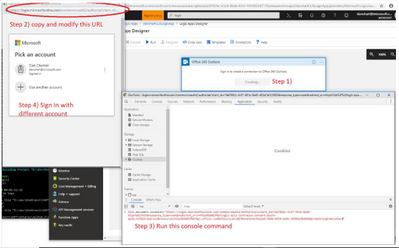
From the Logic Apps side dev member Dan has found a workaround below. It is a hacky workaround but works most of the times:
- Open IE Browser setting to disable Integrated Windows Authentication under Internet Options/Advanced tab. Close the browser and open it again to verify the setting is good.
Picture for reference:

by Contributed | Dec 11, 2020 | Technology
This article is contributed. See the original author and article here.
When you’re starting a new dev project or tackling coding problems, it helps to build on the knowledge of others. In 2020 especially, a helping hand was more than welcome!
 So in our second week of #DevDecember, we are taking some time to celebrate the efforts of the dev community.
We’d love to hear how the dev community came through for you in 2020. Did you get assistance learning a new language? Did someone else inspire your project? Share your version of this week’s fill-in-the-blank and tag your thoughts as #DevDecember.
Now, let’s review this week’s highlights:
Live coding community
Learn from the best on Twitch! Watch devs code live, and connect and ask questions in real time. Find out how joining Microsoft’s virtual community can speed up learning new skills and languages.
Watch an intro video on Twitch and live coding (25 min)
The ReadMe Project
Behind the open–source code used by millions of people are the unseen efforts of countless contributors, who put in long hours to build software, fix issues, and more. Meet some of the people making contributions, including veterans who find the teamwork required for open source collaboration a natural fit.
Read their inspiring stories
Remote collaboration with Live Share in Visual Studio Code
With Live Share, you can instantly share your project with fellow developers. No need to clone a repo or set up the environment. It’s a one-stop, real-time collaboration tool for pairing, code reviews, technical interviews, boot camps, and more.
Watch a short video on how to set up Live Share (5 min)
From the open source kitchen
Cooking up code is a bit like developing food recipes. The more people who test your recipe, the more it’s likely to guarantee that what lands on your plate is what you intended.
Browse our crowdsourced cookbook with free code recipes
Before we call it a wrap, don’t forget to check in with #DevWithABev, developer-with-a-beverage selfies. Add to the collection with a pic of yourself and a favorite holiday beverage, and tag it #DevWithABev.
Next week, we’ll talk about what inspired us in 2020. Keep following #DevDecember, and check out our homepage for more info!
by Contributed | Dec 10, 2020 | Technology
This article is contributed. See the original author and article here.
Version 1.456.0 of the Cluster Creation extension
Deploying infrastructure is always a challenge. There are many variables to track and environmental factors to consider. Windows Admin Center provides an easy-to-use workflow to ensure your Azure Stack HCI deployments progress smoothly and intuitively. All you need to do to get started is to install the Azure Stack HCI Cluster Creation extension. This multi-stage workflow guides you through installing features, configuring networking, creating the cluster, setting by S2D and much more. The cluster creation extension is now available on the Windows Admin Center public nuget feed for you to deploy hyperconverged infrastructure (HCI) clusters on servers running Azure Stack HCI 20H2. Customers running our latest GA version of Windows Admin Center (v2009) will need to update their Cluster Creation extension from the extension feed.
How do I get this update?
Updating to the latest version of the Cluster Creation extension is easy!
- Select the gear icon on the top right corner of Windows Admin Center
- Under Gateway, navigate to Extensions
- Under Available extensions, find the extension titled Cluster Creation and select Install
- Navigate back to the Windows Admin Center landing page by selecting Windows Admin Center in the top left corner
- Select Add and then Create new under Server clusters
What’s New?
RDMA support
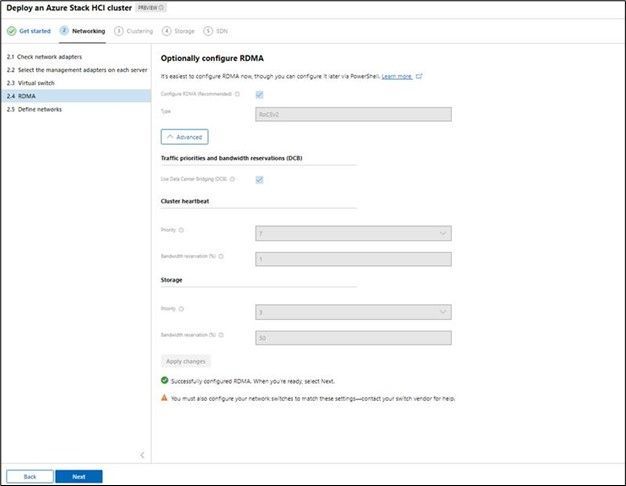
RDMA provisioning is now a part of the deployment flow. Azure Stack HCI customers can fully leverage RDMA capable network adapters using the latest cluster-creation extension in Windows Admin Center. The workflow automatically discovers the supported protocol (iWARP or RoCE V2) and guides with recommended settings for bandwidth and traffic priority.
Stretch Cluster
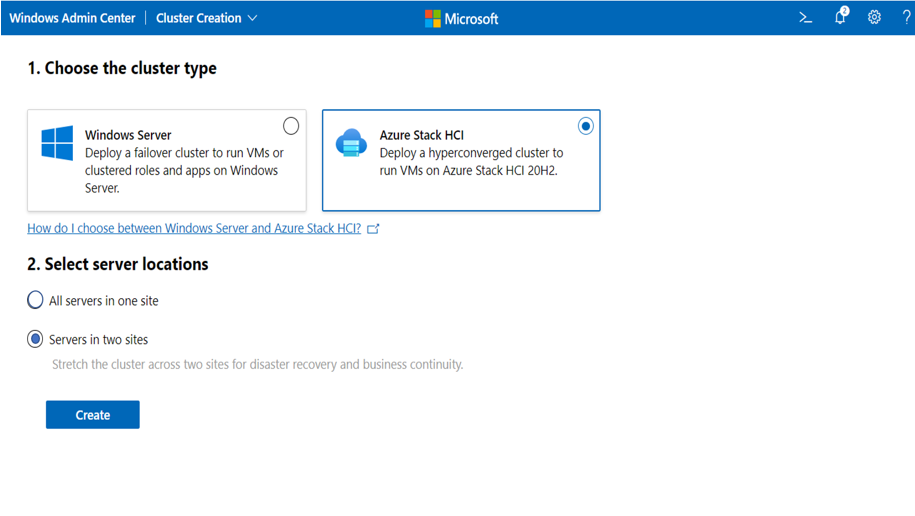
Azure Stack HCI stretch clusters provide a solution for disaster recovery with automatic failover. This release of cluster-creation enables to choose to deploy single-site or multi-site/stretch cluster. The wizard flow provides network configuration options and runs required network connectivity tests to validate user inputs before performing the new cluster creation. The wizard also has in-built ingenuity to auto-assign sites based on AD site provisioning.
Integrated solutions updates
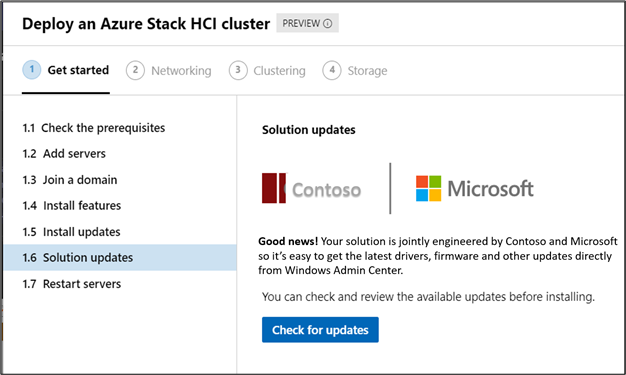
Azure Stack HCI is supported on a broad range of vendor systems and is available through Microsoft’s rich selection of partners and system integrators (SIs). Windows Admin Center provides further integrated solutions through OEM extensions within the cluster deployment flow. This allows Azure Stack HCI customers to not only be up to date with OS updates but also the curated firmware/drivers updates from respective OEMs based on make and model of Azure Stack HCI nodes. This will simplify the deployment of full-stack updates across your Azure Stack HCI cluster infrastructure.
Download today!
As always, thanks for your ongoing support, adoption, and feedback. Your contributions through user feedback continue to be very important and valuable to us, helping us prioritize and sequence our investments.
<3
Windows Admin Center team (@servermgmt)
by Contributed | Dec 10, 2020 | Technology
This article is contributed. See the original author and article here.
A glossary consists of business terms which allows data consumers from different lines of businesses to have a shared understanding of the data they interact with. With Azure Purview, data stewards can curate data assets discovered in the Azure Purview Data Map. They can then standardize the definitions of commonly used terms using business glossary in Azure Purview Data Catalog. Let’s dive into how we make this happen at scale:
1. Concepts – Terms, Term Templates and Custom attributes.
The heart of the business glossary is business term. A term in the Azure Purview Data Catalog business glossary represents a business entity (or process) in an organization. It is highly likely that there are multiple terms representing the same business entity. For example, “customer” = client or purchaser or buyer depending on the business context. Additionally, some terms can inherently have multiple meanings – for eg: API is both Application Programming Interface and Active Pharmaceutical Ingredient! Azure Purview renders distinct meaning to data by defining relationships between terms using related terms and synonyms. It also provides a set of system attributes to define the business term. Finally, data stewards can create custom attributes and templatize terms thus helping customers to contextualize data for easier interpretation.
Azure Purview Data Catalog business glossary also provides flexibility to create custom attributes, logically group them together and attach the same to a term to enrich it’s definition. For example, all finance- related custom attributes like cost center, profit center, accounting code can be grouped in a term template called Finance Template and the Finance template can be used to create financial glossary terms. Learn more about custom attributes and term templates here.
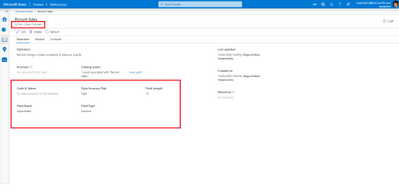
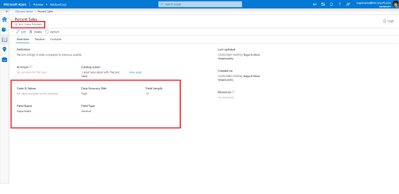
Figure 1: Screenshot showing term template and custom attributes for a term.
2. Role definitions
- Data Curators can create/update/delete glossary terms as well as assign terms to data assets and schemas.
- Data readers can view the glossary terms in Azure Purview.
- Data consumers can refer glossary terms and definitions in the Azure Purview Data Catalog
3. Mapping data to business glossary.
Glossary terms can be associated with data entities such as database tables and files as well as to schemas like table columns to provide a business context to the data object. There can be more than one glossary term assoicated to a data object.
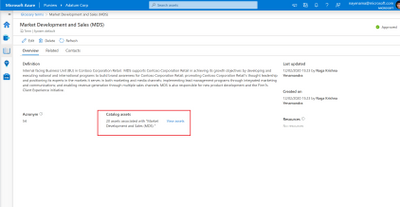
Figure 2 : Screenshot showing number of assets associated with a glossary term.
4.Business Glosssary to facilitate semantic search.
Azure Purview supports the discovery of tables and files using glossary terms. A business analyst can search with terms they understand, such as ‘Sales’ to discover relevant sales data. At the same time, technical data analysts can use terms like ‘Q4 Revenue’ to find the data they need. Further more, glossary terms can be used to narrow down search results to discover data.
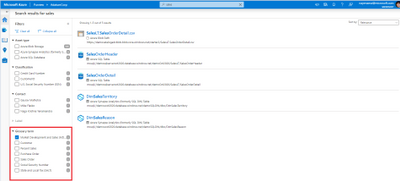
Figure 3 : Screenshot showing search result page filtered by a glossary term..
Note: While classifications define the nature of data in the data asset/schema glossary terms vocabulary for an organization and helps in bridging the gap between various departments in your company.
5.Import glossary terms.
Creating or updating each term is a time-consuming process. Hence Azure Purview provides the ability to bulk create/update glossary terms using a .csv file. All the terms in the csv file should belong to the same term template.
The Azure Purview also provides a sample .csv file per template which can be used as reference to import your terms into your Glossary.
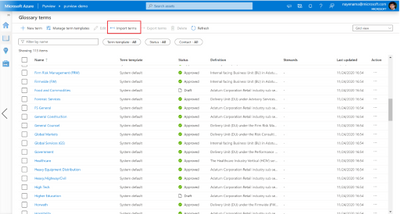
Figure 4: Screenshot showing Import terms icon in Azure Purview business glossary.
6.Export glossary terms.
Like Import, Azure Purview also provides the ability to download glossary terms into a .csv file. All the glossary terms selected for export should belong to same term template.
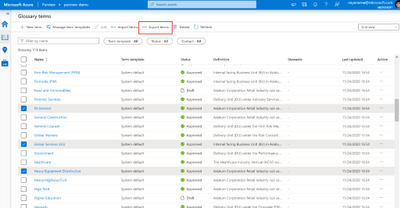
Figure 5: Screenshot showing Export terms icon in Azure Purview business glossary.
Get started today!
We are looking forward to hearing, how Azure Purview helped unlock the potential of your organizations data using business glossary experiences.
- Create an Azure Purview account now and start understanding your data supply chain from raw data to business insights with free scanning for all your SQL Server on-premises and Power BI online
- Use the tutorials to scan and catalog your organization data
- Get an overview of business glossary.
- Go through how-to-guides to create, import and export glossary terms, manage term templates and bulk edit assets to tag glossary terms.
- Use the tutorials document to setup glossary terms in Azure Purview
- Start a conversation on the Azure Purview tech community.


Recent Comments