by Contributed | Jun 23, 2021 | Technology
This article is contributed. See the original author and article here.
We’re excited about what Yammer has launched recently. Take a look at some of the latest updates to Yammer.
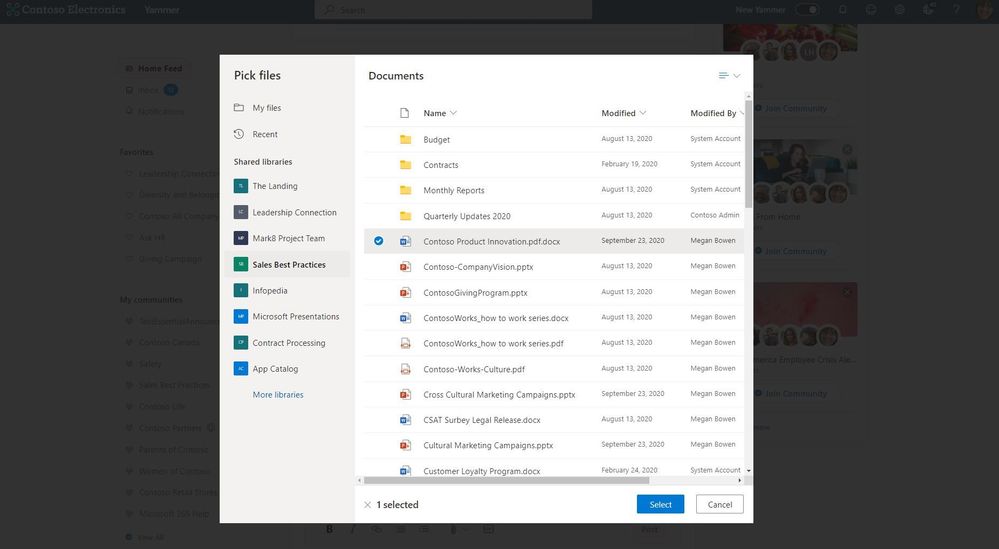
Easily upload OneDrive files or select from Shared Libraries directly into Yammer discussions
Now you can upload OneDrive files into Yammer discussions and select files from shared libraries. Learn more details here. With the new file picker experience, employees working in Yammer can upload files stored in their OneDrive or SharePoint, making it a familiar experience for sharing and collaborating with colleagues across the organization.
Community members will have the same abilities to edit, annotate and comment on documents as they do in OneDrive or SharePoint.
More ways to customize Yammer feeds with Yammer embed
You can enable conversations on your own sites or bring in existing conversations by embedding Yammer feeds. You can use this new widget configuration to quickly create and customize them to better fit the needs of your community, enabling you to embed your Yammer home, community, user, topic, or web link feed right into your site. Visit this site to get started.
Simply select the type of feed you’d like to embed, search the feed by name, customize it to your liking, and publish. A preview of your feed will be shown. Click ‘Get Code’ to retrieve the code you’ll need to embed in your site.
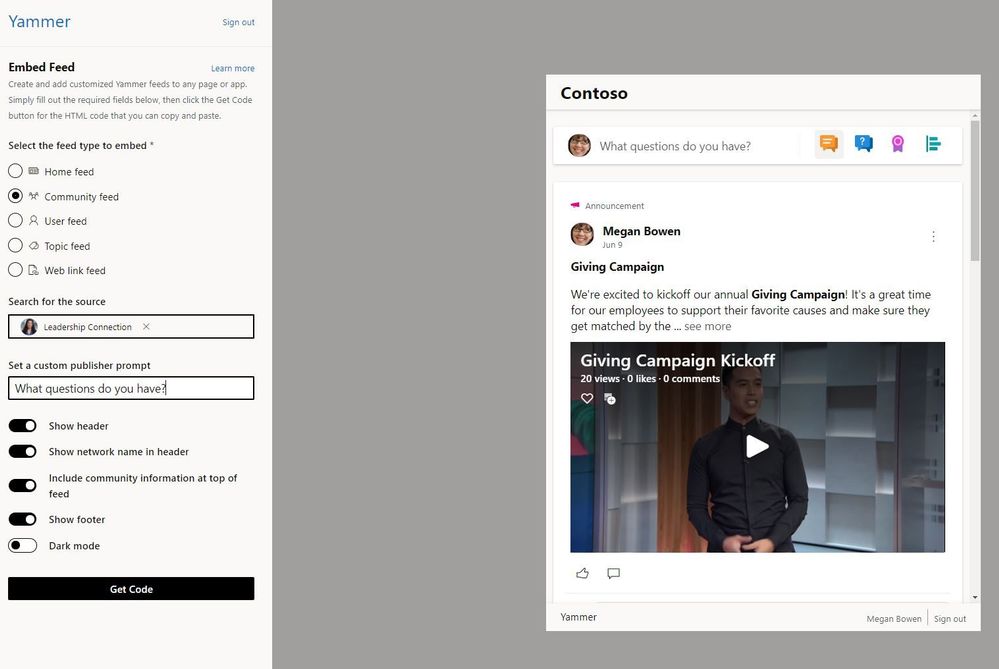
We’re continuing to add new embed customizations so let us know any future improvements you’d like to see.
New announcement delivery options
Learn how you can use Essential Announcements in your communities as a way to keep community members engaged and informed in important changes and news.
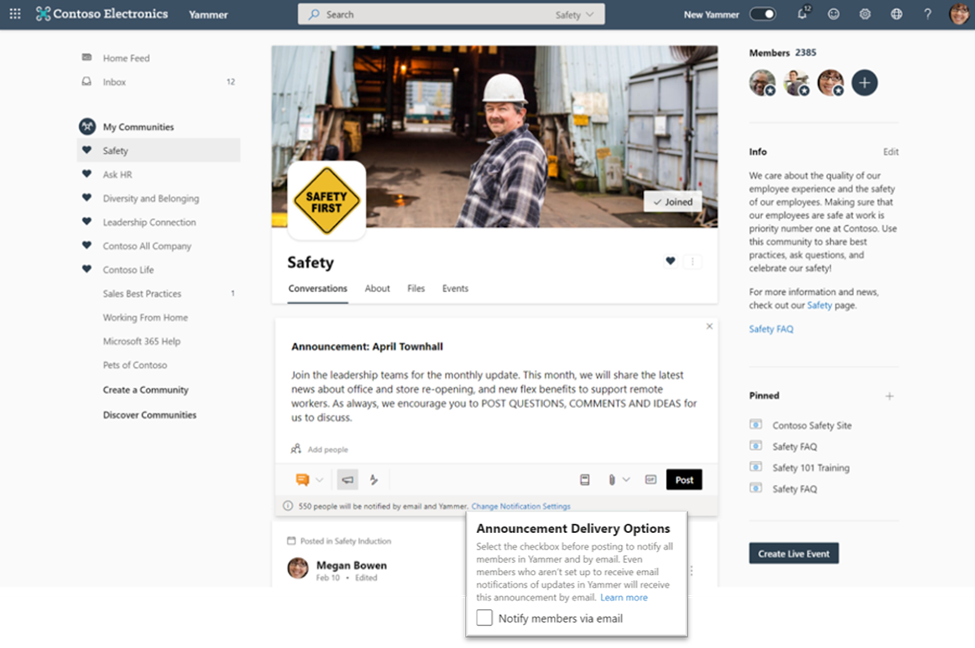
Community admins and network admins can now choose to set any type of post as an ‘essential announcement’. Community admins can change the delivery options before they post, which will notify all community members by email. This will override individual community member email notification settings.
Measure the reach and impact of Yammer discussion with Conversation insights
You can now view Yammer conversation insights which gives data to how content is performing across communities. You can see understand how engagement impacts the conversation, how people react, and see how “viral” the conversation is within the organization.
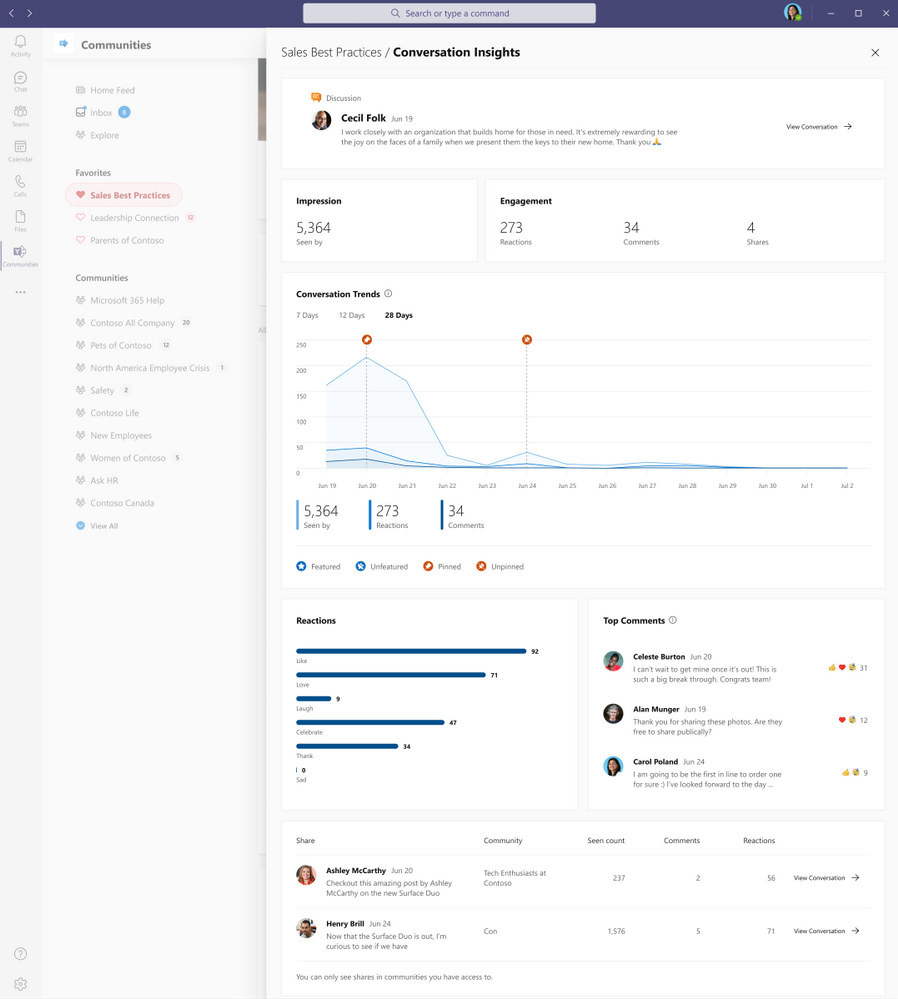
Content creators, communicators and community managers can use these insights to build engaging content that resonates with the community and beyond. You can access these insights in Yammer on the web or the Communities app in Microsoft Teams.
Pin important posts in Yammer communities
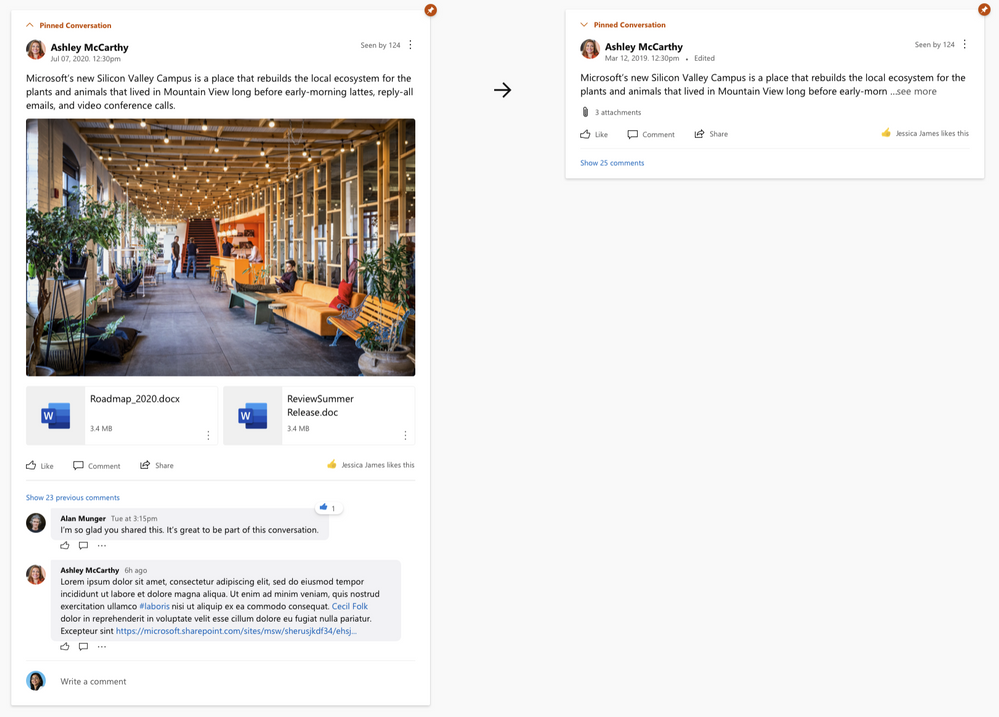
Community admins can pin any type of post in their Yammer community. While this feature launched a few months ago, now Yammer will automatically collapse pinned posts after a user has seen the message. This can help with “pinned post” fatigue if they are a frequent visitor but keeps essential information easily accessible.
New Yammer training videos
Get up and running with the new Yammer with these four new training videos. Share these will your communities and they continue to learn the nuts and bolts of building and engaging with employees in their communities. There are videos about conversations and discovery, notifications and announcements, how to administer Yammer communities and the building blocks of Yammer network administration.
These videos have also been updated in the Microsoft 365 Learning Pathways for easy access to learning directly from your organization.
What’s coming soon?
See what else Yammer has planned on our public roadmap and keep an eye on this blog for more news, updates, and best practices relating to Yammer and communities in Microsoft 365.
by Contributed | Jun 23, 2021 | Technology
This article is contributed. See the original author and article here.
Hello,
With the recent Executive Order on Improving the Nation’s Cybersecurity mandating Zero Trust Architecture and multifactor authentication, you may be wondering what those requirements are and how you can use the tools you have in Azure AD to meet the standards.
I am excited to share with you new guidance within our public documentation. This guidance is tailored to help you meet government and industry identity requirements using Azure Active Directory. Microsoft documents how we as a company meet many of these standards. While you can leverage our compliance, there are often “shared responsibilities” beyond what Microsoft accreditation provides. This new prescriptive guidance is designed to help you meet these identity requirements using Azure Active Directory.
As an example, let us consider meeting FedRAMP High controls IA-2 (1-4). To understand these requirements, one would have to start with FedRAMP Security Controls Baseline, dive into NIST SP 800-53 Rev. 4 which builds on NIST SP 800-63 Rev. 3 which in turn builds on NIST FIPS 140-2. You get the idea…lots of “light” reading. Alternatively, one could leverage the standards & compliance section which provides prescriptive guidance for meeting this control by:
(a) configuring Conditional Access (CA) policies to require MFA,
(b) configuring device management policies and CA policies such that sign-in to these managed devices would require MFA,
(c) viable MFA options meeting NIST Authentication Assurance Level (AAL) 3 as required by FedRAMP High and
(d) use of PIM to eliminate privileged local access without PIM activation.
I am happy to announce the first two content sets under the new standards & compliance area: Configure Azure Active Directory to meet NIST Authenticator Assurance Levels
We have started with NIST 800-63 – Digital Identity Guidelines which is a well understood framework for digital identities that many other standards and regulations use as a building block.
This guidance details how you can use Azure Active Directory to meet NIST Authentication Assurance Levels (AAL) and maps these AAL’s to all available authentication methods.
Configure Azure Active Directory to meet FedRAMP High Impact level
Many US federal agencies as well as cloud solution providers (CSPs) delivering cloud services to these agencies must meet requirements of the FedRAMP program. We anchored our guidance around the FedRAMP High baseline to cover the most stringent set of identify related controls. This approach allows customers who need to adhere to lower FedRAMP baselines to use this guidance as well.
US Government agencies will soon be required to have fully adopted multifactor authentication. Check out our resources to Enable MFA in your organization to verify explicitly as part of your Zero Trust approach.
We would love to hear more from all of you on what standards, regulations, or other compliance frameworks with identity requirements you would like to meet with Azure Active Directory. We will continue to review standards, regulations, or other compliance frameworks and where appropriate, produce guidance to help our customers meet their identity requirements using Azure Active Directory.
Learn more about Microsoft identity:
by Contributed | Jun 23, 2021 | Technology
This article is contributed. See the original author and article here.
Introduction
It’s a new year, and it’s time for another round of #JulyOT! This themed month of blog posts, live streams, videos, and learning materials focuses on all things related to development of IoT Solutions built using Azure IoT Services.
Throughout the month of July, the IoT Cloud Advocacy team @ Microsoft will be sharing content and events put together by IoT enthusiasts from around the world. This includes content from community members, Microsoft employees, and could even involve you!
For every weekday in July, we’ll focus on a featured content piece from our curated collection at the IoT Tech Community. The idea is to inspire those curious about IoT to pursue their own personal projects within the realm of Internet of Things.
Make sure to bookmark our #JulyOT post at the Microsoft IoT Tech Community and be sure to refresh the page throughout the month, as we will be adding new content each week that align to this year’s #JulyOT Content Themes!
#JulyOT Content Themes
Each week during the month of #JulyOT, we will focus on a specific area of IoT and we are pleased to say that we have a little bit of something for everyone. See below for a quick listing of our content themes for the month!
- July 1 – 2 : #JulyOT Content Kickoff
- July 5 – 9 : Artificial Intelligence at the Edge
- July 12 – 16 : Beginners, Students, Teachers and Makers
- July 19 – 23 : Microcontrollers and Embedded Hardware
- July 26 – 30 : Online learning and Certification
Whether you are interested in applied artificial intelligence, a total beginner, a student looking to start a class project, teacher looking for an IoT course curriculum, a hardware tinkerer / hacker, or professional developer looking to designate yourself as an official Azure IoT Developer, we have you covered! Check out the sections below for more details on what to expect during these themed weeks.
July 1 – 2 : #JulyOT Content Kickoff
We plan to begin #JulyOT by spreading the word far and wide ot let everyone know that we are looking to inspire interested individuals from all over the world to build innovative IoT solutions. Help us by sharing this very blog post to your favorite IoT Communities!
July 5 – 9 : Artificial Intelligence at the Edge
Artificial Intelligence at the Edge is one of the hottest trends in IoT, and we have an excellent line-up of community created content to excite all who have an interest in this area. We’ll begin with a creative solution from Goran Vuksic that leverages the Azure Percept Dev Kit and Lego Boost sensors to create an Azure Percept Mobile! Also, Peter Gallagher and Clifford Agius, both incredible Azure IoT MVPs from the larger IoT Developer Community and hosts of Azureish Live, will share some exciting content that will show you how to build your own solutions using the Azure Percept Dev Kit. This will be followed up by an article from Chintan Shah, product manager at NVIDIA, that will show you how to enhance pre-trained AI models using the Transfer Learning Toolkit on Azure Virtual Machines! To finish off the week, Benjamin Cabe will share his infamous Artificial Nose, a device that can make sense of smells using an off the shelf microcontroller paired with TinyML.
July 12 – 16 : Beginners, Students, Teachers, and Makers
We often hear questions from folks interested in getting started with IoT, whether it is students looking to add a new in-demand skill to their learning, faculty looking for curricula to teach their knowledge-hungry students, bootcamps wanting to upskill their members, or experienced developers looking to learn a new area. This is why we’ve built IoT for beginners, a free, open source, project-based, 24 lesson curriculum designed to teach you or your students IoT from the ground up, built in collaboration between Microsoft and students around the globe. We understand that not everyone has access to IoT hardware for learning, so we’ve provided multiple options for what you need to get started, from IoT Kits from Seeed Studios, to virtual IoT hardware that you can run on your computer, simulating a range of sensors and actuators.
We’ll be kicking off the week with an introduction on the IoT Show from Jim Bennett that talks about what we’ve built and why we’ve built it, along with a series of livestreams in collaboration with the Microsoft Reactor covering the first 4 lessons. We will then share more lessons, focusing on a different project each day. We start with learning how to use IoT in a smart farm to help feed our growing population. We then move on a journey from the farm to your table with lessons based on a smart logistics project, tracking your food as it leaves the farm. We jump to AI on the edge next as you learn how to build an AI powered fruit quality detector as part of a smart factory. Retail is next on the agenda as you see how to build stock counting once again using AI on the edge. To round off the week it’s time to cook something nice, using a timer you’ve built as part of a voice controlled smart assistant.
As you get involved trying out these lessons and learning IoT we want you to share your experiences! Please share the IoT apps you have built with the hashtag #JulyOT!
July 26 – 30 : Microcontrollers and Embedded Hardware
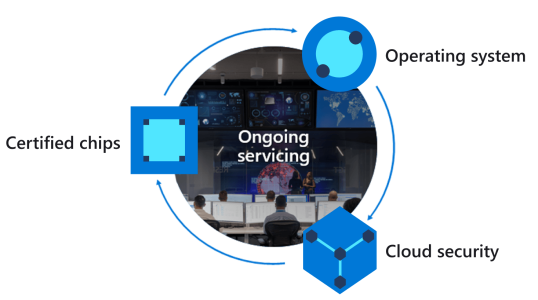
If you are not thinking about secure IoT then you should be especially considering recent ransomware attacks on American infrastructure. The focus of this week will be on building secure by design and default IoT solutions with Azure Sphere and Azure IoT.
This week will kickstart your Azure Sphere journey, and learn about best practices and useful tools that will make your life easier developing Azure Sphere applications.
Following this, be first to learn how we bought the Altair 8800 to Azure Sphere and cloud enabled the 40-year-old technology born when the internet was just a twinkle in Tim Berners-Lee’s eye. This project pushed the boundaries of Azure Sphere, the project is open source and you will learn how to run the Altair 8800 on the Azure Sphere and develop Basic, Assembler and C applications on the Azure Sphere.
We’ve also teamed up with Microchip to release new free courseware on Microchip University and the Enabling a Seamless IoT Experience with Microsoft Azure IoT and Microchip MCUs/MPUs on-demand webinar. Courses will cover the full device lifecycle, including provisioning at scale, connecting devices to the cloud, and working with top Microchip MCUs. (PIC, SAM E54, etc) Plus, we will cover how to work with IoT Plug and Play and using Azure IoT Central for device management.
And finally, the Raspberry Pi Foundation released the new RP2040 based Raspberry Pi Pico this year and there is now a Wi-Fi enabled developer board built on the RP2040 from Arduino. In this segment we will cover how to connect an RP2040 based microcontrollers to Azure IoT and Azure IoT Central with the new Azure SDK for Embedded C.
July 27 – 31 : Online Learning and Certification
During these 31 days, we also want to challenge our community to sharpen their knowledge of Azure IoT Services by offering an Azure IoT Developer Journey designed to guide learners in pursuit of an official designation as a certified Azure IoT Developer. We are accompanying this Learning journey with a “30 Days to Learn It – Cloud Skills Challenge”. This is a limited-time promotion that will challenge you to learn and apply knowledge of Azure IoT Services by completing a curated series of interactive learning modules from the Microsoft Learn Online Learning Platform. Once you have registered for the Cloud Skills Challenge, if you are able to complete the assigned modules within a 30-day time period, you may be eligible to receive a 50% off voucher to take the official AZ-220 IoT Developer Certification Exam.”
Otherwise, if you would like to complete the recommended learning outside the 30 Days to learn it here are the individuals learning paths:
Apart from the self-paced learning approach if you prefer an instructor-led approach to complete your certification training here is where you may find more information.
Also, during this week you will learn more about how to build end to end IoT solutions with our 6 part series. Learn how you can implement Microsoft Azure Defender for IoT to secure your entire IoT/OT environment, protect existing IoT/OT devices, and build security into new IoT innovations in our new learning path.
If you would like to take your learning journey to the next level, applying and relating services and concepts to a real-world scenario, we have a bunch of demo resources, virtual cloud workshops and hands-on labs to help you tackle some of these common scenarios end-to-end whether you are a developer, architect or decision maker trying to apply some of these key concepts to your industry or specific business scenario:
Conclusion:
We hope to inspire all who partake in #JulyOT with the motivation to learn and apply your knowledge to create something new! If you have an idea, let us know about it on social media by using the hashtag #JulyOT to share your ideas and creations! We plan to feature your awesome submissions in a follow-up post, so start thinking about that project you always wanted to and keep us posted along the way, we can’t wait to see what you create!







Recent Comments