by Contributed | Jun 29, 2021 | Technology
This article is contributed. See the original author and article here.
Byline: @blakeknight and @dhanMMS
In support of the upcoming general availability of Azure Arc-enabled Azure SQL we are happy to announce expansion of the Azure Arc ecosystem of trusted partners and validated hardware and software platforms to help customers get started.
The “anywhere” solution for Azure data services at scale
Businesses today are increasingly adopting hybrid and multicloud technologies for their data workloads. Complexity grows as they adopt modernization and migration principles while also responding to data sovereignty, industry regulation, and on-premises latency constraints.
To meet the needs of customers today and solve their complicated hybrid scenarios, Azure Arc-enabled data services integrates across a wide choice of platforms. We have collaborated with industry-leading OEMs, cloud solution providers (CSP), Kubernetes and OS distribution providers, and independent software vendors (ISVs) to validate their Azure Arc hybrid solutions and deliver the latest innovations and unified management tools for data workloads in any environment.
“Azure Arc is the glue that brings the power of Azure – time to market, innovation, security – to all cloud environments. Arc allows us to fully realize multi-cloud – from on-prem, to hybrid, to the edge, and even connect services in other public cloud providers. It’s a game changer, especially as organizations push more solutions towards the intelligent edge.” – Brandon Ebken, CTO, Insight
A customer-centric, solutions-focused approach
With Azure Arc, customers can now have a unified Azure experience across their entire infrastructure – and we have worked with a network of trusted partners to support customers with their migration and modernization efforts. Whether you are just getting started with migration and modernization efforts or in the middle of a multi-year smart factory rollout, our consulting services partners can help you choose the validated infrastructures and applications that are specifically configured and tested to work with Azure Arc.
Azure offers the entire infrastructure – from the network, compute, power, and cooling, all the way up through the software layer – and have worked with a network of trusted partners to help customers get started. Azure Arc-enabled data services helps customers extend the same cloud benefits and data services they receive in Azure to their own infrastructure, such as automated or self-service de/provisioning, scaling, updates, backup/restore, and high availability.
We are working with a broad network of managed service providers (MSPs) and solution integrators (SIs) to help customers deploy and operate Azure data services in multi-cloud and on-prem environments. With the help of our partners, customers can use Azure Arc to:
- Manage cloud-native app development at scale and across multi-cloud environments
- Integrate with cloud native platforms and/or deliver solutions for data and AI
- Accelerate data modernization and create hyperconverged infrastructure (HCI) solutions by combining highly optimized hardware and software platforms
Validated platforms for trusted performance
The Azure Arc validation program ensures customers can adopt from a wide range of partner solutions to fit their needs with the confidence that they have been designed, engineered, configured, and tested to run Azure data services.
With Arc validated solutions, customers receive the benefits of enterprise performance, scale, and support to deploy and operate their data services, like Azure SQL Managed Instance, across any cloud. Arc validated solutions are tested for both hardware and software platforms to optimize hybrid data workloads, and our partnership with industry leading OEMs, like Dell Technologies, delivers HCI and hardware-as-a-service (HaaS) for full stack solutions.
For a consistent experience from cloud to edge, popular infrastructure platforms and Kubernetes distributions have been tested and validated to work with Azure Arc. Current validated solutions include Dell EMC PowerFlex, Dell EMC PowerMax, Dell EMC PowerStore, Dell EMC Integrated System for Microsoft Azure Stack HCI, Dell EMC VxRail, Dell Technologies APEX Data Storage Services, Red Hat Openshift, Portworx by Pure Storage, Nutanix Karbon, and VMware Tanzu. See a full list of technology and service partners here.
“Building upon our long history of close collaboration with Microsoft, Dell Technologies infrastructure is now validated to work with Azure Arc,” said Travis Vigil, senior vice president of product management, Dell Technologies. “We’ve optimized Dell storage and hyperconverged infrastructure offerings, including APEX Data Storage Services, with Azure Arc-enabled data services to vastly simplify the deployment, management and governance of database management systems across private clouds, public clouds and edge locations.”
Read more about Dell validated platforms for Azure Arc here.
“With Red Hat OpenShift, users can run Azure data services across the entirety of the hybrid cloud, including on-premise datacenters, at the edge and in multiple public cloud environments. Whether extending a self-deployed cluster or a managed container service, customers can elastically scale data operations and applications while trusting their container-based data infrastructure is up to date.” – Mike Evans, VP Technical Business Development, Red Hat
For data workloads running SQL, storage is an important component of the overall infrastructure. Our partners deliver purpose-built solutions that optimize hardware and software interlock. Customers can build cloud native infrastructure on cost-effective tiered virtualized storage to receive best of class performance for their data applications.
“Azure Arc simplifies multicloud deployments by bringing Azure management and security to any infrastructure. Paired with Portworx, customers can accelerate application development and app reliability across on-premises, cloud, and edge by automating container storage and data management.” – Shawn Rosemarin, Global VP, Emerging Technology Sales, Pure Storage
Cloud solutions that simplify the most complex hybrid scenarios
Many customers are adjusting to rapid technology advances and responding by adapting their infrastructure, applications, and operations to be cloud native. Our network of managed service providers (MSPs) and solution integrators (SIs) are here to deliver comprehensive platforms that integrate with your existing infrastructure, deploying cloud native tools, GitOps configurations, and applications to one or more Kubernetes clusters at scale.
“We see massive value with Azure Arc and the ability to bring the features and capabilities of Azure to on-premise datacenters, retail stores, and manufacturing facilities, while simultaneously centralizing operations and modernizing technical capabilities across hosting platforms.” – Nick Colyer, Director of Cloud & DevOps, AHEAD
“Azure Arc enabled data services provides a Database-as-a-Service model for us to better serve our customers, like OPET; they now can run data workloads outside of Azure, and yet enjoy all the Azure innovation and cloud benefits.” – Evren Dereçi, Chief Marketing Officer, Koç Sistem
Get started today with an Azure Arc partner
The Azure Arc partner program offers customers validated, enterprise grade solutions to run Azure at the edge. Launched at Microsoft Ignite 2021 with support from industry-leading OEMs, hardware providers, platform providers, and ISVs, we continue to expand coverage into data services to meet the needs of our customers.
by Contributed | Jun 29, 2021 | Technology
This article is contributed. See the original author and article here.
In May we announced the support for Linux across our threat and vulnerability management capabilities in Microsoft Defender for Endpoint. Today, we are excited to announce that threat and vulnerability management for Linux is now generally available across Red Hat, Ubuntu, CentOS, SUSE, and Oracle, with support for Debian coming soon. In addition to Linux, the threat and vulnerability management capabilities already support macOS and Windows, with support for Android and iOS coming later this summer to further expand our support of third party platforms.
Vulnerability Management plays a crucial role in monitoring an organization’s overall security posture. That’s why we continue to expand our cross-platform support to equip security teams with real-time insights into risk with continuous vulnerability discovery, intelligent prioritization, and the ability to seamlessly remediate vulnerabilities for all their platforms. With the general availability of support for Linux, organizations can now review vulnerabilities within installed apps across the Linux OS and issue remediation tasks for affected .
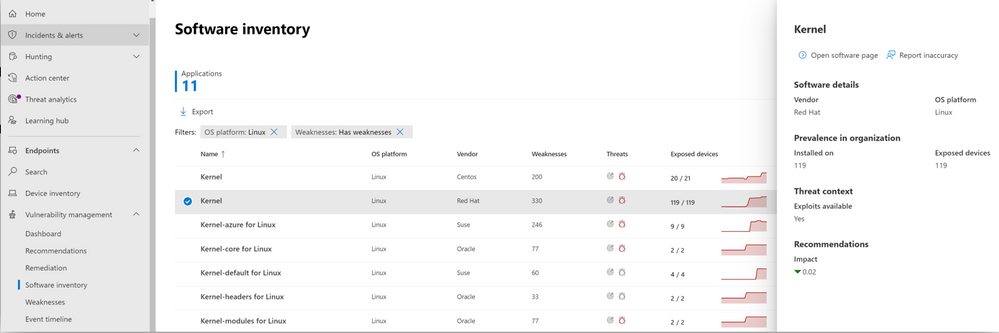
Image 1: Software inventory page in the vulnerability management console, showing various Linux platforms
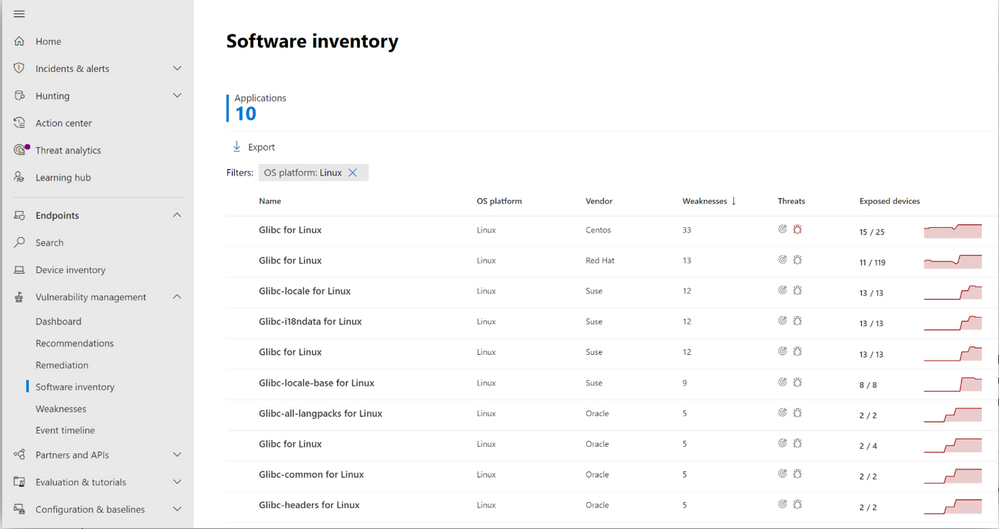 Image 2: Software inventory page in the vulnerability management portal, showing glibc across various Linux systems
Support for the various Linux platforms in threat and vulnerability management closely follows what is available across our Endpoint Detection and Response (EDR) capabilities. This alignment ensures a consistent experience for Microsoft Defender for Endpoint customers, as we continue to expand our cross-platform support.
More information and feedback
The threat and vulnerability management capabilities are part of Microsoft Defender for Endpoint and enable organizations to effectively identify, assess, and remediate endpoint weaknesses to reduce organizational risk.
Check out our documentation for a complete overview of supported operating systems and platforms.
We want to hear from you! If you have any suggestions, questions, or comments, please visit us on our Tech Community page.
by Contributed | Jun 29, 2021 | Technology
This article is contributed. See the original author and article here.
Credit and thanks to Alexandru Jercaianu and Vladimir Cernov for implementation work
Over the last year, we have been improving the DNS over HTTPS (DoH) functionality in the Windows DNS client. Now we are pleased to introduce you to the different features now available through the Windows Insider program.
To start with, we want to note that the registry key controls documented in our original DoH testing blog post are no longer applicable. As stated there, those instructions were time limited to the initial DoH test rollout. If you did ever set that key, please delete it then reboot your machine before proceeding with the rest of this blog post.
Next, we will be reviewing the new configuration behavior, how Windows will know if a DNS server supports DoH, and what our next steps are in advancing encrypted DNS discovery.
UI
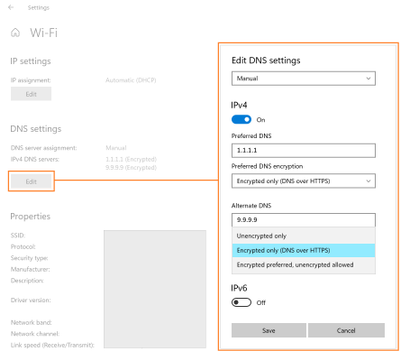
The first control you should try out is the new UI fields in the Settings app, originally announced on the Insider blog. When Windows knows a given DNS server’s IP address has a corresponding DoH server, it will unlock a dropdown that lets you decide whether to require encryption always be used, use encryption but fall back to plain-text DNS when encryption fails, or not to use encryption (the default value).
GPO
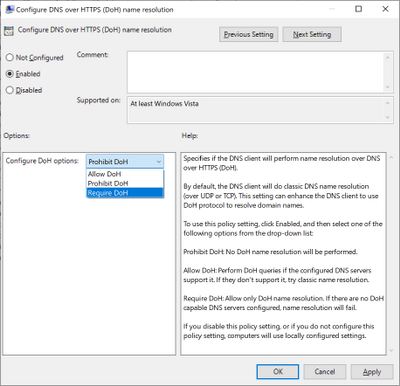
For enterprise administrators, we have provided a new GPO for controlling DoH behavior. This will allow the use of DoH to be allowed, required, or prohibited system-wide.
- Allowed will defer the use of DoH to local settings available in the UI per network adapter.
- Required will prevent the use of configured DNS servers if they do not support DoH and will disable fallback to plain-text DNS.
- Prohibited will prevent any local DoH settings from taking effect, ensuring Windows functions as it did before the DoH client using plain-text DNS only.
NRPT
The Name Resolution Policy Table (NRPT) allows administrators to specify rules for name resolution by namespace. For example, you can create an NRPT rule that specifies all queries for “*.microsoft.com” must be sent to a specific DNS server.
If Windows knows that a DNS server provided in an NRPT rule supports DoH (see the next section for how this works), then the traffic affected by the NRPT rule will inherit the benefits of using DoH. This allows admins who want to use DoH for some namespaces and not others to configure that behavior.
Knowing a server supports DoH
All these mechanisms rely on Windows already knowing a given DNS server IP address supports DoH. We ship a few definitions of known DoH servers in Windows:
Server Owner
|
Server IP addresses
|
Cloudflare
|
1.1.1.1
1.0.0.1
2606:4700:4700::1111
2606:4700:4700::1001
|
Google
|
8.8.8.8
8.8.4.4
2001:4860:4860::8888
2001:4860:4860::8844
|
Quad9
|
9.9.9.9
149.112.112.112
2620:fe::fe
2620:fe::fe:9
|
Other definitions need to be added using the netsh command. To start with, you can check to see what DoH server definitions we already know by retrieving them:
Using netsh
netsh dns show encryption
Using PowerShell
Get-DnsClientDohServerAddress
Then you can add another server definition to the list and ensure it never falls back to plain-text DNS:
Using netsh
netsh dns add encryption server=<resolver-IP-address> dohtemplate=<resolver-DoH-template> autoupgrade=yes udpfallback=no
Using PowerShell
Add-DnsClientDohServerAddress -ServerAddress ‘<resolver-IP-address>’ -DohTemplate ‘<resolver-DoH-template>’ -AllowFallbackToUdp $False -AutoUpgrade $True
If you prefer to allow fallback so that when encryption fails you can still make DNS queries, you can run the same commands with the fallback flag toggled to add a new server:
Using netsh
netsh dns add encryption server=<resolver-IP-address> dohtemplate=<resolver-DoH-template> autoupgrade=yes udpfallback=yes
Using PowerShell
Add-DnsClientDohServerAddress -ServerAddress ‘<resolver-IP-address>’ -DohTemplate ‘<resolver-DoH-template>’ -AllowFallbackToUdp $True -AutoUpgrade $True
The `-AutoUpgrade` and `-AllowFallbackToUdp` flags together represent the values present in the Setting app per-server dropdown. If for some reason you want to add these DoH server definitions but leave them to use unencrypted DNS for now, you can set the `-AutoUpgrade` flag to false instead of true as in the examples above.
If you want to edit an existing list entry rather than adding a new one, you can use the `Set-DnsClientDohServerAddress` cmdlet in place of the `Add-DnsClientDohServerAddress` cmdlet.
It would be easier for users and administrators if we allowed a DoH server to have its IP address determined by resolving its domain name. However, we have chosen not to allow that. Supporting this would mean that before a DoH connection could we established, we would have to first send a plain-text DNS query to bootstrap it. This means a node on the network path could maliciously modify or block the DoH server name query. Right now, the only way we can avoid this is to have Windows know in advance the mapping between IP addresses and DoH templates.
Coming up next
Going forward, we want to be able to directly discover DoH server configuration from the DNS server. This would mean DoH servers could be used without having to include it in Windows or manually configure the IP address to DoH template mapping. We are currently contributing to two proposals in the IETF ADD WG to enable this: Discovery of Designated Resolvers (DDR) and Discovery of Network-designated Resolvers (DNR). We look forward to updating you with our first tests in supporting DoH discovery!
by Contributed | Jun 29, 2021 | Technology
This article is contributed. See the original author and article here.
Updates to SQL Server, Reporting Services, and Analysis Services Management Packs are available (7.0.32.0). We also released an update to SQL Server Dashboards MP. You can download the MPs from the links below. Majority of the changes are based on your direct feedback. Thank you.
Microsoft System Center Management Pack for SQL Server
Microsoft System Center Management Pack for SQL Server Reporting Services
Microsoft System Center Management Pack for SQL Server Analysis Services
Microsoft System Center Management Pack for SQL Server Dashboards
Another change we’ve done recently is to move operations guides for all SQL Server family of management packs from download center to docs.microsoft.com. This unifies the content viewing experience for the user as the rest of the SCOM and SQL Server documentation is already there. Further more, it allows us to present you with the most up to date and accurate content online. The link to the operation guide for each MP can be found on the MP download page. Here are the links that show what’s new in these MPs:
Features and Enhancements in Management Pack for SQL Server
Features and Enhancements in Management Pack for SQL Server Analysis Services
Features and Enhancements in Management Pack for SQL Server Reporting Services
by Contributed | Jun 29, 2021 | Technology
This article is contributed. See the original author and article here.
Introduction
In this article, we will see a step-by-step implementation of how to break and change list item permission using Power Automate. and for this, we will use REST API.
Implementation
Create a SharePoint List
Create a Power Automate – We will create an Automated Cloud Flow
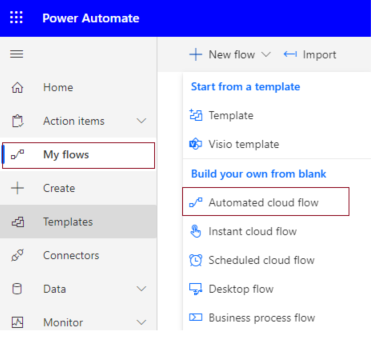
1. Go to Power Automate > My flows > Click on New flow > Select Automated Cloud Flow
2. It will ask for the flow name and trigger.
Add flow name and choose a trigger when an item is created.
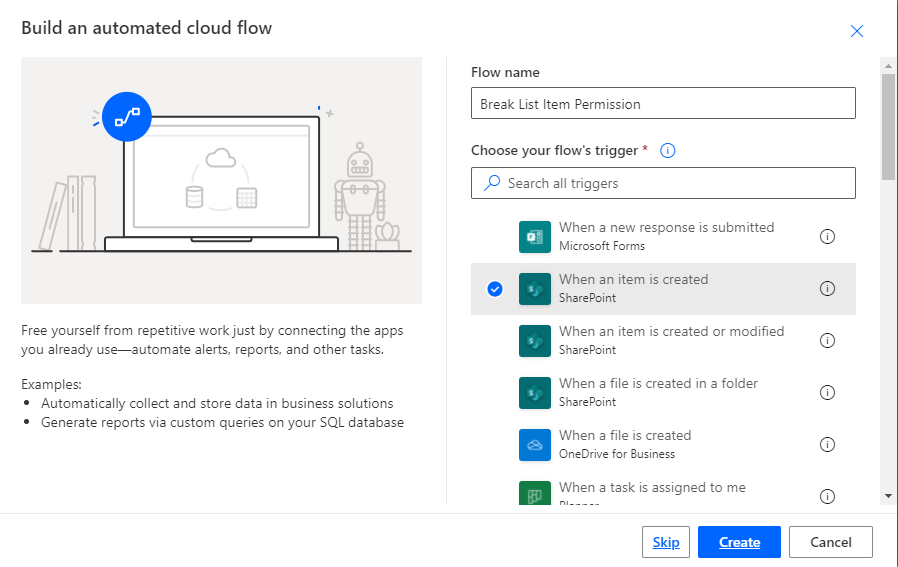
3. Click on Cerate.
4. Now set Site name and list name in when an item is created in list action.
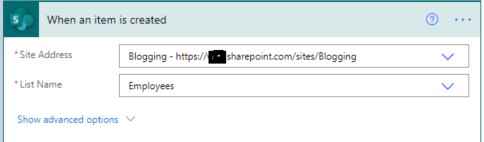
For all API Calling, we will use Send an HTTP request to SharePoint action.
5. Now we will call REST API to break role inheritance.
Set all properties as below.
Site Address |
Select Site Name from Dropdown |
Method |
POST |
Uri |
_api/lists/getByTitle(‘ListTitle’)/items(ID)/breakroleinheritance(copyRoleAssignments=false,clearSubscopes=true) |
Headers |
{
“Accept”: “application/json”,
“Content-type”: “application/json”
} |
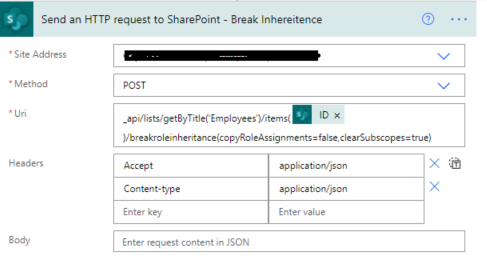
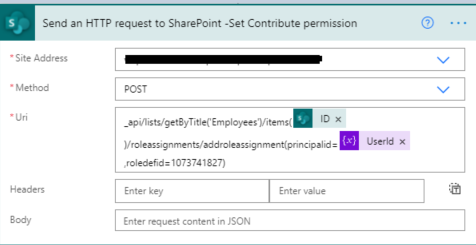
6. Now we will set new permission so for that we need a user id to whom we have to give permission and need a role definition ID.
User ID: You can directly use User ID if you have or if you have a user name or login name then we have to find user id from the particular user so for that we will call REST API.
Role definition ID: You can use id based on permission.
Role Definition Name |
Role Definition Id |
Limited Access |
1073741825 |
View Only |
1073741924 |
Design |
1073741828 |
Edit |
1073741830 |
Contribute |
1073741827 |
Read |
1073741826 |
Full Control |
1073741829 |
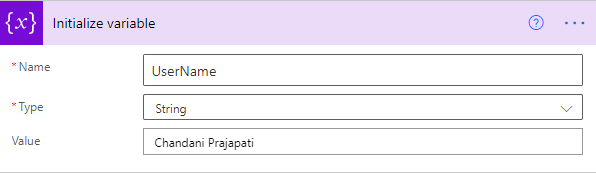
1. Create a variable and set User Title or if you have any list column then you can use it.
2. Call API to get a user ID and filter it by the above-declared user name.
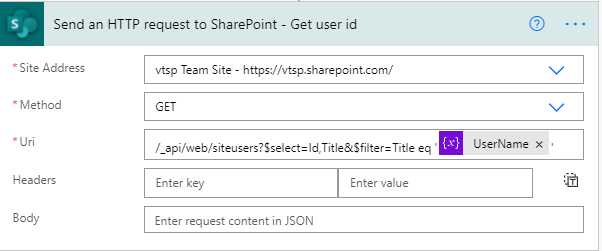
It will return an object as below,
{
  "d": {
    "results": [
      {
        "__metadata": {
          "id": "https://sitename.sharepoint.com/_api/Web/GetUserById(2)",
          "uri": "https://sitename.sharepoint.com/_api/Web/GetUserById(2)",
          "type": "SP.User"
        },
        "Id": 2,
        "Title": "Chandani Prajapati"
      }
    ]
  }
}
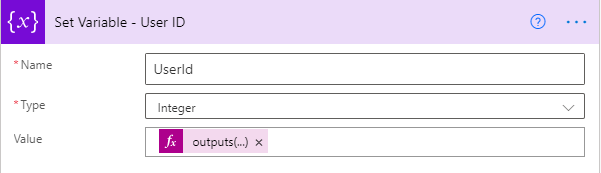
Now we want to use the only id from this so we will use an expression as below,
outputs(‘Send_an_HTTP_request_to_SharePoint_-_Get_user_id’)?[‘body’][‘d’][‘results’]?[0][‘Id’]
And we will set it in a variable called UserId.
3. Now we will set contribute permission for the above UserId.
Now we can test the flow.
Output
We can see contribute permission for an item as below,

Summary
In this article, we have seen how to break and change list item permission using power automate.
Hope this helps!
Sharing is caring!


Recent Comments